1. The TPC/IP protocol is a transport layer protocol, primarily addressing how data is transmitted over the network, while HTTP is an application layer protocol, mainly focused on how to package data.
Regarding the relationship between TCP/IP and HTTP protocols, there is a relatively easy-to-understand introduction: “When we transmit data, we can use only the (transport layer) TCP/IP protocol, but in that case, without an application layer, we cannot recognize the content of the data. If we want the transmitted data to be meaningful, we must use an application layer protocol. There are many application layer protocols, such as HTTP, FTP, TELNET, etc., and we can also define our own application layer protocols. The web uses HTTP as the application layer protocol to encapsulate HTTP text information and then uses TCP/IP as the transport layer protocol to send it over the network.”
The term TCP/IP represents Transmission Control Protocol/Internet Protocol, referring to a suite of protocols.
“IP” stands for Internet Protocol, which TCP and UDP use to transfer data packets from one network to another. Think of IP as a highway that allows other protocols to travel on it and find exits to other computers. TCP and UDP are the “trucks” on the highway, carrying goods such as protocols like HTTP and File Transfer Protocol (FTP).
You should understand that TCP and UDP are the transport layer protocols used by FTP, HTTP, and SMTP. Although both TCP and UDP are used to transmit other protocols, they have a significant difference: TCP provides guaranteed data transmission, while UDP does not. This means that TCP has a special mechanism to ensure that data is transmitted safely and without errors from one endpoint to another, while UDP does not provide any such guarantees.
HTTP (Hypertext Transfer Protocol) is a protocol that uses TCP to transmit information between two computers (usually a web server and a client). The client initiates an HTTP request to the web server, which then sends the requested information back to the client.
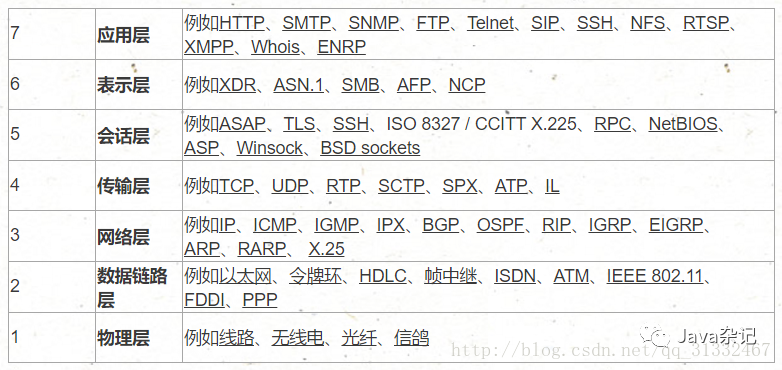
The following chart attempts to show the initial positions of different TCP/IP and other protocols in the OSI model:
1. Several Important Concepts of HTTP Protocol
1. Several Important Concepts of HTTP Protocol
1. Connection: An actual flow at the transport layer, established between two communicating applications.
2. Message: The basic unit of HTTP communication, consisting of a structured sequence of octets transmitted over a connection.
3. Request: Information from the client to the server, including the method applied to the resource, the resource identifier, and the version of the protocol.
4. Response: Information returned from the server, including the version of the HTTP protocol, the status of the request (e.g., “success” or “not found”), and the MIME type of the document.
5. Resource: A network data object or service identified by a URI.
6. Entity: A special representation of data resources or reflections from service resources, which may be enclosed in a request or response message. An entity includes entity header information and the content of the entity itself.
7. Client: An application that establishes a connection for the purpose of sending requests.
8. User Agent: The client that initiates a request. These are browsers, editors, or other user tools.
9. Server: An application that accepts connections and returns information in response to requests.
10. Origin Server: A server on which a given resource can reside or be created.
11. Proxy: An intermediary program that can act as a server or a client, establishing requests for other clients. Requests may be translated internally or passed to other servers. A proxy must interpret and, if possible, rewrite the request information before sending it.
Proxies often serve as portals for clients through firewalls and can also act as helpers for applications to process requests not completed by user agents.
12. Gateway: A server that acts as an intermediary for other servers. Unlike a proxy, a gateway accepts requests as if it were the origin server for the requested resource; the client making the request is unaware that it is dealing with a gateway.
Gateways often serve as portals for servers through firewalls and can also act as protocol translators to access resources stored in non-HTTP systems.
13. Tunnel: An intermediary program that acts as a relay between two connections. Once activated, the tunnel is considered not to belong to HTTP communication, although it may be initialized by an HTTP request. When the relay connections at both ends are closed, the tunnel disappears. Tunnels are often used when a portal must exist or when an intermediary cannot interpret the relayed communication.
14. Cache: Local storage of response information.
2. Sending Requests
After opening a connection, the client sends the request message to the server’s listening port, completing the request action.
The format of the HTTP/1.0 request message is:
Request Message = Request Line (General Information | Request Header | Entity Header) CRLF [Entity Content]
Request Line = Method Request URL HTTP Version CRLF
Method = GET | HEAD | POST | Extended Method
URL = Protocol Name + Host Name + Directory and File Name
The method described in the request line specifies the action that should be performed on the resource. Common methods include GET, HEAD, and POST. The results corresponding to different request objects are different, as follows:
Object Result of GET
File Content of the file
Program Execution result of the program
Database Query Query results
HEAD requests the server to find metadata about an object rather than the object itself.
POST sends data from the client to the server and is used when further processing by the server and CGI is required. POST is mainly used to send the contents of forms in HTML text for processing by CGI programs.
An example of a request is:
GET http://networking.zju.edu.cn/zju/index.htm HTTP/1.0 networking.zju.edu.cn/zju/index.htm HTTP/1.0 The header information is also known as metadata, which is information about the information, allowing for conditional requests or responses.
Request Header: Tells the server how to interpret this request, mainly including the types of data the user can accept, compression methods, and languages.
Entity Header: Entity information types, lengths, compression methods, last modified times, data validity periods, etc.
Entity: The object of the request or response itself.
3. Sending Responses
After the server processes the client’s request, it must send a response message back to the client.
The format of the HTTP/1.0 response message is as follows:
Response Message = Status Line (General Information Header | Response Header | Entity Header) CRLF [Entity Content]
Status Line = HTTP Version Status Code Reason Phrase
Status codes indicate the type of response.
1xx Reserved
2xx Indicates that the request was successfully received
3xx Indicates that the client needs to further refine the request to complete it
4xx Client Error
5xx Server Error
Response header information includes: service program name, notification to the client that the requested URL requires authentication, and when the requested resource will be available.
4. Closing Connections
Both the client and server can end the TCP/IP dialogue by closing the socket.
2. TCP (Transmission Control Protocol):
1. TCP is a connection-oriented, reliable transport layer protocol;
TCP protocol is built on top of the unreliable network layer IP protocol, which does not provide any reliability mechanisms; TCP’s reliability is entirely implemented by itself;
The most basic reliability techniques used by TCP are: acknowledgment and timeout retransmission mechanism, flow control mechanism;
1. Timeout retransmission is an important mechanism by which TCP guarantees data reliability. Its principle is to start a timer after sending a piece of data, and if no acknowledgment (ACK) message for the sent data is received within a certain time, the data is retransmitted until it is successfully sent.
2. Flow control ensures that the sending rate is not too fast, allowing the receiver to keep up. The sliding window mechanism can be used to implement flow control.
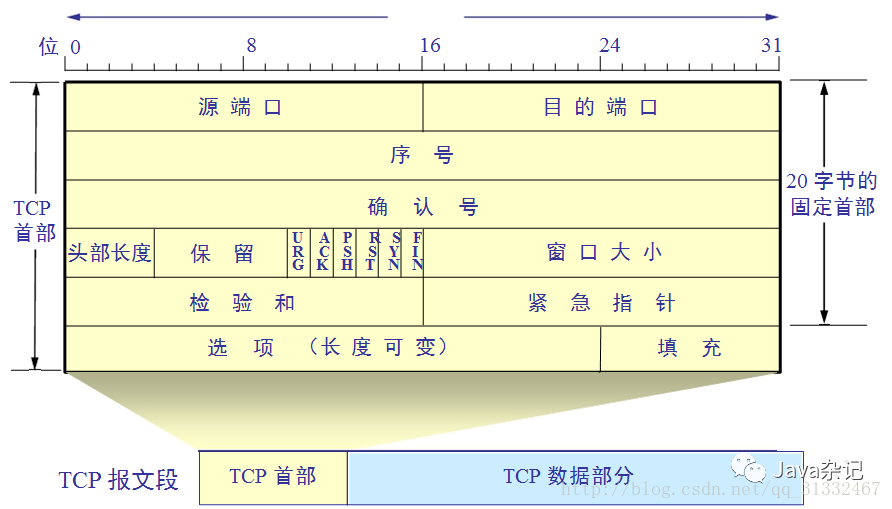
1. Source port and destination port fields – socket (IP + port number). TCP packets do not have IP addresses; that is a matter for the IP layer. However, there are source and destination ports.
2. Sequence Number SEQ – The sequence number of the current segment.
3. Acknowledgment Number AN – The sequence number of the first byte of data expected to be received from the other party’s next segment;
4. Urgent URG – When URG = 1, it indicates that the urgent pointer field is valid. It tells the system that this segment contains urgent data that should be transmitted as soon as possible (equivalent to high-priority data);
5. Acknowledgment ACK – When ACK = 1, it indicates that the acknowledgment number AN is valid.
6. Push PSH (PuSH) – When TCP receives a segment with PSH = 1, it delivers it to the receiving application process as soon as possible, without waiting for the entire buffer to fill up before delivering it upwards;
7. Reset RST (ReSeT) – When RST = 1, it indicates that a serious error has occurred in the TCP connection (such as due to a host crash or other reasons), and the connection must be released before a new transmission connection can be established;
8. Synchronize SYN – When SYN = 1, it indicates that this is a connection request message.
9. Terminate FIN (Finish) – Used to release a connection. FIN = 1 indicates that the sending end has finished sending data and requests to release the transmission connection;
10. Window field – occupies 2 bytes, used to let the other party set the basis for the sending window, measured in bytes. The window value is an integer between [0, 216-1];
11. Checksum – occupies 2 bytes. The checksum field checks the range, including both the header and data parts. When calculating the checksum, a 12-byte pseudo-header (protocol field 6, indicating TCP) is added to the front of the TCP segment;
12. Urgent pointer field – occupies 16 bits, indicating how many bytes of urgent data are in this segment (urgent data is placed at the front of the segment data);
13. Options field – variable length. ① Maximum Segment Size MSS: MSS refers to the maximum length of the data field that can be carried by each segment during communication negotiated at the establishment of a TCP connection (not the maximum length of the TCP segment, but: MSS = TCP segment length – TCP header length), measured in bytes (the minimum value of MSS provided by both parties is the maximum MSS for this connection); ② Window Scale Option; ③ Timestamp Option; ④ Selective Acknowledgment Option;
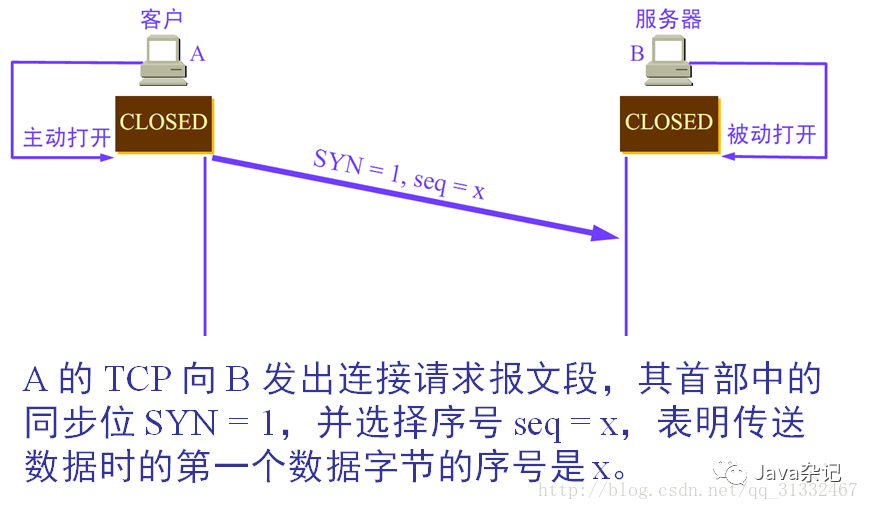
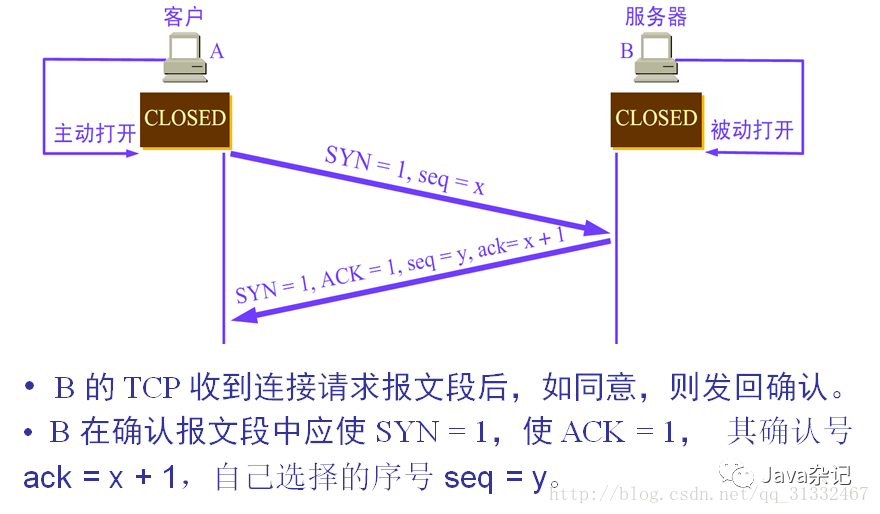
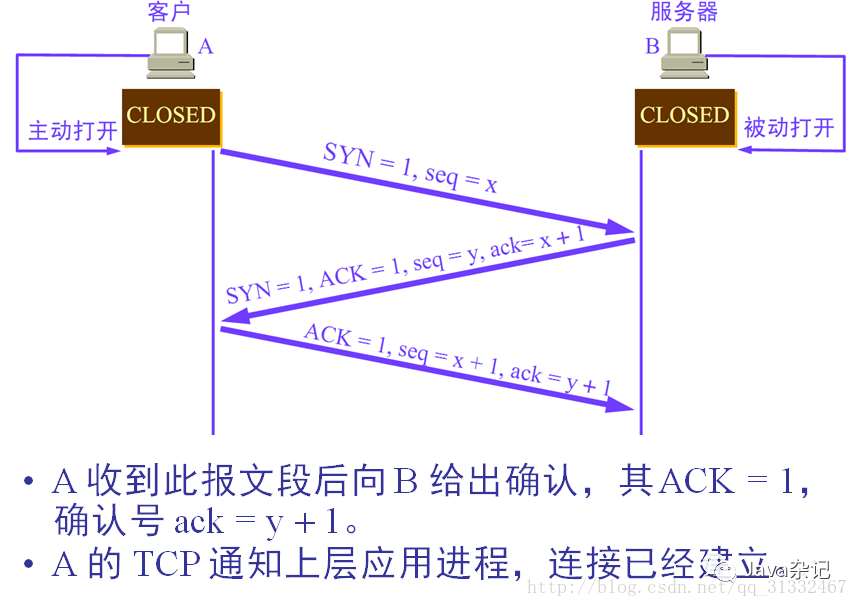
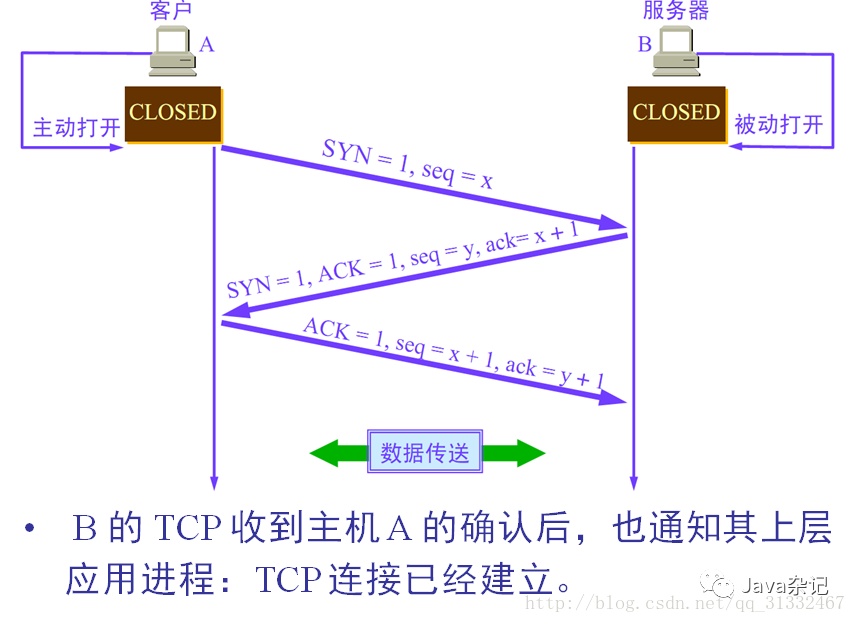
2. TCP Three-Way Handshake (Very Important)
* First Handshake: The client sends a request segment to the server, with the SYN bit = 1, sequence number SEQ = x (indicating that the first byte of data being transmitted is x), waiting for server confirmation;
* Second Handshake: The server receives the request from the client. If it agrees to establish a connection, it sends back a confirmation segment, with SYN bit = 1, acknowledgment number ACK = x + 1, sequence number SEQ = y;
* Third Handshake: After the client receives the server’s confirmation segment, it also needs to confirm to the server by sending an acknowledgment packet ACK (ack = y + 1), thereby completing the three-way handshake.
Through this three-way handshake, a reliable duplex connection is established between the client and server, allowing data transmission to begin.
To ensure the server can receive the client’s information and respond correctly, the first two handshakes (the first and second) are performed, and to ensure the client can receive the server’s information and respond correctly, the last two handshakes (the second and third) are performed.
3. User Datagram Protocol (UDP)
UDP is a connectionless, unreliable transport layer protocol;
It provides limited error checking functionality;
The goal is to achieve inter-process communication in a network environment with minimal overhead;
With the rapid development of network technology, network speed is no longer the bottleneck for transmission. Due to its simplicity and fast transmission, the UDP protocol has replaced TCP in more and more scenarios, such as web browsing, streaming media, real-time gaming, and the Internet of Things.
1. The increase in network speed provides reliable network assurance for UDP stability
CDN provider Akamai (NASDAQ: AKAM) reported that from 2008 to 2015, the average network speed in various countries increased from 1.5Mbps to 5.1Mbps, nearly a fourfold increase. As the network environment improves, the latency and stability of network transmission also improve, with UDP’s packet loss rate falling below 5%. If application layer retransmission is also used, transmission reliability can be fully ensured.
2. Comparative test results show UDP performance surpasses TCP
To improve browsing speed, Google proposed the SPDY protocol and HTTP/2 based on TCP. Google experimented with the QUIC protocol based on UDP in Chrome, reducing transmission speed to under 100ms.
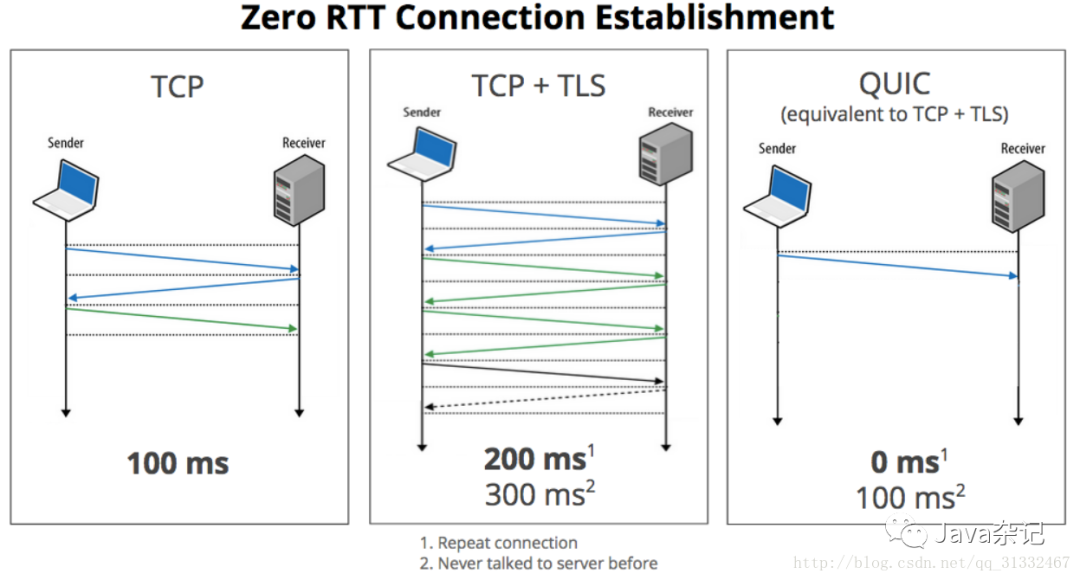
Google’s adoption of QUIC can effectively improve connection rates by 75%.
After adopting QUIC, Google Search saw a 3% improvement in page loading performance.
After adopting QUIC, YouTube reduced rebuffering instances by 30%.
3. TCP design is overly redundant, making speed improvements difficult
To achieve reliability in network communication, TCP uses complex congestion control algorithms, establishing cumbersome handshake processes and retransmission strategies. Since TCP is built into the system protocol stack, it is extremely difficult to improve.
4. The UDP protocol, with its simplicity and fast transmission advantages, has replaced TCP in more and more scenarios.
4.1 Web Browsing
Using the UDP protocol has three advantages:
• It can streamline the handshake process, reducing the number of round trips in network communication;
• It can optimize the TLS encryption and decryption process;
• Fast sending and receiving, non-blocking.
4.2 Streaming Media
Using TCP, once packet loss occurs, TCP will cache subsequent packets and wait for the previous packets to be retransmitted and received before continuing to send, resulting in increasing delays. Protocols based on UDP, such as WebRTC, are excellent choices.
In 2010, Google enhanced web video speeds by acquiring Global IP Solutions, which provided WebRTC (Web Real-Time Communication) technology.
4.3 Real-Time Gaming
In scenarios requiring strict real-time performance, custom reliable UDP protocols, such as Enet and RakNet (used by Sony Online Game, Minecraft), are adopted to create custom retransmission strategies that minimize the delays caused by packet loss, reducing the impact of network issues on gameplay.
Classic games using UDP include FPS games like Quake and CS, and the famous game engine Unity3D also uses RakNet.
5. Differences Between TCP and UDP
1. Whether a connection needs to be established.
UDP does not require a connection to be established before transmitting data; TCP provides connection-oriented services;
2. Whether confirmation is required
The receiving transport layer does not need to provide any confirmation upon receiving UDP packets, while TCP requires acknowledgment packets to provide reliable, connection-oriented transmission services.
3. Although UDP does not provide reliable delivery, in certain situations, UDP is the most efficient working method; [UDP replaces TCP]
Relationship with the IP layer: The IP layer is only responsible for delivering data to nodes and cannot distinguish between different applications above it. Therefore, TCP and UDP protocols add port information on top of it, with each port identifying an application on a node. Aside from adding port information, the UDP protocol does not process any data from the IP layer. In contrast, the TCP protocol adds more complex transmission controls, such as sliding data sending windows, acknowledgment of receipt, and retransmission mechanisms to achieve reliable data delivery. Regardless of how stable the TCP data stream appears to the application layer, what is transmitted underneath are individual IP packets that need to be reassembled by the TCP protocol.
6. Applicable Scenarios for TCP and UDP.
1. TCP is used in situations where reliable transmission is necessary at the transport layer.
2. UDP is mainly used for communications or broadcasting that require high-speed transmission and real-time performance.
For example, in a phone call made via IP phone, if TCP is used, data that is lost during transmission will be retransmitted, resulting in an inability to smoothly transmit the speaker’s voice. In contrast, using UDP will not perform retransmission, thus avoiding significant delays in voice delivery, and even if some data is lost, it will only affect a small portion of the conversation.