Recently, after upgrading the ESP32 firmware to LVGL 9.2.2 + MicroPython 1.25, previously functioning code began to experience crashes and restarts. At this point, the following error message can be seen:
A fatal error occurred. The crash dump printed below may be used to help
determine what caused it. If you are not already running the most recent
version of MicroPython, consider upgrading. New versions often fix bugs.

To learn more about how to debug and/or report this crash visit the wiki
page at: https://github.com/micropython/micropython/wiki/ESP32-debugging

LVGL MicroPython
IDF version : 67c1de1e
Machine     : Generic ESP32 module with SPIRAM with ESP32

Guru Meditation Error: Core  0 panic'ed (Interrupt wdt timeout on CPU0).
Additionally, there will be a long string of Backtrace information, such as:
Backtrace: 0x400858d6:0x3ffc0760 0x401a15f4:0x3ffc0800 0x401a7365:0x3ffc0870 0x401d0470:0x3ffc0890 0x401d04ad:0x3ffc08d0 0x401a7365:0x3ffc08f0 0x401b925d:0x3ffc0910 0x40089475:0x3ffc09c0 0x400894c5:0x3ffc0a00 0x400834fd:0x3ffc0a30 0x4008763d:0x3ffc0a50 0x0004001e:0x00000000 |<-CORRUPTEDThis type of error Backtrace information can help us locate the function in the code where the crash occurred. Referring to the article Decoding ESP32 back trace, we can use the built-in <span>xtensa-esp32s3-elf-addr2line</span> tool from ESP-IDF along with the compiled <span>.elf file</span> for analysis.
1. Using the xtensa-esp32s3-elf-addr2line Tool
<span>xtensa-esp32s3-elf-addr2line</span> is a command-line tool in the ESP32 compilation toolchain that can convert crash addresses back to C++ source code locations (function name + line number), making it easier for us to locate bugs.
Typically, the <span>xtensa-esp32s3-elf-addr2line</span> tool is already installed with the ESP-IDF installation. We just need to navigate to the esp-idf folder and set the environment variable changes for ESP-IDF to use this tool. Taking the <span>lvgl-micropython</span> project as an example, the steps are as follows:
Open the command line and navigate to the <span>lvgl-micropython</span> project’s <span>lib/esp-idf</span> folder:
cd ~/lvgl_micropython/lib/esp-idfSet the environment variable changes for ESP-IDF:
source export.sh2. Locate the .elf File
Generally, the <span>.elf file</span> is located in the <span>lvgl_micropython/lib/micropython/ports/esp32/build-ESP32_***</span> folder, named <span>micropython.elf</span>. Since this file path is quite long, it is recommended to copy it to the home directory for easier access later. For example, you can use the following command to copy it:
cp ~/lvgl_micropython/lib/micropython/ports/esp32/build-ESP32_*/micropython.elf ~/3. Analyzing the Backtrace
After completing the above steps, use the <span>xtensa-esp32s3-elf-addr2line</span> tool to analyze the Backtrace information. The specific command is as follows:
xtensa-esp32-elf-addr2line -pfiaC-e ~/micropython.elf 0x400858d6:0x3ffc0760 0x401a15f4:0x3ffc0800 0x401a7365:0x3ffc0870 0x401d0470:0x3ffc0890 0x401d04ad:0x3ffc08d0 0x401a7365:0x3ffc08f0 0x401b925d:0x3ffc0910 0x40089475:0x3ffc09c0 0x400894c5:0x3ffc0a00 0x400834fd:0x3ffc0a30 0x4008763d:0x3ffc0a50 0x0004001e:0x00000000After executing the above command, the tool will output the analysis results:
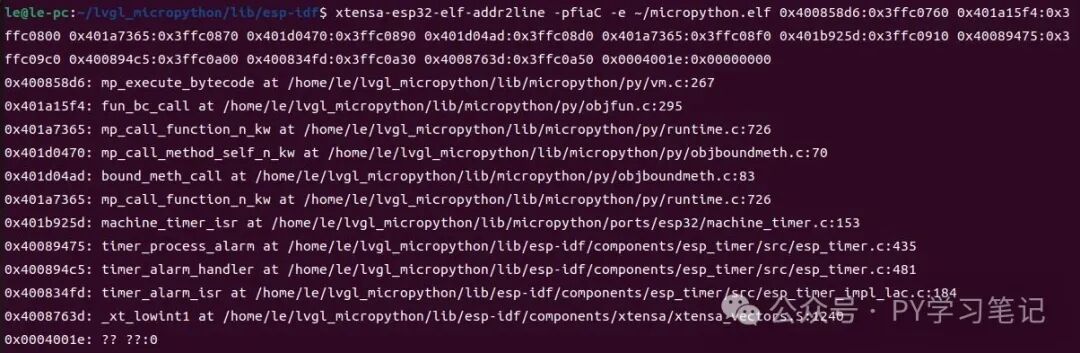
The output results include function names and line numbers, helping us to more intuitively understand the specific location of the code crash, thus facilitating our troubleshooting and repair work.
Recommended Reading:
-
Compile an LVGL-Micropython firmware in three simple steps
-
Compile Micropython firmware for ESP32-S3 to support cameras like OV2640
- Compile OpenMV firmware for ESP32S3-EYE to enable machine vision learning
- ESP32S3-BOX3 keyboard example based on LVGL
- ESP32 handheld device implementing a timetable based on LVGL
- Modular remote-controlled car: Camera remote-controlled car
