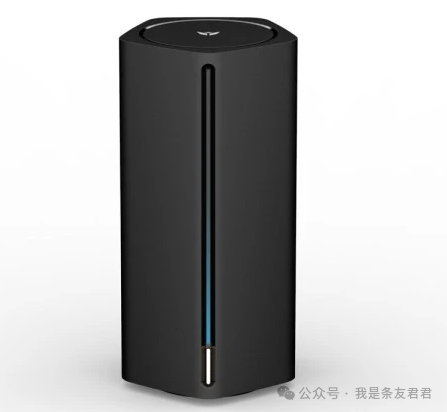
Product Introduction: The JD Cloud Arthur AX1800 Pro is one of the most cost-effective hard/soft routing devices of 2024. This device was originally a CDN product from JD Cloud (related to K machines), an older model from a few years ago, which has been recycled and upgraded. Compared to popular soft routers from a few years ago, such as the Phicomm N1 (2GB+8GB configuration), it has slightly lower specifications but better wireless performance. The Phicomm N1 has a significant flaw with its weak single-band 5G signal, while this device supports WiFi 6, achieving maximum speeds of up to AX1800Mbps.
Hardware Configuration Details: The upgraded configuration includes 1GB of RAM and 8GB of flash storage (replacing the original 128GB flash chip); the processor is based on the Qualcomm IPQ6000 series, featuring 5 cores (1 NPU network acceleration core + 4 A53 architecture cores); interfaces include 3 Gigabit Ethernet ports, 1 10 Gigabit port, and 1 USB port. The overall performance is sufficient to easily run certain internet applications, install plugins, and handle multitasking, and after flashing the firmware, it can also be used as a light NAS.
Price and Cost-Effectiveness Analysis: Acquired for just over 70 yuan on Huangyu (a second-hand platform), this is considered a very good deal. “Buying a hard router with excellent wireless performance and a 1+8G configuration for just over 70, why not?” Compared to the previous Tianji 820 platform routers (dream devices but too expensive), this device excels in performance, configuration, and wireless signal without the need for high-end hardware.
Firmware and Flashing Process: The seller has pre-flashed a simple firmware, and users can recompile the OpenWrt firmware, integrating features such as certain internet applications. It is recommended to use the OpenWrt online compilation website (select models like JDCloud, customize plugins, and compile/download with one click). Flashing steps: first enter Uboot mode (press and hold the Reset button with a toothpick while powering on, wait for the light to flash, then the green light stays on); set the computer IP to 192.168.1.x, DNS to 192.168.1.1, access the upgrade interface to upload the initial firmware; after rebooting, enter the system, adjust settings, and then upgrade to the custom firmware through the interface. The entire process is simple and without lag.
Applicable Scenarios and Recommendations: Suitable for budget-conscious users as an entry-level soft router, supporting systems like OpenWrt/iStoreOS, with a rich array of plugins. Its good wireless signal, ample ports, and high cost-effectiveness make it especially suitable for certain internet applications and light NAS usage.