Virtualization technology is essentially a resource management technology, which abstracts, logically transforms, and isolates various physical resources (CPU, network, memory, storage, etc.), freeing them from physical structure limitations, allowing for better utilization of these resources than the original configuration.The main types of virtualization are:1. Server Virtualization (Mainstream)This is the most common form of virtualization, dividing a physical server into multiple independent virtual services(virtual machines).
- VMware vSphere: separates applications and operating systems from the underlying hardware.
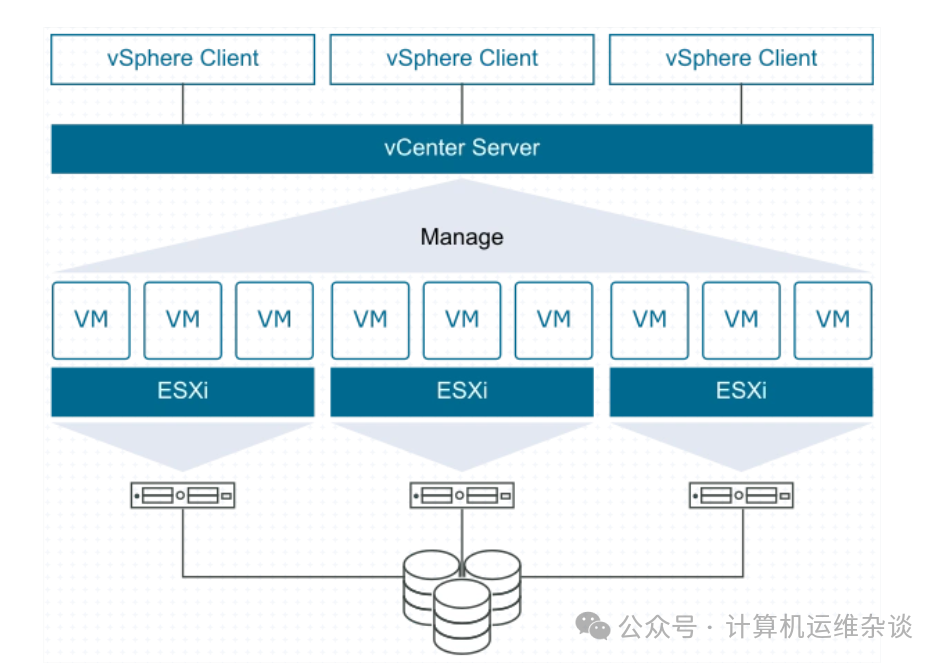
VMware ESXi: a hypervisor that is directly installed on a physical server, responsible for creating and running virtual machines, and abstracting and managing the underlying physical resources (such as CPU, memory, storage).VMware vCenter Server: a centralized management platform that can act as a unified administrator for multiple ESXi hosts on the network.
- Microsoft Hyper-V: a virtualization product launched by Microsoft, which creates and runs multiple VMs (virtual machines) on a single physical machine, thus utilizing hardware resources more efficiently.
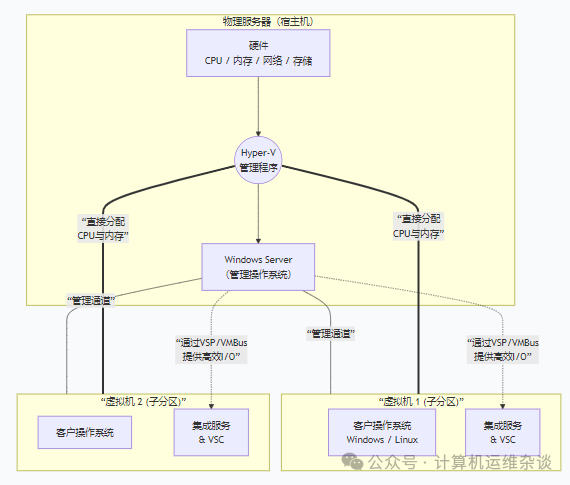
Hyper-V: runs directly on hardware, responsible for managing and allocating resources to each virtual machine.
Virtual Machine: each VM is an independent, isolated software container that runs its own operating system and applications
-
KVM (Kernel-based Virtual Machine): an open-source virtualization module based on the Linux kernel, managed through the libvirt tool.
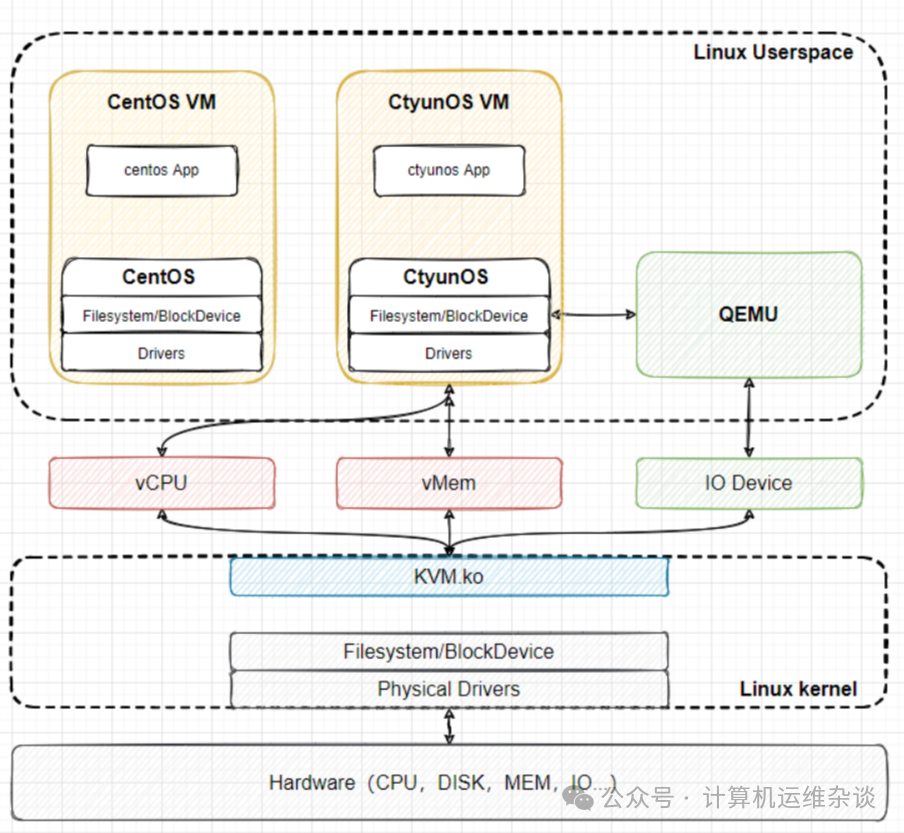
Linux kernel module (kvm.ko): manages virtual CPUs and memory, providing a management interface for programs through the /dev/kvm character device.
User-space tool (QEMU): responsible for providing I/O virtualization, simulating virtual hardware, devices, and managing the lifecycle of virtual machines.
Libvirt: is the management tool for KVM. OpenStack also uses Libvirt at its core.
Libvirt consists of three components:
a background daemon program libvirtd, an API library, and a command-line tool virsh
(1) libvirtd is the service program that receives and processes API requests;
(2) The API library allows others to develop advanced tools based on Libvirt;
(3) virsh is a commonly used command-line tool for KVM.
2. Network Virtualization
is the technology that logically abstracts and combines physical network resources (such as switches, routers, firewalls, etc.) to create multiple independent, virtual network environments.
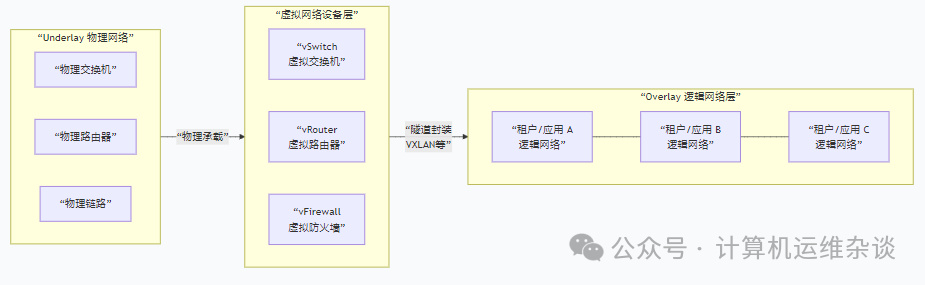
The core layers and implementation technologies of network virtualization mainly include the following three layers:
-
Layer 1: Underlay Physical Network
composed of real switches, routers, fiber optics, and network cables, the Underlay network is responsible for ensuring physical connectivity between virtualization hosts.
-
Layer 2: Virtual Network Device Layer
implements network functions within a single server, serving as the foundational carrier of network virtualization:
Virtual Switch: a software program running on a physical machine that simulates the functions of a physical network switch, used for communication between VMs on the physical machine and between VMs and the external physical network.
Virtual Router: implements layer 3 routing functions in software.
Virtual Firewall: provides security policies in software form.
-
Layer 3: Overlay Logical Network Layer
a logical network built on top of the physical network using tunneling encapsulation technology, which is the essence of network virtualization. It encapsulates the entire data frame of the VM as a “data payload” within an IP packet, transmitted over the Underlay network, and then decapsulated upon reaching the destination. VXLAN is currently the most mainstream Overlay technology.
Another important and easily confused concept is NFV, which stands for Network Functions Virtualization: it decouples network functions (such as firewalls, load balancers, routers, etc.) from dedicated hardware devices, allowing them to run as software applications on standard commercial servers.
3. Storage Virtualization
abstracts physically dispersed storage resources (such as hard drives, SAN) into a unified logical storage pool, allocated on demand to VMs or applications.
The implementation of storage virtualization mainly includes:
-
Host-based Virtual Storage
the virtualization layer runs on the host operating system using storage technologies like logical volume managers, a typical technology is Linux LVM logical volumes.
-
Storage Device-based Storage Virtualization
the virtualization function is embedded in the controller of high-end storage arrays.
-
Network-based Virtual Storage (most mainstream)
the virtualization layer is deployed as an independent device or controller in the Storage Area Network (SAN).
4. Application Virtualization
separates applications from the underlying operating system (OS), encapsulating them in an independent, virtual “sandbox” environment where applications have all the components needed to run (such as registry entries) and are isolated from other parts of the operating system and from each other.
For example, when an application tries to write a file to C:\Program Files\MyApp, the virtualization layer redirects it to a location like C:\Users\\AppData\Local\VirtualStore\… For the application, it successfully wrote to the system directory; for the host machine, the file is safely placed in the user directory.
5. Docker (Containerization Technology):
packages an application and all its dependencies (including libraries, binaries, configuration files, etc.) into a standardized, isolated unit.
It utilizes the Linux kernel’s Namespace to achieve isolation of processes, networks, file systems, etc. It uses Cgroups to limit and manage resources such as CPU, memory, and disk I/O.
Docker containers: use a sandbox mechanism to isolate process resources, remotely manage the container lifecycle through a client-daemon architecture, with core components including Docker Image (image), Container (container), and Registry (repository), where the image serves as a template for creating containers, and the container is a running instance of the image.