 This article is from “Introduction to Computing Virtualization Basics“, for in-depth content refer to “Introduction to Arm v8 Architecture Virtualization, Collection: Detailed Explanation of Storage Virtualization Technology, Collection: Introduction to Storage Virtualization Technology”, mainly introducing the emergence and development of virtualization, KVM’s CPU, memory, and I/O virtualization, and a comparison of ARM and X86.Download links: Introduction to Computing Virtualization Basics, Detailed Explanation of Virtual Switch Technology, 2023 Computer SSD Solid State Drive Entry Report, 2023 Microprocessor Chip Technology Entry Report
Virtualization integrates underutilized servers, eliminating the need to purchase additional hardware for new projects, thereby reducing capital costs while streamlining the number of data center servers, which can proportionally reduce operational costs related to power, cooling, and space.
By utilizing advanced virtualization management and cloud operations management software, a secure and auditable data center environment is established, providing business units with a lower-cost, higher-service-level infrastructure, allowing for quick responses to business unit needs.
Through virtualization management and cloud operations management software, centralized management of data center IT infrastructure is fully realized, which not only streamlines IT operations and improves management efficiency but also simplifies monitoring, management, reporting, and remote access operations.
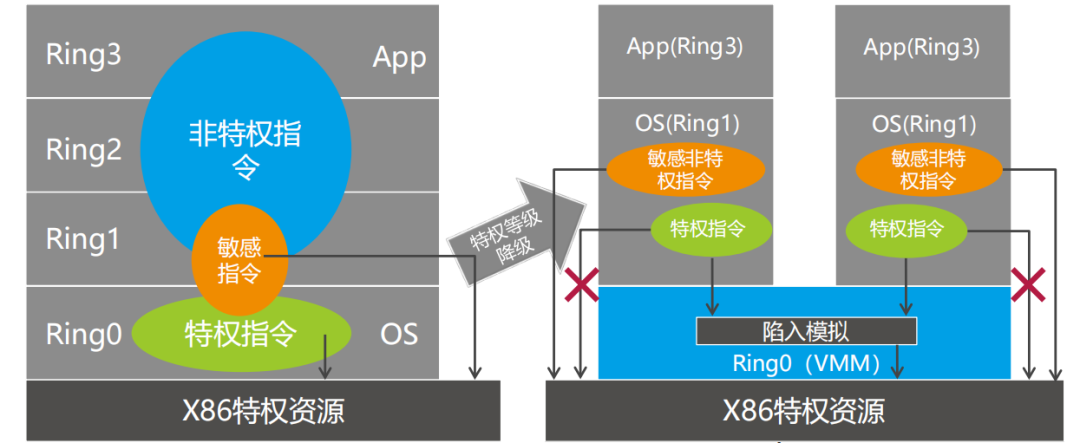
The original x86 architecture is not suitable for virtualization.
The x86 architecture has 17 sensitive non-privileged instructions that do not generate exceptions at runtime; executing these instructions on the guest operating system will compromise the entire system.
Solution 1: Para-Virtualization
Xen Para-Virtualization architecture
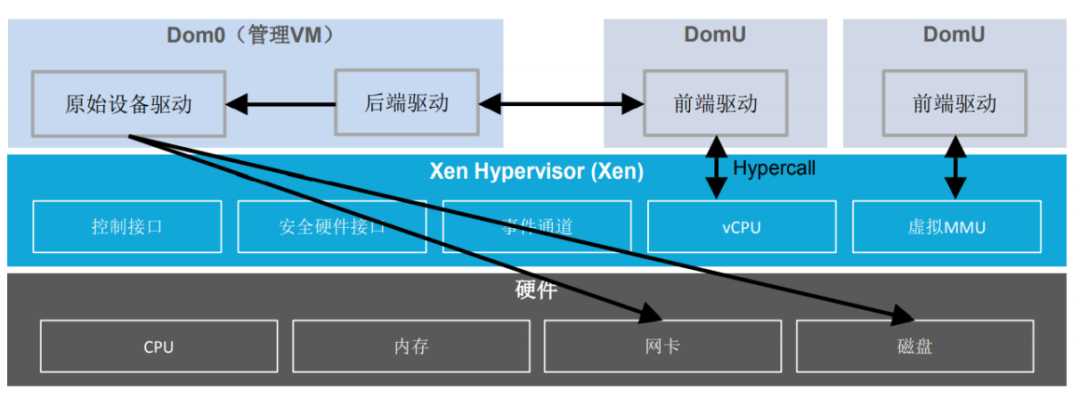
The Guest OS running on the Hypervisor has integrated code related to para-virtualization, allowing the Guest OS to work very well with the Hypervisor to achieve virtualization.
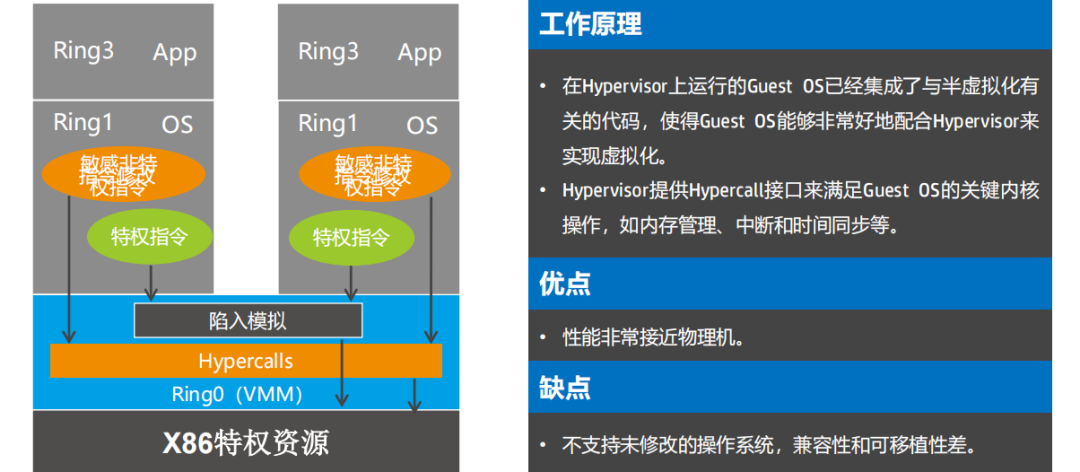
The Hypervisor provides a Hypercall interface to meet the critical kernel operations of the Guest OS, such as memory management, interrupts, and time synchronization.
Solution 2: BT (Binary Translation)
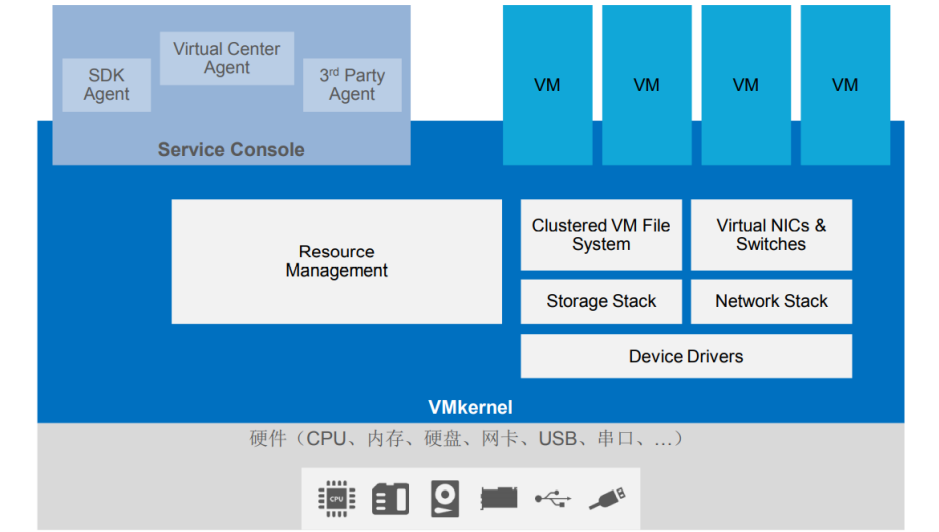
Full Virtualization
VMware ESX software system architecture
Guest OS instruction segments are translated before execution, replacing sensitive non-privileged instructions with corresponding privileged instructions executed in Ring0.
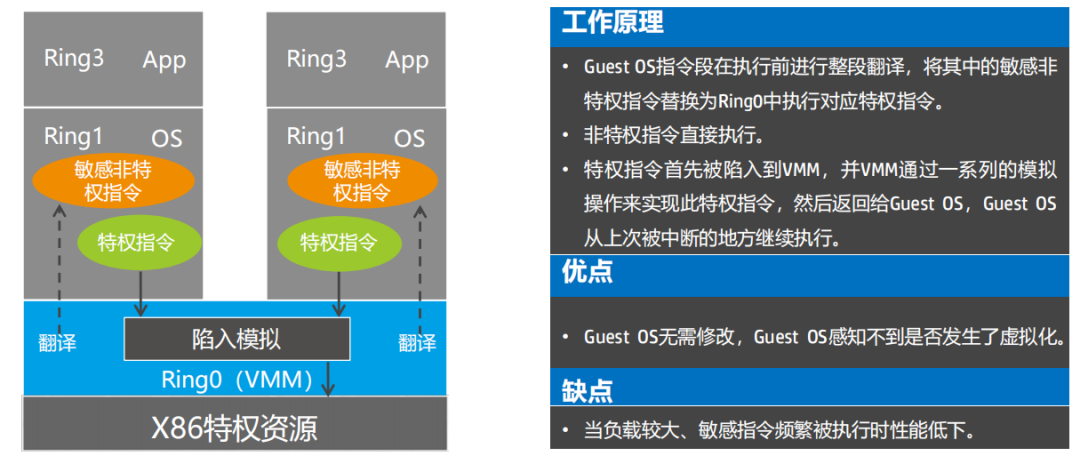
Non-privileged instructions are executed directly.
Privileged instructions first trap to the VMM, and the VMM simulates this privileged instruction through a series of emulation operations before returning to the Guest OS, allowing the Guest OS to continue execution from where it was last interrupted.
Hardware-assisted virtualization
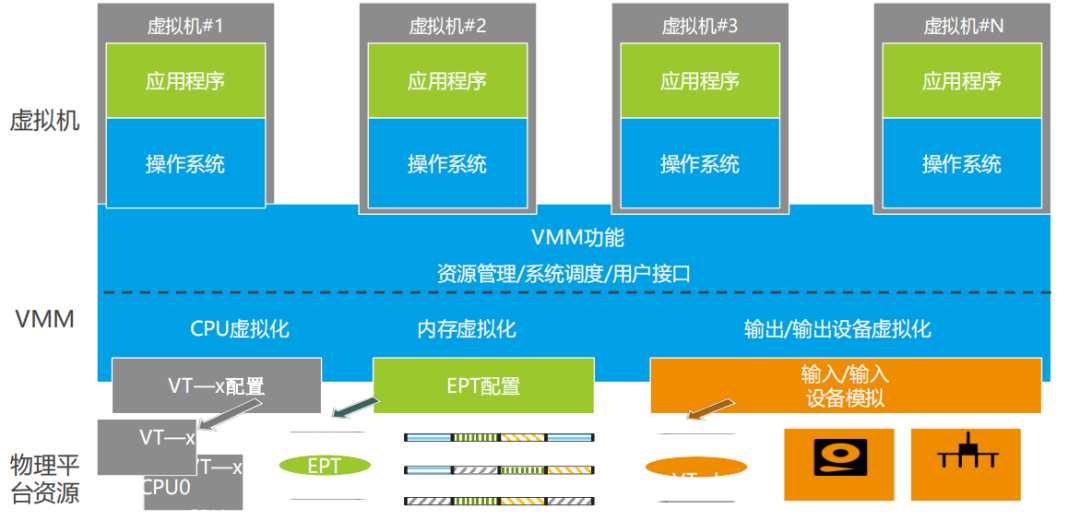
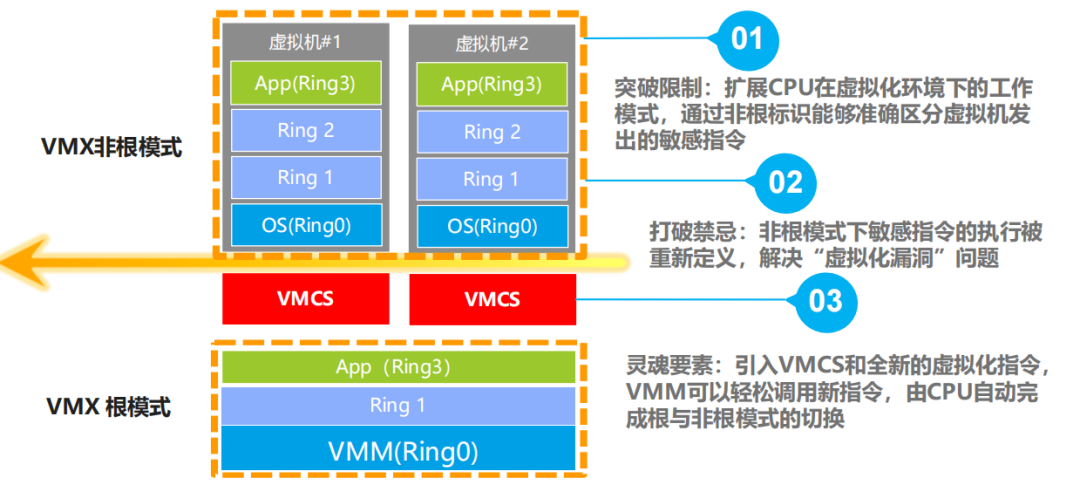
Hardware-assisted virtualization – CPU
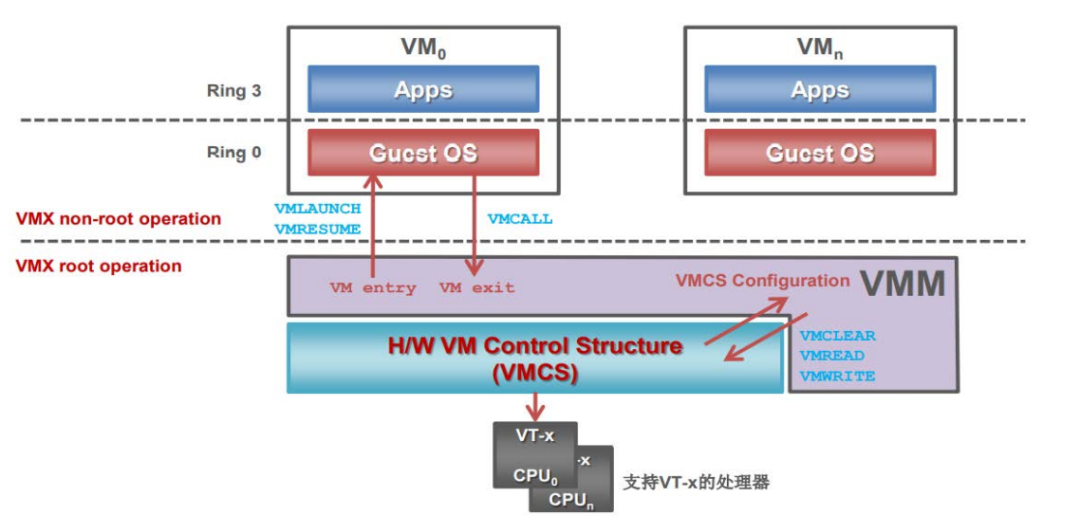
CPU hardware virtualization — Intel VT-i
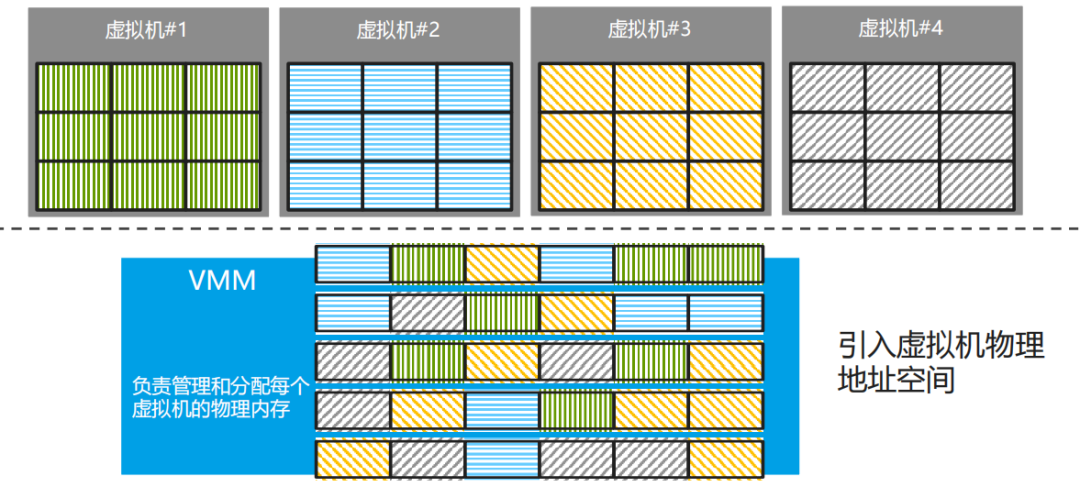
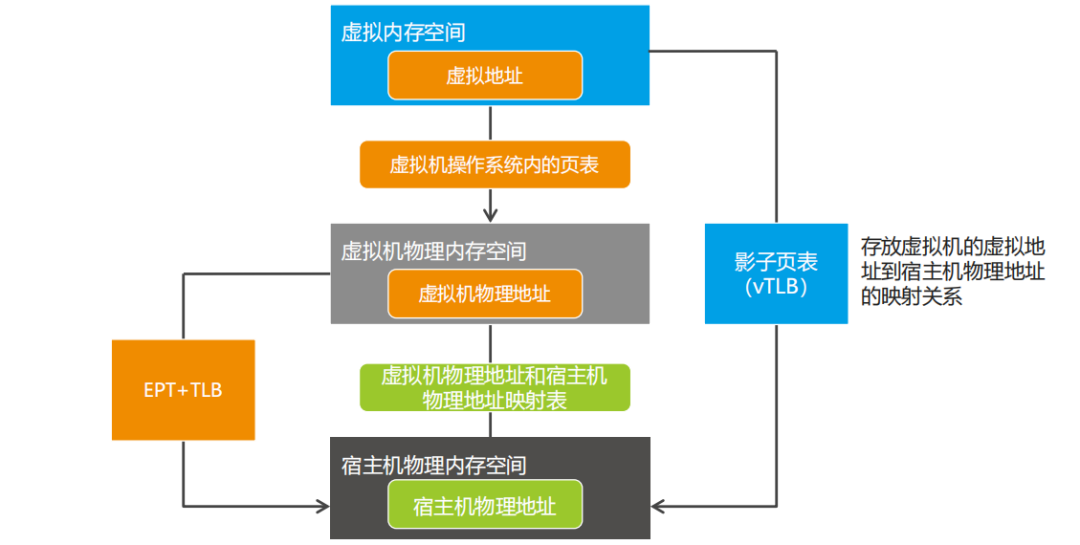
Hardware-assisted virtualization — memory
I/O virtualization
The device driver of the client initiates an I/O request operation, and the I/O operation capture code in the KVM module intercepts this I/O request.
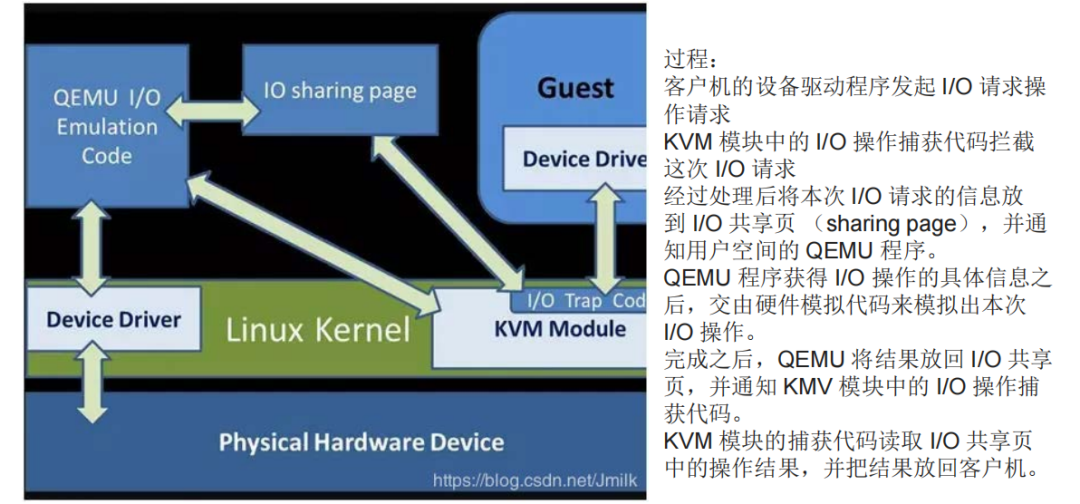
After processing, the information of this I/O request is placed in the I/O sharing page, and the user space QEMU program is notified.
After the QEMU program obtains the specific information of the I/O operation, it hands it over to the hardware emulation code to simulate this I/O operation.
Once completed, QEMU places the result back into the I/O sharing page and notifies the I/O operation capture code in the KVM module.
The capture code of the KVM module reads the operation result from the I/O sharing page and returns the result to the client.
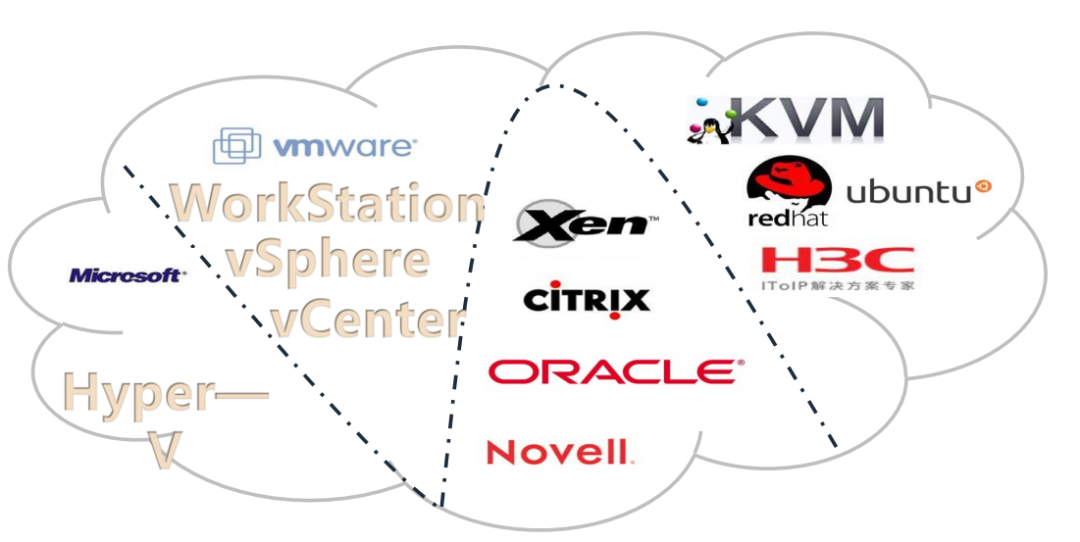
Leading Hypervisor products
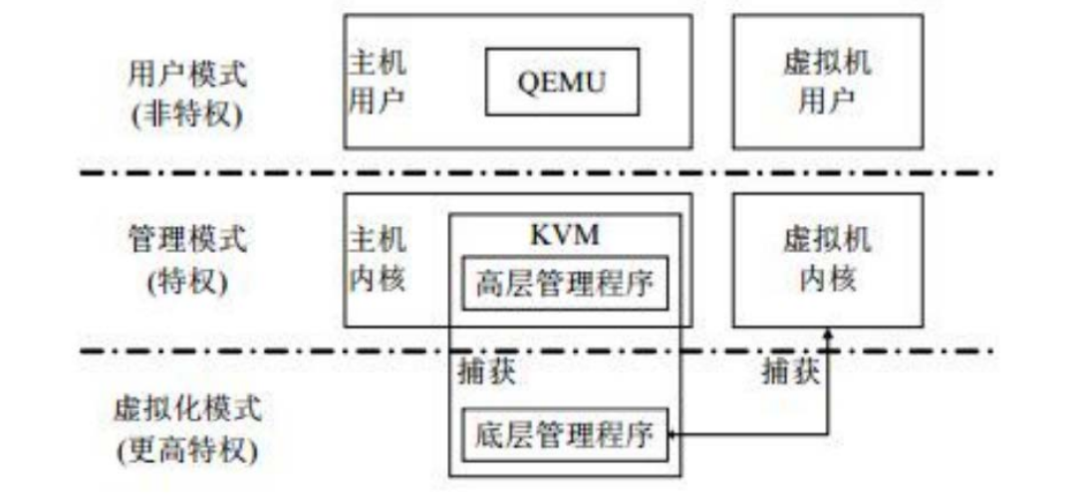
ARM processor mode — virtualization mode
In the x86 architecture, the non-root mode corresponds to the root mode, which includes the traditional CPU modes with permission levels from Ring 0 to Ring 3; in the root mode, there are also corresponding permission levels from Ring 0 to Ring 3. This means that root mode and non-root mode are parallel.
In ARM, the virtualization mode is parallel to the existing modes, but the virtualization mode has a higher privilege level than the management mode.
KVM/ARM virtualization technology principles
This article is from “Introduction to Computing Virtualization Basics“, mainly introducing the emergence and development of virtualization, KVM’s CPU, memory, and I/O virtualization, and a comparison of ARM and X86.
“Complete Knowledge of Server Fundamentals (Ultimate Edition)” sister article “Complete Knowledge of Storage Systems” has been updated and released; the content is richly illustrated and comprehensive, covering storage medium technology, storage system and form introduction, storage protocol details, storage system technology overview, key storage technologies, storage system technology innovations and trends, storage virtualization technology, storage system data backup technology, and storage backup solution design, among other nine chapters.

Disclaimer: Thanks to the original author’s hard work. All articles reposted by this account will be noted in the text; if there are copyright issues, please contact us for resolution.
Recommended Reading
1. The entire store’s content is continuously updated; now order the “Architect Technical Store Material Package (All)” to receive together the Complete Knowledge of Server Fundamentals (Ultimate Edition) and Complete Knowledge of Storage Systems in PDF and PPT versions, and enjoy “free” updates of all store content for a price of only 249 yuan (original total price 439 yuan).
2. As the number of e-books increases and content updates, prices will also increase, so ordering now is the most cost-effective, and after purchase, you can enjoy “free” updates of all store content.
Warm Reminder:
Scan the QR code to follow the public account, click Read Original link to get the details of the “Architect Technical Store Material Package (All)” e-book materials.