⭐ Click the blue text above to follow ~ Continuous sharing, let’s learn together ⭐ Previous recommendations: Network Resource Devices: Network Servers Network Resource Devices: Storage Architecture Network Resource Devices: Independent Disk Redundant Array (RAID) Network Resource Devices: Network Storage Systems Network Resource Devices: Basics of Cloud Computing
1. Basics of Virtualization
1. Basic Concepts
Virtualization is a technology that abstracts and transforms physical computing resources (such as servers, networks, storage, desktops, etc.) through software.
Virtualization is the core technology of cloud computing, with its core value in breaking the physical boundaries of hardware and transforming resources into logically flexible units that can be scheduled.
2. Necessity of Virtualization
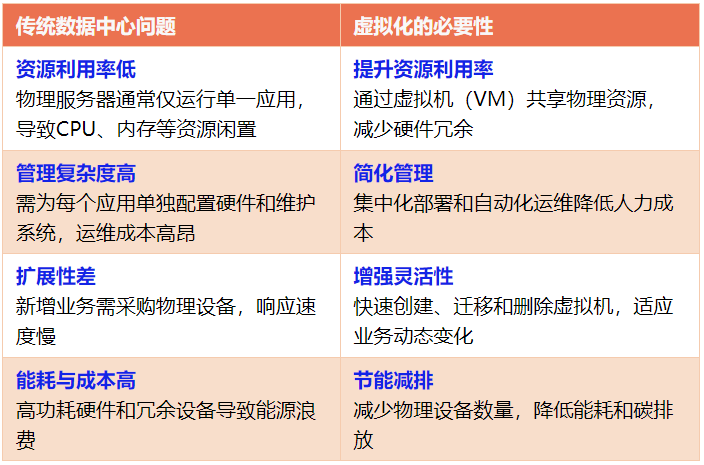
3. Categories of Virtualization Applications
Common virtualization applications include server virtualization, storage virtualization, network virtualization, desktop virtualization, etc. The Soft Exam Network Planning Tutorial focuses on server virtualization and desktop virtualization.
2. Applications of Virtualization
The application of virtualization technology has penetrated all levels of IT infrastructure, with its core being to break physical limitations through “software-defined resources” to achieve efficient, flexible, and secure resource management.
Below, we will discuss typical applications of virtualization from five dimensions: servers, desktops, storage, networks, cloud computing.
1. Server Virtualization: The Core Efficiency Enhancement Method for Data Centers
Scenario Description: Enterprises/institutions abstract the CPU, memory, storage, and other resources of physical servers into multiple logical virtual machines (VMs), with each VM independently running an operating system and applications, replacing the traditional wasteful model of “one machine, one application”.
1) Traditional vs. Virtualized Architecture
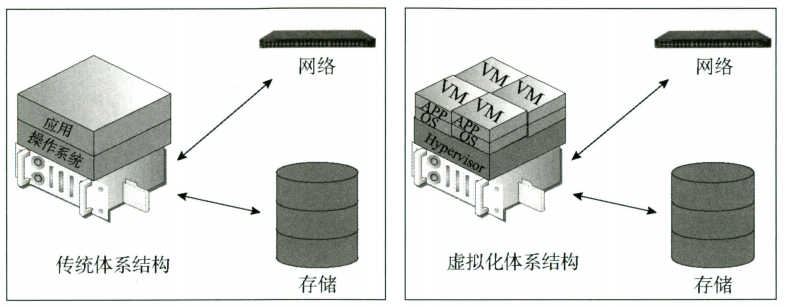
Traditional Architecture: Physical servers have a “one-to-one” relationship with operating systems and applications, resulting in low resource utilization (most hardware is idle), and installation and configuration are time-consuming.
Virtualized Architecture: A “many-to-one” relationship is established through virtualization software, allowing a single physical server to run multiple virtual machines (VMs).
2) Advantages of Server Virtualization
Improved Resource Utilization: By sharing the CPU, memory, storage, and other resources of physical servers, it avoids the monopolization of hardware resources by a single application, reducing idle waste.
Reduced Hardware and Operational Costs: Reduces the number of physical servers purchased, lowering costs for hardware procurement, data center space leasing, and electricity consumption, while simplifying equipment management and maintenance.
Enhanced Data Center Efficiency: Saves data center space, reduces energy consumption, and improves overall energy efficiency (PUE) through centralized management.
Increased Business Flexibility: Virtual machines can dynamically allocate resources (such as memory, hard disk) as needed, supporting rapid scaling up or down to adapt to business load changes.
Rich Functionality: Supports operations such as VM backup/restoration, cross-physical machine migration, cloning, template deployment, and quick reboot.
Strong Isolation: Each virtual machine is equipped with independent virtual resources (CPU, memory, network adapters, etc.), and software dependency conflicts do not affect each other; a single VM failure does not impact others.
Reduced Risk of Failure: Supports real-time migration of virtual machines (e.g., cross-host migration), avoiding risks of hardware failure and maintenance upgrades without interrupting services, enhancing business continuity.
Accelerated Business Deployment: Quickly create virtual machines through templating, simplifying the application deployment process and significantly shortening the new business launch cycle.
3) Components of a Virtual Machine
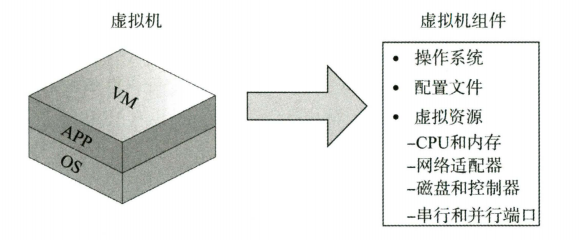
A virtual machine (VM) is the core carrier of virtualization, and its components include:
Base Layer: Operating systems (such as Windows/Linux) and applications (APP);
Configuration File: Defines the hardware parameters of the virtual machine (such as the number of virtual CPUs, memory size), network settings, etc.;
Virtual Resources:
Virtual CPU/Memory: Dynamically allocated from physical host resources, appearing as “independent computing units” during runtime;
Virtual Network Adapters: Simulate the functions of physical network cards, supporting various protocols (such as TCP/IP) and VLAN;
Virtual Disks/Controllers: Map physical storage or shared storage, providing persistent data storage;
Serial/Parallel Ports: Simulate physical interfaces, supporting peripheral connections (such as debugging serial ports).
4) CPU Resource Allocation and Network Communication Mechanism
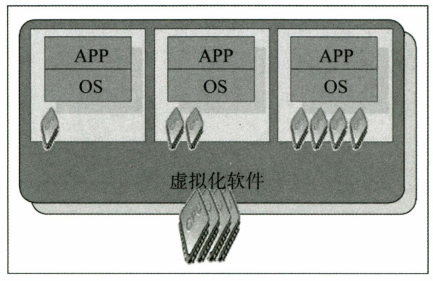
Physical host CPU is allocated to virtual machines as needed: Virtual machines directly use physical CPU instructions during operation (non-emulation mode), improving efficiency; when multiple VMs compete for CPU, the host allocates usage time through “time slicing”, making each VM perceive it as “exclusive virtual CPU”.
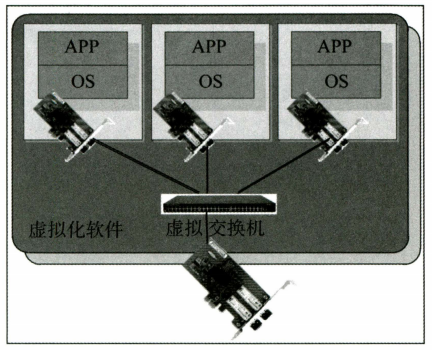
Virtual machines connect to the physical network through virtual switches, and the functions of the virtual switch are as follows:
Supports communication between virtual machines within the same host (based on physical switch protocols);
Compatible with VLAN (configurable ports as access or trunk ports), achieving network isolation;
Supports physical network card binding (link aggregation), enhancing bandwidth and redundancy;
Isolation: Virtual machine traffic only flows within this virtual switch, multiple virtual switches are not interconnected, and there is no need for a spanning tree protocol (to avoid loops);External connectivity: Connects the physical host network card through the virtual switch, enabling communication between virtual machines and external networks.
5) Virtual Machines and Shared Storage
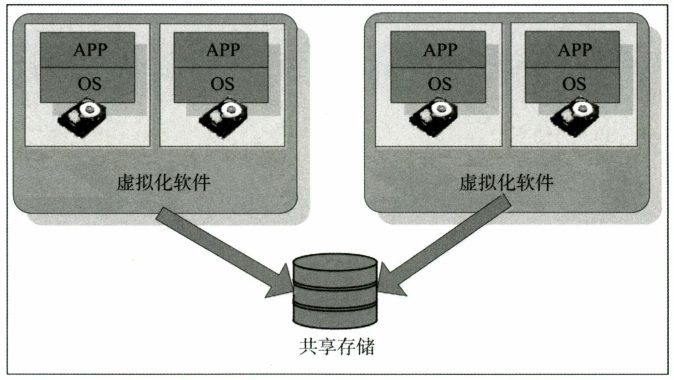
To achieve virtual machine migration, load balancing, and other functions, multiple physical hosts need to connect through virtualization software to shared storage:
Role of Shared Storage: Multiple physical hosts connect through shared storage, allowing virtual machine data to be centrally stored in a storage pool; supporting advanced functions such as real-time migration, load balancing, and fault tolerance (data sharing is the basis for these functions).
Architectural Advantages: Separation of storage and computing enhances resource utilization and management flexibility; distributed design ensures high availability and scalability, forming the core infrastructure of virtualization clusters.
Typical Technologies: VMware vSphere’s VMFS file system provides a unified interface for storage resources, supporting access to virtual machine storage through various protocols such as Fibre Channel, Ethernet Fibre Channel, iSCSI, enhancing compatibility and deployment flexibility;
Utilizes a distributed locking mechanism to strengthen the association between virtual machines and storage resources, ensuring data consistency during concurrent access by multiple hosts, enabling seamless addition of virtual machines to the cluster.
Mainstream Vendors: VMware (market leader), Huawei, H3C (accelerating domestic substitution).
6) Storage Methods of Virtualization Software
There are two common storage solutions used by virtualization software, each with its advantages and disadvantages:
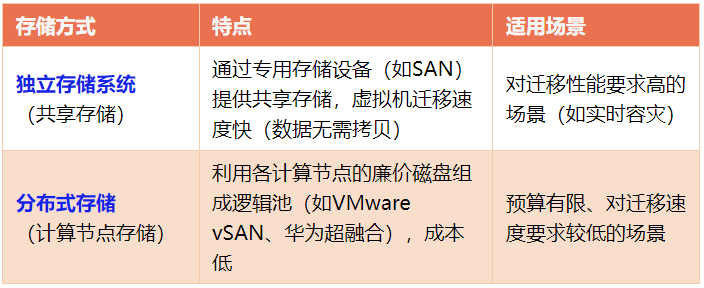
7) Mainstream Server Virtualization Platforms
VMware ESXi (Type-1 Hypervisor, commercial closed-source): The benchmark for enterprise-level virtualization, with the most mature ecosystem.
Type-1 Hypervisor (also known as “native” or “bare-metal” hypervisor) is a virtualization software layer that runs directly on the physical server hardware, without relying on any host operating system. It directly calls hardware resources (CPU, memory, storage, network) to provide computing, storage, and network virtual resources for upper-layer virtual machines (VMs), making it a core component of server virtualization.
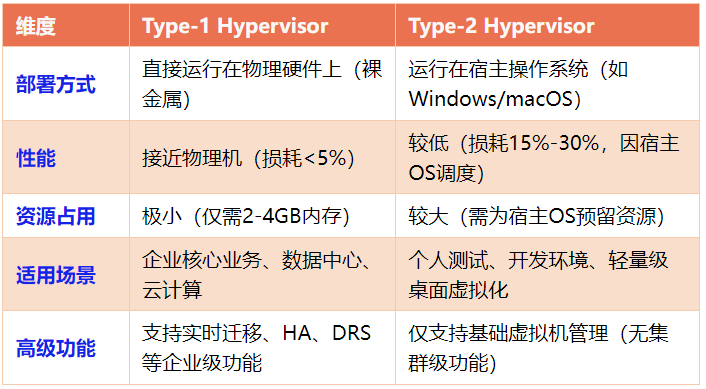
Citrix XenServer (Type-1 Hypervisor, open-source + commercial dual-mode): A pioneer in open-source virtualization, focusing on desktop cloud and cloud computing.
Microsoft Hyper-V (Type-1 Hypervisor, commercial closed-source): Exclusive to the Windows ecosystem, the preferred choice for hybrid cloud.
Open-source KVM (Type-1 Hypervisor, open-source free + commercial distribution): The cornerstone of the Linux ecosystem, the king of cost-performance ratio, with three core advantages: open-source, high performance, high compatibility.
KVM (Kernel-based Virtual Machine): A fully open-source Type-1 Hypervisor (bare-metal virtual machine monitor) integrated directly into the Linux kernel, transforming the Linux operating system into a virtualization platform through kernel modules, providing computing, storage, and network virtual resources for upper-layer virtual machines (VMs).
Domestic Server Virtualization Platforms have formed a complete ecosystem based on KVM open-source technology combined with independent innovation after years of development, widely used in industries with high requirements for “independent control” such as government, finance, energy, and telecommunications.
For example, Huawei FusionSphere (Huawei Cloud’s core virtualization platform), H3C CloudOS, Sangfor Hyper-Converged (aSV), Inspur Cloud Sea InCloud Sphere, Alibaba Cloud Shenlong Architecture (Alibaba Cloud Shenlong Server), etc.
When choosing a domestic server virtualization platform, comprehensive consideration can be given based on enterprise needs (scale, business type, compliance requirements):
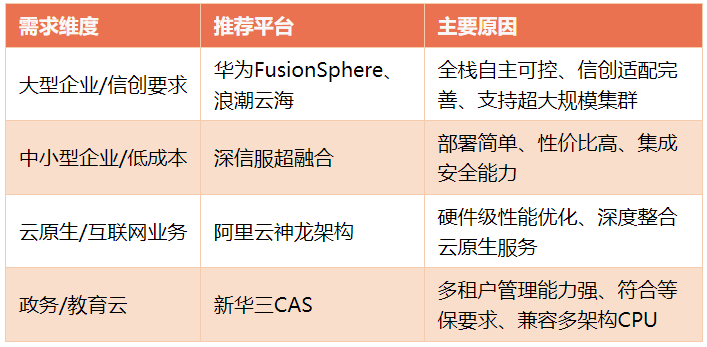
Domestic server virtualization platforms are accelerating their evolution towards cloud-native, hyper-converged, and trusted adaptation, and will deeply integrate with AI and edge computing in the future, becoming the core infrastructure for enterprise digital transformation.
2. Desktop Virtualization: A Revolution in Terminal Management
Scenario Description: User terminals (such as PCs, thin clients) no longer install local operating systems but access “virtual desktops” on the server side through the network, with all computing and data centralized in the data center.
1) Basic Concepts
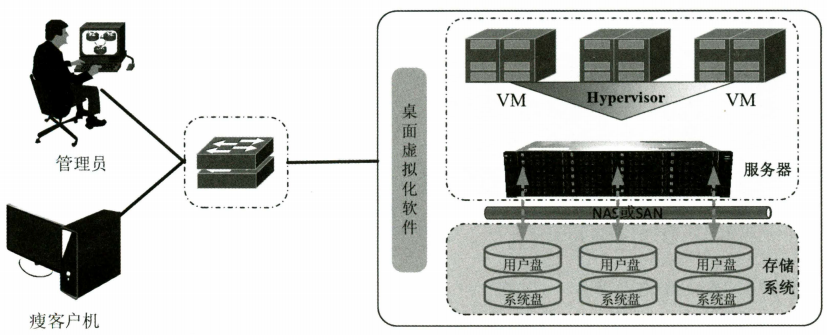
Desktop virtualization (Virtual Desktop Infrastructure, VDI) (cloud desktop) is a technology that centralizes the user desktop environment (operating system, applications, data) on servers in the data center through server virtualization technology, allowing users to access remotely via thin clients.
2) System Composition
Thin Clients: Provide only input (keyboard, mouse) and output (monitor) functions, with no local storage and computing capabilities, reducing terminal costs and maintenance complexity.
Server Clusters: Multiple physical servers pool resources through virtualization software (Hypervisor), with each server virtualizing multiple independent virtual machines (VMs), with each user corresponding to a dedicated VM.
Storage Systems: Store user disks (personal data) and system disks (virtual machine operating systems, applications), supporting centralized storage and backup.
Virtualization Software: Manages physical server resources (CPU, memory, network), achieving VM isolation, dynamic resource allocation, and hot migration (such as fault migration, load balancing).
3) Workflow
Users log into the desktop virtualization system through thin clients → the system allocates dedicated VMs → VMs call server CPU/memory/network/storage resources to operate → users receive remote screen images and input commands through thin clients → all business data only circulates within the data center, without passing through terminals.
4) Core Advantages
Resource Pooling: Multiple servers form a cluster, with resources (CPU, memory) managed in a unified pool, then virtualized into multiple VMs (many-to-many), supporting dynamic allocation as needed.
Elastic Expansion: When the number of users increases, servers can be quickly added for expansion, avoiding resource waste from the traditional PC “one machine, one user” model.
High Reliability and Isolation: VMs are isolated from each other, and a single VM failure (such as application crash, operating system hang) does not affect other users; supports hot migration (VM migration between servers without downtime), avoiding hardware failure risks.
High Data Security: Data is uniformly stored on backend servers or data centers, combined with RAID, data backup, and multi-copy redundancy technologies, significantly reducing the risk of data loss.
Simplified Operation and Maintenance Management: Upgrades, patch installations, and permission configurations for all VMs can be completed centrally through a management console, allowing management of hundreds or even thousands of desktops simultaneously, greatly reducing operational costs.
Lower Total Cost of Ownership (TCO): Thin clients consume less power, saving energy and reducing long-term operational and energy costs.
Support for Mobile Office: Can access virtual desktops through any device and any network (wired/wireless), achieving “office anytime, anywhere”.
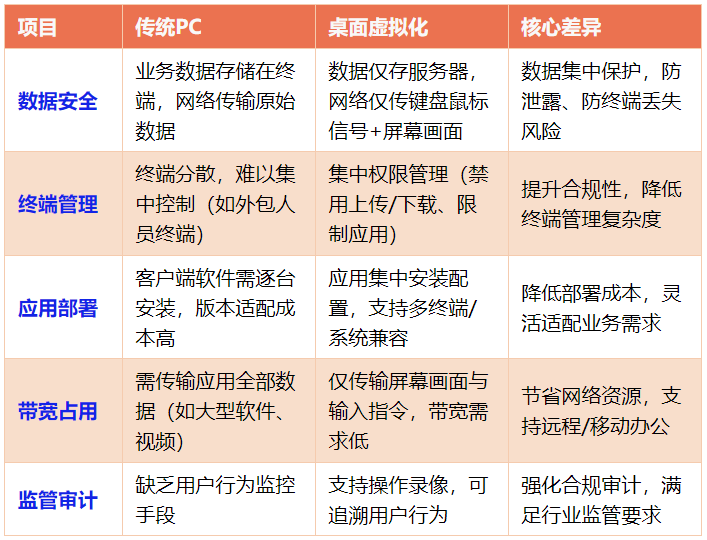
5) Comparison of Traditional PCs and Desktop Virtualization
Comparing the two clearly shows the core advantages of desktop virtualization in data security, management efficiency, etc.:
6) Main Disadvantages
Highly Dependent on Network:
The operation of virtual desktops relies on a stable network connection; disconnection or network congestion can lead to desktop lag, unresponsiveness, or even complete disconnection.
Overall Performance is Weaker:
Traditional VDI has weak support for GPU-intensive applications such as 3D modeling, 4K video editing, and large games (which require GPU virtualization technologies like NVIDIA vGPU, which are costly).
Incompatibility with Peripherals and Terminals:
Some specialized peripherals (such as industrial control boards, high-precision printers, multi-interface barcode scanners) require separate adaptation of drivers in the virtual environment, which may lead to functional deficiencies or compatibility failures.
Although multiple terminal access is supported, complex operations (such as CAD drawing, video editing) still rely on high-performance terminals or local computing resources, leading to a decline in experience on low-end devices.
Higher Initial Construction Costs:
Requires deployment of server clusters, storage arrays (such as SAN/NAS), virtualization platforms (such as VMware Horizon, Citrix Virtual Apps and Desktops), and network devices, with initial investment significantly higher than traditional PC solutions.
VDI has significant management, security, and cost advantages in enterprise-level scenarios, especially suitable for standardized office and security-sensitive environments, but its network dependency and performance bottlenecks still need to be alleviated through technical optimization (such as edge computing, GPU virtualization) and reasonable planning (such as on-demand expansion, peripheral adaptation).
3. Storage Virtualization: The Cornerstone of Elastic Storage
1) Basic Concepts
Storage virtualization is a technology that abstracts physical storage devices (such as hard disks, tape libraries, SSDs, etc.) into logical storage resources, providing users with a unified virtual storage pool by masking underlying hardware differences.
2) Core Objectives (Advantages)
Simplified Management: Integrates dispersed heterogeneous storage devices into a single view, reducing operational complexity.
Improved Resource Utilization: Avoids the “fragmentation” problem of traditional storage through dynamic allocation and tiered storage technologies.
Enhanced Flexibility: Supports on-demand expansion, migration, and backup of data, adapting to rapidly changing business needs.
Strengthened Data Security: Provides features such as snapshots, cloning, and remote replication, enhancing disaster recovery capabilities.
3) System Composition
A storage virtualization system typically consists of the following four layers:
Physical Device Layer: Includes all underlying storage hardware (such as disk arrays, tape libraries, NAS devices, etc.).
Virtualization Layer: Composed of two main modules: virtualization engine and metadata management.
Management Layer: Provides user interfaces (GUI/CLI) and APIs, automating policy allocation of storage resources, as well as data protection and disaster recovery.
Application Layer: Provides storage services for upper-layer applications (such as virtual machines, databases) through virtual storage pools.
4) Core Technologies
The core technologies of storage virtualization revolve around resource abstraction, dynamic management, and performance optimization, mainly including the following four categories:
Virtualization Engine:
Function: Abstracts physical storage devices (such as hard disks, SSDs) into logical resource pools, masking underlying hardware differences.
Implementation: Achieved through LVM (Logical Volume Management), RAID technology for block-level virtualization, or through distributed file systems (such as Ceph) for file-level virtualization.
Examples: VMware vSphere’s storage virtualization module, Huawei FusionStorage’s distributed virtualization engine.
Metadata Management:
Function: Records the mapping relationship between virtual volumes and physical storage, supporting dynamic resource allocation and quick data location.
Technologies: Distributed metadata (such as Ceph’s CRUSH algorithm), centralized metadata (such as NetApp ONTAP’s cluster mode).
Challenges: Metadata performance directly affects the scalability and latency of storage systems.
Automated Policies:
Function: Automatically allocates storage resources (such as capacity, performance, QoS) based on business needs.
Storage pooling technology: Automatically thin provisioning, allocating storage space on demand, avoiding excessive pre-allocation (such as OpenStack Cinder’s volume management).
Intelligent tiering technology: Automatically migrates data to different storage media based on data hot/cold characteristics (such as SSD + HDD hybrid pools).
Data Protection and Disaster Recovery:
Function: Ensures data security through technologies such as snapshots, cloning, and remote replication.
Technologies: Synchronous/asynchronous replication for cross-data center disaster recovery; erasure coding (EC) mathematical encoding replaces traditional RAID physical redundancy, improving storage utilization.
5) Software-Defined Storage (SDS)
SDS is an advanced form of storage virtualization, with the core being to decouple storage functions from hardware through software, achieving policy-driven, flexible storage services.
Core Features of SDS:
Hardware independence: Supports deployment on general servers (such as x86/ARM), breaking vendor lock-in (such as Red Hat Ceph).
Protocol compatibility: Integrates block (iSCSI), file (NFS/CIFS), and object (S3) storage protocols, providing a unified interface.
Automated management: Deeply integrates with cloud platforms (such as OpenStack, Kubernetes) through APIs, achieving dynamic allocation of storage resources.
Typical Architecture of SDS:
Control Plane: Responsible for policy formulation (such as storage pool division, QoS configuration).
Data Plane: Handles actual data read/write (such as distributed storage nodes, caching acceleration modules).
Examples: OpenStack Cinder provides block storage services for virtual machines, supporting various backend storage (such as SAN, NAS).
6) Storage Pooling
Storage pooling is a key implementation method of storage virtualization, with the core being to enhance utilization through resource integration and dynamic allocation.
Thin Provisioning:
Only allocates the storage space actually used by users, rather than pre-allocating all capacity (for example, if a user requests 1TB, it actually occupies only 100GB), improving utilization and enabling automatic expansion on demand.
Challenges: Requires real-time monitoring of storage usage to prevent physical resource exhaustion.
Other Forms of Pooling Technology:
Block-level pooling: Integrates multiple physical disks into logical volumes through LVM or SAN (such as VMware vSAN).
File-level pooling: Merges storage resources based on NAS or distributed file systems (such as GlusterFS).
Object pooling: Manages massive unstructured data using object storage (such as Amazon S3).
7) Application Examples
Video Platform Storage Expansion:
A short video company’s business rapidly grew, and the original 3 NAS storage capacities were insufficient. By deploying SDS, new and old storage devices were integrated into a resource pool, allocating space for new video upload tasks as needed, without the immediate need to purchase new devices, saving 30% on procurement costs.
High Availability Storage for Databases:
A financial institution’s core database needs to support “storage-level disaster recovery”. Through storage virtualization, cross-data center mirroring is achieved (when the primary center’s storage fails, it automatically switches to the backup center’s storage), reducing RPO (data loss amount) to 0, meeting compliance requirements in the financial industry.
8) Summary
The core technologies of storage virtualization include virtualization engines, metadata management, automated policies, and data protection; SDS is its implementation paradigm, decoupling hardware through software; storage pooling is a key technology that enhances resource utilization.
These three together constitute the core capabilities of modern storage systems, supporting the efficient operation of scenarios such as cloud computing and big data.
4. Network Virtualization: The Practice of Software-Defined Networking
Scenario Description: Decouples network functions (such as routing, firewalls, load balancing) from dedicated hardware through software, achieving dynamic scheduling and on-demand deployment of network resources.
Core Technologies: Software-Defined Networking (SDN, such as OpenFlow protocol), Network Function Virtualization (NFV, such as VMware NSX, Huawei NFV).
Application Examples
Data Center Internal Traffic Optimization:
A certain internet company’s data center originally used traditional hardware switches, and the east-west traffic (communication between servers) surged, causing congestion.
After deploying SDN, the controller dynamically adjusts the forwarding paths of virtual switches based on real-time traffic, reducing latency by 40%.
Telecom Network Transformation:
Telecom operators replace physical routers and firewalls with virtual network functions (VNFs) through NFV, and when deploying new services (such as 5G slicing), only need to issue software configurations without purchasing hardware, reducing the business launch time from 3 months to 1 week.
Value: Network agility (minute-level adjustments), cost reduction (reducing dedicated hardware procurement), multi-tenant support (allocating independent virtual networks for different users).
5. Cloud Computing: The Large-Scale Implementation of Virtualization
Scenario Description: Public clouds, private clouds, and hybrid clouds are all based on virtualization, providing users with elastic computing, storage, and network services through resource pooling.
Core Technologies: Cloud management platforms (such as OpenStack, AWS CloudFormation), containerization (Docker/K8s, lightweight virtualization).
Application Examples
Public Cloud Elastic Scaling:
A gaming company quickly created 1000 VMs to accommodate player logins during the launch of a new game through Alibaba Cloud ECS (based on KVM virtualization), automatically releasing 90% of resources after peak usage, paying only for actual usage, reducing costs by 60% compared to self-built servers.
Enterprise Private Cloud Office:
A medium-sized enterprise deployed OpenStack private cloud, virtualizing existing servers into a resource pool, allocating VMs for finance, R&D, and other departments, and monitoring resource usage through a unified cloud platform, improving IT operational efficiency by 50%.
Value: Resource serviceization (pay-as-you-go), elastic expansion (to cope with business fluctuations), cross-regional collaboration (multi-cloud interconnection).
6. Summary
The essence of virtualization applications is “resource abstraction + flexible scheduling”, which abstracts physical resources into logical resource pools through software layers, achieving decoupling of hardware and software, dynamic allocation and isolation of resources, thereby enhancing utilization, flexibility, and management efficiency.
If you find this useful, we look forward to your likes, shares, and recommendations for support⭐ Welcome to follow the public account above~~ to receive updates in real-time⭐