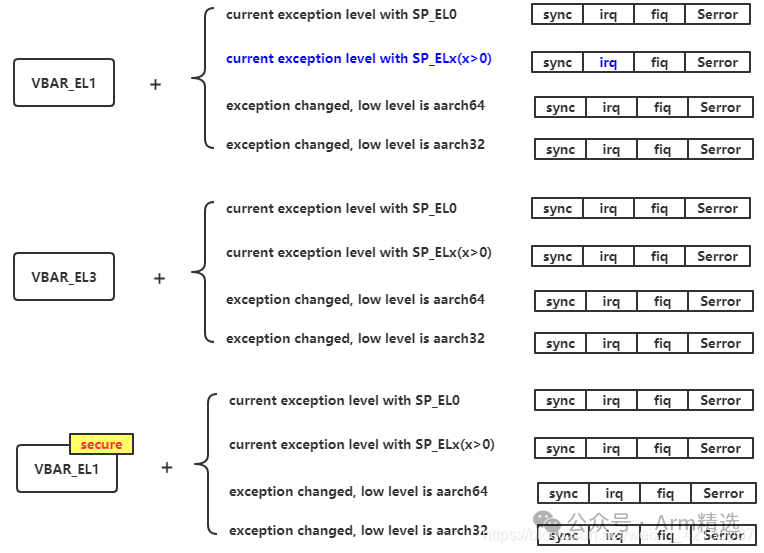
Click the blue "Arm Selected" in the upper left corner and choose "Set as Favorite"First, let’s look at a block diagram. After an interrupt occurs, the PC will jump to VBAR + interrupt offset. For example, the blue part in the diagram 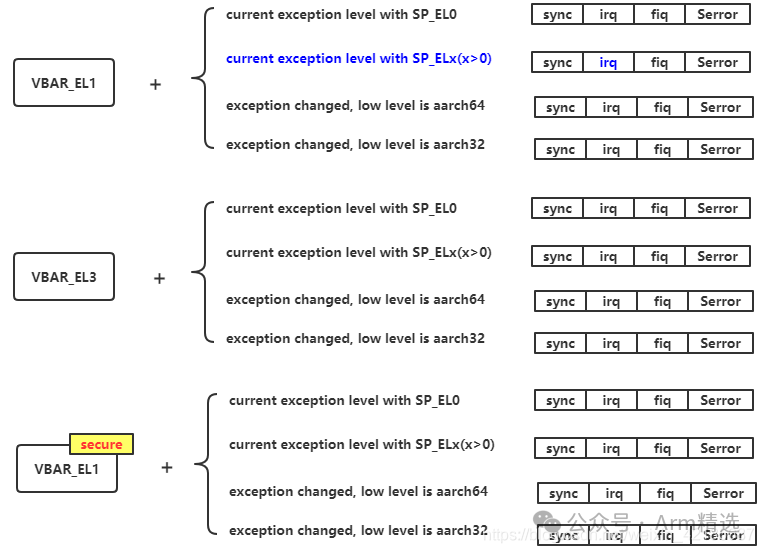
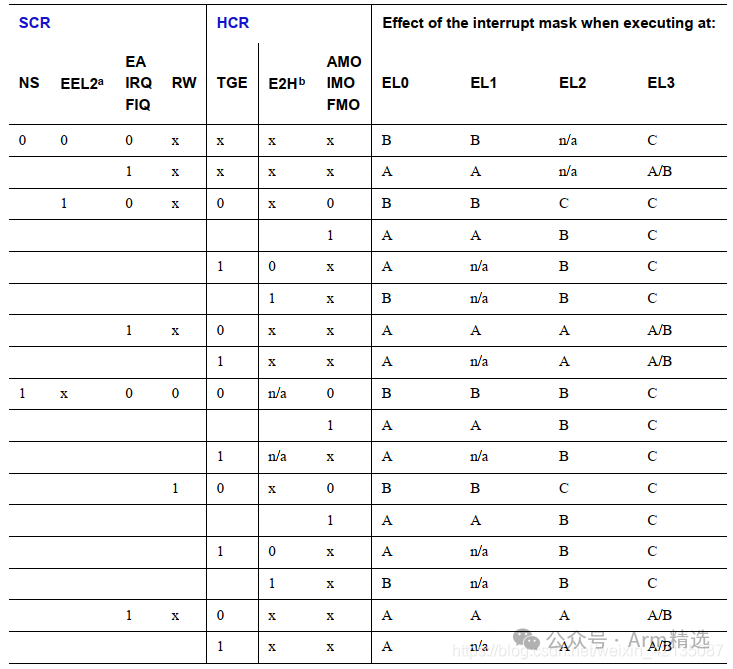
There are three base addresses: VBAR_EL1, VBAR_EL3, and VBAR_EL1 (secure). Which one should be used? This is determined by the table titled Routing when both EL3 and EL2 are implemented. If the interrupt routing goes to EL1, VBAR_EL1 is used; if it routes to EL3, VBAR_EL3 is used; if it routes to secure EL1, VBAR_EL1 (secure) is used. 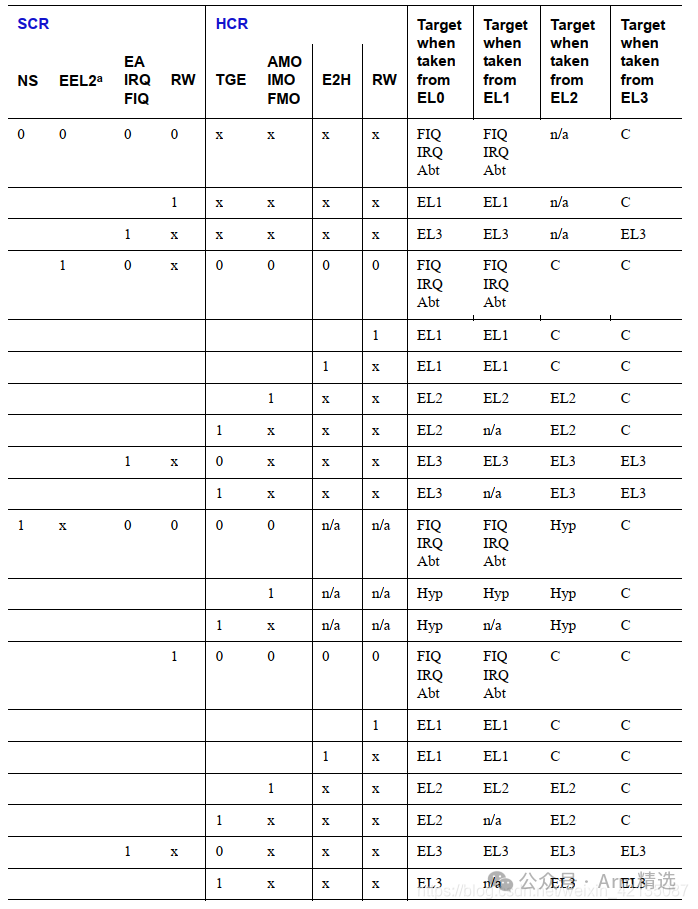 After selecting the base address, how do we choose the offset? We see that the vector table has four rows; which row should be chosen? This is determined by the table titled Vector offsets from vector table base address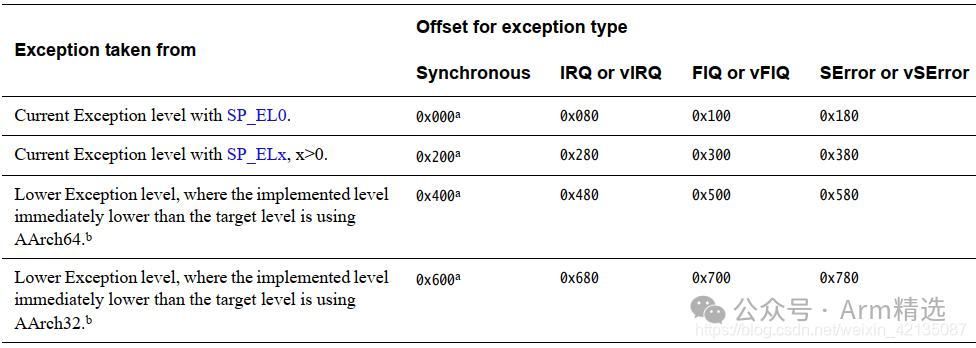
-
If an exception occurs but does not cause an exception level switch, and the stack pointer used is SP_EL0, then the first group of exception vector tables is used.
-
If an exception occurs but does not cause an exception level switch, and the stack pointer used is SP_EL1/2/3, then the second group of exception vector tables is used.
-
If an exception occurs that causes an exception level switch, and the lower exception level is running in AARCH64 mode, then the third group of exception vector tables is used.
-
If an exception occurs that causes an exception level switch, and the lower exception level is running in AARCH32 mode, then the fourth group of exception vector tables is used.
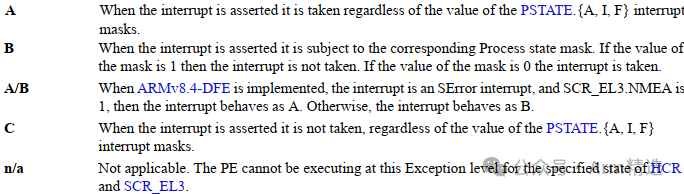
After selecting a specific row from the interrupt vector table, how do we choose which offset? This will be determined by the type of interrupt. If it is IRQ or FIQ, it will depend on the current PE state and interrupt configuration attributes to decide between IRQ or FIQ 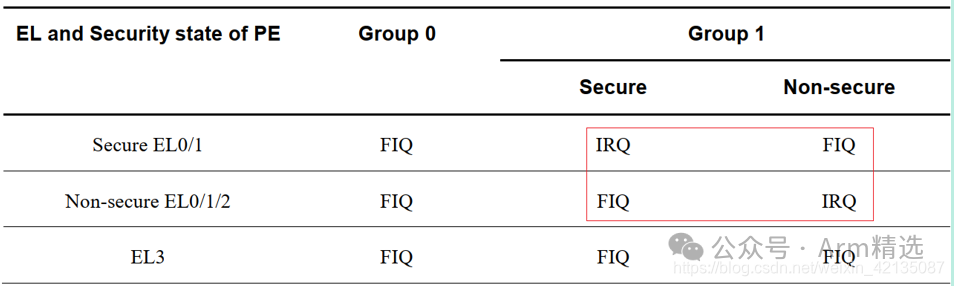
The mask for interrupts is determined by the table below (Physical interrupt target and masking when both EL3 and EL2 are implemented)
Classic Courses
☞[Member]Arm Selected Classroom – Platinum VIP Introduction  ☞[Course] “ARMv8/ARMv9 Architecture from Beginner to Expert” – Phase II Video Course ☞[Course] Trustzone/TEE/Security from Beginner to Expert – Standard Version Video Course ☞[Course] Secure Boot from Beginner to Expert (Phase II) ☞[Course] CA/TA Development from Beginner to Expert☞[Course] “ATF Architecture Development Overview” – Video Course☞[Course] “OP-TEE System Development Overview” – Video Course☞[Course] ATF/OP-TEE/Hafnium/Linux/Xen Code Reading☞[Course] HSM/HSE/SHE/SE/Crypto Engine Overview☞[Course] Introduction to Keystore/Keymaster/Keymint ☞[Course] Arm Microarchitecture Course and Arm MMU/SMMU Discussion Course☞[Course] TEE Overview Course – TEE/Security Interview Course☞[Guidance][Guide] Four Ways to Watch Our Courses☞[Guidance]What is the Difference Between Phase I and Phase II of Arm Video Courses?☞[Guidance]What are the Differences Between Replay Version, Standard Version, and High-Configuration Version of Trustzone/TEE/Security from Beginner to Expert?
[Store Address]
[Customer Service Consultation]