AuthorForum Account: Li1y
Preliminary Analysis
Problem link: https://wws.lanzous.com/i6Zo2gpbolc
This is an IOT reverse engineering challenge from the 2020 HWS selection competition, containing 3 files.

The content of readme.txt is as follows:
The command to run the challenge is as follows:
sudo qemu-system-mipsel -M malta -hda openwrt-malta-le-root.ext4 -kernel openwrt-malta-le-vmlinux.elf -nographic -append “root=/dev/sda console=tty50”
The program to analyze is ./bin/maze
The .ext4 format file can be directly extracted, and copy out /bin/maze, then use file to check the file format.

It is found to be little-endian MIPS. According to the content of readme.txt, the entire openwrt system can be simulated to run, and gdb can be used for debugging. However, many issues arose during debugging, such as inexplicably losing the ability to display input and output characters.
Therefore, static analysis is considered, and the following tools can be chosen:
-
Ghidra
-
IDA 7.5
-
JEB-MIPS
First, IDA 7.5 is recommended; it requires payment to gain more features. If you want to use it for free, JEB-MIPS is the better choice.
Based on personal experience, JEB-MIPS’s pseudocode is better than Ghidra. In some XOR operations, Ghidra’s pseudocode can be ambiguous compared to assembly, which can mislead users.
The version of JEB I use can be obtained from the following link:
[Android Tools] JEB 3.17.1 Anti-Covid19 Edition by DimitarSerg
https://www.52pojie.cn/thread-1162477-1-1.html
Static Analysis
From the challenge maze, we can also see that this is a typical maze problem in a CTF reverse engineering challenge.
sub_400B44 is the main function.
It first limits the input length to 32.
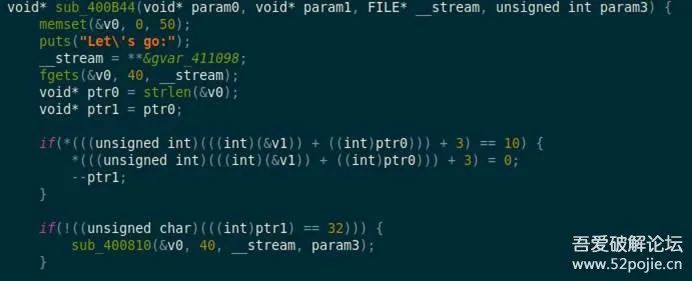
Then in sub_4006F0(), the maze layout is derived from the preset string “AMz1nG~#–Ma7e~”, which is the maze array in the .bss segment.
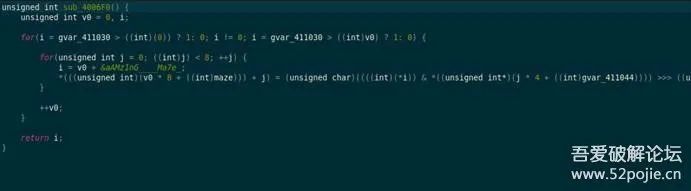
Based on the length of the string and the number of loops, we can determine that the maze size is 8×15.
We can restore the maze generation function based on the pseudocode to print the maze.
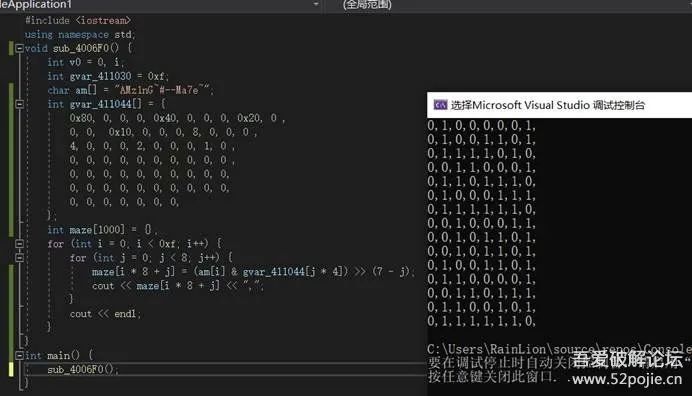
What remains is to judge the directions, using UDLR for up, down, left, and right, respectively, as shown in the ASCII representation below.
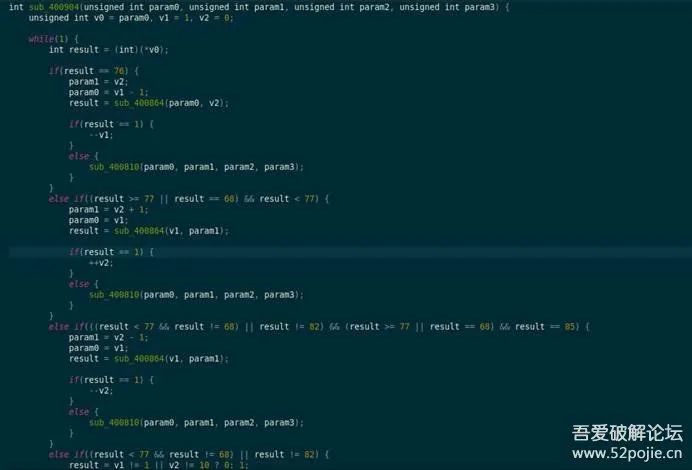
Based on v1=1, v2=0, we can determine that the starting point is (1,0), and to walk 32 steps, the only possible path is as shown in the image below.
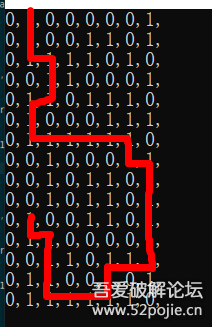
The result is:
DDRDDLDDRRRRRDRDDDDDLLDDLLLUUULU
Dynamic Analysis
If the maze generation steps are more complex, it would be difficult to restore the maze from the pseudocode analysis, thus dynamic debugging is needed.
As mentioned earlier, gdb debugging cannot be used with the built-in gdb of openwrt, so can external gdb be used?
It is known that using qemu can directly simulate the execution of statically compiled programs, but how to simulate the dynamically compiled programs that require external dependencies in this challenge?
After researching (https://www.colabug.com/2020/0824/7658729/), referring to the blogger’s debugging process for embedded_heap, the command is as follows:
qemu-mipsel -L ./ ./bin/maze

Note that according to the blogger’s process, it is necessary to modify the corresponding so files by referring to the two 1kb files in the lib folder; otherwise, a parsing error will occur.

To clarify, for example, ld-musl-mipsel-sf.so.1 is not actually an ELF format program; when opened with a text editor, it only contains libc.so. Therefore, delete the old ld-musl-mipsel-sf.so.1 and rename libc.so to the new ld-musl-mipsel-sf.so.1.
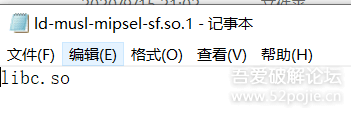
The same processing applies to libatomic.so.1; after processing, you can enjoy dynamic debugging.
Since gdb debugging is needed, use the -g parameter to set the port.
qemu-mipsel -g 1234 -L ./ ./bin/maze
Then install with apt-get install gdb-multiarch, and use the following command to start gdb:
gdb-multiarch -q ./bin/maze
Set the architecture and endianness (default is little-endian):
set architecture mips
set endian little (this challenge is little-endian, so this command can be omitted)
Finally, connect to the remote debugging port. If on localhost 127.0.0.1, it can be omitted:
target remote :1234
I thought this would be the end, and I could happily set breakpoints, but after setting breakpoints, executing gdb crashed, and the same happened with pwngdb. The process is shown in the image below:

The issue remains unresolved for now; I hope someone who knows the reason can inform me.
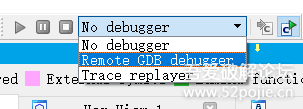
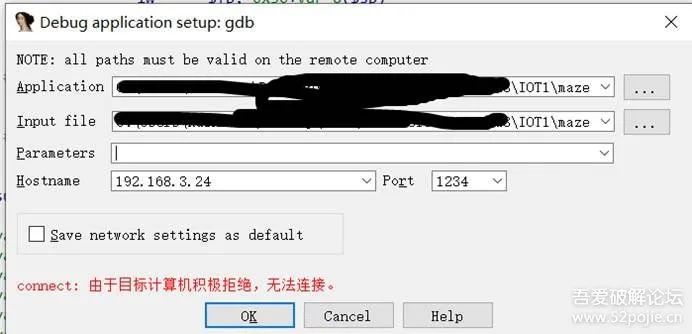
Therefore, I chose to use IDA for debugging. Although IDA below version 7.5 does not support displaying MIPS pseudocode, remote debugging works just fine. Still using qemu-mipsel -g 1234 -L ./ ./bin/maze to start remote debugging, check the virtual machine’s IP with ifconfig, open the maze file in IDA, set breakpoints, and choose Remote GDB debugger to run.
Fill in the virtual machine IP and port, and leave the other parameters as default to click OK.
If the breakpoint is set after the maze layout initialization is completed, for example at sub_400904, after running to this point, you can find the .bss segment maze variable converted to an array to see the entire maze.
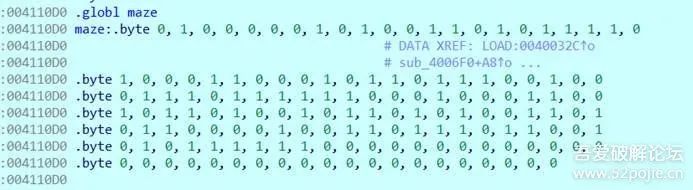
There is another pitfall here: when using IDA 7.0, the same process does not show the results after the .bss segment initialization, all showing as ?.
However, switching to 7.2 works fine, which is frustrating; indeed, you need to pay to become stronger.
However, there is a version 7.2 available on the forum; just download one.
The rest can be seen in the static analysis.

Finally, I seek clarification on why gdb debugging crashes.
[Update: After switching to Ubuntu, it no longer crashes, mysterious…]
––OfficialForum
www.52pojie.cn
––RecommendedtoFriends
PublicWeChatAccount:WeLoveBreakingAnalysisForum
OrSearchWeChatAccount:pojie_52