The process of building machine learning models has traditionally required a significant amount of manual tuning work, including hyperparameter optimization, algorithm selection, and feature engineering, often taking weeks of time investment. Although this traditional development model still exists, the development of AutoML technology has significantly simplified this process.
With years of practical experience with AutoML libraries, these tools have profoundly changed the way machine learning projects are developed. Whether under tight project timelines or when a baseline model needs to be established quickly, AutoML can provide effective technical support.
This article will systematically introduce the main Python AutoML libraries that have been validated in actual projects, analyzing their technical characteristics and applicable scenarios.
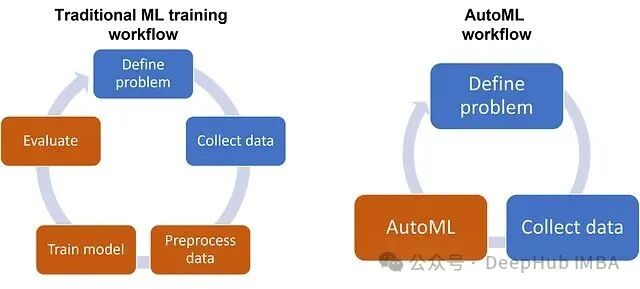
Principles and Core Functions of AutoML Technology
AutoML is essentially an automated machine learning pipeline that can simulate the workflow of an experienced machine learning engineer, automatically executing optimization tasks across multiple key stages. These stages include selecting data preprocessing steps, applying feature engineering techniques, filtering model algorithms, tuning hyperparameter configurations, and constructing ensemble methods.
The core goal of AutoML is to automatically discover the optimal performing machine learning pipeline with minimal human intervention. While this process is not entirely “black magic,” its level of automation is approaching an ideal state.
AutoGluon: Enterprise-Level Automated Machine Learning Platform
AutoGluon is an AutoML framework developed by Amazon Web Services, which has gained widespread application in the industry since its release in 2020. The platform excels in handling tabular data, text data, and image data, adopting a “zero-configuration” design philosophy.
The core advantage of AutoGluon lies in its extremely simple API design, where the complete model training process can be accomplished in just three lines of code:
 from autogluon.tabular import TabularPredictor

 # Train model
 predictor = TabularPredictor(label="target_column").fit("train.csv")

 # Make predictions
 predictions = predictor.predict("test.csv")
The technical highlights of this framework include its automated stack integration and deep learning integration mechanisms. AutoGluon automatically attempts various algorithm combinations and constructs complex ensemble models, which often outperform single models tuned manually.
AutoGluon is suitable for scenarios involving large-scale dataset processing, achieving optimal performance metrics, and multimodal data fusion projects (such as combining text and tabular data, or image and tabular data). However, it should be noted that the framework’s support on Windows systems is not as comprehensive as on Linux and macOS, and its high level of automation may not be transparent enough for applications requiring a deep understanding of the model’s internal mechanisms.
PyCaret: Low-Code Machine Learning Development Framework
PyCaret is positioned as a low-code AutoML library designed to simplify the machine learning workflow, particularly suitable for beginners and scenarios requiring rapid prototyping. This framework is highly recommended in the machine learning community due to its good learning curve and comprehensive feature coverage.
A typical PyCaret workflow demonstrates its structured development approach:
 import pandas as pd
from pycaret.datasets import get_data
from pycaret.classification import *

# Load data
diabetes = get_data('diabetes')

# Set up ML environment
clf = setup(diabetes, target='Class variable')

# Compare multiple models
best_models = compare_models()

# Create and tune the best model
model = create_model('rf')
tuned_model = tune_model(model)

# Finalize and deploy
final_model = finalize_model(tuned_model)
The core value of PyCaret lies in its ability to cover the entire machine learning lifecycle. This framework not only provides model training capabilities but also integrates data visualization, model interpretation, and deployment functions, forming a complete machine learning development ecosystem.
PyCaret is particularly suitable for the learning phase of machine learning, rapid prototype validation, projects requiring detailed model explanations, and building demonstration systems. However, due to the complexity of its automated preprocessing and integration techniques, there may be performance bottlenecks when handling extremely large datasets.
TPOT: Pipeline Optimization Framework Based on Genetic Algorithms
TPOT uses genetic algorithms to search for the optimal combinations of machine learning pipelines, including model selection, hyperparameter tuning, and feature preprocessing techniques. This evolutionary computation-based approach is unique in the AutoML field.
from tpot import TPOTClassifier
from sklearn.datasets import load_digits
from sklearn.model_selection import train_test_split

# Load data
digits = load_digits()
X_train, X_test, y_train, y_test = train_test_split(
    digits.data, digits.target, train_size=0.75, test_size=0.25
)

# Initialize and fit TPOT
tpot = TPOTClassifier(
    generations=5,
    population_size=20,
    verbosity=2,
    random_state=42
)
tpot.fit(X_train, y_train)

# Export the best pipeline
tpot.export('best_pipeline.py')
TPOT’s standout feature is its code generation capability, which allows the optimized machine learning pipeline to be exported as readable Python code, facilitating subsequent model understanding and modification.
TPOT is suitable for projects that require a deep understanding of model pipeline composition, scenarios involving medium to small-scale datasets, and development needs for generating clear, maintainable code. It should be noted that active development of this project has ceased, making it more suitable for research and learning purposes rather than long-term maintenance in production environments.
Auto-sklearn: A Natural Extension of the Scikit-learn Ecosystem
Auto-sklearn is an open-source AutoML library built on the scikit-learn ecosystem, providing a smooth technical transition path for developers familiar with scikit-learn.
import autosklearn.classification
from sklearn.datasets import load_breast_cancer
from sklearn.model_selection import train_test_split

# Load and split data
X, y = load_breast_cancer(return_X_y=True)
X_train, X_test, y_train, y_test = train_test_split(X, y, random_state=1)

# Initialize and train
automl = autosklearn.classification.AutoSklearnClassifier(
    time_left_for_this_task=300,  # 5 minutes
    per_run_time_limit=30
)
automl.fit(X_train, y_train)

# Make predictions
predictions = automl.predict(X_test)
Auto-sklearn’s technical architecture includes 15 classifiers, 14 feature preprocessing methods, and 4 data preprocessing methods, forming a structured search space with 110 hyperparameters.
This framework is suitable for project teams that have deeply engaged with the scikit-learn ecosystem, require stable and reliable algorithm support, and seek solutions for traditional machine learning problems. However, it should be noted that Auto-sklearn performs well on small-scale training data but may have performance limitations on large-scale datasets.
H2O AutoML: A Large-Scale Machine Learning Platform for Enterprises
H2O AutoML is built on Java and integrates mainstream algorithms in the data science field, including Gradient Boosting Machines (GBM), Random Forests, and Stacked Ensembles. This platform is specifically optimized for large-scale data processing.
import h2o
from h2o.automl import H2OAutoML

# Initialize H2O
h2o.init()

# Load data
df = h2o.import_file("train.csv")

# Define target and features
target = "target_column"
features = df.columns
features.remove(target)

# Split data
train, test = df.split_frame(ratios=[0.8])

# Run AutoML
aml = H2OAutoML(max_models=20, seed=1)
aml.train(x=features, y=target, training_frame=train)

# View leaderboard
lb = aml.leaderboard
print(lb.head(rows=lb.nrows))
H2O AutoML is suitable for large data processing scenarios, production environment deployment, projects requiring integration with existing H2O infrastructure, and situations where a web interface is needed for non-technical team members. For small-scale projects, the Java dependency may seem overly complex, and a pure Python solution may be more appropriate.
AutoKeras: Deep Learning Automation through Neural Architecture Search
AutoKeras focuses on automation in the deep learning field, automatically discovering deep learning model architectures suitable for specific tasks through Neural Architecture Search (NAS) technology. This framework provides a simplified interface for the complexities of deep learning.
import autokeras as ak

# For image classification
clf = ak.ImageClassifier(
    overwrite=True,
    max_trials=1,
    directory='image_classifier'
)
clf.fit(x_train, y_train, epochs=10)

# For text classification
clf = ak.TextClassifier(max_trials=3)
clf.fit(x_train, y_train, epochs=2)
AutoKeras is mainly suitable for deep learning projects, computer vision tasks, natural language processing applications, and scenarios requiring neural architecture search while avoiding complex configurations.
MLBox: A Specialized Platform for Data Preprocessing
MLBox adopts a modular design, providing three core sub-packages: the preprocessing module is responsible for data reading and preprocessing, the optimization module is responsible for model testing and optimization, and the prediction module is responsible for generating predictions on the test dataset.
from mlbox.preprocessing import *
from mlbox.optimisation import *
from mlbox.prediction import *

# Define paths
paths = ["train.csv", "test.csv"]
target_name = "target"

# Read and preprocess
rd = Reader(sep=",")
df = rd.train_test_split(paths, target_name)

# Drift detection and preprocessing
dft = Drift_thresholder()
df = dft.fit_transform(df)

# Optimization
opt = Optimiser(scoring="accuracy", n_folds=3)
best = opt.optimise(df, 15)  # Up to 15 minutes

# Prediction
prd = Predictor()
prd.fit_predict(best, df)
MLBox is particularly suitable for projects with high data preprocessing complexity, scenarios requiring enhanced feature engineering, and competition environments with varying data quality.
Decision Framework for Selecting AutoML Libraries
Based on practical project experience, the following technical selection decision framework can be established:
Applicable Scenarios for AutoGluon: Projects that require the highest prediction accuracy with minimal engineering investment, handling medium to large-scale datasets (1000+ samples), and applications that can accept a certain degree of model transparency trade-off.
Applicable Scenarios for PyCaret: Learning phase of machine learning skills, business scenarios requiring detailed explanations of model decision processes, teams wishing to adopt guided structured workflows, and projects needing extensive data visualization support.
Applicable Scenarios for TPOT: Projects requiring a deep understanding and customized modification of model pipelines, scenarios involving medium to small-scale datasets, and development needs for generating clear, maintainable code.
Applicable Scenarios for Auto-sklearn: Teams with deep technical accumulation in the scikit-learn ecosystem, projects requiring well-validated stable algorithm support, and solutions for traditional machine learning problems.
Applicable Scenarios for H2O AutoML: Large-scale data processing needs, enterprise-level functionality and technical support requirements, projects needing integration with existing H2O infrastructure, and scenarios requiring a web interface for non-technical stakeholders.
Performance Benchmarking Results
The performance comparison tests conducted on a customer churn prediction dataset (data size: 50,000 rows, 20 features, including categorical and numerical features) yielded the following results:
AutoML Library Performance Benchmarking
=====================================
Dataset: Customer Churn Prediction (50,000 rows, 20 features)
Evaluation Metric: ROC-AUC Score

AutoGluon:     0.876 (Training Time: 10 minutes)
H2O AutoML:    0.872 (Training Time: 15 minutes)
PyCaret:       0.864 (Training Time: 12 minutes)
Auto-sklearn:  0.858 (Training Time: 20 minutes)
TPOT:          0.851 (Training Time: 25 minutes)

Note: Actual results may vary based on specific data characteristics and hyperparameter configurations
The test results show that AutoGluon performs best in terms of prediction accuracy, while as the data size scales up to 500,000 rows, H2O AutoML approaches performance parity with AutoGluon, but demonstrates more stable performance in large-scale data processing capabilities.
Conclusion
AutoML technology has fundamentally changed the development model of machine learning projects. Compared to the traditional model selection cycle of several days, reliable performance baselines can now be established within hours, allowing more time to be invested in truly critical work: deeply understanding business problems, improving data quality, and building robust deployment pipelines.
For machine learning beginners, it is recommended to start with Ludwig, AutoKeras, or TPOT; for applications requiring large-scale data processing, H2O.ai or TransmogrifAI are more suitable; for projects pursuing state-of-the-art model performance, AutoGluon or Google Cloud AutoML are ideal choices.
The key to successful AutoML applications lies in the precise matching of tools to specific needs. Selection criteria should not be based solely on performance metrics but should also consider the team’s technical background, infrastructure constraints, and specific business requirements for model interpretability.
The continuous development of AutoML technology provides an important impetus for the popularization of machine learning, but professional data science skills and domain knowledge remain core elements to ensure project success.
Author: Sohail Saifi
Follow the code to learn more about quantification