OpenWrt supports three types of wireless relays: Relay Bridge, WDS, and 802.11s.Among these three methods, only the “Relay Bridge” does not require any configuration on the upstream wireless router and does not need the upstream wireless router to provide specific features; it can be configured directly on the OpenWrt router that is to be relayed.The “WDS” relay and “802.11s” relay require the upstream wireless to support WDS and 802.11s features, respectively, and WDS may fail due to compatibility issues.Among the three methods, the “Relay Bridge” requires the installation of the relayd + luci-proto-relay software; “WDS” does not require software installation but needs the upstream wireless configured in AP (WDS) mode and the relay end wireless configured in client (WDS) mode; “802.11s” requires the installation of mesh11sd + wpad-openssl (or other mesh-supporting software). Additionally, very few third-party wireless routers provide an open setting for Mesh ID like OpenWrt, so using the 802.11s relay generally requires OpenWrt routers to connect to other OpenWrt routers.Among the three methods, both “WDS” and “802.11s” support IPv6 and layer 2 relays similar to bridges, while the “Relay Bridge” has poor support for IPv6 and uses a layer 2 relay similar to ARP proxy (when data passes through the relay bridge, the source MAC is changed to the MAC of the upstream wireless client connected to the relay, while the source IP remains unchanged).Among the three methods, the “Relay Bridge” supports relaying between any layer 3 interface networks, while “WDS” and “802.11s” must add the WDS and 802.11s wireless interfaces, as well as the wireless access point AP interface providing terminal access, to the wired network to achieve relaying.Among the three methods, the “Relay Bridge” requires setting firewall rules to allow communication between the networks to be relayed (or the networks to be relayed can be set to the same firewall zone without adding firewall rules). In contrast, “WDS” and “802.11s” do not require additional firewall rules since they are added to the same wired network.Among the three methods, the “Relay Bridge” can be configured to relay between the “wireless AP network” and the “upstream wireless client network” while keeping the original wired network configuration unchanged; however, the “WDS” and “802.11s” relays must be bound to a specific wired network and cannot be configured separately for relaying between the wireless AP network and the upstream wireless client network.The key points for configuring the “Relay Bridge” are as follows:1. Create a wireless client that connects to the upstream network and a wireless AP that provides wireless access to terminals.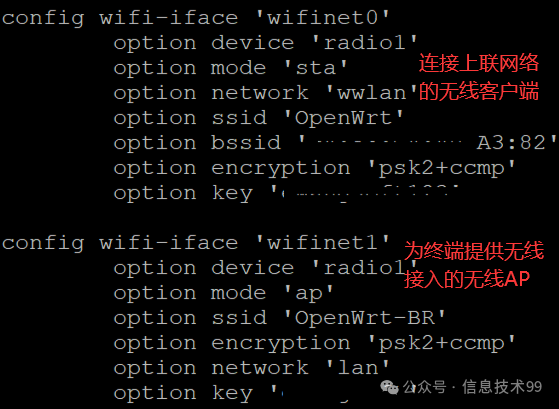
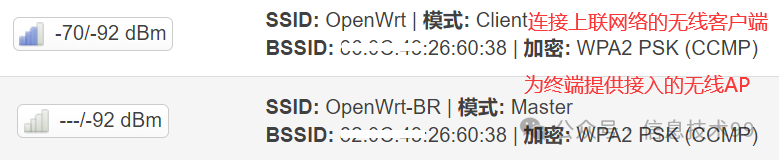 2. In the “Network – Interfaces” configuration, add a relay bridge and set the network to be relayed.
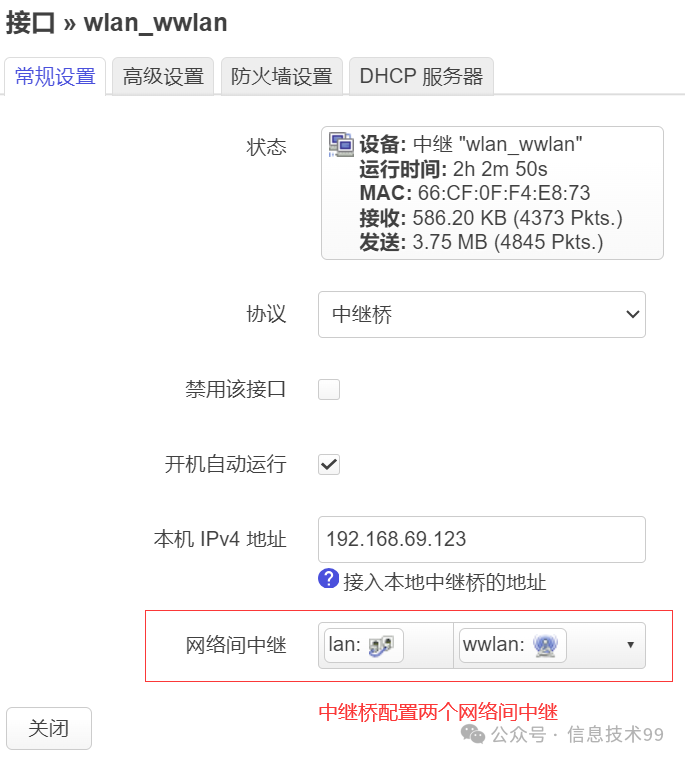 3. If both the wlan network and lan network belong to the firewall lan zone, no additional firewall rules need to be added; otherwise, add firewall rules to allow forwarding between wlan and lan.Configuration for WDS and 802.11s relays:Change the “wireless client connecting to the upstream network” in the above “Relay Bridge” configuration to “Client (WDS)” and “802.11s” and add them to the lan wired network. At the same time, change the “wireless AP” mode in the upstream wireless router to “Access Point AP (WDS)” and “802.11s” and add them to the lan wired network.Official OpenWrt documentation on the three types of relays:
Relay Bridge:
https://openwrt.org/docs/guide-user/network/wifi/relay_configuration?s[]=luci&s[]=proto&s[]=relay
WDS Relay:
https://openwrt.org/docs/guide-user/network/wifi/wifiextenders/wds
802.11s:
https://openwrt.org/docs/guide-user/network/wifi/mesh/802-11s