Common Firmware Encryption and Decryption Methods and D-Link Firmware Decryption Practical Analysis

Introduction
When we need to analyze firmware, the first step is to obtain the firmware. This can be done by downloading it from the official website, intercepting traffic to get the firmware, using a programmer to read the firmware from flash memory, or extracting it through serial debugging. After obtaining the firmware, the next step is to analyze it, focusing on the firmware’s kernel and file system, including web applications, protocols, core control programs, etc.
However, most manufacturers now encrypt their firmware to ensure the security of their products and prevent attacks. They might use complex encryption methods like AES, DES, SM4, or simpler methods like XOR and ROT. The decryption program is generally located in the Boot loader, kernel, or file system. In such cases, we cannot directly use <span>binwalk</span> and other tools for extraction; we need to decrypt the encrypted firmware first.
Manufacturers typically encrypt firmware in one of the following three ways.
Common Firmware Encryption and Decryption Methods

1. Firmware is not encrypted at the factory, followed by an unencrypted version containing a decryption scheme, and finally a released encrypted version.
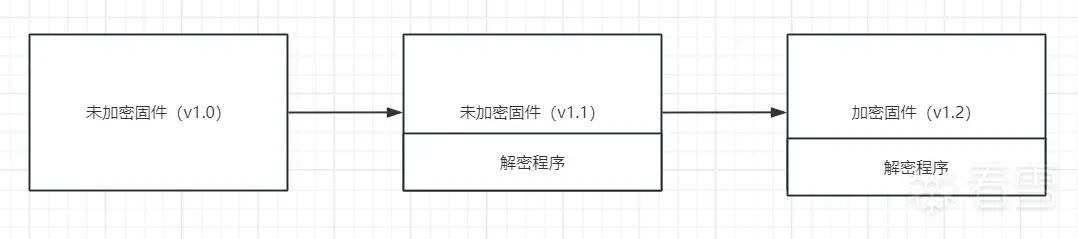
The device firmware is not encrypted at the factory (assume this version is v1.0) and does not contain any decryption sequence. The manufacturer later releases an unencrypted firmware v1.1 containing the decryption program, and finally releases an encrypted firmware v1.2 version containing the decryption program. We can obtain the decryption program from firmware v1.1 to decrypt the firmware of v1.2, and then extract the firmware.
Common Firmware Encryption and Decryption Methods and D-Link Firmware Decryption Practical Analysis

2. Firmware is encrypted at the factory, followed by an unencrypted firmware containing a new decryption scheme, and finally a new encrypted version.
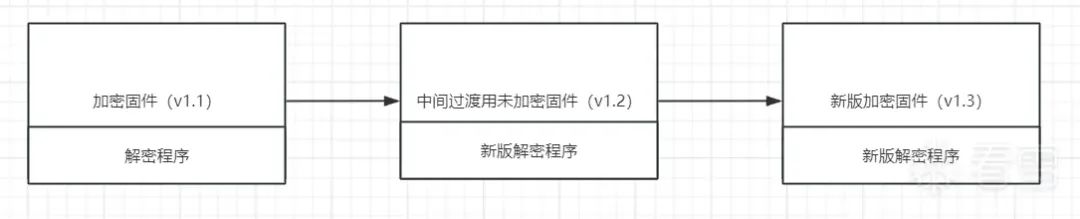
The manufacturer directly encrypts the original version of the device firmware, but decides to change the encryption scheme and releases an unencrypted v1.2 version of the new firmware as a transition, which contains the new version of the decryption program.
Common Firmware Encryption and Decryption Methods and D-Link Firmware Decryption Practical Analysis
Before updating the firmware version, it is necessary to check the release announcement of the new firmware version. This announcement will instruct users that before upgrading to the latest version, they need to first upgrade to an intermediate version of the firmware, which is the unencrypted firmware version. By upgrading through this intermediate version, we can ultimately obtain the decryption program for the new version of the encrypted firmware.

3. Firmware is encrypted at the factory, followed by an encrypted firmware containing a new decryption scheme, and finally a new encrypted version.
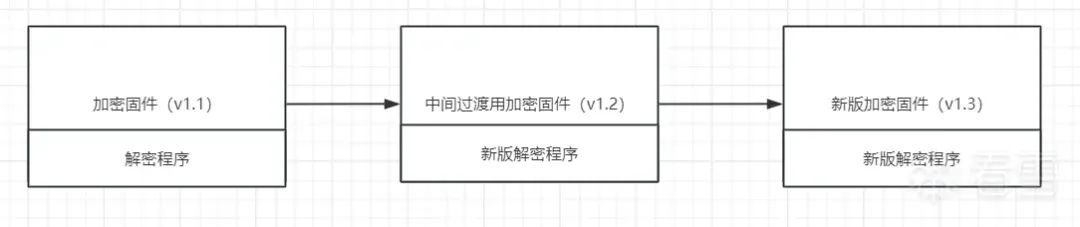
The device firmware downloaded from the internet is encrypted in the original version. The manufacturer decides to change the encryption scheme and releases an intermediate iteration of the encrypted firmware with a new decryption program. However, since the initial version of the firmware was encrypted, it is challenging to obtain the decryption program.
Common Firmware Encryption and Decryption Methods and D-Link Firmware Decryption Practical Analysis
In this case, decrypting the encrypted firmware can be quite difficult. One approach is to purchase the device and use <span>JTAG</span>, <span>UART</span> debugging, etc., to access <span>Linux Shell</span> or <span>Uboot Shell</span> to directly extract the firmware’s file system from the hardware. Then, deeper analysis of the firmware can be performed to see how to reverse engineer the encrypted firmware, obtain the encryption logic, and ultimately crack it.
Decrypting Encrypted D-Link Firmware
The general approach without the device is as follows:

Preparation

Here we take the firmware of D-Link DIR-822-US series router version 3.15B02 as an example for analysis.
This firmware can be downloaded from the official website (https://support.dlink.com/productinfo.aspx?m=dir-822-us).
wget https://support.dlink.com/resource/PRODUCTS/DIR-822-US/REVC/DIR-822_REVC_FIRMWARE_v3.15B02.zip
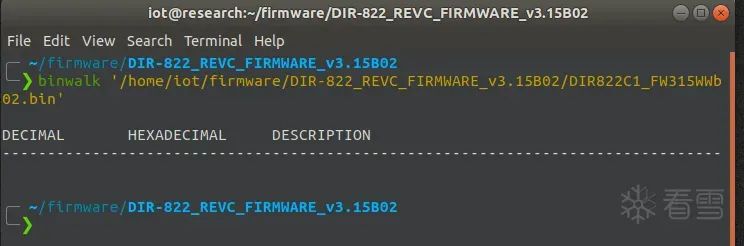
After downloading, if we analyze the firmware with <span>binwalk</span>, we will find that the report is blank.
Common Firmware Encryption and Decryption Methods and D-Link Firmware Decryption Practical Analysis
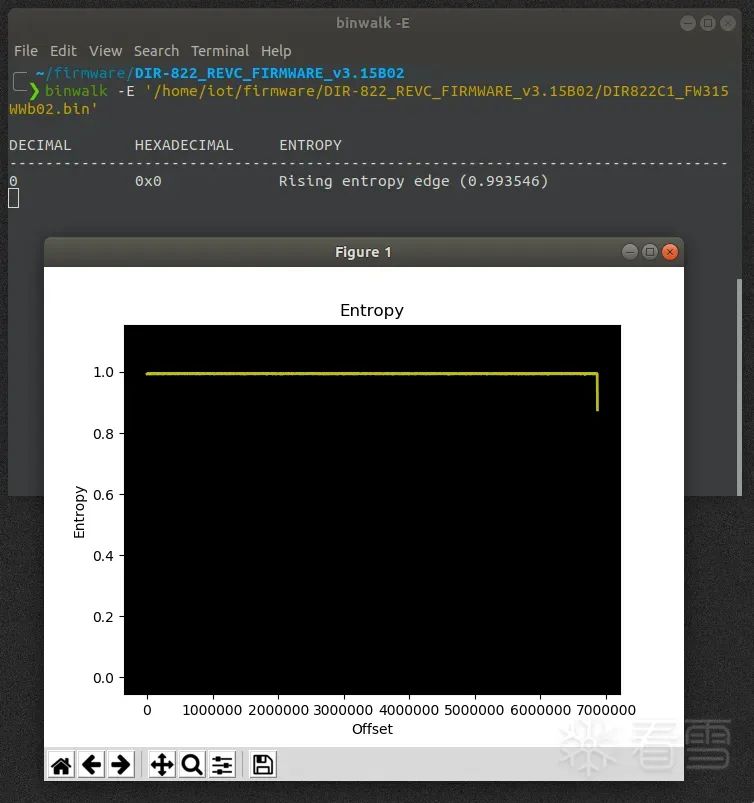
At this point, we can use <span>binwalk -E</span> to check the entropy of the firmware (checking entropy is an effective way to confirm whether a given byte sequence is compressed or encrypted. The higher the entropy, the more likely the byte sequence is encrypted or compressed).
Common Firmware Encryption and Decryption Methods and D-Link Firmware Decryption Practical Analysis
Here, the entropy value is almost 1, indicating that all parts of this firmware are encrypted.
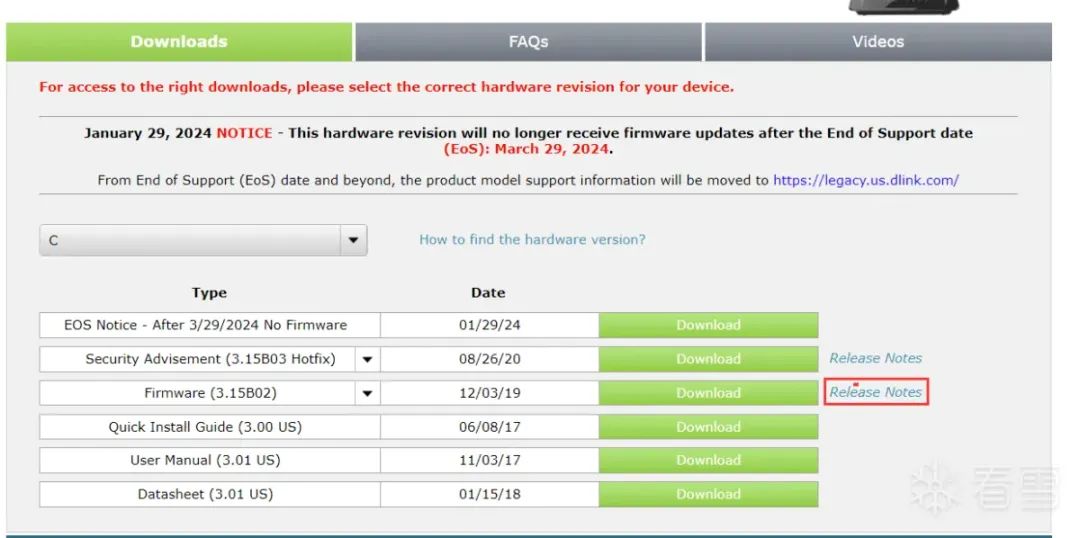
Fortunately, we discovered in the release notes for the corresponding version of the firmware that it mentioned <span>The firmware v3.15 must be upgraded from the transitional version of firmware v303WWb04_middle.</span>
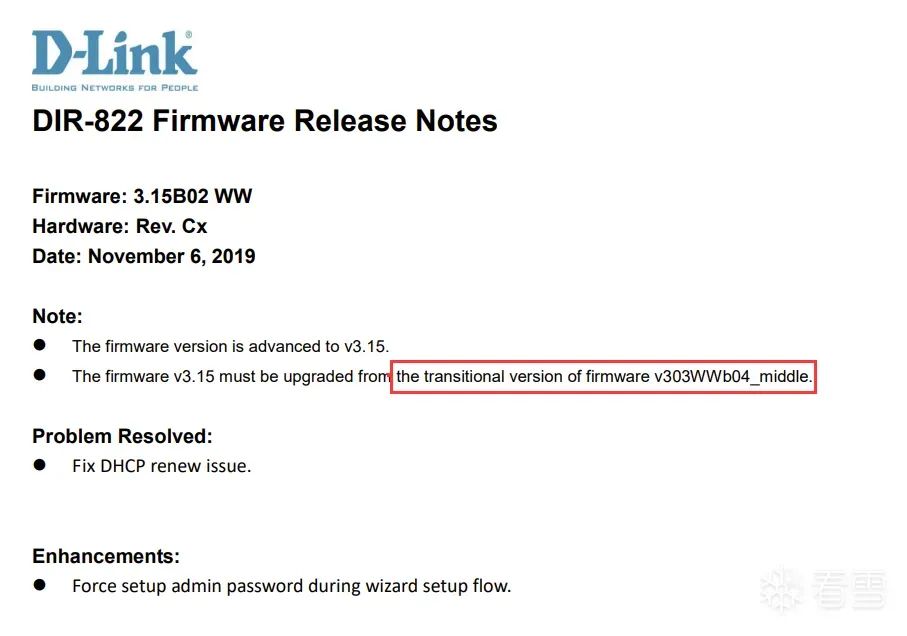
Common Firmware Encryption and Decryption Methods and D-Link Firmware Decryption Practical AnalysisCommon Firmware Encryption and Decryption Methods and D-Link Firmware Decryption Practical Analysis

Using the Transitional Version to Decrypt the Firmware

Combining the three encryption update methods of the previous firmware, this <span>firmware v303WWb04_middle</span> likely contains the decryption program of the unencrypted transitional firmware. Therefore, we can find a way to download this firmware and find the decryption scheme to decrypt <span>DIR822C1_FW315WWb02</span> firmware.Common Firmware Encryption and Decryption Methods and D-Link Firmware Decryption Practical Analysis
This firmware can be downloaded from the FTP server set up by D-Link (https://www.dlink.com/uk/en/support/faq/network-storage-and-backup/nas/dns-series/how-do-i-setup-the-built-in-ftp-server, or you can download it from the attachment).
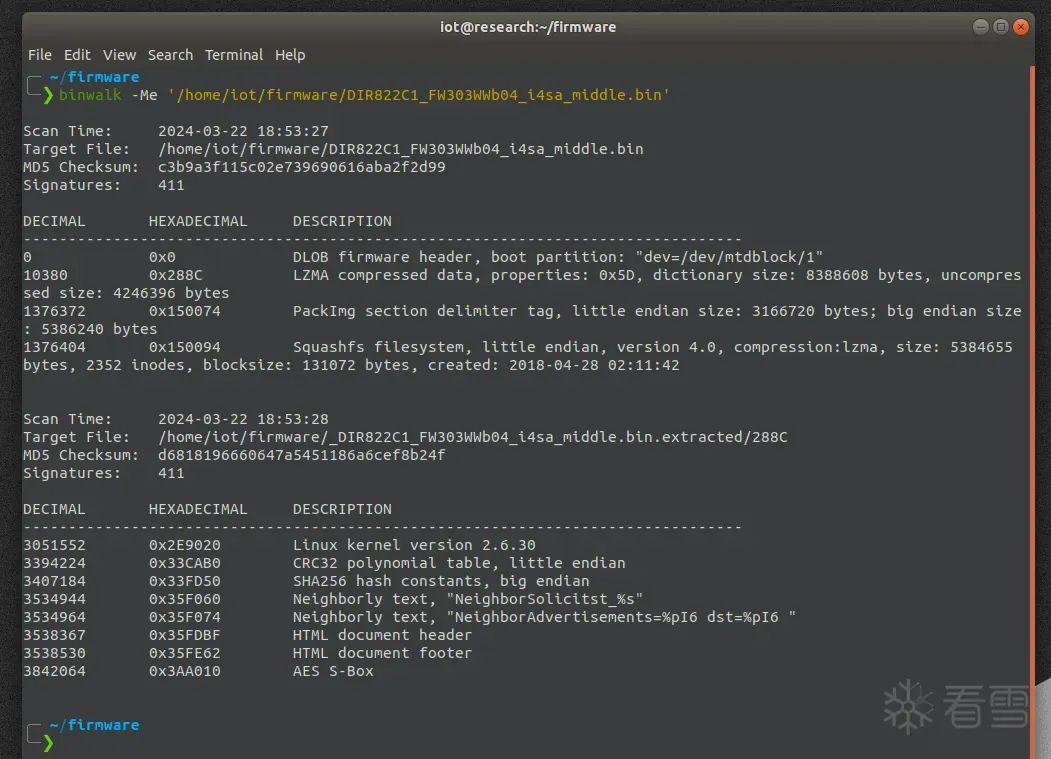
The transitional version firmware is unencrypted and can be directly extracted using <span>binwalk -ME</span>.
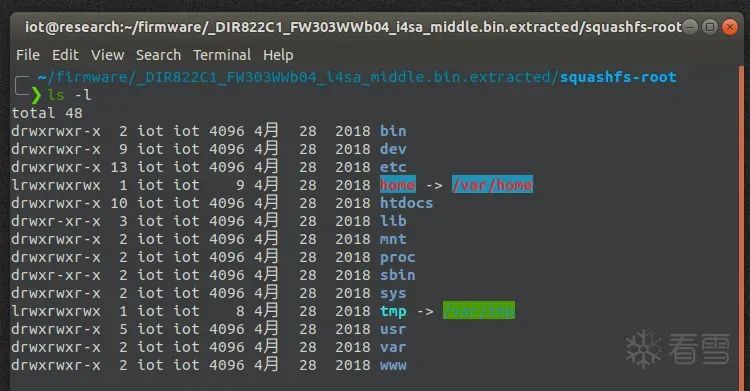
Common Firmware Encryption and Decryption Methods and D-Link Firmware Decryption Practical AnalysisCommon Firmware Encryption and Decryption Methods and D-Link Firmware Decryption Practical Analysis
Since the encrypted firmware is upgraded from this unencrypted firmware, we can search for key strings such as <span>update</span>, <span>firmware</span>, <span>upgrade</span>, <span>download</span> in the <span>squashfs-root</span> folder.
grep -rnw './' -e 'update\|firmware\|upgrade\|download'
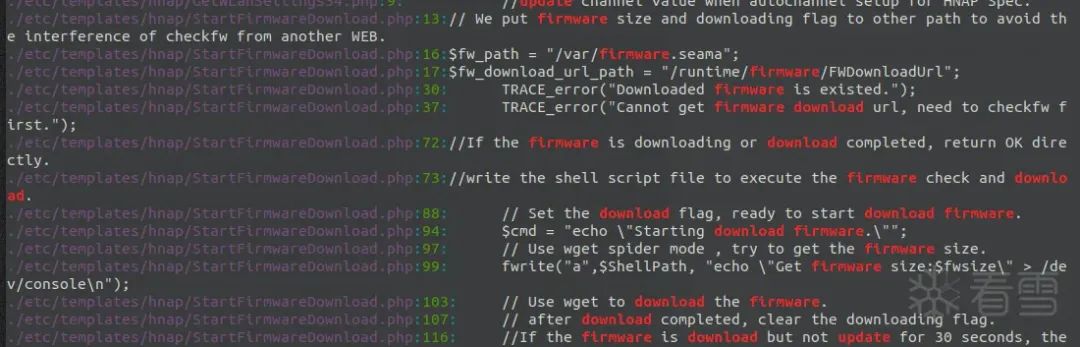
Common Firmware Encryption and Decryption Methods and D-Link Firmware Decryption Practical Analysis
Finally, we can find clues in the <span>/etc/templates/hnap/StartFirmwareDownload.php</span> file. Accessing this file in a browser will execute the operation to download the firmware. Here, there is a line of comment: <span>// fw encimg</span>, which corresponds to <span>firmware</span>, <span>encryption</span>, <span>image</span>.
// fw encimg 
    setattr("/runtime/tmpdevdata/image_sign" ,"get","cat /etc/config/image_sign");
    $image_sign = query("/runtime/tmpdevdata/image_sign");
    fwrite("a", $ShellPath, "encimg -d -i ".$fw_path." -s ".$image_sign." > /dev/console 
");
    del("/runtime/tmpdevdata");
The first two lines of code are used to obtain the firmware image signature. The <span>setattr</span> function sets the attribute <span>/runtime/tmpdevdata/image_sign</span> to <span>cat /etc/config/image_sign</span>, and then the <span>query</span> function retrieves the firmware image signature from the attribute <span>/runtime/tmpdevdata/image_sign</span> and stores it in the variable <span>$image_sign</span>.

Common Firmware Encryption and Decryption Methods and D-Link Firmware Decryption Practical Analysis
The third line of code is used to execute the firmware image decryption operation, using the <span>fwrite</span> function to write the command string <span>encimg -d -i .".$fw_path." -s ".$image_sign." > /dev/console</span> into the file <span>$ShellPath</span>. This shell will subsequently be executed.
This <span>encimg</span> program is located in <span>/usr/sbin</span>.

Common Firmware Encryption and Decryption Methods and D-Link Firmware Decryption Practical Analysis
Then, using the <span>readelf</span> command, we can find that this program is a 32-bit big-endian MIPS architecture.
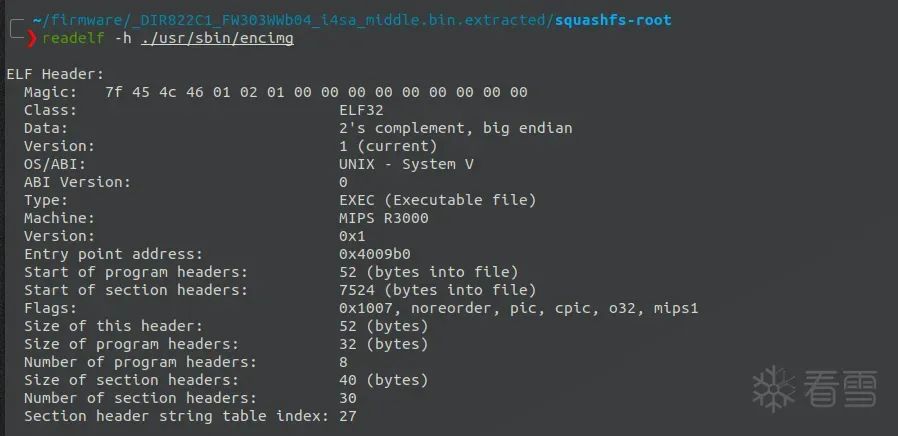
Common Firmware Encryption and Decryption Methods and D-Link Firmware Decryption Practical Analysis
Now use <span>qemu</span> user mode for simulation and add parameters like <span>encimg -d -i .".$fw_path." -s .".$image_sign.</span>.
<span>.$fw_path.</span> is the path of the encrypted firmware that needs to be decrypted, which is the path of the D-Link DIR-822-US series router version 3.15B02 firmware.
<span>.$image_sign.</span> is <span>wrgac43s_dlink.2015_dir822c1</span>.
Copy <span>qemu-mips-static</span> and the encrypted firmware <span>DIR822C1_FW315WWb02.bin</span> to the <span>squashfs-root</span> directory to run <span>encimg</span>.
Decrypt the firmware:
sudo chroot . ./qemu-mips-static ./usr/sbin/encimg -d -i ./DIR822C1_FW315WWb02.bin -s wrgac43s_dlink.2015_dir822c1

Common Firmware Encryption and Decryption Methods and D-Link Firmware Decryption Practical Analysis
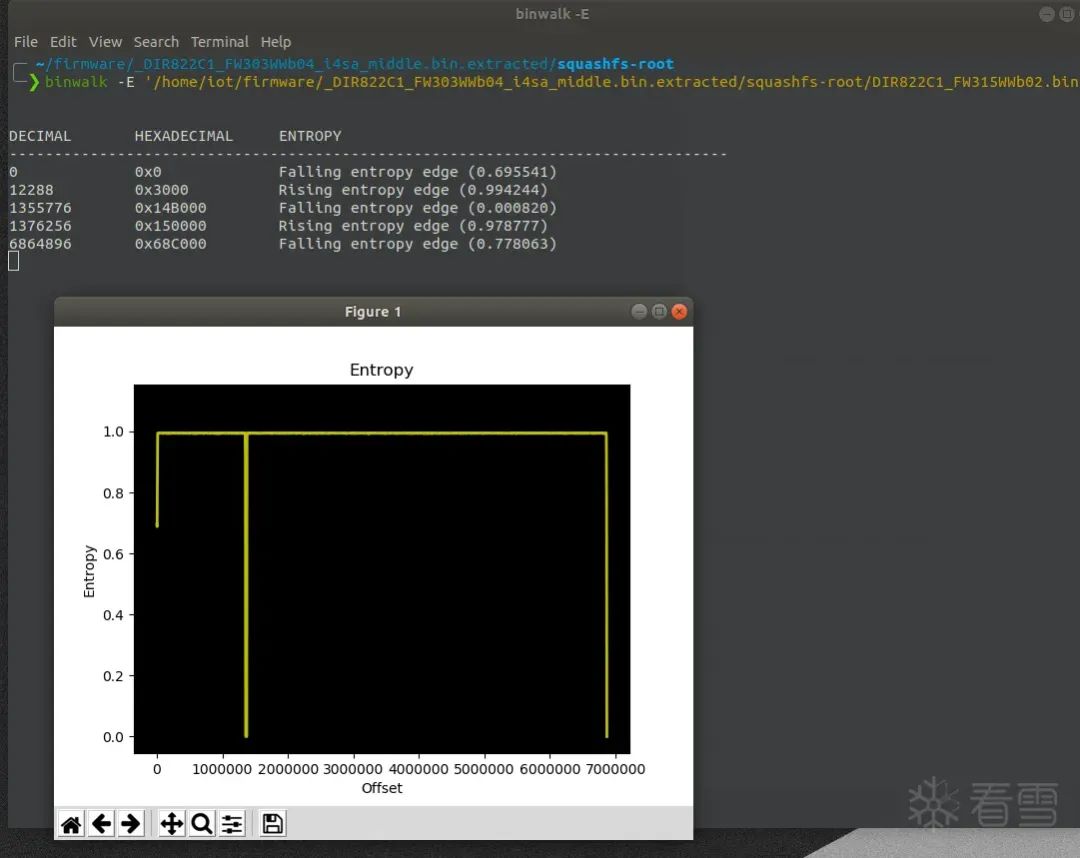
At this point, using <span>binwalk</span> to check <span>DIR822C1_FW315WWb02.bin</span>, we can not only see the file information but also find that the entropy value has changed.
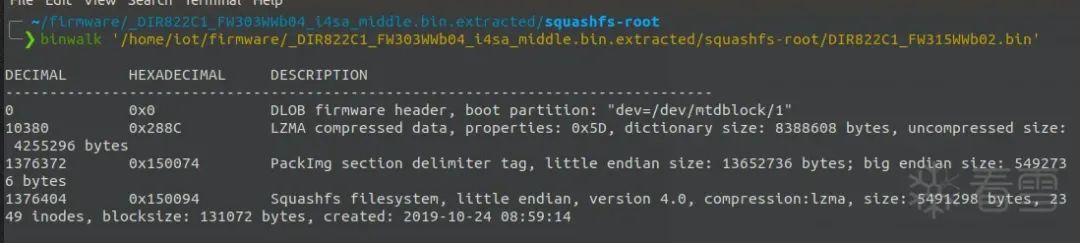
Common Firmware Encryption and Decryption Methods and D-Link Firmware Decryption Practical AnalysisCommon Firmware Encryption and Decryption Methods and D-Link Firmware Decryption Practical Analysis

Extracting the Decrypted Firmware

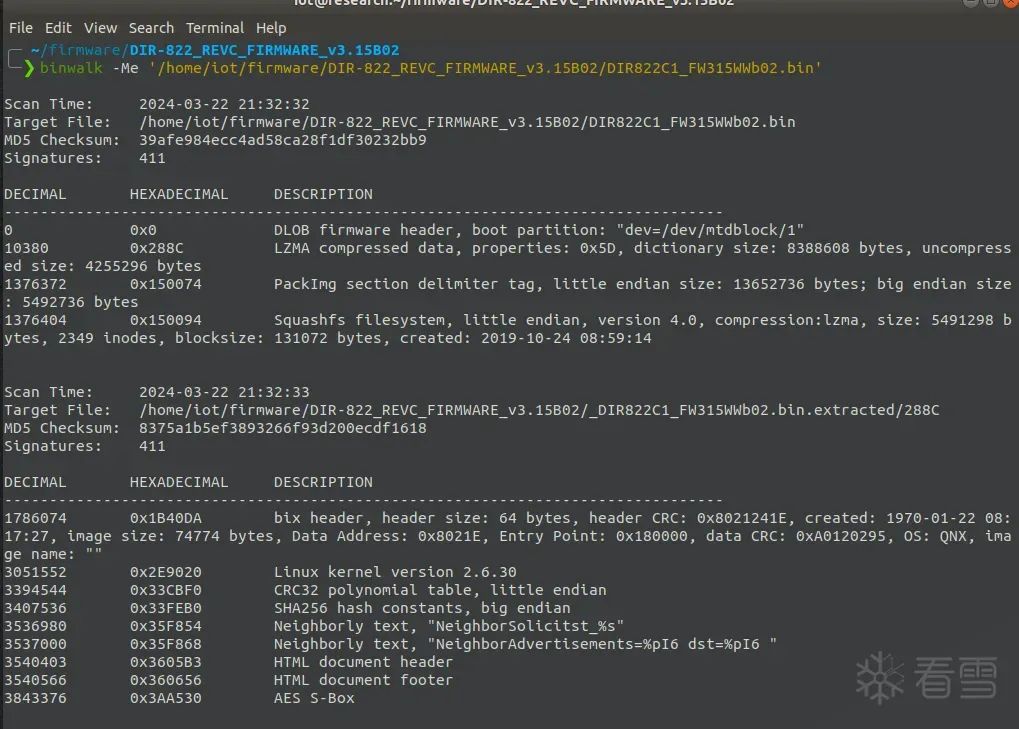
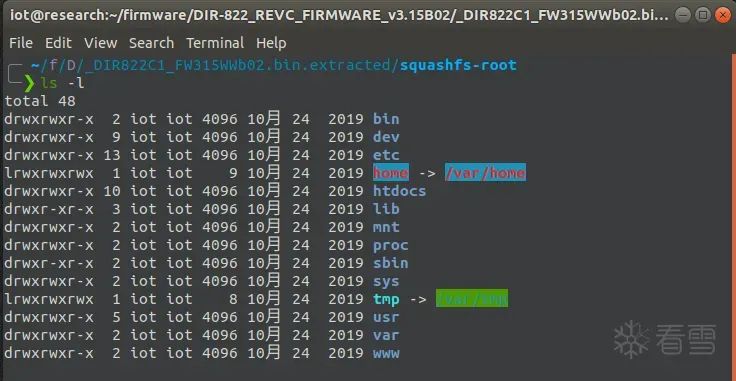
At this point, we can use <span>binwalk -Me</span> to successfully extract the firmware system files.
Common Firmware Encryption and Decryption Methods and D-Link Firmware Decryption Practical Analysis
Successfully extracted the encrypted firmware!
Reference Book: “Practical Exploitation of IoT Security Vulnerabilities”

Common Firmware Encryption and Decryption Methods and D-Link Firmware Decryption Practical Analysis

Kanxue ID: Arahat0

https://bbs.kanxue.com/user-home-964693.htm

*This article is an excellent piece from the Kanxue forum, authored by Arahat0. Please acknowledge the source when reprinting from the Kanxue community.

Common Firmware Encryption and Decryption Methods and D-Link Firmware Decryption Practical Analysis

# Previous Recommendations

1. iOS Jailbreak Detection Apps and Frida Bypass Detection

2. Large Bin Attack Learning (Detailed Analysis of _int_malloc Source Code)

3. CVE-2022-2588 Dirty Cred Vulnerability Analysis and Reproduction

4. Development Knowledge | Thoroughly Clarifying the Relationship Between CreateFile Read/Write Permissions and Sharing Modes

5. XAntiDenbug Detection Logic and Basic Anti-Debugging

6. Frida-Hook-Java Layer Operation Guide
Common Firmware Encryption and Decryption Methods and D-Link Firmware Decryption Practical Analysis

Common Firmware Encryption and Decryption Methods and D-Link Firmware Decryption Practical Analysis

Share

Common Firmware Encryption and Decryption Methods and D-Link Firmware Decryption Practical Analysis

Like

Common Firmware Encryption and Decryption Methods and D-Link Firmware Decryption Practical Analysis

Watching

Leave a Comment