Introduction: When “Everything Can Run DOOM” Meets Extreme Creativity
In the tech community, “Everything Can Run DOOM” is a widely circulated meme, with countless devices from calculators to digital cameras successfully porting this classic game by enthusiasts. But what if the question became even crazier: what if the walls of the game were actual circuit board traces, and the enemies were chip packages? What would that look like?
The answer is the KiDoom project. It renders the classic 1993 game DOOM in a professional PCB editor, KiCad. This project is filled with clever technical concepts and surprising implementation details, and the following will reveal the five most interesting facts about it.
—————————————————————————–
1. Core Idea: An “Unnoticed” Yet Elegantly Extreme Technical Showcase
KiDoom was not created to solve any practical problem; its birth stemmed from pure curiosity and a spirit of technical exploration: “What if the walls of DOOM were actual PCB traces?” The creator of the project aimed to answer a question that nobody had ever asked, which itself is filled with a kind of geeky romance.
What if DOOM’s walls were actual PCB traces? What if enemies were QFP-64 chips and health packs were SOT-23 transistors? KiDoom answers these questions nobody asked…
This seemingly “useless” creation is the best embodiment of the innovative spirit and humor of the tech community. It proves that the purest joy often comes from exploring the boundaries of technology rather than merely satisfying practical needs.
2. Technical Breakthrough: From 0.15 Frames Per Second to Playable Transition
The initial concept of the project was to use PCB pads to render the game screen pixel by pixel, but this idea was quickly proven unfeasible.
- Pixels per frame: 320 x 200 = 64,000 pixels
- Rendering time: 64,000 pads × 0.1 milliseconds per pad = 6.4 seconds per frame
- Final frame rate: 0.15 FPS (completely unplayable)
The real breakthrough came during an “aha moment”: the developer realized that the DOOM engine itself calculates visible geometry using vectors (line segments) rather than pixels, storing this data in internal arrays like <span>drawsegs[]</span> and <span>vissprites[]</span>. PCB copper traces are also vector data. This discovery completely changed the implementation path, making rendering efficiency 200 to 500 times faster than the pixel scanning approach.
- Line segments per frame: approximately 100-300
- Rendering time: approximately 200 traces × 0.1 milliseconds per trace = 20 milliseconds per frame (+ refresh overhead)
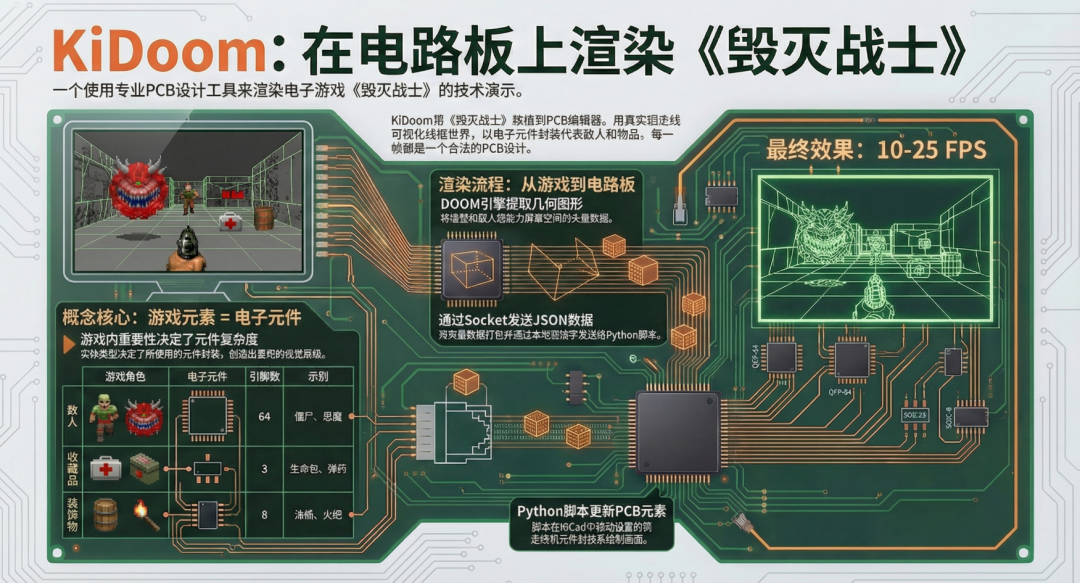
- Final frame rate: 10-25 FPS (sufficient for basic gameplay)
This shift in thinking from pixels to vectors was the cornerstone that allowed the project to transform from an impossible idea into a playable technical demonstration.
3. Most Creative Design: Using Chip Packages’ Complexity to Represent Game Characters
The most ingenious design in the KiDoom project is its establishment of a physical mapping system: different entities in the game (enemies, items, etc.) are rendered as real PCB components of varying complexity.
| Game Character | PCB Package | Pin Count | Examples |
|---|---|---|---|
| Collectibles | SOT-23 | 3 | Health packs, ammo clips, key cards |
| Decorations | SOIC-8 | 8 | Barrels, corpses, torches |
| Enemies | QFP-64 | 64 | Zombies, demons, players |
The cleverness of this design lies in its creation of a visual hierarchy that “any PCB designer can intuitively understand.” A powerful shotgunner is a complex 64-pin chip, while a simple health pack is just a 3-pin transistor. To achieve this mapping system for over 150 different game entities, the developer had to delve into the C source code of DOOM for modifications. The challenge was that the original <span>vissprite_t</span> rendering structure did not contain type information for the entities. The solution was to perform “surgery” on the engine: by modifying the <span>r_defs.h</span> file to add a <span>mobjtype</span> field to the <span>vissprite_t</span> structure, and capturing <span>thing->type</span> in the <span>R_ProjectSprite()</span> function in the <span>r_things.c</span> file, allowing precise identification of each entity during frame rendering.
4. Architecture Demystified: DOOM Does Not Run Inside KiCad
A common misconception is that KiDoom runs DOOM inside KiCad, but this is not the case. In this project, KiCad serves merely as a “display” or “renderer.” The actual DOOM game engine runs as a separate C language process in the background.
The project employs a “three-mode rendering” architecture, running three parallel visualization windows:
- SDL Window: The actual place to play the game, displaying the full DOOM screen.
- Python Wireframe Window: For debugging, showing the vector lines extracted from the game.
- KiCad PCB Window: The main character of the project, displaying walls made of copper traces and entities made of component packages.
Data for each frame follows a clear process: geometric data is extracted from the C language DOOM engine’s <span>drawsegs[]</span> and <span>vissprites[]</span> arrays, serialized into JSON format via Unix sockets, received and parsed by a Python script, and finally updated on KiCad’s canvas. This clear architectural division shows that the project is not a simple script but a thoughtfully designed complex system. The performance bottleneck of the entire system clearly points to the KiCad Python API call <span>pcbnew.Refresh()</span>, which takes 30-50 milliseconds and is the main limiting factor for frame rate.
5. Final Impression: A Wonderful Fusion of Retro Arcade Style and Modern Engineering Tools
The final visuals of KiDoom do not resemble the finely detailed pixels of modern games nor the complex textures, but rather a unique wireframe style, as if it were a blend of retro arcade games and modern engineering software.
Think “1982 vector arcade game meets 1993 FPS meets 2025 PCB editor.”
Key visual elements of the scene include:
- Walls: Blue (B.Cu bottom layer copper) wireframe.
- Entities: Real PCB component packages.
- Depth Cueing: Thicker traces up close, thinner ones further away to create depth perception.
- Ceiling/Floor: Not rendered sector by sector, but represented by simple full-screen gradient colors.
KiDoom successfully merges three seemingly unrelated elements: a classic game, retro vector graphic aesthetics, and professional engineering software into an unprecedented and captivating visual experience.
—————————————————————————–
Conclusion: Extreme Creativity Born from Constraints
KiDoom is not only a successful technical demonstration but also a brilliant story about creativity, problem-solving, and technical passion. It shows us that even using the most unexpected tools, with enough ingenuity, one can create astonishing works.
Is it practical? No. Is it efficient? Barely. Is it the correct use of a professional PCB design tool? Absolutely not. But it works.
The project leaves us with a thought: in your professional field, are there seemingly “offbeat” ideas that can inspire boundless creativity? Or what will be the next unexpected thing that can run DOOM?
Project homepage:
https://www.mikeayles.com/#kidoom
Note: If you want to receive KiCad content updates promptly, please click the business card below, follow, and set it as a star.
Common collection summary:
-
Learn KiCad with Dr. Peter
- KiCad 8 Exploration Collection
- KiCad Usage Experience Sharing
- KiCad Design Projects (Made with KiCad)
- Common Questions and Solutions
- KiCad Development Notes
- Plugin Applications
- Release Records