Recently, we introduced how to take advantage of certain public cloud resources (Fan Benefit: Get a free VPN gateway from Tianyi Cloud and 1000 yuan), and also discussed how to meet specific access needs (Step-by-step tutorial: Build a 10Mbps cross-border dedicated line using public cloud resources、Own a corporate email for 0 yuan! A step-by-step guide to getting Tencent corporate email for free). Some readers have reported that the operations are cumbersome. Why are you so stubborn? If you don’t know how to operate, can’t you submit a ticket? Just clearly state your needs; don’t you know that tickets have a resolution time? There are people available to handle your issues even outside of working hours.
Alright, today we will introduce how to configure VPC cross-domain intercommunication through Cloud High-Speed. If you have any questions, remember to submit a ticket.
1. Configure Domestic Resource Pool
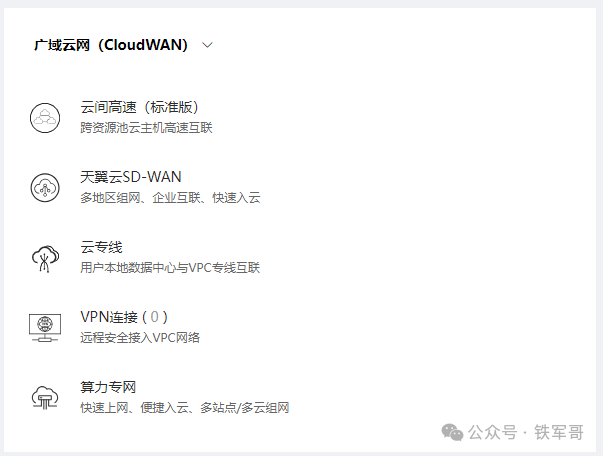
First, click on【Wide Area Cloud Network CloudWAN】 under 【Cloud High-Speed (Standard Version)】 to enter the configuration page for Cloud High-Speed (Standard Version).
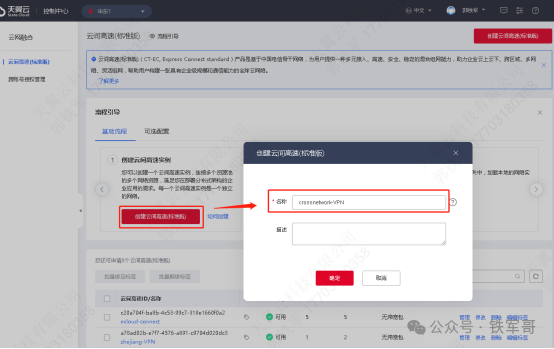
Then, click on【Create Cloud High-Speed (Standard Version)】 and specify a name for the Cloud High-Speed in the pop-up dialog.
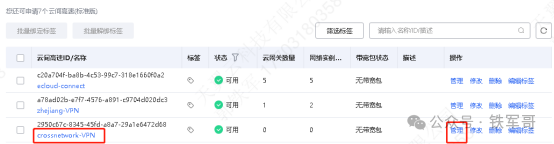
After successful creation, click on the instance name or【Manage】 to enter the details of the Cloud High-Speed instance.
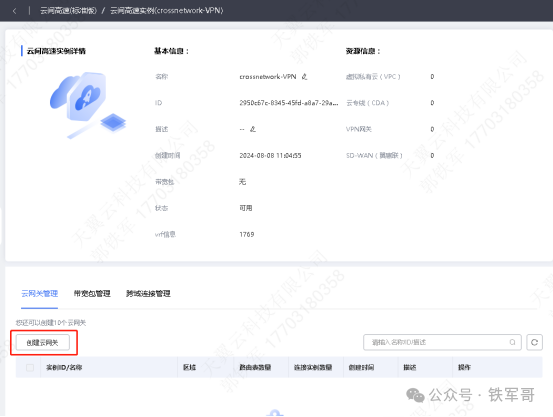
Click on【Create Cloud Gateway】.
Select the large area as【Domestic】, choose the resource pool where we created theVPN gateway, and specify the name for the cloud gateway.
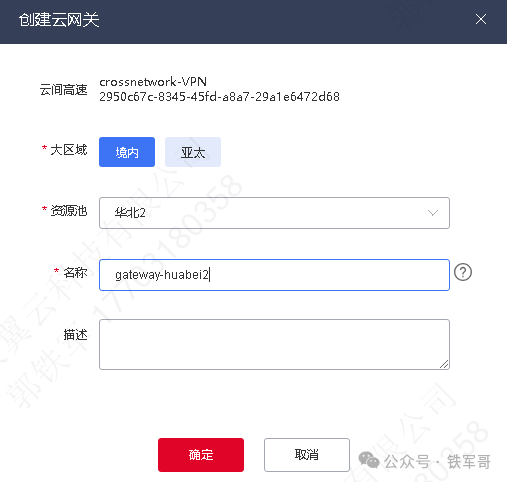
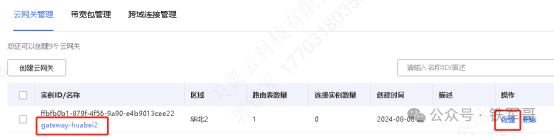
After successful creation, click on the instance name or【Configure】 to enter the cloud gateway instance details.
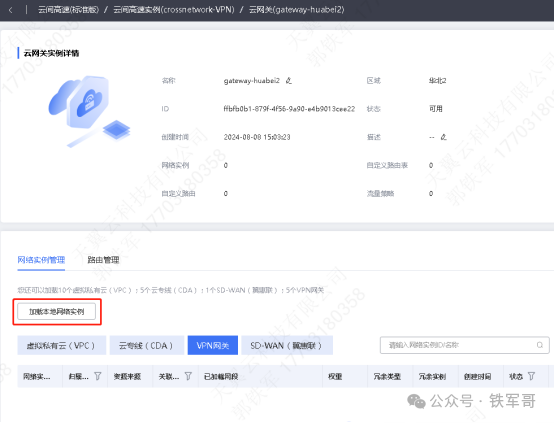
On the【Network Instance Management】 tab, click on【Load Local Network Instance】.
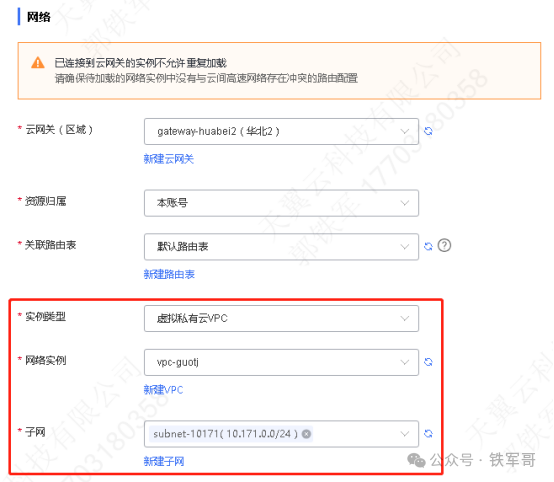
In the network section, confirm the cloud gateway, resource ownership, and associated routing table information. Select the instance type as【Virtual Private CloudVPC】, and choose the VPC and subnet information to bind.
2. Configure Hong Kong Resource Pool
Still on the Cloud High-Speed instance details page, click on【Create Cloud Gateway】.
Select the large area as【Asia-Pacific】, choose the Hong Kong 2 resource pool, and specify the name for the cloud gateway.
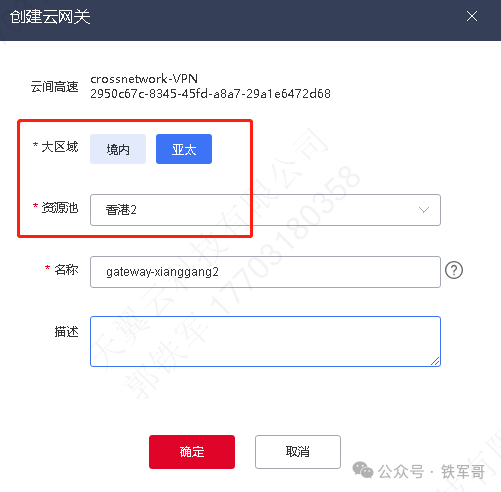
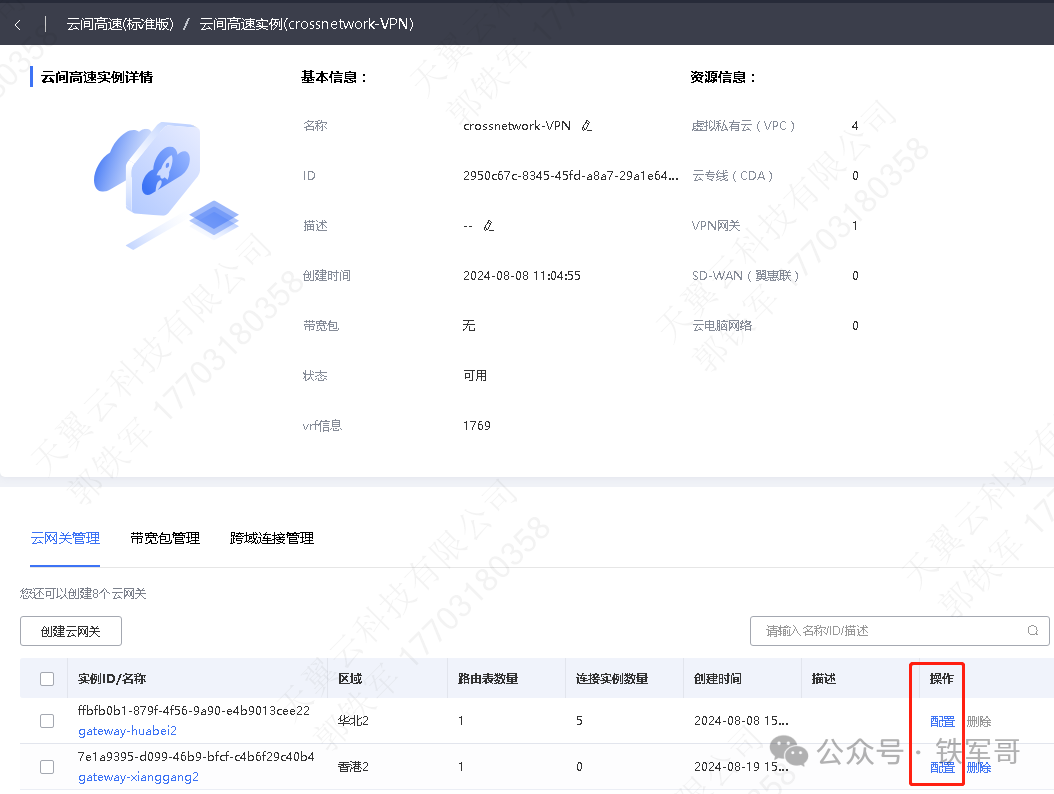
After successful creation, click on the instance name or【Configure】 to enter the cloud gateway instance details.
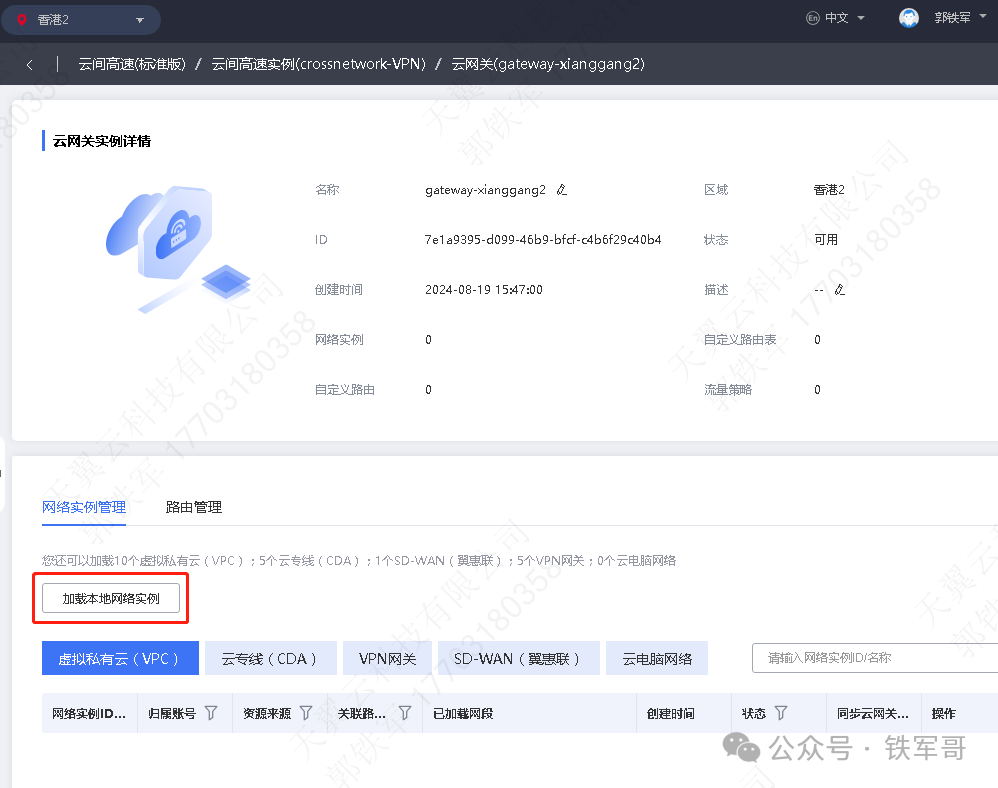
On the【Network Instance Management】 tab, click on【Load Local Network Instance】.
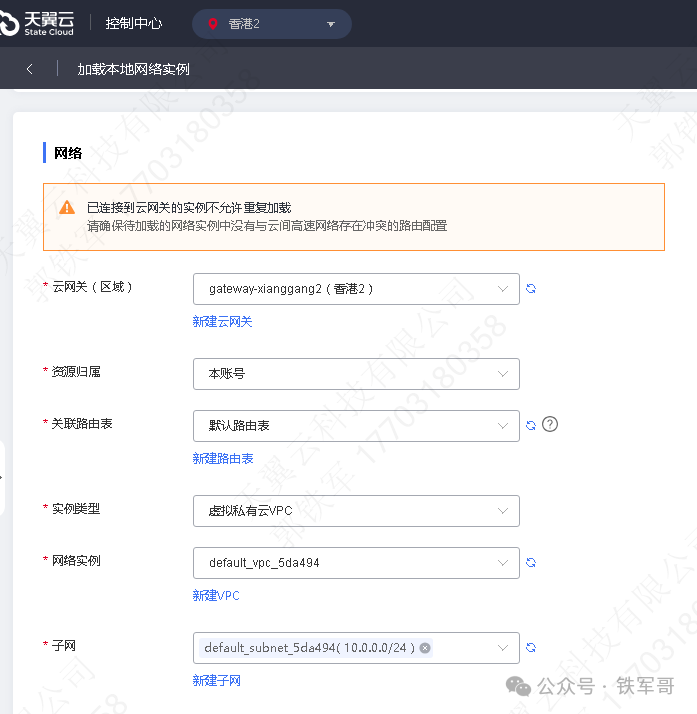
In the【Network】 section, confirm the cloud gateway, resource ownership, and associated routing table information. Select the instance type as【Virtual Private CloudVPC】, and choose the VPC and subnet information to bind.
3. Configure Cross-Domain Connection
When ordering a bandwidth package, select the Cloud High-Speed instance to which the bandwidth package belongs, choose the bandwidth package type as【Cross-Border】, select Region A as【Mainland China】, and Region B as【Asia-Pacific】. After ordering, you can view the ordered bandwidth package in the【Bandwidth Package Management】 tab of Cloud High-Speed.
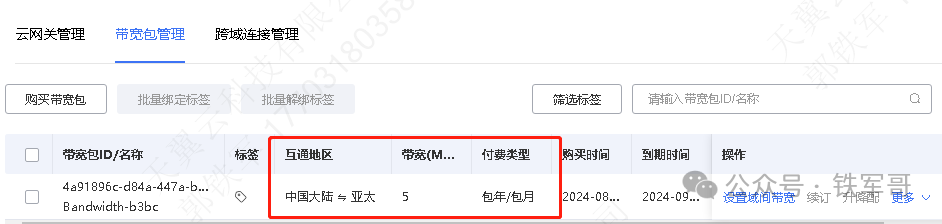
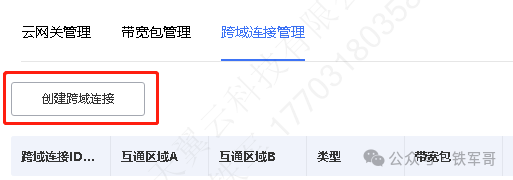
Switch to the【Cross-Domain Connection Management】 tab, and click on【Create Cross-Domain Connection】.
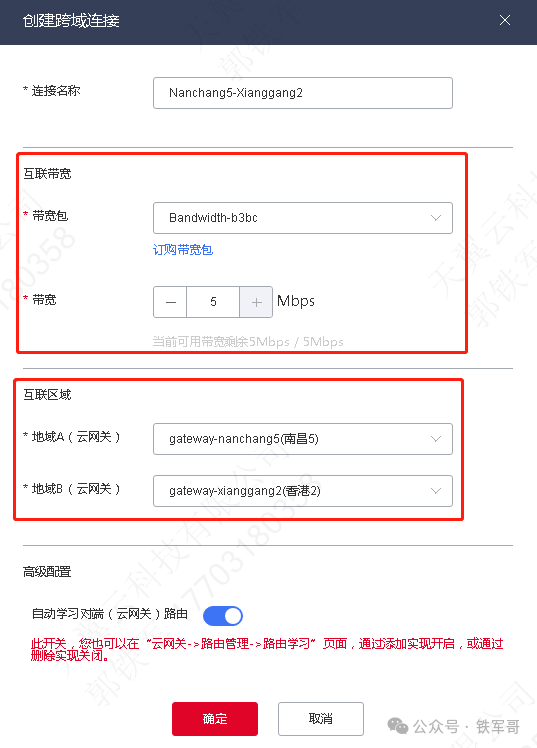
First, in the interconnection bandwidth section, select the ordered bandwidth package and allocate bandwidth size as needed; then in the interconnection area section, select the cloud gateways that need to be interconnected.
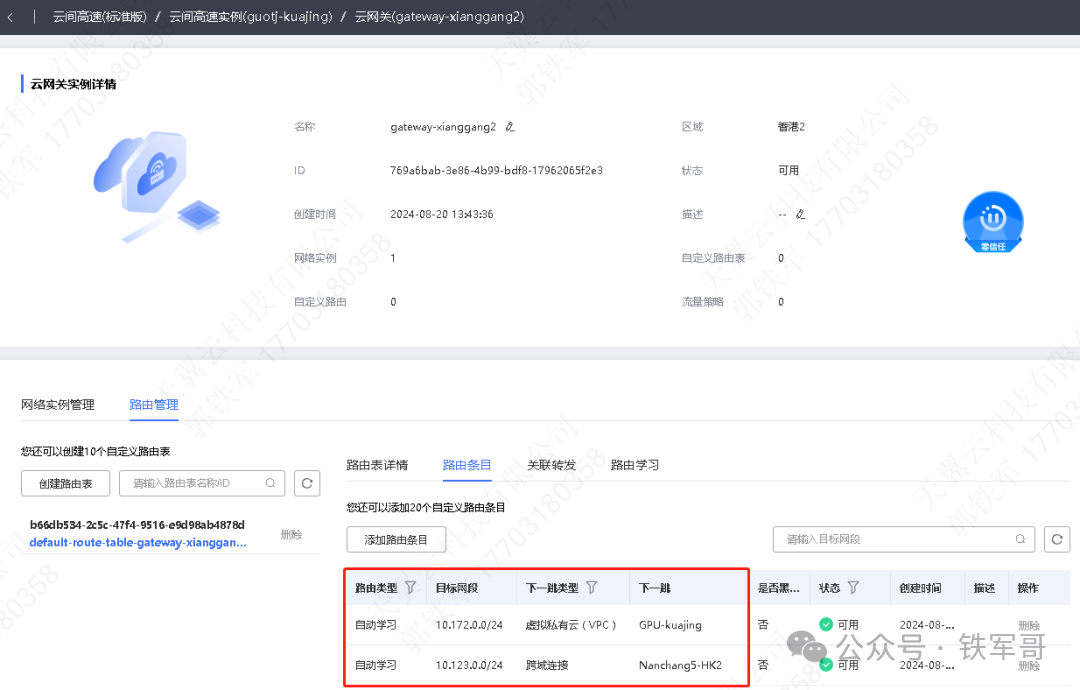
Enter the Hong Kong 2 cloud gateway instance details, check the routing management, and you can see that the routing entry for Nanchang 5 has been automatically learned through the cross-domain connection.
Now, the cloud host in Hong Kong 2 can communicate with the cloud host in Nanchang 5 through the internal IP address, with very stable latency and no packet loss.
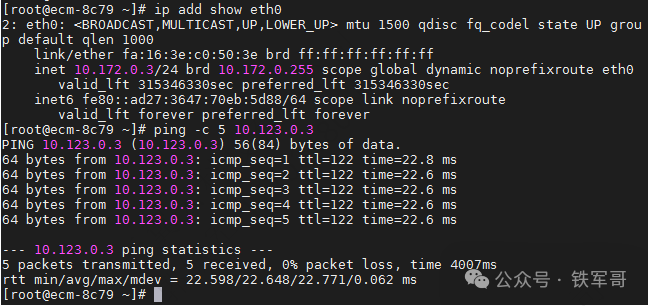
The forwarding path from the domestic cloud host to the Hong Kong cloud host has been detected.
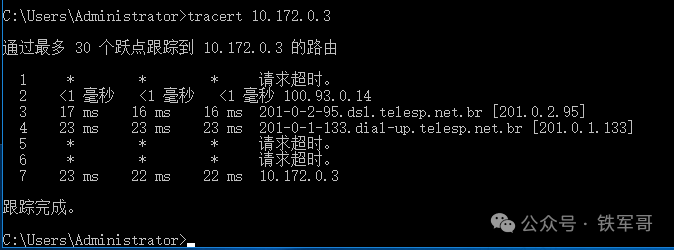
The entire process did not go through the internet, completely avoiding the risk of public network traffic being banned.
**Recommended Reading***
From Bricked to Rebirth: My RK3588 Development Board’s Journey to Modifying UbuntuFan Benefit: Get a free VPN gateway from Tianyi Cloud and 1000 yuanStep-by-step tutorial: Build a 10Mbps cross-border dedicated line using public cloud resources【Book Giveaway】Not understanding computing power = elimination! — A must-read “Survival Guide in the Era of Computing Power” for 2025Own a corporate email for 0 yuan! A step-by-step guide to getting Tencent corporate email for freeWhat is “Doing It Fast”? A deep dive into a domestic routing system sparked by a misunderstanding!Automatic negotiation is great! Aikang IPsec runs at full 500Mbps, and the configuration is simpler than L2TPFree Aikang + OpenVPN test: Choosing the wrong encryption algorithm leads to an 80% drop in speed!17 types of ARIA algorithms tested! Without hardware acceleration, it is less than 50% of AES?OpenVPN all-platform access guide: Windows/macOS/Linux/Android one-click access secretsTwo commands to solve it! Kali natively integrates GVM vulnerability scanner, saving 5GB of space compared to DockerHigh-performance gaming cloud phone revolution! GPU acceleration makes Redroid’s performance catch up with Xiaomi 15Connect to WiFi to switch IP! Unveiling the black technology of enterprise-level routers with multiple VPN exits!Global deployment of cloud phones in practice: Using policy routing to achieve free switching of Docker container networksWireGuard too complicated? Teach you to easily set up global networking with Netmaker in ten minutesCloud phone technology revealed! Low-cost implementation of turning one computer into hundreds of “virtual phones” in practice