Enhancing Httprunner Test Cases with Parameter Extraction (Extract)
httprunner version: 4.3.5
In practical business scenarios, there are often cases where parameters are interrelated, meaning that the current interface request parameters come from the response results of previous interfaces. For example, in a scenario where a user logs in using a phone number, the request parameters for the login interface need to include the SMS verification code returned by the server in advance; if this parameter association is missing, the interface call will fail. Currently, HttpRunner supports two methods for extracting response result fields:
JMESPath Expressions
The parameters extracted using regular expressions (regex) are similar to session parameters, with a scope limited to the current step and subsequent steps, and can be referenced like ordinary variables. 1. JMESPath Expressions If the response result is in JSON format, parameters can be extracted using JMESPath expressions. JMESPath is a JSON query language that allows for very flexible and powerful expressions to query fields within a JSON data structure and return data that meets specified conditions.
HttpRunner fully inherits the powerful capabilities of JMESPath, with two key points to note: 1. The extractable objects are limited to 5 types:
status_code: Extracts the response status code, e.g., 200, 404 proto: Extracts the protocol type, e.g., “HTTP/2.0”, “HTTP/1.1” headers: Extracts fields from the response headers, e.g., headers.name cookies: Extracts fields from the response cookies, e.g., cookies.Token body: Extracts fields from the response body, e.g., body.args.foo1
2. If the expression contains <span>- </span>, it needs to be enclosed in quotes. For example, <span>headers."Content-Type"</span> Example test case:
config:
  name: "Login Interface"
  verify: False
  base_url: "https://gitlink.org.cn"
  headers:
    content-type: "application/json"
teststeps:
  -
    name: User Login
    request:
      method: POST
      url: /api/accounts/login.json
      headers:
        Content-Type: application/json
      body:
        autologin: 0
        login: floraachy
        password: ******
    validate:
      - eq: ["status_code", 200]
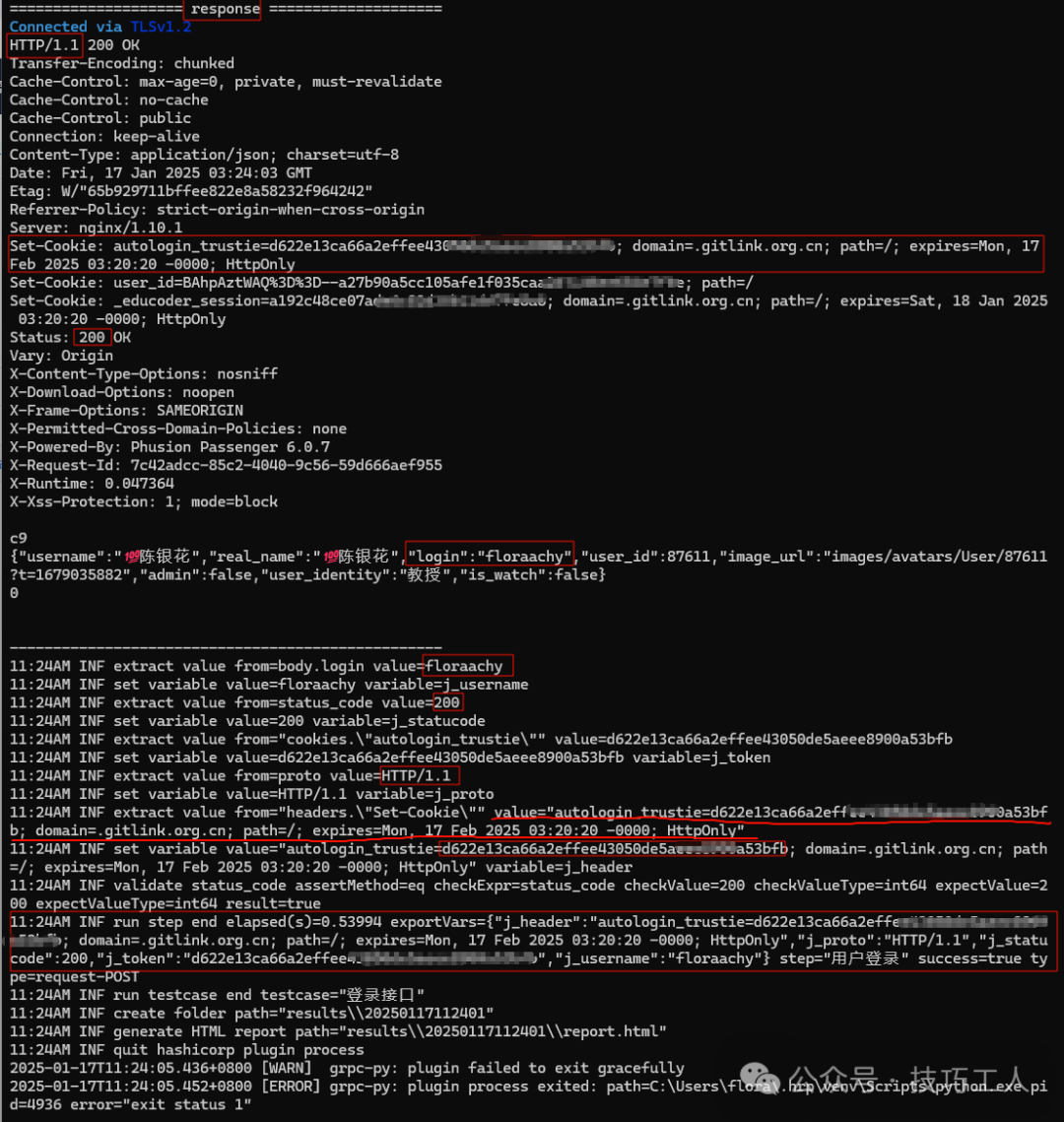
    extract:
      j_username: body.login
      j_statucode: status_code
      j_token: cookies."autologin_trustie"
      j_proto: proto
      j_header: headers."Set-Cookie"
You can view the extraction results through the execution logs:
2. Regular Expressions (Regex)
If the response result is in text/html format, parameters can be extracted using regular expressions. For example, if the response body is:
<html>
<title>Parameter Extraction (Extract) | HttpRunner</title>
</html>
If we want to extract the title field of the page, we can do it like this:
In the extraction expression, specify the left and right boundaries of the target parameter, and replace the target parameter with (.*); this way, we can assign the value matched by the regex to the parameter variable.
"teststeps": [
    {
        "name": "",
        "variables": {
            "name": "demo"
        },
        "request": {
            "method": "GET",
            "url": "https://www.httpbin.org",
            "params": {},
            "headers": {
                "name": "$name",
                "Content-Type": "text/plain"
            }
        },
        "validate": [],
        "extract": {
            "title": "<title>(.*)</title>"
        }
    }
]