Hello everyone, this is the Programming Cookbook. This article provides a detailed introduction to HTTP request and response messages in computer networks.
Table of Contents
- HTTP Request Messages
- HTTP Response Messages
- Common Fields in HTTP Messages
- How the Server Parses HTTP Request Data
HTTP Request Messages
HTTP request messages consist of request line, request headers, an empty line, and request body, formatted as follows:
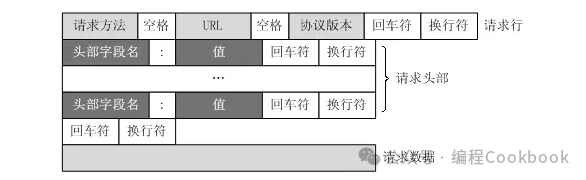
Request Line
The request line contains three parts:
- Request Method (e.g.,
<span>GET</span>,<span>POST</span>,<span>PUT</span>etc.) - Request URL: The address of the requested resource
- HTTP Version: e.g.,
<span>HTTP/1.1</span>
Example:
GET /index.html HTTP/1.1
Request Headers
The request headers contain various information about the request (such as host, user agent, accepted types, etc.). For example:
Host: www.example.com
User-Agent: Mozilla/5.0
Accept: text/html
Empty Line
There must be an empty line between the request headers and the request body, indicating the end of the request headers.
Request Body
The request body contains the data to be sent to the server. For <span>GET</span> requests, the request body is usually empty; for <span>POST</span>, <span>PUT</span>, and other methods, the request body contains the data to be sent (such as form data or JSON).
HTTP Response Messages
HTTP response messages consist of response line, response headers, an empty line, and response body, as shown below: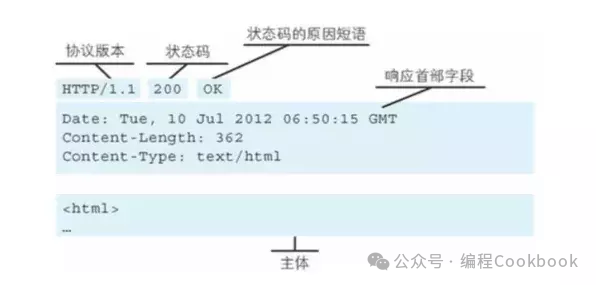
Response Line
The response line contains three parts:
- HTTP Version: e.g.,
<span>HTTP/1.1</span> - Status Code: A 3-digit number, such as
<span>200</span>(Success),<span>404</span>(Not Found) - Status Code Description: A brief description, such as
<span>OK</span>,<span>Not Found</span>
Example:
HTTP/1.1 200 OK
Response Headers
The response headers contain various information about the response (such as server type, content type, cache control, etc.). For example:
Content-Type: text/html
Content-Length: 1234
Server: Apache/2.4
Empty Line
There must be an empty line between the response headers and the response body, indicating the end of the response headers.
Response Body
The response body contains the actual data returned by the server (such as HTML, JSON, images, etc.).
Common Fields in HTTP Messages
Common HTTP request and response fields include:
Common Request Header Fields
<span>Host</span>: The hostname of the request<span>User-Agent</span>: Client browser information<span>Accept</span>: The content types the client can handle<span>Authorization</span>: Authentication information<span>Cookie</span>: Cookie information stored by the client
Common Response Header Fields
<span>Content-Type</span>: The type of response content<span>Content-Length</span>: The length of the response body<span>Set-Cookie</span>: Cookies sent from the server to the client<span>Cache-Control</span>: Cache control<span>Location</span>: The URL for redirection
How the Server Parses HTTP Request Data
When the server parses an HTTP request, it typically processes it in the following steps:
- Parse the Request Line: Retrieve the request method (e.g.,
<span>GET</span>), URL path, and HTTP version from the start of the request message. - Parse the Request Headers: Parse each request header field, such as
<span>Host</span>,<span>User-Agent</span>,<span>Accept</span>, etc. - Parse the Request Body: If the request method is
<span>POST</span>or<span>PUT</span>, it will contain a request body, and the server needs to parse the request body data based on<span>Content-Type</span>(such as form data, JSON, etc.). - Process the Request: Execute the corresponding operation based on the request method (e.g.,
<span>GET</span>,<span>POST</span>, etc.), such as retrieving data from a database or processing form data. - Generate the Response Message: Generate the HTTP response message based on the request processing result and send it back to the client.
Popular Collection Review
Welcome to subscribe to our Cookbook knowledge collection. Currently, the collections on Operating Systems, Computer Networks, MySQL Database, Redis Database, and Go Language have been updated. Please click the image below to access the collection directory.






 Discussion Group