Linux Networking Series:Container Networking Series 1: BasicsContainer Networking Series 2: Unveiling the Packet Transmission ProcessContainer Networking Series 3: Understanding Linux VLAN NetworksContainer Networking Series 4: Network Packet Capture and Analysis on LinuxContainer Networking Series 5: The Versatile Tool iproute2Container Networking Series 6: Comprehensive Guide to Linux Routing TableContainer Networking Series 7: Linux Policy-Based RoutingContainer Networking Series 8: Linux Virtual Routing and Forwarding To be updatedContainer Networking Series 9: Linux vxlan To be completedContainer Networking Series 10: Linuxiptables To be completed
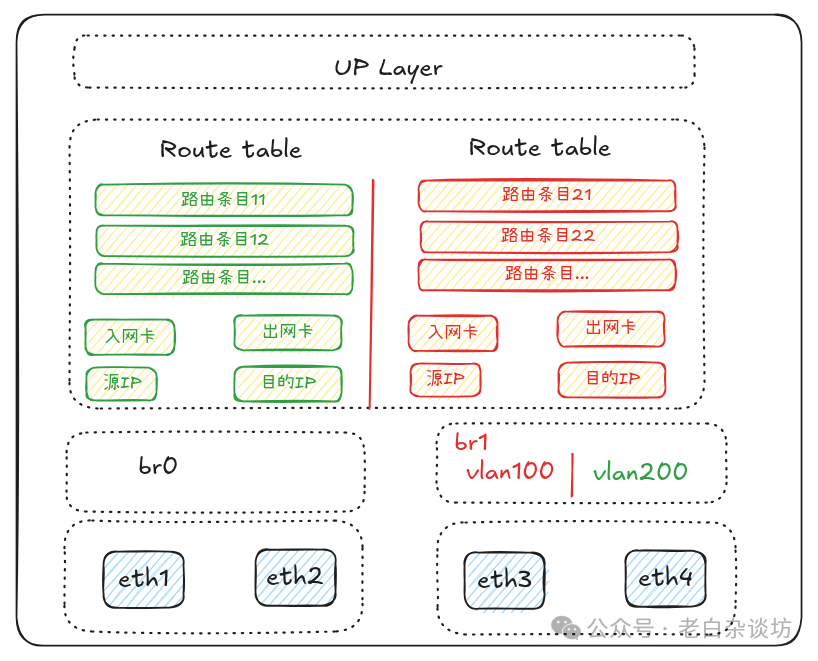
In the previous article on <span>Linux routing table</span>, we gained further insights into Linux routing and introduced the concept of a custom <span>routing table</span> based on <span>rule</span> (which is essentially PBR) for precise control of routing traffic;
In this article, we will comprehensively learn about Linux PBR (Policy-Based Routing);
01 What is Linux PBR
Policy-Based Routing (PBR) is a very powerful feature in the Linux networking stack, available since the release of Linux 2.2 in 1999, and has been around for a long time;
Typically, Linux routing decisions are made solely based on the destination IP address of the packet using the ‘longest prefix match’ principle;
However, in some complex business scenarios, we expect to make routing decisions more flexibly based on additional factors (such as source/destination address, source/destination port, protocol, user UID, etc.);
Based on this, Linux PBR comes into play, Linux Policy-Based Routing (PBR) achieves flexible traffic control through multi-dimensional decision-making (source address, destination address, protocol type, QoS tags, etc.);
These multi-dimensional decision factors are maintained through <span>linux ip rules</span>;
1.1 Review of ip rule
Every Linux system has a default set of rules, which includes rules for local, main, and default tables, viewable via <span>ip rule</span>.
root@node3:~# ip rule show
0:      from all lookup local
32766:  from all lookup main
32767:  from all lookup default
The output information above is referred to as the Linux Routing Policy Database (<span>Routing Policy DataBase</span>, abbreviated as RPDB), which mainly consists of three elements:
- • Priority: e.g., 0, 32766, and 32767, where a smaller number indicates a higher priority
- • Selector: The selector of the rule applies to {source address, destination address, inbound interface, service type (tos), firewall mark (fwmark), etc., such as
<span>from all</span>above - • Action: The specific operation performed after matching the selector, such as looking up a certain routing table or providing a failure prompt, such as
<span>lookup local/main/default</span>above
Combining the above analysis, when Linux starts, the kernel configures the default RPDB, which contains three rules:
- • 1. Priority: 0, Selector: matches anything, Action: look up the local routing table (ID 255). The local table is a special routing table that contains high-priority control routes for local and broadcast addresses.
- • 2. Priority: 32766, Selector: matches anything, Action: look up the main routing table (ID 254). The main routing table contains all non-policy routes and can be modified or overridden by the administrator.
- • 3. Priority: 32767, Selector: matches anything, Action: look up the default routing table (ID 253). The default table is empty and is reserved for some post-processing when no previous default rule selects the packet. This rule can also be deleted.
The correspondence between routing tables and IDs was discussed in the previous article, recorded in the following file:
root@node3:~# cat /etc/iproute2/rt_tables

# reserved values

255     local
254     main
253     default
0       unspec
<span>ip rule</span> definition: Detailed usage of this tool can be found in <span>man ip rule</span>, with a brief explanation as follows:
root@node3:~# man ip rule

NAME
       ip-rule - routing policy database management

SYNOPSIS
       ip [ OPTIONS ] rule { COMMAND | help }

       ip rule [ list [ SELECTOR ]]

       ip rule { add | del } SELECTOR ACTION

       ip rule { flush | save | restore }

       SELECTOR := [ not ] [ from PREFIX ] [ to PREFIX ] [ tos TOS ] [ fwmark FWMARK[/MASK] ] [ iif STRING ] [ oif STRING ]
               [ pref NUMBER ] [ l3mdev ] [ uidrange NUMBER-NUMBER ] [ ipproto PROTOCOL ] [ sport [ NUMBER | NUMBER-NUMBER
               ] ] [ dport [ NUMBER | NUMBER-NUMBER ] ] [ tun_id TUN_ID ]

       ACTION := [ table TABLE_ID ] [ protocol PROTO ] [ nat ADDRESS ] [ realms [SRCREALM/]DSTREALM ] [ goto NUMBER ] SUP‐
               PRESSOR

       SUPPRESSOR := [ suppress_prefixlength NUMBER ] [ suppress_ifgroup GROUP ]

       TABLE_ID := [ local | main | default | NUMBER ]
...
       ip rule add - insert a new rule

       ip rule delete - delete a rule

              type TYPE (default)
                     the type of this rule. The list of valid types was given in the previous subsection.

              from PREFIX
                     select the source prefix to match.

              to PREFIX
                     select the destination prefix to match.

              iif NAME
                     select the incoming device to match. If the interface is loopback, the rule only matches packets orig‐
                     inating from this host. This means that you may create separate routing tables for forwarded and local
                     packets and, hence, completely segregate them.

              oif NAME
                     select  the outgoing device to match. The outgoing interface is only available for packets originating
                     from local sockets that are bound to a device.

              tos TOS

              dsfield TOS
                     select the TOS value to match.

              fwmark MARK
                     select the fwmark value to match.

              uidrange NUMBER-NUMBER
                     select the uid value to match.

              ipproto PROTOCOL
                     select the ip protocol value to match.

              sport NUMBER | NUMBER-NUMBER
                     select the source port value to match. supports port range.

              dport NUMBER | NUMBER-NUMBER
                     select the destination port value to match. supports port range.

              priority PREFERENCE
                     the priority of this rule.  PREFERENCE is an unsigned integer value, higher number means lower  prior‐
                     ity,  and  rules  get processed in order of increasing number. Each rule should have an explicitly set
                     unique priority value.  The options preference and order are synonyms with priority.

              table TABLEID
                     the routing table identifier to lookup if the rule selector matches.   It  is  also  possible  to  use
                     lookup instead of table.

              protocol PROTO
                     the  routing protocol who installed the rule in question.  As an example when zebra installs a rule it
                     would get RTPROT_ZEBRA as the installing protocol.

              suppress_prefixlength NUMBER
                     reject routing decisions that have a prefix length of NUMBER or less.

              suppress_ifgroup GROUP
                     reject routing decisions that use a device belonging to the interface group GROUP.
              realms FROM/TO
                     Realms to select if the rule matched and the routing table lookup succeeded. Realm TO is only used  if
                     the route did not select any realm.

              nat ADDRESS
                     The  base  of the IP address block to translate (for source addresses).  The ADDRESS may be either the
                     start of the block of NAT addresses (selected by NAT routes) or a local host address (or  even  zero).
                     In the last case the router does not translate the packets, but masquerades them to this address.  Us‐
                     ing map-to instead of nat means the same thing.

                     Warning:  Changes to the RPDB made with these commands do not become active immediately. It is assumed
                     that after a script finishes a batch of updates, it flushes the routing  cache  with  ip  route  flush
                     cache.
The original text is more accessible, so I will not translate it one by one.
1.2 Routing Table
On a Linux-initialized system, there are typically three routing tables (to be precise, four tables)
root@node3:~# cat /etc/iproute2/rt_tables

# reserved values

255     local
254     main
253     default
0 unspec- •
<span>local</span>: The most important table in the kernel, storing routes for “local addresses” and “broadcast” types, which users generally do not need to modify manually (only deletions are allowed, not additions); - •
<span>main</span>: During system startup, network-scripts, NetworkManager, and systemd-networkd write the network card configuration and default gateway routes into the main table, and operations using tools like<span>ip route</span>also affect the main table, which users can modify, add, or delete routes as needed; - •
<span>default</span>: A somewhat ambiguous name, traditionally reserved for the “backup default route”. When the main table finds no matches, and the policy rule<span>ip rule</span>directs packets to table 253, it will look here for matches. Currently, mainstream distributions do not automatically insert entries into the default table, requiring explicit action from the administrator. - •
<span>unspec</span>: A placeholder that is not used at the user level;
<span>ip route</span> command operations can be detailed through <span>main ip route</span>, and common operations have been shared previously, so they will not be elaborated on here.
02 Using Linux PBR
For specific usage of Linux PBR, the following steps can be followed:
- • 1. Planning: Understand what you want to achieve
- • 2. Customizing the route table: Establish a name and ID correspondence for easier future maintenance
- • 3. Customizing rules: Define routing based on the desired factors
- • 4. Associating rules with the route table
2.1 PBR Based on Destination Port
Background: The local site Local has two dedicated lines to the remote site Remote, one of which is 100M (simulated with vlan100), and the other is 10GE (vlan200);
Requirement: The administrator expects to route HTTP or HTTPS traffic initiated from the local site through the 100M dedicated line, while other backup and business traffic should use the 10GE dedicated line;
Topology
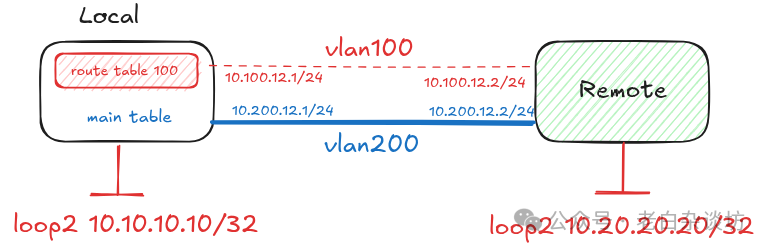
Solution: 1. Customize the route table t_100 2. Create an ip rule based on destination ports, including ports 80 and 443 3. Associate the rule with t_100, specifying the routing exit as vlan100 4. Other traffic will follow the system’s default routing table main (or a custom routing table and rule can also be defined)
Detailed Configuration:
1. Configure interface information for Local and Remote
# Local site configuration
root@Local:~# ip link add link ens4 name vlan100 type vlan id 100
root@Local:~# ip link add link ens4 name vlan200 type vlan id 200
root@Local:~# ip link set ens4 up
root@Local:~# ip link set vlan100 up
root@Local:~# ip link set vlan200 up

root@Local:~# ip addr add 10.100.12.1/24 dev vlan100
root@Local:~# ip addr add 10.200.12.1/24 dev vlan200

root@Local:~# ip link add name loop2 type dummy
root@Local:~# ip link set loop2 up
root@Local:~# ip addr add 10.10.10.10/32 dev loop2

# Remote site configuration
root@Remote:~# ip link add link ens4 name vlan100 type vlan id 100
root@Remote:~# ip link add link ens4 name vlan200 type vlan id 200
root@Remote:~# ip link set ens4 up
root@Remote:~# ip  link set vlan200 up
root@Remote:~# ip  link set vlan100 up

root@Remote:~# ip addr add 10.100.12.2/24 dev vlan100
root@Remote:~# ip addr add 10.200.12.2/24 dev vlan200

root@Remote:~# ip link add name loop2 type dummy
root@Remote:~# ip link set loop2 up
root@Remote:~# ip addr add 10.20.20.20/32 dev loop2
2. Configure dual-load return routing for Remote
root@Remote:~# ip route add 10.10.10.10/32 nexthop dev vlan100 weight 1  nexthop dev vlan200 weight 1
root@Remote:~# ip r
default via 172.20.88.1 dev ens3 proto dhcp src 172.20.88.3 metric 100
10.10.10.10
        nexthop dev vlan100 weight 1
        nexthop dev vlan200 weight 1
3. Configure PBR for Local
# Add custom routing table t_100
root@Local:~# echo "100  t_100" >> /etc/iproute2/rt_tables

# Custom rule for local destination ports
root@Local:~# ip rule add dport 80 table t_100
root@Local:~# ip rule add dport 443 table t_100

# View custom rules
root@Local:~# ip rule
0:      from all lookup local
32764:  from all dport 443 lookup t_100
32765:  from all dport 80 lookup t_100
4. Configure routing for the custom routing table
root@Local:~# ip r add default dev vlan100  table t_100
root@Local:~# ip r show t t_100
default dev vlan100 scope link
5. Configure routing for the default routing table main for Local
root@Local:~# ip r add 10.20.20.20/32 dev vlan200

root@Local:~# ip r get 10.20.20.20
10.20.20.20 dev vlan200 src 10.200.12.1 uid 0
6. Packet capture analysis
# Capture ICMP request packets at Local vlan100 and vlan200 exits
## Capture results on vlan100 interface are as follows
root@Local:~# tcpdump  -i vlan100 -nel -vv  'icmp[icmptype] == 8'
tcpdump: listening on vlan100, link-type EN10MB (Ethernet), snapshot length 262144 bytes

## Capture results on vlan200 interface are as follows
root@Local:~# tcpdump -i vlan200 -nel -vv 'icmp[icmptype] == 8'
tcpdump: listening on vlan200, link-type EN10MB (Ethernet), snapshot length 262144 bytes
03:59:26.688458 52:54:a0:64:66:cf > 52:54:a0:85:23:f5, ethertype IPv4 (0x0800), length 98: (tos 0x0, ttl 64, id 42075, offset 0, flags [DF], proto ICMP (1), length 84)
    10.10.10.10 > 10.20.20.20: ICMP echo request, id 1557, seq 1, length 64
03:59:27.717279 52:54:a0:64:66:cf > 52:54:a0:85:23:f5, ethertype IPv4 (0x0800), length 98: (tos 0x0, ttl 64, id 42133, offset 0, flags [DF], proto ICMP (1), length 84)
    10.10.10.10 > 10.20.20.20: ICMP echo request, id 1557, seq 2, length 64
03:59:28.741268 52:54:a0:64:66:cf > 52:54:a0:85:23:f5, ethertype IPv4 (0x0800), length 98: (tos 0x0, ttl 64, id 42246, offset 0, flags [DF], proto ICMP (1), length 84)
    10.10.10.10 > 10.20.20.20: ICMP echo request, id 1557, seq 3, length 64
03:59:29.765266 52:54:a0:64:66:cf > 52:54:a0:85:23:f5, ethertype IPv4 (0x0800), length 98: (tos 0x0, ttl 64, id 42816, offset 0, flags [DF], proto ICMP (1), length 84)
    10.10.10.10 > 10.20.20.20: ICMP echo request, id 1557, seq 4, length 64


# Initiate 4 ping test packets
root@Local:~# ping -I 10.10.10.10 10.20.20.20 -c 4
Careful readers will notice that all 4 ping request packets are sent from the vlan200 interface, confirming that they follow the system’s default main routing table.
We will initiate an HTTP request again and capture packets
# Remote starts HTTP service using Python
root@Remote:~# python3 -m  http.server 80
Serving HTTP on 0.0.0.0 port 80 (http://0.0.0.0:80/) ...

# Capture HTTP packets on vlan100 and vlan200 interfaces

## Capture results on vlan100 are as follows
root@Local:~# tcpdump  -i vlan100 -nel tcp
tcpdump: verbose output suppressed, use -v[v]... for full protocol decode
listening on vlan100, link-type EN10MB (Ethernet), snapshot length 262144 bytes
04:09:03.025876 52:54:a0:64:66:cf > 52:54:a0:85:23:f5, ethertype IPv4 (0x0800), length 74: 10.100.12.1.56962 > 10.20.20.20.80: Flags [S], seq 72765822, win 64240, options [mss 1460,sackOK,TS val 2056124516 ecr 0,nop,wscale 7], length 0
04:09:03.026292 52:54:a0:85:23:f5 > 52:54:a0:64:66:cf, ethertype IPv4 (0x0800), length 74: 10.20.20.20.80 > 10.100.12.1.56962: Flags [S.], seq 2911479468, ack 72765823, win 65160, options [mss 1460,sackOK,TS val 798413473 ecr 2056124516,nop,wscale 7], length 0
04:09:03.026332 52:54:a0:64:66:cf > 52:54:a0:85:23:f5, ethertype IPv4 (0x0800), length 66: 10.100.12.1.56962 > 10.20.20.20.80: Flags [.], ack 1, win 502, options [nop,nop,TS val 2056124517 ecr 798413473], length 0
04:09:03.026420 52:54:a0:64:66:cf > 52:54:a0:85:23:f5, ethertype IPv4 (0x0800), length 140: 10.100.12.1.56962 > 10.20.20.20.80: Flags [P.], seq 1:75, ack 1, win 502, options [nop,nop,TS val 2056124517 ecr 798413473], length 74: HTTP: GET / HTTP/1.1
04:09:03.026569 52:54:a0:85:23:f5 > 52:54:a0:64:66:cf, ethertype IPv4 (0x0800), length 66: 10.20.20.20.80 > 10.100.12.1.56962: Flags [.], ack 75, win 509, options [nop,nop,TS val 798413473 ecr 2056124517], length 0
04:09:03.027718 52:54:a0:85:23:f5 > 52:54:a0:64:66:cf, ethertype IPv4 (0x0800), length 221: 10.20.20.20.80 > 10.100.12.1.56962: Flags [P.], seq 1:156, ack 75, win 509, options [nop,nop,TS val 798413474 ecr 2056124517], length 155: HTTP: HTTP/1.0 200 OK
04:09:03.027745 52:54:a0:64:66:cf > 52:54:a0:85:23:f5, ethertype IPv4 (0x0800), length 66: 10.100.12.1.56962 > 10.20.20.20.80: Flags [.], ack 156, win 501, options [nop,nop,TS val 2056124518 ecr 798413474], length 0
04:09:03.027755 52:54:a0:85:23:f5 > 52:54:a0:64:66:cf, ethertype IPv4 (0x0800), length 540: 10.20.20.20.80 > 10.100.12.1.56962: Flags [FP.], seq 156:630, ack 75, win 509, options [nop,nop,TS val 798413474 ecr 2056124517], length 474: HTTP
04:09:03.028723 52:54:a0:64:66:cf > 52:54:a0:85:23:f5, ethertype IPv4 (0x0800), length 66: 10.100.12.1.56962 > 10.20.20.20.80: Flags [F.], seq 75, ack 631, win 501, options [nop,nop,TS val 2056124519 ecr 798413474], length 0
04:09:03.028961 52:54:a0:85:23:f5 > 52:54:a0:64:66:cf, ethertype IPv4 (0x0800), length 66: 10.20.20.20.80 > 10.100.12.1.56962: Flags [.], ack 76, win 509, options [nop,nop,TS val 798413476 ecr 2056124519], length 0


## Capture results on vlan200 are as follows
root@Local:~# tcpdump -i vlan200 -nel -vv
tcpdump: listening on vlan200, link-type EN10MB (Ethernet), snapshot length 262144 bytes

# Initiate HTTP request from local
root@Local:~# curl http://10.20.20.20
This time, because it is an HTTP request targeting port 80, it follows our PBR definition and goes through the custom routing table t_100 to reach <span>Remote</span>.
2.2 PBR Based on Source Address
Background: The local site Local has two ISPs to the internet, one of which is a 100M dedicated line (simulated with vlan100), and the other is a 300M dedicated line (vlan200);
Requirement: The administrator expects to route local LAN network users through the ISP links based on the bandwidth ratio, meaning users with IP addresses from 1 to 63 should use the 100M dedicated line, while users from 64 to 254 should use the 300M ISP link;
Topology
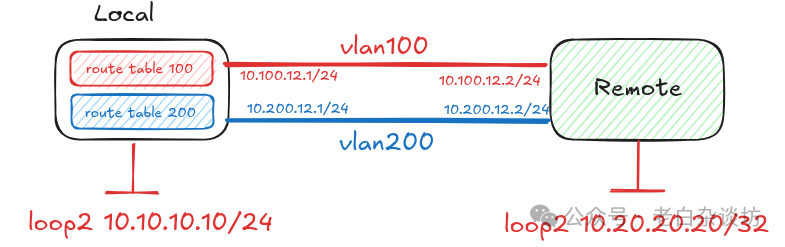
Solution: 1. Customize route tables t_100 and t_200 2. Create rules based on IP ranges as follows:
- • rule r_100 from 10.10.10.0/26
- • rule r_200 from 10.10.10.64/26, 10.10.10.128/25
3. Associate the rules with the route tables, specifying different exits
Detailed Configuration:
1. Configure interface information for Local and Remote
# Local site configuration
root@Local:~# ip link add link ens4 name vlan100 type vlan id 100
root@Local:~# ip link add link ens4 name vlan200 type vlan id 200
root@Local:~# ip link set ens4 up
root@Local:~# ip link set vlan100 up
root@Local:~# ip link set vlan200 up

root@Local:~# ip addr add 10.100.12.1/24 dev vlan100
root@Local:~# ip addr add 10.200.12.1/24 dev vlan200

root@Local:~# ip link add name loop2 type dummy
root@Local:~# ip link set loop2 up
# Simulate the first group of users with IP 10.10.10.10
root@Local:~# ip addr add 10.10.10.10/32 dev loop2

# Simulate the second group of users with IP 10.10.10.100
root@Local:~# ip addr add 10.10.10.100/32 dev loop2

# Remote site configuration
root@Remote:~# ip link add link ens4 name vlan100 type vlan id 100
root@Remote:~# ip link add link ens4 name vlan200 type vlan id 200
root@Remote:~# ip link set ens4 up
root@Remote:~# ip  link set vlan200 up
root@Remote:~# ip  link set vlan100 up

root@Remote:~# ip addr add 10.100.12.2/24 dev vlan100
root@Remote:~# ip addr add 10.200.12.2/24 dev vlan200

root@Remote:~# ip link add name loop2 type dummy
root@Remote:~# ip link set loop2 up
root@Remote:~# ip addr add 10.20.20.20/32 dev loop2
2. Configure dual-load return routing for Remote
root@Remote:~# ip r add  10.10.10.0/24  nexthop dev vlan100 weight 1  nexthop dev vlan200 weight 1
root@Remote:~# ip r
default via 172.20.88.1 dev ens3 proto dhcp src 172.20.88.3 metric 100
10.10.10.0/24
        nexthop dev vlan100 weight 1
        nexthop dev vlan200 weight 1
3. Configure PBR for Local
# Add custom routing tables t_100 and t_200
root@Local:~# echo "100  t_100" >> /etc/iproute2/rt_tables
root@Local:~# echo "200  t_200" >> /etc/iproute2/rt_tables

# Custom rules based on IP range
root@Local:~# ip rule add from 10.10.10.0/26 table t_100
root@Local:~# ip rule add from 10.10.10.64/26 table t_200
root@Local:~# ip rule add from 10.10.10.128/25 table t_200

# View custom rules
root@Local:~# ip rule ls
0:      from all lookup local
32763:  from 10.10.10.128/25 lookup t_200
32764:  from 10.10.10.64/26 lookup t_200
32765:  from 10.10.10.0/26 lookup t_100
4. Configure routing for the custom routing tables
root@Local:~# ip r add default dev vlan100   table t_100
root@Local:~# ip r add default dev vlan200   table t_200

# View routing in custom routing tables
root@Local:~# ip r show table t_100
default dev vlan100 scope link
root@Local:~# ip r show table t_200
default dev vlan200 scope link
5. Packet capture test between 10.10.10.10 <—> 10.20.20.20
# Capture packets on local vlan100 and vlan200 interfaces
## Capture results on vlan100 are as follows:
root@Local:~# tcpdump  -i vlan100 -nel -vv  'icmp[icmptype] == 8'
tcpdump: listening on vlan100, link-type EN10MB (Ethernet), snapshot length 262144 bytes
06:38:41.815200 52:54:a0:64:66:cf > 52:54:a0:85:23:f5, ethertype IPv4 (0x0800), length 98: (tos 0x0, ttl 64, id 31644, offset 0, flags [DF], proto ICMP (1), length 84)
    10.10.10.10 > 10.20.20.20: ICMP echo request, id 3833, seq 1, length 64
06:38:42.849402 52:54:a0:64:66:cf > 52:54:a0:85:23:f5, ethertype IPv4 (0x0800), length 98: (tos 0x0, ttl 64, id 32485, offset 0, flags [DF], proto ICMP (1), length 84)
    10.10.10.10 > 10.20.20.20: ICMP echo request, id 3833, seq 2, length 64
06:38:43.873377 52:54:a0:64:66:cf > 52:54:a0:85:23:f5, ethertype IPv4 (0x0800), length 98: (tos 0x0, ttl 64, id 33053, offset 0, flags [DF], proto ICMP (1), length 84)
    10.10.10.10 > 10.20.20.20: ICMP echo request, id 3833, seq 3, length 64
06:38:44.897393 52:54:a0:64:66:cf > 52:54:a0:85:23:f5, ethertype IPv4 (0x0800), length 98: (tos 0x0, ttl 64, id 33156, offset 0, flags [DF], proto ICMP (1), length 84)
    10.10.10.10 > 10.20.20.20: ICMP echo request, id 3833, seq 4, length 64

## Capture results on vlan200 are as follows:
root@Local:~# tcpdump -i vlan200 -nel -vv 'icmp[icmptype] == 8'
tcpdump: listening on vlan200, link-type EN10MB (Ethernet), snapshot length 262144 bytes

# Initiate ICMP from source address 10.10.10.10
root@Local:~# ping -I 10.10.10.10 10.20.20.20 -c 4
PING 10.20.20.20 (10.20.20.20) from 10.10.10.10 : 56(84) bytes of data.
64 bytes from 10.20.20.20: icmp_seq=1 ttl=64 time=0.469 ms
64 bytes from 10.20.20.20: icmp_seq=2 ttl=64 time=0.442 ms
64 bytes from 10.20.20.20: icmp_seq=3 ttl=64 time=0.349 ms
64 bytes from 10.20.20.20: icmp_seq=4 ttl=64 time=0.369 ms
Through packet capture, it can be seen that because the source IP is 10.10.10.10, it matches the custom rule associated with t_100, thus all 4 request packets are sent through the vlan100 interface.
6. Packet capture test between 10.10.10.100 <—> 10.20.20.20
# Capture packets on local vlan100 and vlan200 interfaces
## Capture results on vlan100 are as follows:
root@Local:~# tcpdump  -i vlan100 -nel -vv  'icmp[icmptype] == 8'
tcpdump: listening on vlan100, link-type EN10MB (Ethernet), snapshot length 262144 bytes

## Capture results on vlan200 are as follows:
root@Local:~# tcpdump -i vlan200 -nel -vv  'icmp[icmptype] == 8'
tcpdump: listening on vlan200, link-type EN10MB (Ethernet), snapshot length 262144 bytes
06:42:30.438662 52:54:a0:64:66:cf > 52:54:a0:85:23:f5, ethertype IPv4 (0x0800), length 98: (tos 0x0, ttl 64, id 27919, offset 0, flags [DF], proto ICMP (1), length 84)
    10.10.10.100 > 10.20.20.20: ICMP echo request, id 3879, seq 1, length 64
06:42:31.457370 52:54:a0:64:66:cf > 52:54:a0:85:23:f5, ethertype IPv4 (0x0800), length 98: (tos 0x0, ttl 64, id 28347, offset 0, flags [DF], proto ICMP (1), length 84)
    10.10.10.100 > 10.20.20.20: ICMP echo request, id 3879, seq 2, length 64
06:42:32.481378 52:54:a0:64:66:cf > 52:54:a0:85:23:f5, ethertype IPv4 (0x0800), length 98: (tos 0x0, ttl 64, id 28893, offset 0, flags [DF], proto ICMP (1), length 84)
    10.10.10.100 > 10.20.20.20: ICMP echo request, id 3879, seq 3, length 64
06:42:33.505400 52:54:a0:64:66:cf > 52:54:a0:85:23:f5, ethertype IPv4 (0x0800), length 98: (tos 0x0, ttl 64, id 29460, offset 0, flags [DF], proto ICMP (1), length 84)
    10.10.10.100 > 10.20.20.20: ICMP echo request, id 3879, seq 4, length 64

# Initiate ICMP from source address 10.10.10.100
root@Local:~# ping -I 10.10.10.100 10.20.20.20 -c 4
PING 10.20.20.20 (10.20.20.20) from 10.10.10.100 : 56(84) bytes of data.
64 bytes from 10.20.20.20: icmp_seq=1 ttl=64 time=0.615 ms
64 bytes from 10.20.20.20: icmp_seq=2 ttl=64 time=0.406 ms
64 bytes from 10.20.20.20: icmp_seq=3 ttl=64 time=0.357 ms
64 bytes from 10.20.20.20: icmp_seq=4 ttl=64 time=0.387 ms
Through packet capture, it can be seen that because the source IP is 10.10.10.100, it matches the custom rule associated with t_200, thus all 4 request packets are sent through the vlan200 interface.
2.3 PBR Based on Interface
Through the small experiments in sections 2.1 and 2.2, it can be seen that as long as the packet’s extended elements match the defined <span>ip rule</span> rules, the routing table queried can be flexibly changed based on our custom routing entries;
Adding routing entries to the routing table is the same as the method of adding routes in Linux itself;
If you want to customize rules based on source ports, refer to the following:
ip rule add iif eth2 table 23For rules based on outgoing interfaces:
ip rule add oif vlan100 table 23Using rules based on outgoing interfaces is not very common.
For specific verification, please try it out yourself!
03 Summary
Linux PBR actually consists of two parts:
- • Policy: the content defined by
<span>ip rule</span> - • Routing: custom routing tables and routing entries
- • Then associate the two
As long as you are adept at managing <span>rules</span> and <span>routing tables</span>, I believe packets will obediently follow the defined paths!
Thank you for your attention!