
Code BraidCertifiedbyMillionsof FollowersAccount
By following us, you not only gain a tool for finding resources but also an interesting soul ▶ ▶ ▶
In embedded project development, many functional modules require frequent parameter modifications. On Linux, we can save configuration information using INI format files.
This article uses the open-source library iniparser to explain in detail how to implement parameter parsing and configuration saving for INI files using C language.
1. INI Files
1. What is an INI File?
- INI (Initialization File) is a simple and intuitive data storage format commonly used for configuring application initialization settings. These files typically contain several sections and key-value pairs. Each part of an INI file is self-descriptive, easy to read and edit, allowing non-programmers to easily understand and modify configuration parameters.
- Due to its simplicity and ease of use, INI files are widely used in many programming languages, especially in Windows operating systems, where many applications adopt INI files as configuration files. However, with the popularity of richer and more structured data exchange formats like XML and JSON, the use of INI files in modern applications has relatively decreased. Nevertheless, it remains a common and practical configuration file format in lightweight applications or scenarios with high startup speed requirements.
2. Structure of INI Files
-
Section:
Each part of an INI file is defined by a name enclosed in square brackets [], for example, **[Section1]**. Each section can contain multiple key-value pairs.
-
Key-Value Pairs:
Keys and values are separated by an equal sign =, such as key1=value1. Keys are typically descriptive strings, while values can be strings, numbers, or other types of data.
-
Comments:
Comment lines start with a semicolon ;, and everything until the end of the line is considered comment content and will not be parsed by the program.
-
Multi-line Values:
Some INI parsers allow values to span multiple lines, typically by adding a backslash \ at the end of the line to continue to the next line.
3. Example of an INI File
;author yikoupeng

[BASIC_INFO]
version                = V1.1.1.1
user                   = yikou
number                 = 999


[FTP]
ftppath                = /home/ftp
ftpuser                = ftp
ftppass                = 123456
port                   = 21

......
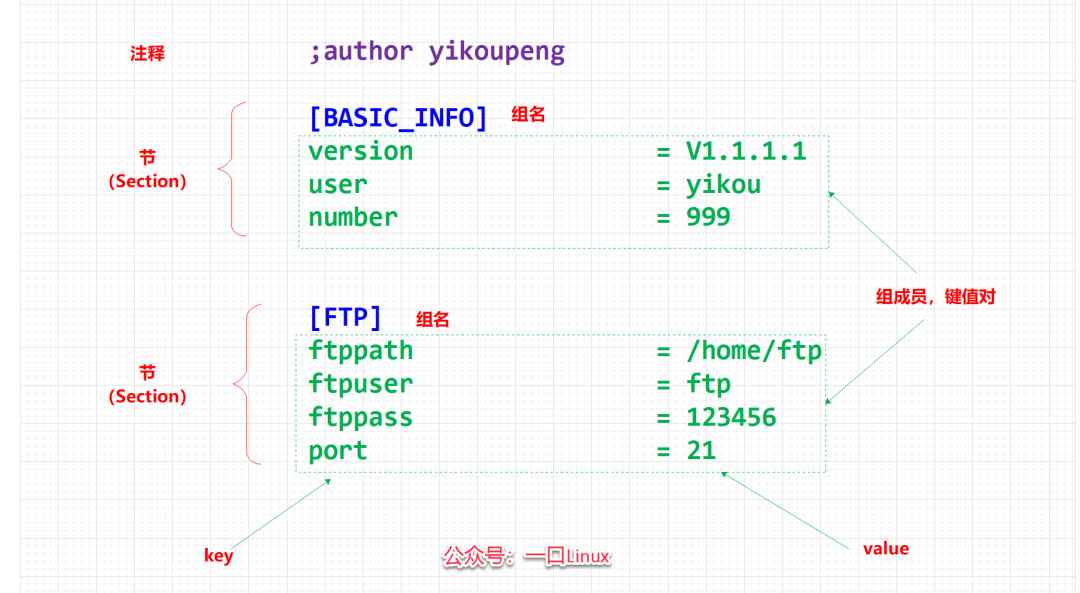
Among them:
- Comments start with a semicolon (;)
- [BASIC_INFO] and [FTP] are group names,
- Group members include “version”……..“ftppath”…
Note:
The key under each group must be unique and cannot be repeated, but the same key can exist under different groups.
2. iniparser Library
1. Introduction to iniparser
iniparser is a C language library used for parsing and manipulating INI format configuration files, serving as an open-source parser for INI files.
iniparser can perform operations such as parsing, adding, modifying, and deleting configuration files.
The GitHub address is as follows:
https://github.com/ndevilla/iniparser
2. Installation of iniparser
1. Download iniparser
wget https://codeload.github.com/ndevilla/iniparser/tar.gz/refs/tags/v4.1 -O iniparserv4.1.tar.gz
2. Extract
tar -zxvf iniparserv4.1.tar.gz
3. Enter the directory
cd iniparser-4.1/
peng@ubuntu:~/work/iniparser-4.1$ ls
AUTHORS  doc  example  FAQ-en.md  FAQ-zhcn.md  html  INSTALL  libiniparser.a  libiniparser.so.1  LICENSE  Makefile  README.md  src  test
4. Entering the src folder, you can see the main code we need
peng@ubuntu:~/work/iniparser-4.1$ cd src/
peng@ubuntu:~/work/fdw/code/config/iniparser-4.1/src$ ls
dictionary.c  dictionary.h   iniparser.c  iniparser.h
If you want to port this program to our project, you only need to add these files to the corresponding project directory and compile them into the project.
3. iniparser API (Application Programming Interface)
dictionary.h declares some APIs for directly parsing INI files, while iniparser.h declares some APIs for user operations.
The APIs in iniparser.h are a re-encapsulation of the APIs in dictionary.h to provide user-friendliness.
Main APIs in iniparser.h
1. Load INI File
/*
   *  @brief  Load data from an INI format configuration file
   *  @param  [IN]  ininame  The INI format file to open
   *  @return != NULL Returns a pointer to the dictionary structure
   *          == NULL Failed to load the INI file
*/
dictionary * iniparser_load(const char *ininame);
2. Get Key Value
-
/*
   *  @brief  Get the string value corresponding to the specified key
   *  @param  [IN]  d  Pointer to the dictionary structure
   *  @param  [IN]  key  The key to look for, usually in the format "section:key", indicating which section's key value to retrieve.
   *  @param  [IN]  def  The default return value when the key does not exist or its value is not a string. If the corresponding key is not found, the function will return this default value.
   *  @return If the corresponding key is found, return the string corresponding to the key value
   *    If no matching key is found, return the string value specified by def
*/
const char * iniparser_getstring(const dictionary *d, const char *key, const char *def);

/*
*  @brief  Get the integer value corresponding to the specified key
*  @param  [IN]  d  Pointer to the dictionary structure
*  @param  [IN]  key  The key to look for, usually in the format "section:key", indicating which section's key value to retrieve.
*  @param  [IN]  notfound  The default value returned when the key does not exist or its value cannot be converted to an integer.
*  @return If the corresponding key is found and its value can be successfully converted to an integer, return that integer value.
*     If no matching key is found, or the value corresponding to the key cannot be converted to an integer, return the default value provided by notfound.
*/
int iniparser_getint(const dictionary * d, const char * key, int notfound);

/*
*  @brief  Get the floating-point value corresponding to the specified key
*  @param  [IN]  d  Pointer to the dictionary structure
*  @param  [IN]  key  The key to look for, usually in the format "section:key", indicating which section's key value to retrieve.
*  @param  [IN]  notfound  The default value returned when the key does not exist or its value cannot be converted to a double.
*  @return If the corresponding key is found and its value can be successfully converted to a double, return that floating-point value.
*     If no matching key is found, or the value corresponding to the key cannot be interpreted as a valid double, return the default value provided by notfound.
*/
double iniparser_getdouble(const dictionary *d, const char *key, double notfound);
3. Set Key Value
/*
*  @brief  Set or modify a key-value pair in the INI configuration file
*  @param  [IN]  d  Pointer to the dictionary structure
*  @param  [IN]  entry  The string identifier for the key-value pair, usually in the format "section:key", indicating where to set or modify the value (val) in which section (section) and key (key).
*      If the key exists, modify the corresponding val; if the key does not exist, it will be added.
*  @param  [IN]  val: The new value to be set, passed as a string.
*  @return Returns 0 to indicate success
*/
int iniparser_set(dictionary *ini, const char *entry, const char *val);
4. Remove Key Value
-
/*
*  @brief  Remove a key-value pair from the INI configuration file
*  @param  [IN]  d  Pointer to the dictionary structure
*  @param  [IN]  entry  The string identifier for the key, including optional section and key names
*          If no key is specified, the entire section will be removed
*/
void iniparser_unset(dictionary *ini, const char *entry);
5. Check if Key Exists
-
/*
*  @brief  Check if a key value exists in the INI configuration file
*  @param  [IN]  d  Pointer to the dictionary structure
*  @param  [IN]  entry  The string identifier for the key-value pair, usually in the format "section:key"
*  @return Returns 1 if it exists, returns 0 if it does not exist
*/
int iniparser_find_entry(const dictionary *ini, const char *entry);
6. Get Number of Sections
-
/*
*  @brief  Get the number of sections in the INI configuration file
*  @param  [IN]  d  Pointer to the dictionary structure
*  @return Returns the number of sections on success, returns -1 on failure
*/
int iniparser_getnsec(const dictionary * d);

/*
*  @brief  Get the value of a specific section
*  @param  [IN]  d  Pointer to the dictionary structure
*  @param  [IN]  n  Specify which section value to retrieve
*  @return Returns the retrieved section value on success, returns NULL on failure
*/
const char *iniparser_getsecname(const dictionary * d, int n);
7. Get Number of Keys under a Section
-
/*
*  @brief  Get the number of keys in a specific section of the INI configuration file
*  @param  [IN]  d  Pointer to the dictionary structure
*  @param  [IN]  s  section
*  @return Returns the number of keys in the specified section
*/
int iniparser_getsecnkeys(dictionary * d, char * s);

/*
*  @brief  Get all keys in a specific section of the INI configuration file
*  @param  [IN]  d  Pointer to the dictionary structure
*  @param  [IN]  s  section
*  @param  [OUT]  keys  Output keys through this parameter, can also be obtained through the return value
*  @return  Returns the specified section's keys on success, returns NULL on failure
*/
const char **iniparser_getseckeys(const dictionary *d, const char *s, const char **keys);
8. Save Dictionary Object to File
-
/*
*  @brief  Save the dictionary object to a file
*  @param  [IN]  d  Pointer to the dictionary structure
*  @param  [IN]  f  Opened file descriptor
*/
void iniparser_dump_ini(const dictionary *d, FILE *f);
9. Free Dictionary Object
-
/*
*  @brief  Free the dictionary object
*  @param  [IN]  d  Pointer to the dictionary structure
*/
void iniparser_freedict(dictionary * d);
10. API Summary
- APIs in iniparser.h
// Get the number of sections in the dictionary object
int iniparser_getnsec(dictionary * d);

// Get the name of the nth section in the dictionary object
char * iniparser_getsecname(dictionary * d, int n);

// Save the dictionary object to a file
void iniparser_dump_ini(dictionary * d, FILE * f);

// Save a section of the dictionary object to a file
void iniparser_dumpsection_ini(dictionary * d, char * s, FILE * f);

// Save the dictionary object to a file
void iniparser_dump(dictionary * d, FILE * f);

// Get the number of keys in a specific section of the dictionary object
int iniparser_getsecnkeys(dictionary * d, char * s);

// Get all keys in a specific section of the dictionary object
char ** iniparser_getseckeys(dictionary * d, char * s);

// Return the string value corresponding to section:key in the dictionary object
char * iniparser_getstring(dictionary * d, const char * key, char * def);

// Return the integer value corresponding to section:key in the dictionary object
int iniparser_getint(dictionary * d, const char * key, int notfound);

// Return the double value corresponding to section:key in the dictionary object
double iniparser_getdouble(dictionary * d, const char * key, double notfound);

// Return the boolean value corresponding to section:key in the dictionary object
int iniparser_getboolean(dictionary * d, const char * key, int notfound);

// Set the value of a specific section:key in the dictionary object
int iniparser_set(dictionary * ini, const char * entry, const char * val);

// Delete a specific section:key from the dictionary object
void iniparser_unset(dictionary * ini, const char * entry);

// Check if a specific section:key exists in the dictionary object
int iniparser_find_entry(dictionary * ini, const char * entry) ;

// Parse the dictionary object and return (allocate memory) the dictionary object
dictionary * iniparser_load(const char * ininame);

// Free the dictionary object (memory)
void iniparser_freedict(dictionary * d);
- APIs in dictionary.h
 // Calculate the hash value of the key
unsigned dictionary_hash(const char * key);

// Create a dictionary object
 dictionary * dictionary_new(int size);

// Delete a dictionary object
void dictionary_del(dictionary * vd);

// Get the key value of the dictionary object
char * dictionary_get(dictionary * d, const char * key, char * def);

// Set the key value of the dictionary object
int dictionary_set(dictionary * vd, const char * key, const char * val);

// Delete the key value of the dictionary object
void dictionary_unset(dictionary * d, const char * key);

// Save the dictionary object
void dictionary_dump(dictionary * d, FILE * out);
4. Example of C Language Operations with iniparser Library
1. config.ini
Write the configuration file:
vim config.ini
[BASIC_INFO]
version                        = V1.1.1.1
user                           = yikou
number                         = 999


[FTP]
ftppath                        = /home/ftp
ftpuser                        = ftp
ftppass                        = 123456
port                           = 21


[NETWORK]
interface                      = eth1
dns1                           = 8.8.8.8
dns2                           = 8.8.8.8
subnet                         = 255.255.255.0
router                         = 192.168.3.1
2. Read Configuration Parameters
Try writing an iniparser program to modify the INI file:
#include <stdio.h>
#include "iniparser.h"
#include "dictionary.h"

#define PATH "config.ini"

typedef unsigned char BYTE;
typedef unsigned char UINT8;
typedef unsigned char UCHAR;

typedef unsigned short int UINT16;
typedef unsigned long int UINT32;

struct device_cfg_s{
/*basicinfo*/
char version[32];
char user[32];
int number;
/*ftp*/
char ftppath[128];
char ftpuser[32];
char ftppass[32];
 UINT16 port;
/*network*/
char interface[16];
char dns1[32];
char dns2[32];
char subnet[32];
char router[32];
};

struct device_cfg_s devcfg;

int cfg_load(char *name)
{
    dictionary *ini= NULL;
    /*  Parse the dictionary object and return (allocate memory) the dictionary object*/
    ini = iniparser_load(name);
    if( ini ==NULL)
    {
        printf("iniparser failure\n");
        return-1;
    }

/*basicinfo*/
strcpy(devcfg.version,iniparser_getstring(ini, "BASIC_INFO:version", "v0.0.0.0"));
strcpy(devcfg.user ,iniparser_getstring(ini, "BASIC_INFO:user", "yikou"));
devcfg.number = iniparser_getint(ini, "BASIC_INFO:number", 666);

/*ftp*/
strcpy(devcfg.ftppath ,iniparser_getstring(ini, "FTP:ftppath", "/"));
strcpy(devcfg.ftpuser ,iniparser_getstring(ini, "FTP:ftpuser", "ftp"));
strcpy(devcfg.ftppass ,iniparser_getstring(ini, "FTP:ftppass", "123456"));
devcfg.port = iniparser_getint(ini, "FTP:port", 21);


/*network*/
strcpy(devcfg.interface,iniparser_getstring(ini, "NETWORK:interface", "eth0"));
strcpy(devcfg.dns1,iniparser_getstring(ini, "NETWORK:dns1", NULL));
strcpy(devcfg.dns2 ,iniparser_getstring(ini, "NETWORK:dns2", NULL));
strcpy(devcfg.subnet ,iniparser_getstring(ini, "NETWORK:subnet", "255.255.255.0"));
strcpy(devcfg.router ,iniparser_getstring(ini, "NETWORK:router", "192.168.3.1"));

    /* Return the string value corresponding to the section and key of the dictionary object */
    printf("version:%s\n",devcfg.version);
    printf("user:%s\n", devcfg.user);
    printf("number:%d\n",devcfg.number);

    printf("ftppath:%s\n", devcfg.ftppath);
    printf("ftpuser:%s\n",devcfg.ftpuser);
    printf("ftppass:%s\n",devcfg.ftppass);
    printf("port:%d\n",devcfg.port);

    printf("interface:%s\n", devcfg.interface);
    printf("dns1:%s\n",devcfg.dns1);
    printf("dns2:%s\n", devcfg.dns2);

    printf("subnet:%s\n",devcfg.subnet);
    printf("router:%s\n", devcfg.router);
    iniparser_freedict(ini);
}
int main (int argc, char **argv)
{
 cfg_load(PATH);
//cfg_save_key(PATH,"BASIC_INFO","chnAddr","3501");
//cfg_save_key(PATH,"BASIC_INFO","enddeviceNo","87564289");
    return0;
}
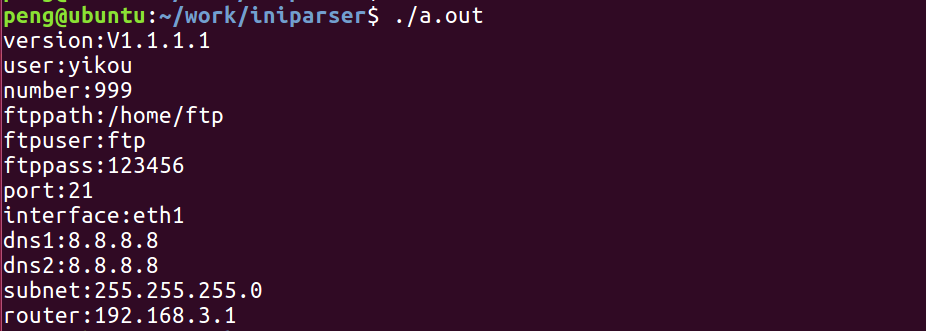
You can see that the final values are based on the configuration file.
If the configuration file does not have configuration parameters, the default values in iniparser_getxxxxx() will be used.
3. Save Configuration Information to File
To facilitate saving key values, Teacher Peng encapsulated the function
int cfg_save_key(char *filename,char *section,char *key,char *value)
Parameters:
    filename  Configuration file name
    section   Section name
    key       Key
    value     Value
int cfg_save_key(char *filename,char *section,char *key,char *value)
{
 FILE  *fp = NULL  ;
 dictionary *ini= NULL;

char item[128]={0};

/*  Parse the dictionary object and return (allocate memory) the dictionary object*/
 ini = iniparser_load(filename);
if( ini ==NULL)
 {
printf("iniparser failure\n");
return-1;
 }

sprintf(item,"%s:%s",section,key);

/* Set the value of a specific section:key in the dictionary object */
 iniparser_set(ini, item, value);

 fp = fopen(filename, "w");
if( fp == NULL ) {
printf("stone:fopen error!\n");
exit(-1);
 }

/* Save the dictionary object */
//   iniparser_dumpsection_ini(ini, "BASIC_INFO", fp);
 iniparser_dump_ini(ini, fp);
fclose(fp);
/*  Free the dictionary object (memory)*/
iniparser_freedict(ini);
}
For example, we modify the value of the BASIC_INFO section’s user to yikoupeng, and the number value to 12345
 cfg_save_key(PATH,"BASIC_INFO","user","yikoupeng");
 cfg_save_key(PATH,"BASIC_INFO","number","12345");
Execution result: 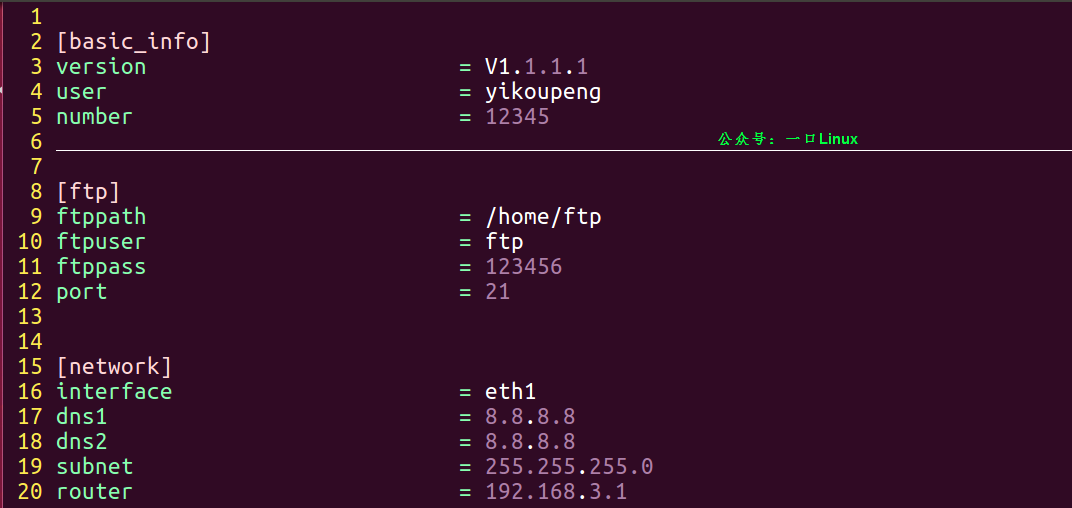 You can see that the configuration file’s basic_info section’s user and number key-value pairs have been modified.
High-quality original review
The most difficult IT company to get hired in China…
Elon Musk sent a private message asking a beautiful internet celebrity to have his child, but after being rejected, cut off her $21,000 advertising income every two weeks?
A colleague from outsourcing attended a dinner, and just as he arrived at the door of the private room, he heard the supervisor say: We are all insiders, in the future, any dirty or tiring work will be given to outsourcing, they are here to serve us, don’t feel embarrassed.
After leaving the job, a bug appeared online, and the interface was developed by himself, the n+1 compensation was reclaimed.
Heard that the internet is no longer hiring people over 35?
Programmers start “defensive programming” to protect their jobs…..
This operation by ByteDance directly changed everyone’s habits?
A Huawei employee revealed: Most people in OD are at their peak upon joining! D4 level, except for a 3k monthly salary increase when promoted to D5, it has never increased at any other time.
Don’t forget to share, bookmark, like, and give a thumbs up!