 Click the blue text above and remember to follow us!Networking Requirements
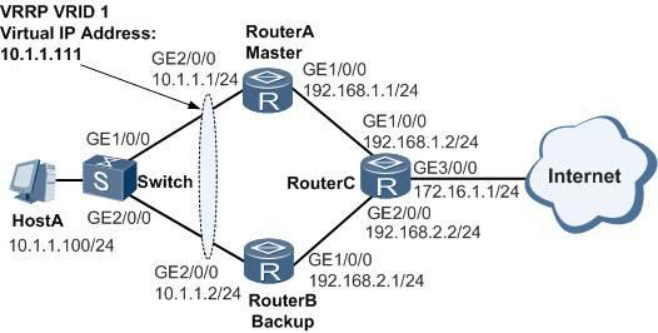
As shown in Figure 1, HostA connects to RouterA and RouterB through Switch with dual attachment. The user wishes to achieve:
1. Under normal circumstances, the host accesses the Internet with RouterA as the default gateway. When RouterA fails, RouterB takes over as the gateway to continue operations, achieving gateway redundancy.
2. After RouterA recovers from failure, it can become the gateway again.
Figure 1 Configuration Diagram for VRRP Backup
Configuration Approach
Use VRRP backup to achieve gateway redundancy. The configuration approach is as follows:
1. Configure the IP addresses of each device’s interfaces and routing protocols to ensure network layer connectivity between devices.
2. Configure the VRRP backup group on RouterA and RouterB. On RouterA, configure a higher priority and a 20-second preemption delay, acting as the Master device to handle traffic forwarding; on RouterB, configure a lower priority to serve as the backup router for gateway redundancy.
Operational Steps
1. Configure network interconnection between devices.
# Configure the IP addresses of each interface, taking RouterA as an example. The configurations for RouterB and RouterC are similar; refer to the configuration file for details.
<Huawei> system-view[Huawei] sysname RouterA[RouterA] interface gigabitethernet 2/0/0[RouterA-GigabitEthernet2/0/0] ip address 10.1.1.1 24[RouterA-GigabitEthernet2/0/0] quit[RouterA] interface gigabitethernet 1/0/0[RouterA-GigabitEthernet1/0/0] ip address 192.168.1.1 24[RouterA-GigabitEthernet1/0/0] quit
# Configure OSPF protocol for interconnection among RouterA, RouterB, and RouterC. Taking RouterA as an example, the configurations for RouterB and RouterC are similar; refer to the configuration file for details.
[RouterA] ospf 1[RouterA-ospf-1] area 0[RouterA-ospf-1-area-0.0.0.0] network 10.1.1.0 0.0.0.255[RouterA-ospf-1-area-0.0.0.0] network 192.168.1.0 0.0.0.255[RouterA-ospf-1-area-0.0.0.0] quit[RouterA-ospf-1] quit
2. Configure the VRRP backup group.
# Create VRRP backup group 1 on RouterA, configuring RouterA’s priority in this group to 120 and setting the preemption time to 20 seconds.
[RouterA] interface gigabitethernet 2/0/0[RouterA-GigabitEthernet2/0/0] vrrp vrid 1 virtual-ip 10.1.1.111[RouterA-GigabitEthernet2/0/0] vrrp vrid 1 priority 120[RouterA-GigabitEthernet2/0/0] vrrp vrid 1 preempt-mode timer delay 20[RouterA-GigabitEthernet2/0/0] quit
# Create VRRP backup group 1 on RouterB, with the default priority of 100.
[RouterB] interface gigabitethernet 2/0/0[RouterB-GigabitEthernet2/0/0] vrrp vrid 1 virtual-ip 10.1.1.111[RouterB-GigabitEthernet2/0/0] quit
3. Verify the configuration results.
# After completing the above configurations, execute thedisplay vrrp command on RouterA and RouterB respectively to see RouterA’s status in the backup group as Master and RouterB’s status as Backup.
[RouterA] display vrrp GigabitEthernet2/0/0 | Virtual Router 1 State : Master Virtual IP : 10.1.1.111 Master IP : 10.1.1.1 PriorityRun : 120 PriorityConfig : 120 MasterPriority : 120 Preempt : YES Delay Time : 20 s TimerRun : 1 s TimerConfig : 1 s Auth type : NONE Virtual MAC : 0000-5e00-0101 Check TTL : YES Config type : normal-vrrp Backup-forward : disabled Create time : 2012-05-11 11:39 Last change time : 2012-05-11 11:39[RouterB] display vrrp GigabitEthernet2/0/0 | Virtual Router 1 State : Backup Virtual IP : 10.1.1.111 Master IP : 10.1.1.1 PriorityRun : 100 PriorityConfig : 100 MasterPriority : 120 Preempt : YES Delay Time : 0 s TimerRun : 1 s TimerConfig : 1 s Auth type : NONE Virtual MAC : 0000-5e00-0101 Check TTL : YES Config type : normal-vrrp Backup-forward : disabled Create time : 2012-05-11 11:39 Last change time : 2012-05-11 11:39
# Executeshutdown command on RouterA’s interface GE2/0/0 to simulate RouterA failure.
[RouterA] interface gigabitethernet 2/0/0[RouterA-GigabitEthernet2/0/0] shutdown[RouterA-GigabitEthernet2/0/0] quit
# Executedisplay vrrp command on RouterB to check the VRRP status information, and you will see RouterB’s status as Master.
[RouterB] display vrrp GigabitEthernet2/0/0 | Virtual Router 1 State : Master Virtual IP : 10.1.1.111 Master IP : 10.1.1.2 PriorityRun : 100 PriorityConfig : 100 MasterPriority : 100 Preempt : YES Delay Time : 0 s TimerRun : 1 s TimerConfig : 1 s Auth type : NONE Virtual MAC : 0000-5e00-0101 Check TTL : YES Config type : normal-vrrp Backup-forward : disabled Create time : 2012-05-11 11:39 Last change time : 2012-05-11 11:39
# Executeundo shutdown command on RouterA’s interface GE2/0/0, wait 20 seconds, and then executedisplay vrrp command on RouterA to check the VRRP status information, and you will see RouterA’s status restored to Master.
[RouterA] interface gigabitethernet 2/0/0[RouterA-GigabitEthernet2/0/0] undo shutdown[RouterA-GigabitEthernet2/0/0] quit[RouterA] display vrrp GigabitEthernet2/0/0 | Virtual Router 1 State : Master Virtual IP : 10.1.1.111 Master IP : 10.1.1.1 PriorityRun : 120 PriorityConfig : 120 MasterPriority : 120 Preempt : YES Delay Time : 20 s TimerRun : 1 s TimerConfig : 1 s Auth type : NONE Virtual MAC : 0000-5e00-0101 Check TTL : YES Config type : normal-vrrp Backup-forward : disabled Create time : 2012-05-11 11:39 Last change time : 2012-05-11 11:39
Add Assistant
Add the assistant WeChat, note to join the group, and invite you to join the Brick Moving Network Engineering Community to get the latest industry dynamics, meet industry leaders, improve your skills, and expand your network.
 Done
Done