In the daily use and maintenance of Linux systems, accurately grasping the system version information (including kernel version, distribution information, system architecture, etc.) is a fundamental and critical skill. Whether installing software, troubleshooting compatibility issues, or performing system upgrades, understanding this core information is essential. Below, we will break down various query commands in detail, combined with practical examples and supplementary explanations, to help you comprehensively master Linux version information queries.
1. Clarifying the Difference Between Kernel Version and Distribution Version
Kernel Version: The Linux kernel is the core of the operating system, responsible for managing hardware, process scheduling, and other low-level tasks. The kernel version consists of the major version number, minor version number, and revision number (e.g., 3.10.0-862.el7.x86_64).
Distribution Version: A distribution is a complete system based on the Linux kernel, combined with various application software and tools (such as CentOS, Ubuntu, Debian, etc.).
2. Core Commands: Several Methods to Query Kernel Version
1. cat /proc/version: View Detailed Kernel Information
/proc is the virtual file system of the Linux system, containing a wealth of runtime information, and the version file directly stores kernel-related details.
cat /proc/version
Information Interpretation: The Linux kernel version is 5.10.0 – 16 – amd64, compiled by the Debian team (contact email [email protected]) using gcc – 10 (version 10.2.1), GNU ld (version 2.35.2), with the kernel being #1 SMP Debian 5.10.127 – 1, and the compilation date is June 30, 2022.
2. uname -r: Quickly Obtain Kernel Version Number
If you only need the kernel version number (without additional details), for example, some software requires a specified kernel version, uname -r is the most efficient command, with the -r option specifically used to output the kernel release number.
uname -r
3. uname -a: View Full Information on Kernel + System Architecture
The uname command is used to query system kernel and hardware-related information, and the -a option (all) will output the most complete content, including kernel, hostname, architecture, etc.
uname -a -s: Outputs kernel name (Linux). -r: Outputs kernel version number. -m: Outputs system architecture.
3. Key Commands: Several Methods to Query Distribution Version
The distribution version information is directly related to the system’s software sources, support cycles, etc. The query methods vary slightly among different distributions (such as RHEL/CentOS, Ubuntu, Debian), and the following are common and widely used methods.
1. lsb_release -a: Universal Command Across Distributions
LSB (Linux Standard Base) is a universal standard for Linux systems, and the lsb_release command can uniformly output standard information about the distribution, supporting the vast majority of mainstream distributions (CentOS, Ubuntu, SUSE, etc.).
lsb_release -a
Output Example (Debian 11):
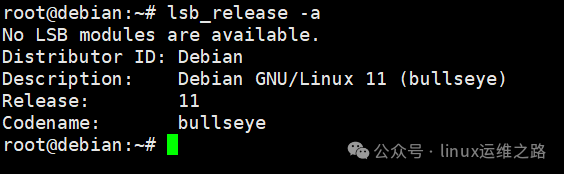
Some minimal systems may not have lsb_release pre-installed and need to be installed manually:
# RHEL/CentOS 7/8: yum install redhat-lsb-core (Note: not the lsb_release package) # Ubuntu/Debian: apt-get install lsb-release2. cat /etc/redhat-release: RHEL/CentOS Specific Command
For RedHat-based distributions (such as CentOS, RHEL, Fedora), the system stores the distribution information in the /etc/redhat-release file, which can be read directly to obtain the accurate version.
cat /etc/redhat-release
3. cat /etc/issue: Lightweight Distribution Information
/etc/issue is a text file that usually stores the prompt information before system login, which contains simplified distribution and kernel information, concise content that is supported by almost all Linux systems.
cat /etc/issue
4. cat /etc/os-release: Standard System Configuration File
/etc/os-release is the standard file for Systemd systems (the mainstream initialization system for modern Linux) used to define the operating system’s identification information, structured content that is easy for scripts to parse, supporting CentOS 7+, Ubuntu 16.04+, etc.
cat /etc/os-release
5. hostnamectl: Comprehensive Query Under Systemd
hostnamectl was originally used to manage hostnames but can also output system version information, requiring no additional installation and is directly available in Systemd systems.
hostnamectl
Advantages: Outputs distribution version, kernel version, system architecture, virtualization type, and other information simultaneously, providing a one-stop solution for multi-dimensional content.
4. Supplementary Commands: Query System Architecture (32-bit / 64-bit)
Some older production environments may still be using 32-bit systems. If new software needs to be installed, it is necessary to match the system architecture. The following two methods can quickly query:
1. getconf LONG_BIT: Directly Output Architecture
getconf LONG_BIT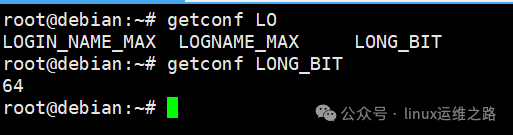
2. uname -m: Determine Architecture by Output, x86_64 or amd64: 64-bit system; i386, i686: 32-bit system.
uname -m
5. For convenience in daily use, here is a compilation of the optimal commands corresponding to different needs for direct reference:
Quickly check kernel version: Recommended uname -r, suitable for all Linux systems, can obtain the kernel version number in the simplest way.Check detailed kernel information (including compilation): Recommended cat /proc/version, suitable for all Linux systems, can obtain complete details such as kernel compiler and compiler version.Cross-distribution check for distribution version: Recommended lsb_release -a, supports the vast majority of distributions, requires prior installation of the corresponding package.RedHat/CentOS check for distribution version: Recommended cat /etc/redhat-release, exclusive command requiring no additional installation, accurate information.Check system architecture: Recommended getconf LONG_BIT or uname -m, the former directly outputs the architecture, the latter indirectly determines it through architecture, both suitable for all Linux systems.One-stop check for version + architecture + virtualization: Recommended hostnamectl, suitable for Systemd systems, can synchronously obtain multi-dimensional system information.
In daily use, uname -r (kernel), lsb_release -a (distribution), getconf LONG_BIT (architecture) are the most commonly used combinations, covering over 90% of scenarios. For Systemd systems, hostnamectl can obtain all key information in one step.
By mastering these commands, whether troubleshooting software compatibility, configuring software sources, or providing system information to technical support, you can do so more efficiently and accurately. Be sure to bookmark this article for easy access next time you need it, so you won’t have to ask Baidu again!