1. Introduction to JS Encryption
1. Instant Data Interaction
In previous articles, crawlers obtained the required response data by making one-time requests to web pages. This method can directly filter data using Xpath or JsonPath based on the type of data. However, if the data to be crawled requires instant interaction to obtain, it will involve JS encryption.
2. Advantages of Data Encryption
Using JavaScript to encrypt data on web pages can enhance data security and protect personal privacy.
-
Preventing Data Interception: Using JavaScript to encrypt data can protect the security of data during transmission, ensuring that data is not sniffed or intercepted. This is particularly important for websites containing sensitive information, such as login data or financial information.
-
Preventing Data Tampering: By encrypting the data being transmitted, it can prevent hackers or other attackers from attempting to tamper with web data or data during transmission.
-
Protecting Personal Privacy: Without encryption, individuals can easily access sensitive information by viewing the source code of the web page. Using JavaScript to encrypt data can protect data from access by suspicious individuals to some extent. Reducing DDoS Attacks: Using JavaScript to encrypt data can reduce the impact of DDoS attacks to some extent. This is because attackers find it difficult to determine whether the encrypted data is the data they need, making the attack more difficult.
In summary, using JavaScript to encrypt data can improve the security and privacy of websites, enhancing user trust and experience.
2. Code Debugging in Browsers
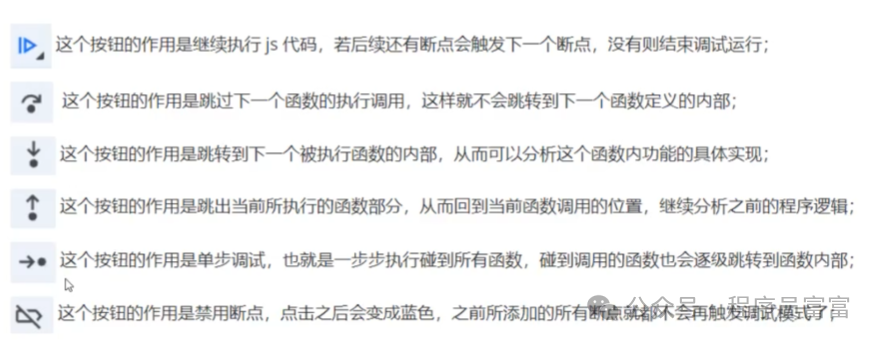
When the browser triggers a breakpoint and enters debug mode, you can control the subsequent execution flow of the JS code through the function buttons on the right side, allowing you to observe changes in parameters.
3. JS Reverse Engineering of Web Parameters
1. Web Login
-
Open the official website of Autohome and click the login button.
https://www.autohome.com.cn/
-
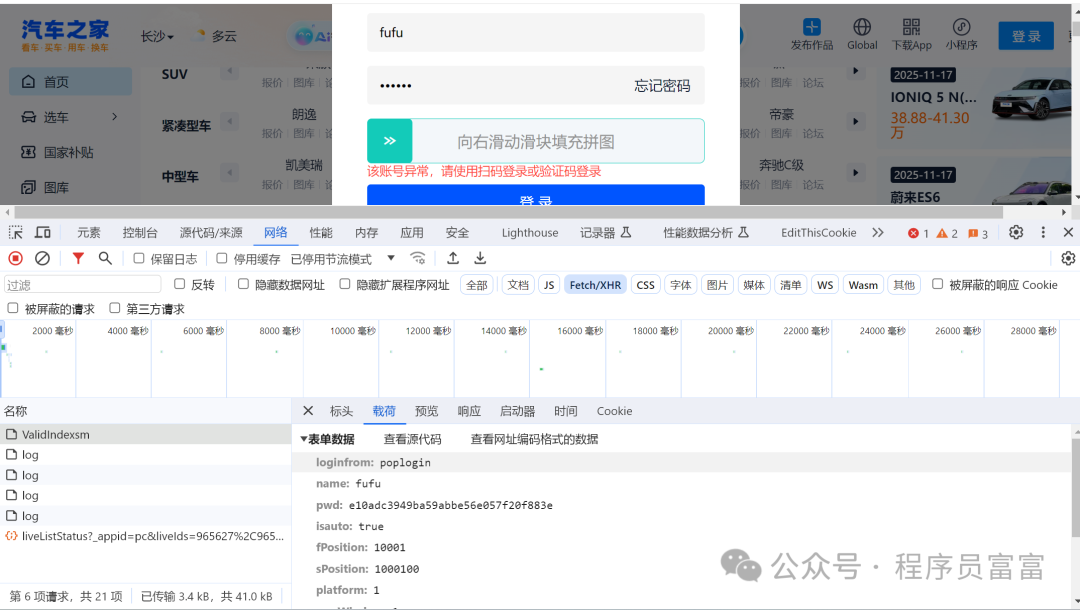
Check the password parameter in the login request.
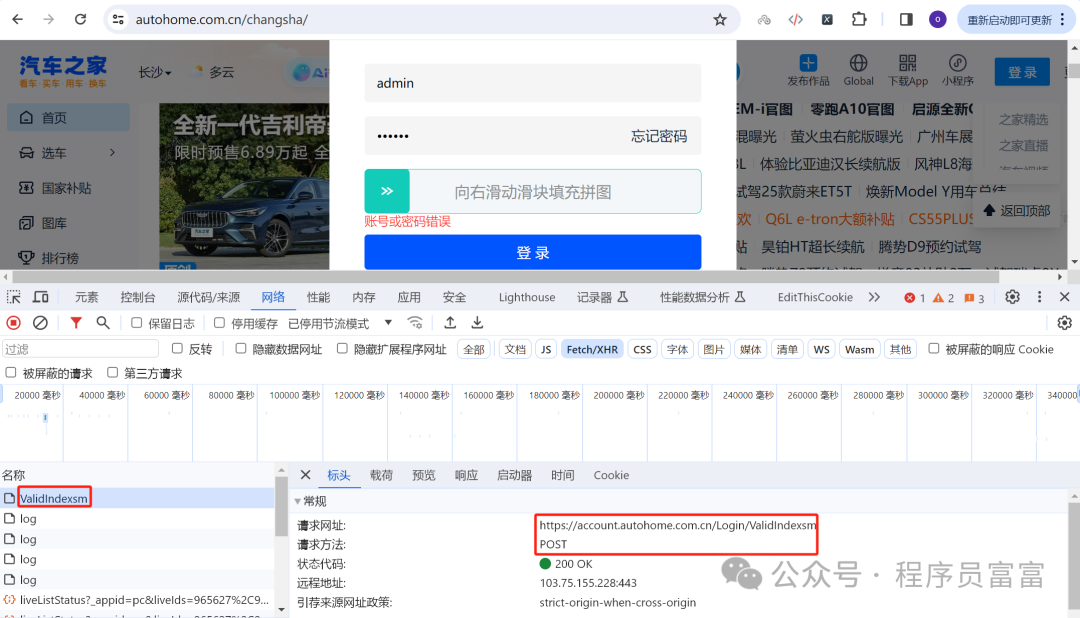
2. Finding the Login Data Packet
Send a request to the server with the account password to verify whether the account password is correct.
Generally, requests are JSON data, so check the XHR category.
3. Validating Data
-
In developer mode, open the Search function in the (..) options, then enter the pwd parameter in the Search box;
-
Click on the search result to jump to the source code location of the pwd parameter for analysis. If there are too many results, try searching for other parameters to reduce duplication;
-
After searching for the loginfrom parameter, only one result is found, which helps locate the source code location of the loginfrom parameter;
-
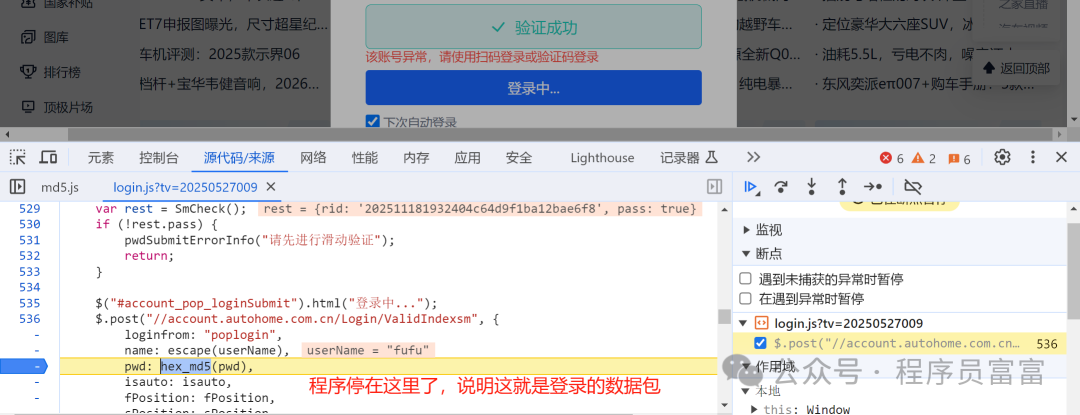
Analyze whether the current code has the generation part of the pwd parameter, and test whether the current parameter location is correct by adding breakpoints;
-
If the current position is the generation location of the pwd parameter, when the breakpoint is triggered and enters debug mode, hover the mouse cursor over the pwd parameter to view its content;
4. Completing the pwd Parameter Code
-
When the hex_md5 method’s content is copied to the login.js file and this method is called to run the code, an error “binl2hex is not defined” will appear;
-
Find the binl2hex method in the browser, jump to the definition of the binl2hex method, and copy this method to the front of the login.js file;
-
After running the code again, it prompts: “core_md5 is not defined”. Similarly, copy the core_md5 method to the front of the login.js file;
-
After running the code again, it prompts: “str2binl is not defined”. Similarly, copy the str2binl method to the front of the login.js file;
-
After running the code again, it prompts: “chrsz is not defined”. It is determined that chrsz is a variable, which can be defined directly in the login.js file;
-
After running the code again, it prompts: “md5_ff is not defined”. It is analyzed that this is a method and there are multiple calls similar to the md5_ff method;
-
Copy all the methods called like md5_f, md5_g, md5_h, md5_i to the front of the login.js file;
-
After running the code again, it prompts: “md5_cmn is not defined”. It is determined that this is a method that is dependent on the methods like md5_ff, and similarly copy and complete it;
-
After running the code again, it prompts: “safe_add is not defined”. This is a method that the md5_cmn method depends on, continue to copy and complete this method;
-
After running the code again, it prompts: “hexcase is not defined”. It is determined that hexcase is a variable, which can be defined directly in the login.js file.
/** * @author FuFu * @createTime 2025-11-18 */
var chrsz = 8;
var hexcase = 0;
function str2binl(str) {    var bin = Array();    var mask = (1 << chrsz) - 1;    for (var i = 0; i < str.length * chrsz; i += chrsz)        bin[i >> 5] |= (str.charCodeAt(i / chrsz) & mask) << (i % 32);    return bin;}
function safe_add(x, y) {    var lsw = (x & 0xFFFF) + (y & 0xFFFF);    var msw = (x >> 16) + (y >> 16) + (lsw >> 16);    return (msw << 16) | (lsw & 0xFFFF);}
function bit_rol(num, cnt) {    return (num << cnt) | (num >>> (32 - cnt));}
function md5_cmn(q, a, b, x, s, t) {    return safe_add(bit_rol(safe_add(safe_add(a, q), safe_add(x, t)), s), b);}
function md5_ff(a, b, c, d, x, s, t) {    return md5_cmn((b & c) | ((~b) & d), a, b, x, s, t);}
function md5_gg(a, b, c, d, x, s, t) {    return md5_cmn((b & d) | (c & (~d)), a, b, x, s, t);}
function md5_hh(a, b, c, d, x, s, t) {    return md5_cmn(b ^ c ^ d, a, b, x, s, t);}
function md5_ii(a, b, c, d, x, s, t) {    return md5_cmn(c ^ (b | (~d)), a, b, x, s, t);}
function core_md5(x, len) {    /* append padding */    x[len >> 5] |= 0x80 << ((len) % 32);    x[(((len + 64) >>> 9) << 4) + 14] = len;    var a = 1732584193;    var b = -271733879;    var c = -1732584194;    var d = 271733878;    for (var i = 0; i < x.length; i += 16) {        var olda = a;        var oldb = b;        var oldc = c;        var oldd = d;        a = md5_ff(a, b, c, d, x[i + 0], 7, -680876936);        d = md5_ff(d, a, b, c, x[i + 1], 12, -389564586);        c = md5_ff(c, d, a, b, x[i + 2], 17, 606105819);        b = md5_ff(b, c, d, a, x[i + 3], 22, -1044525330);        a = md5_ff(a, b, c, d, x[i + 4], 7, -176418897);        d = md5_ff(d, a, b, c, x[i + 5], 12, 1200080426);        c = md5_ff(c, d, a, b, x[i + 6], 17, -1473231341);        b = md5_ff(b, c, d, a, x[i + 7], 22, -45705983);        a = md5_ff(a, b, c, d, x[i + 8], 7, 1770035416);        d = md5_ff(d, a, b, c, x[i + 9], 12, -1958414417);        c = md5_ff(c, d, a, b, x[i + 10], 17, -42063);        b = md5_ff(b, c, d, a, x[i + 11], 22, -1990404162);        a = md5_ff(a, b, c, d, x[i + 12], 7, 1804603682);        d = md5_ff(d, a, b, c, x[i + 13], 12, -40341101);        c = md5_ff(c, d, a, b, x[i + 14], 17, -1502002290);        b = md5_ff(b, c, d, a, x[i + 15], 22, 1236535329);        a = md5_gg(a, b, c, d, x[i + 1], 5, -165796510);        d = md5_gg(d, a, b, c, x[i + 6], 9, -1069501632);        c = md5_gg(c, d, a, b, x[i + 11], 14, 643717713);        b = md5_gg(b, c, d, a, x[i + 0], 20, -373897302);        a = md5_gg(a, b, c, d, x[i + 5], 5, -701558691);        d = md5_gg(d, a, b, c, x[i + 10], 9, 38016083);        c = md5_gg(c, d, a, b, x[i + 15], 14, -660478335);        b = md5_gg(b, c, d, a, x[i + 4], 20, -405537848);        a = md5_gg(a, b, c, d, x[i + 9], 5, 568446438);        d = md5_gg(d, a, b, c, x[i + 14], 9, -1019803690);        c = md5_gg(c, d, a, b, x[i + 3], 14, -187363961);        b = md5_gg(b, c, d, a, x[i + 8], 20, 1163531501);        a = md5_gg(a, b, c, d, x[i + 13], 5, -1444681467);        d = md5_gg(d, a, b, c, x[i + 2], 9, -51403784);        c = md5_gg(c, d, a, b, x[i + 7], 14, 1735328473);        b = md5_gg(b, c, d, a, x[i + 12], 20, -1926607734);        a = md5_hh(a, b, c, d, x[i + 5], 4, -378558);        d = md5_hh(d, a, b, c, x[i + 8], 11, -2022574463);        c = md5_hh(c, d, a, b, x[i + 11], 16, 1839030562);        b = md5_hh(b, c, d, a, x[i + 14], 23, -35309556);        a = md5_hh(a, b, c, d, x[i + 1], 4, -1530992060);        d = md5_hh(d, a, b, c, x[i + 4], 11, 1272893353);        c = md5_hh(c, d, a, b, x[i + 7], 16, -155497632);        b = md5_hh(b, c, d, a, x[i + 10], 23, -1094730640);        a = md5_hh(a, b, c, d, x[i + 13], 4, 681279174);        d = md5_hh(d, a, b, c, x[i + 0], 11, -358537222);        c = md5_hh(c, d, a, b, x[i + 3], 16, -722521979);        b = md5_hh(b, c, d, a, x[i + 6], 23, 76029189);        a = md5_hh(a, b, c, d, x[i + 9], 4, -640364487);        d = md5_hh(d, a, b, c, x[i + 12], 11, -421815835);        c = md5_hh(c, d, a, b, x[i + 15], 16, 530742520);        b = md5_hh(b, c, d, a, x[i + 2], 23, -995338651);        a = md5_ii(a, b, c, d, x[i + 0], 6, -198630844);        d = md5_ii(d, a, b, c, x[i + 7], 10, 1126891415);        c = md5_ii(c, d, a, b, x[i + 14], 15, -1416354905);        b = md5_ii(b, c, d, a, x[i + 5], 21, -57434055);        a = md5_ii(a, b, c, d, x[i + 12], 6, 1700485571);        d = md5_ii(d, a, b, c, x[i + 3], 10, -1894986606);        c = md5_ii(c, d, a, b, x[i + 10], 15, -1051523);        b = md5_ii(b, c, d, a, x[i + 1], 21, -2054922799);        a = md5_ii(a, b, c, d, x[i + 8], 6, 1873313359);        d = md5_ii(d, a, b, c, x[i + 15], 10, -30611744);        c = md5_ii(c, d, a, b, x[i + 6], 15, -1560198380);        b = md5_ii(b, c, d, a, x[i + 13], 21, 1309151649);        a = md5_ii(a, b, c, d, x[i + 4], 6, -145523070);        d = md5_ii(d, a, b, c, x[i + 11], 10, -1120210379);        c = md5_ii(c, d, a, b, x[i + 2], 15, 718787259);        b = md5_ii(b, c, d, a, x[i + 9], 21, -343485551);        a = safe_add(a, olda);        b = safe_add(b, oldb);        c = safe_add(c, oldc);        d = safe_add(d, oldd);    }    return Array(a, b, c, d);}
function binl2hex(binarray) {    var hex_tab = hexcase ? "0123456789ABCDEF" : "0123456789abcdef";    var str = "";    for (var i = 0; i < binarray.length * 4; i++) {        str += hex_tab.charAt((binarray[i >> 2] >> ((i % 4) * 8 + 4)) & 0xF) +            hex_tab.charAt((binarray[i >> 2] >> ((i % 4) * 8)) & 0xF);    }    return str;}
function hex_md5(s) {    return binl2hex(core_md5(str2binl(s), s.length * chrsz));}
var hexMd5 = hex_md5("123456");
console.log(hexMd5) // e10adc3949ba59abbe56e057f20f883e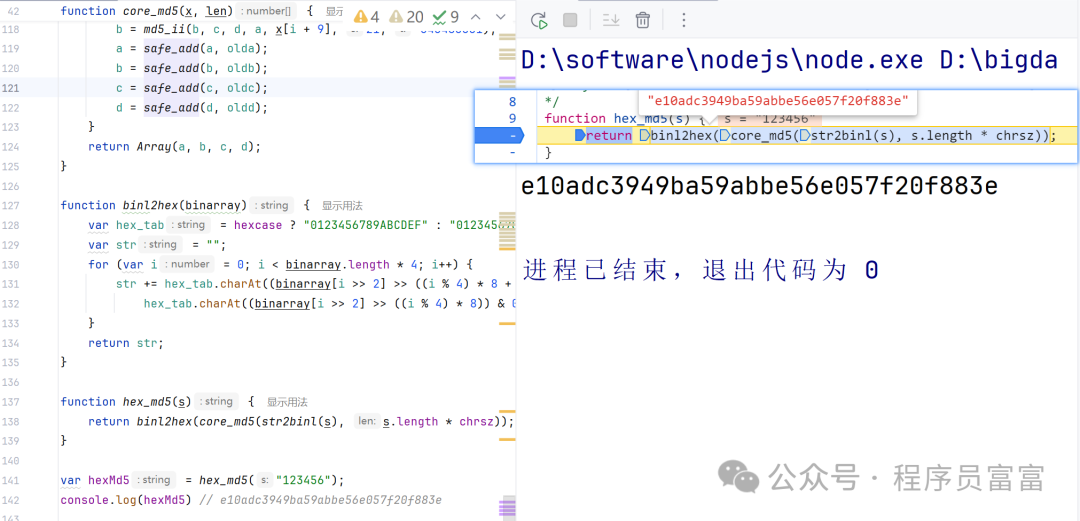
4. Local Invocation of JS Code
1. Install Node.js Interpreter
To run JS file code, you need to install the Node.js interpreter, and then check the configuration of the Node.js interpreter path in PyCharm.Official download link:https://nodejs.org/en/download/
-
Install the Node.js interpreter using the installation package.
-
After installation, enter the node command in the cmd window.
-
If the following prompt appears, it indicates that the installation was successful.
C:\Users\okk>node
Welcome to Node.js v20.18.1.
Type ".help" for more information.
>
2. Install pyexecjs Library
After configuring the Node.js environment, you also need to install the PyExecJS third-party library in the Python interpreter to enable interaction between Python and JS code.PyExecJS is a Python library that provides a way to execute JavaScript in Python without configuring and managing the JavaScript runtime environment. PyExecJS can pass JavaScript runtime through text, and its speed is relatively slow. Additionally, it does not fully support runtime-specific features.
pip install PyExecJS# -*- coding: utf-8 -*-
# @Time : 2025/11/18
# @Author : FuFu
import execjs
# Use file read and write to get the code inside the js file
with open('day11_1.js', 'r', encoding='utf-8') as f: js_data = f.read()
# Use compile function to convert js code to js object
js_obj = execjs.compile(js_data)
# Use js object to call functions in js code
data = js_obj.call('hex_md5', "123456")
print(data) # e10adc3949ba59abbe56e057f20f883e