This article is based on a thorough review of relevant authoritative literature and materials, forming a professional and reliable content. All data in the article is verifiable and traceable. Special note: The data and materials have been authorized. The content of this article does not involve any biased views and objectively describes the facts with a neutral attitude.
At the end of the article, there are the latest trending articles; feel free to check them out if interested.
Continuously updated: Modern C++ Efficient Programming Practical Manual: From Project Pain Points to the Essence of Modern C++
Hands-on Learning CUDA Programming
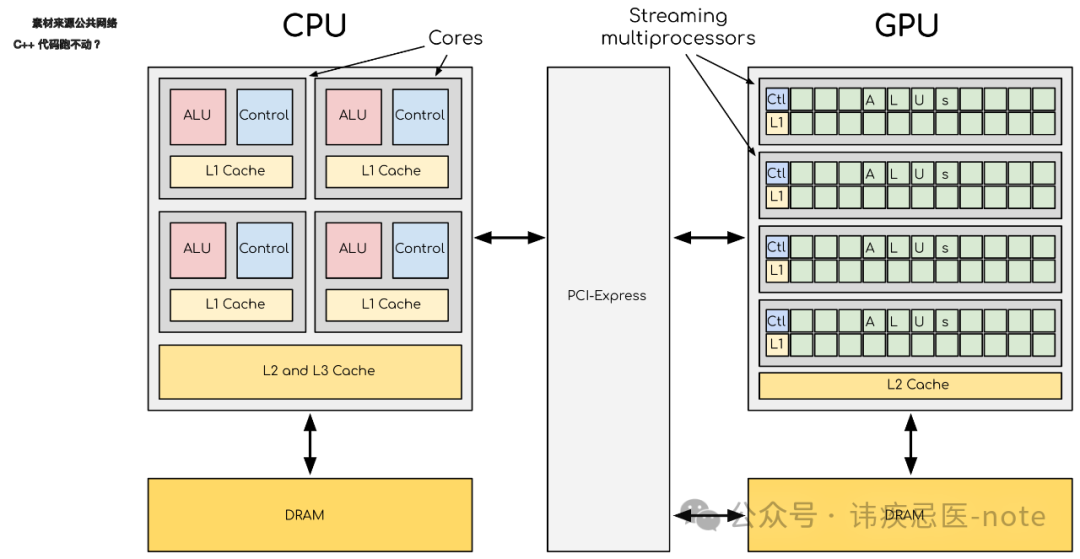
SIMD, which stands for Single Instruction, Multiple Data, translates to “single instruction multiple data”. It sounds a bit academic, but it’s actually quite easy to understand: it allows the CPU to operate on multiple data points simultaneously with a single instruction. Imagine boiling water; the traditional method is to boil one kettle at a time, but with SIMD? You can boil four, five, or even more at once! In C++, this technology is implemented using the CPU’s special instruction sets, such as Intel’s SSE (Streaming SIMD Extensions) and AVX (Advanced Vector Extensions), which are standard for the x86 architecture.
Why can SIMD speed up programs? Because it utilizes data parallelism. For tasks like image processing and audio decoding, the operations are repetitive (adding a value to each pixel, multiplying each sample point by a coefficient). The traditional method has the CPU calculate one by one, while SIMD processes them in a “packed” manner, doubling the efficiency. To put it simply: scalar processing is like one person doing the work, while SIMD is like gathering a team to work together, making the job much faster!
How does SIMD work? A Deep Dive
The core of SIMD is wide registers and parallel instructions. A regular CPU register (like the 32-bit EAX) can only hold one number at a time, while SIMD uses super-wide registers. For example, the SSE’s XMM register is 128 bits wide, capable of holding 4 32-bit floating-point numbers or 16 8-bit integers; the AVX’s YMM register is even more impressive at 256 bits wide, able to store 8 floating-point numbers. These registers are like “super-sized trucks” that can carry a bunch of data at once and then process it using SIMD instructions (like addition and multiplication) uniformly.
For example, if you want to add 10 to four numbers, the traditional method would require four addition instructions, while SIMD only needs one instruction to handle all four numbers simultaneously. This is supported by the CPU’s hardware, and C++ programmers can call these functions through Intrinsic functions (essentially encapsulated assembly instructions), such as <span>_mm_add_ps</span> (for adding floating-point numbers) and <span>_mm_adds_epu8</span> (for adding unsigned integers with overflow protection).
Hardcore Case: Comparing SIMD and Non-SIMD with Code
Enough talk, let’s dive into the code and see how powerful SIMD really is. Suppose we want to process a grayscale image (where each pixel is an integer from 0-255) and the task is to increase the brightness of all pixels by 10. The scenario is simple, but as the data volume increases, the performance difference becomes apparent.
Version 1: Honest Scalar Processing
#include <iostream>
#include <vector>
#include <chrono>

void adjustBrightnessScalar(std::vector<uint8_t>& image, int adjustment) {
    for (size_t i = 0; i < image.size(); ++i) {
        int newValue = static_cast<int>(image[i]) + adjustment;
        image[i] = (newValue > 255) ? 255 : (newValue < 0) ? 0 : newValue; // Prevent overflow
    }
}

int main() {
    const size_t imageSize = 10'000'000; // 10 million pixels
    std::vector<uint8_t> image(imageSize, 100); // Initial value 100

    auto start = std::chrono::high_resolution_clock::now();
    adjustBrightnessScalar(image, 10);
    auto end = std::chrono::high_resolution_clock::now();

    std::chrono::duration<double> elapsed = end - start;
    std::cout << "Scalar processing time: " << elapsed.count() << " seconds\n";
    return 0;
}
Code Analysis:
- It loops through each pixel one by one.
- Each time it adds 10 and manually checks for overflow (not exceeding 255 or going below 0).
- Simple and easy to understand, but inefficient, putting a lot of strain on the CPU.
Version 2: Parallel Processing with SIMD (Using SSE)
#include <iostream>
#include <vector>
#include <chrono>
#include <immintrin.h> // SSE header file

void adjustBrightnessSIMD(std::vector<uint8_t>& image, int adjustment) {
    const size_t vecSize = 16; // SSE processes 16 bytes at a time
    size_t i = 0;
    __m128i adj = _mm_set1_epi8(adjustment); // Broadcast adjustment value to 16 positions

    // Main loop: process in 16-byte blocks
    for (; i + vecSize <= image.size(); i += vecSize) {
        __m128i pixels = _mm_loadu_si128(reinterpret_cast<const __m128i*>(&image[i])); // Load 16 pixels
        __m128i result = _mm_adds_epu8(pixels, adj); // Saturated addition, automatically prevents overflow
        _mm_storeu_si128(reinterpret_cast<__m128i*>(&image[i]), result); // Write back result
    }

    // Handle remaining pixels that are less than 16
    for (; i < image.size(); ++i) {
        int newValue = static_cast<int>(image[i]) + adjustment;
        image[i] = (newValue > 255) ? 255 : (newValue < 0) ? 0 : newValue;
    }
}

int main() {
    const size_t imageSize = 10'000'000; // 10 million pixels
    std::vector<uint8_t> image(imageSize, 100); // Initial value 100

    auto start = std::chrono::high_resolution_clock::now();
    adjustBrightnessSIMD(image, 10);
    auto end = std::chrono::high_resolution_clock::now();

    std::chrono::duration<double> elapsed = end - start;
    std::cout << "SIMD processing time: " << elapsed.count() << " seconds\n";
    return 0;
}
Code Analysis:
- Loading:
<span>_mm_loadu_si128</span>reads 16 pixels into the XMM register at once. - Calculating:
<span>_mm_adds_epu8</span>performs parallel addition with saturation (automatically limits to 0-255). - Storing:
<span>_mm_storeu_si128</span>writes the result back to memory. - Handling the Remainder: The remaining pixels that are less than 16 are processed using scalar methods to ensure none are missed.
Performance Comparison (my test results, i7-9700K, Release mode):
- Scalar version: 0.015 seconds
- SIMD version: 0.004 seconds SIMD is nearly 4 times faster! If using AVX (256-bit registers), it could be even faster. This is the power of parallel computing!
In-Depth Analysis: Why is SIMD So Fast?
- Reduced Instruction Count: The scalar version loops 10 million times, while the SIMD version only loops 625,000 times (10 million ÷ 16).
- Hardware Parallelism: The CPU has dedicated SIMD execution units that can handle 16 tasks at once.
- Memory Efficiency: Continuous loading and storing lead to higher cache hit rates.
However, SIMD is not a panacea:
- Applicable Scenarios: It must be data-parallel tasks; it won’t help with serial logic.
- Code Complexity: Writing SIMD code is more complicated than scalar; you need to consider alignment and boundary handling.
My stance is: the value of SIMD lies in its “precision strike”; don’t misuse it, but when used correctly, it can significantly boost performance.
How to Use SIMD in C++? Expert Tips
- Header File:
<span><immintrin.h></span>, includes support for all Intel instruction sets. - Intrinsic Functions: For example,
<span>_mm_loadu_si128</span>(loading),<span>_mm_adds_epu8</span>(addition), check the Intel Intrinsics Guide directly. - Memory Alignment: SSE prefers data aligned to 16 bytes; using
<span>_mm_load_si128</span>is faster, but<span>std::vector</span>is not aligned by default, so the<span>u</span>version (unaligned) is more universal. - Debugging Tips: Printing SIMD register contents with
<span>cout</span>is cumbersome; it’s recommended to step through and check memory.
Learning Path:
- Start with SSE; 128 bits is simple enough;
- Then learn AVX; 256 bits is more powerful;
- Finally, try AVX-512 (if hardware supports it), which is the ultimate weapon.
SIMD is Not Just a Technology, But a Mindset Upgrade
Understanding SIMD is not just about learning a few instructions, but about adopting a “parallel thinking” approach. Modern CPUs have immense performance potential, but it requires you to tap into it. Don’t settle for “it runs”; try to optimize your code to the extreme with SIMD! I bet that when you see SIMD cut the processing time in half, the sense of achievement will be overwhelming. Don’t hesitate, give it a try, and make your programs run as fast as the wind!
References:
- Intel® 64 and IA-32 Architectures Software Developer’s Manual
- Agner Fog, “Optimizing software in C++”
- Michael Abrash, “Zen of Assembly Language”
Latest Popular Articles Recommended:
Frequent Object Creation in High-Concurrency Scenarios? C++ Object Pool’s Underlying Logic for Performance Improvement!
Senior C++ Engineer’s Secrets: 10 Key Details of High-Performance Memory Pool Implementation
Is Writing a Redis Server in C++ Too Difficult? This Project Takes You from Zero to Full Implementation
Confused by C++ Thread Pool Interview Questions? This Comprehensive Tutorial Helps You Understand the Principles + Practice (with Code)
Real-Time Video Voice Chat Room Based on C++11
The Road to C++ Developer’s Comeback: Most High-Paying Positions Are Looking for CUDA Talent, Are You Still Hesitating?
From CUDA Novice to Expert: How I Optimized Complex Computational Tasks with Thread-Level Optimization
Struggling with File Operations in C++ Project Development? This Article is Enough!
Tired of the Complexity of Multi-Language Processing in C++? This Article Helps You Master Advanced Techniques Easily!
Old Binary Operations Inefficient? C++23 New Features Teach You to Redefine Efficient I/O!
Still Troubled by Time Handling in Old Projects? C++20/23 New Features Come to the Rescue!
#CPU#SIMD#Performance Improvement#CPU Instructions#Must-Know for Programmers#Must-Know for Interviews#Advanced Learning