Effect
Library Introduction
1. <span>tkinter</span> Library
- Function:
<span>tkinter</span>is the standard GUI library that comes with Python, acting like a magical interface designer. In the project of batch scraping Douban Movie Top 250 information, it helps us create a visual interface that allows users to easily start the scraping task and display the scraped movie information, making the entire operation process intuitive and convenient. - Applicable Scenarios: Widely used for developing various desktop applications, such as small tools, data display software, etc. Since it is a standard library of Python, it is included when Python is installed, requiring no additional installation.
- Installation Command: No installation is required, as it comes with Python.
2. <span>requests</span> Library
- Function:
<span>requests</span>is a powerful and easy-to-use HTTP library, acting like a network courier. When scraping Douban movie information, it helps us send requests to the Douban movie webpage to obtain the HTML content of the page, providing a basis for subsequent information extraction. - Applicable Scenarios: Commonly used in web scraping, API calls, etc. Whenever data interaction with the network is involved, it can perform excellently.
- Installation Command: Install using
<span>pip</span>, the command is as follows:
pip install requests
3. <span>BeautifulSoup</span> Library
- Function:
<span>BeautifulSoup</span>is a library for parsing HTML and XML documents, acting like a super information detective. When we obtain the HTML content of the Douban movie webpage, it helps us extract the required movie ranking, name, and rating from this complex code. - Applicable Scenarios: Suitable for web data extraction, web parsing, etc., allowing us to easily find the required data from HTML documents.
- Installation Command: Install using
<span>pip</span>, the command is as follows:
pip install beautifulsoup4
Code Example
import tkinter as tk
import requests
from bs4 import BeautifulSoup
import threading

def fetch_movies():
    all_movies = []
    for start in range(0, 250, 25):
        url = f'https://movie.douban.com/top250?start={start}'
        headers = {
            'User - Agent': 'Mozilla/5.0 (Windows NT 10.0; Win64; x64) AppleWebKit/537.36 (KHTML, like Gecko) Chrome/58.0.3029.110 Safari/537.3'}
        try:
            response = requests.get(url, headers=headers)
            response.raise_for_status()
            soup = BeautifulSoup(response.text, 'html.parser')
            items = soup.find_all('div', class_='item')
            for item in items:
                rank = item.find('em').text
                title = item.find('span', class_='title').text
                rating = item.find('span', class_='rating_num').text
                all_movies.append((rank, title, rating))
        except requests.RequestException as e:
            result_text.insert(tk.END, f"Request error: {e}\n")
        except Exception as e:
            result_text.insert(tk.END, f"An unknown error occurred: {e}\n")
    result_text.delete(1.0, tk.END)
    for rank, title, rating in all_movies:
        result_text.insert(tk.END, f"Ranking: {rank}, Name: {title}, Rating: {rating}\n")

def start_fetching():
    thread = threading.Thread(target=fetch_movies)
    thread.daemon = True
    thread.start()

# Create main window
root = tk.Tk()
root.title("Douban Movie Top 250 Information Scraper")

# Create start button
start_button = tk.Button(root, text="Start Scraping", command=start_fetching)
start_button.pack(pady=20)

# Create text box to display results
result_text = tk.Text(root, width=60, height=30)
result_text.pack(pady=10)

# Run main loop
root.mainloop()
Introduction
Hello, movie enthusiasts and programming aficionados! Welcome to the wonderful world of uncovering Douban Movie Top 250 information! In this tool, you act like a super movie informant; just click the “Start Scraping” button, and the program will work like a diligent little bee, pulling out the ranking, name, and rating information of the Douban Movie Top 250 and displaying it on the interface. Come and see which classic movies made the list!
Code Explanation
1. Import Necessary Libraries
import tkinter as tk
import requests
from bs4 import BeautifulSoup
import threading
- Function: Imports four key libraries.
<span>tkinter</span>is used to create a graphical user interface, allowing users to interact with the program conveniently;<span>requests</span>is used to send HTTP requests to the Douban movie webpage to obtain the content;<span>BeautifulSoup</span>is used to parse HTML content and extract the required movie information;<span>threading</span>is used to run the scraping task in a separate thread to avoid blocking the Tkinter main loop. - Logic: Prepares the necessary tools for subsequent scraping and interface display.
- Syntax: Uses
<span>import</span>statements to import libraries, and<span>from...import</span>statements to import specific classes or functions from libraries.
2. Define the Function to Scrape Movie Information
def fetch_movies():
    all_movies = []
    for start in range(0, 250, 25):
        url = f'https://movie.douban.com/top250?start={start}'
        headers = {
            'User - Agent': 'Mozilla/5.0 (Windows NT 10.0; Win64; x64) AppleWebKit/537.36 (KHTML, like Gecko) Chrome/58.0.3029.110 Safari/537.3'}
        try:
            response = requests.get(url, headers=headers)
            response.raise_for_status()
            soup = BeautifulSoup(response.text, 'html.parser')
            items = soup.find_all('div', class_='item')
            for item in items:
                rank = item.find('em').text
                title = item.find('span', class_='title').text
                rating = item.find('span', class_='rating_num').text
                all_movies.append((rank, title, rating))
        except requests.RequestException as e:
            result_text.insert(tk.END, f"Request error: {e}\n")
        except Exception as e:
            result_text.insert(tk.END, f"An unknown error occurred: {e}\n")
    result_text.delete(1.0, tk.END)
    for rank, title, rating in all_movies:
        result_text.insert(tk.END, f"Ranking: {rank}, Name: {title}, Rating: {rating}\n")
- Function: This function is the core of the entire scraping process. It loops through each page of the Douban Movie Top 250 (25 records per page), constructs the corresponding URL, and sends requests. It uses
<span>BeautifulSoup</span>to parse the HTML content of the response, finds each movie’s information item, extracts the ranking, name, and rating, and stores this information in the<span>all_movies</span>list. If an error occurs during the request process, it captures the corresponding exception and displays the error message. Finally, it displays all extracted movie information in the text box. - Logic: Loops through each page, sends requests, parses content, extracts information, stores information, handles exceptions, and displays results.
- Syntax:
<span>requests.get()</span>sends an HTTP request,<span>response.raise_for_status()</span>checks if the request was successful,<span>BeautifulSoup()</span>parses HTML,<span>soup.find_all()</span>and<span>soup.find()</span>find HTML elements,<span>result_text.delete()</span>and<span>result_text.insert()</span>manipulate the text box content,<span>try-except</span>statements capture exceptions, and<span>for</span>loops iterate over ranges and lists.
3. Define the Function to Start the Scraping Task
def start_fetching():
    thread = threading.Thread(target=fetch_movies)
    thread.daemon = True
    thread.start()
- Function: This function is used to start the scraping task. It creates a new thread
<span>thread</span>, setting the<span>fetch_movies()</span>function as the target function of the thread. It sets the thread as a daemon thread to ensure that it exits normally when the main program exits. Finally, it starts the thread to begin executing the scraping task. - Logic: Starts the scraping task in a separate thread to avoid blocking the Tkinter main loop.
- Syntax:
<span>threading.Thread()</span>creates a thread,<span>thread.daemon</span>sets the thread as a daemon thread, and<span>thread.start()</span>starts the thread.
4. Create the Main Window and Set the Title
# Create main window
root = tk.Tk()
root.title("Douban Movie Top 250 Information Scraper")
- Function: Uses
<span>tk.Tk()</span>to create the main window, which is the basic container for the entire graphical interface. Then, it uses the<span>root.title()</span>method to set the window title, making it clear to users that this is a tool for scraping Douban Movie Top 250 information. - Logic: Creates the main window and gives it an appropriate title, preparing for adding interface elements later.
- Syntax:
<span>tk.Tk()</span>creates the main window, and<span>root.title()</span>sets the window title.
5. Create the Start Button and Text Box
# Create start button
start_button = tk.Button(root, text="Start Scraping", command=start_fetching)
start_button.pack(pady=20)

# Create text box to display results
result_text = tk.Text(root, width=60, height=30)
result_text.pack(pady=10)
- Function: Creates a button
<span>start_button</span>with the text “Start Scraping”; clicking the button will call the<span>start_fetching()</span>function to start the scraping task. It uses the<span>pack()</span>method to display the button in the window and set vertical spacing. It creates a text box<span>result_text</span>to display the scraped movie information, also using the<span>pack()</span>method for layout. - Logic: Provides a button to start the scraping task and a text box to display results.
- Syntax:
<span>tk.Button()</span>creates a button,<span>tk.Text()</span>creates a text box, and<span>pack()</span>method is used for layout.
6. Run the Main Loop
# Run main loop
root.mainloop()
- Function: Calls
<span>root.mainloop()</span>to start the Tkinter main window’s event loop, keeping the window displayed and continuously listening for user actions, such as button clicks. - Logic: Enters the main loop waiting for user actions, ensuring the program can respond to user interactions properly.
- Syntax:
<span>root.mainloop()</span>starts the main loop.
Project Knowledge Points and Goals
Knowledge Points
<span>tkinter</span>Library Usage: Master the use of<span>tkinter</span>to create main windows, buttons, text boxes, and other interface elements, as well as using layout managers for interface layout and handling button click events.<span>requests</span>Library Usage: Learn to use the<span>requests.get()</span>method to send HTTP requests, set request headers, and handle exceptions during the request process.<span>BeautifulSoup</span>Library Usage: Understand how to use<span>BeautifulSoup</span>to parse HTML content, find HTML elements, and extract the required information.- Multithreading Programming: Understand and use the
<span>threading</span>module to run tasks in separate threads, avoiding blocking the Tkinter main loop. - Exception Handling: Master the use of
<span>try-except</span>statements to capture and handle exceptions that may occur during program execution. - Function Definition and Calling: Be able to define functions that encapsulate specific functionalities and call them when needed.
Goals
- Implement Batch Scraping of Douban Movie Top 250 Information: Users can start the scraping task through the graphical interface, and the program can automatically scrape the ranking, name, and rating information of the Douban Movie Top 250 and display the results on the interface.
- Learn and Practice Python Programming: Through this project, deepen the understanding and mastery of the Python language and the
<span>tkinter</span>,<span>requests</span>,<span>BeautifulSoup</span>, and<span>threading</span>libraries, enhancing programming skills, especially in web scraping and graphical user interface development.
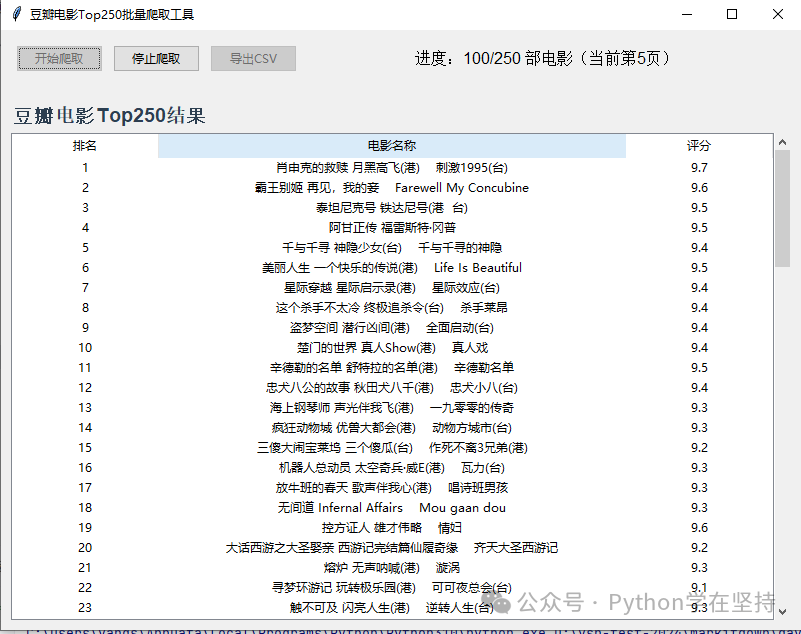
Here is a batch scraping tool for Douban Movie Top 250, combining tkinter graphical interface + requests + BeautifulSoup, supporting visual initiation of scraping, real-time display of progress, result table display, and export to CSV file, with an intuitive interface and complete functionality:
Core Functions
- Batch scrape Douban Top 250 movies’ “Ranking”, “Movie Name”, “Rating”
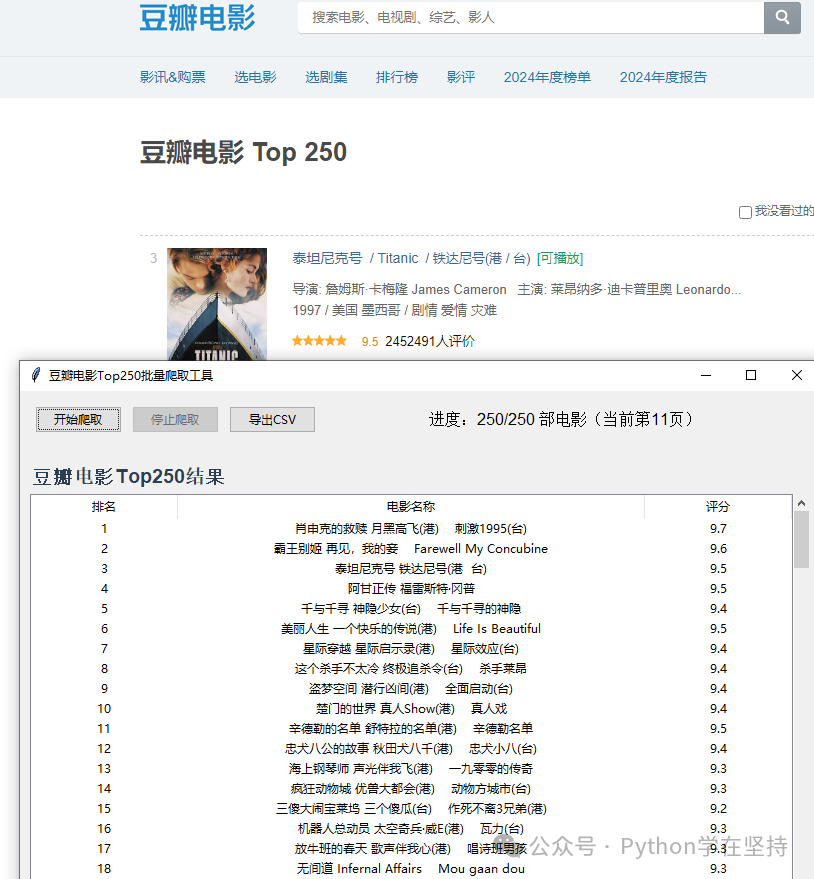
- Real-time display of scraping progress (current page number, number of movies scraped)
- Display scraping results in a table (supports scrolling view)
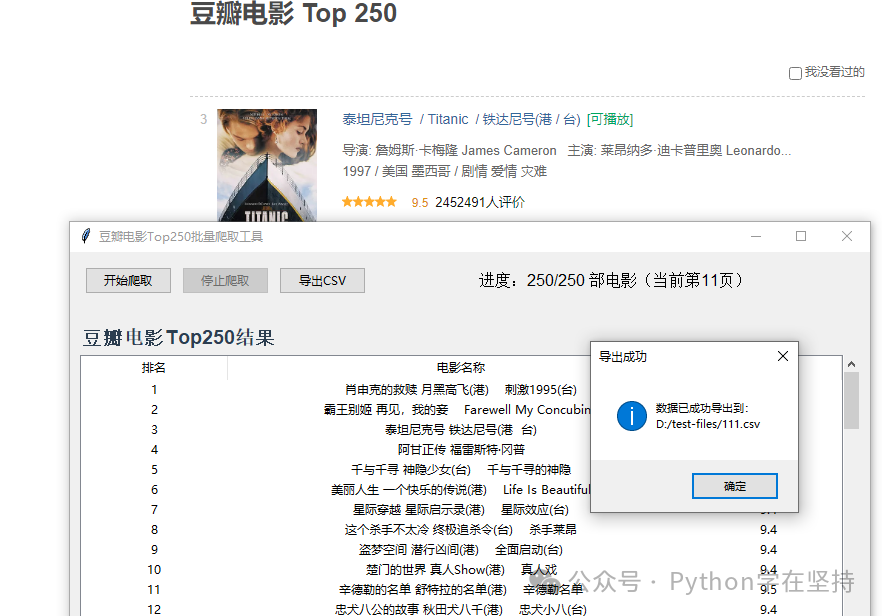
- Support exporting results to CSV file (for subsequent analysis)
- Exception handling (network errors, scraping failure prompts)
- Anti-scraping optimization (disguising browser request headers, reasonable delays)
Complete Code
import tkinter as tk
from tkinter import ttk, messagebox, filedialog
import requests
from bs4 import BeautifulSoup
import threading
import time
import csv
from typing import List, Dict

class DoubanTop250Crawler(tk.Tk):
    def __init__(self):
        super().__init__()
        self.title("Douban Movie Top 250 Batch Scraping Tool")
        self.geometry("800x600")
        self.resizable(True, True)

        # Scraping configuration
        self.base_url = "https://movie.douban.com/top250"
        self.headers = {
            "User-Agent": "Mozilla/5.0 (Windows NT 10.0; Win64; x64) AppleWebKit/537.36 \
                          (KHTML, like Gecko) Chrome/120.0.0.0 Safari/537.36",
            "Accept": "text/html,application/xhtml+xml,application/xml;q=0.9,*/*;q=0.8",
            "Accept-Language": "zh-CN,zh;q=0.9,en;q=0.8",
            "Referer": "https://www.douban.com/"
        }
        self.total_pages = 10  # Douban Top 250 has 10 pages (25 items/page)
        self.crawled_count = 0  # Number of movies scraped
        self.movie_data = []  # Store scraping results
        self.crawl_running = False  # Scraping status

        # Create GUI components
        self.create_widgets()

    def create_widgets(self):
        # 1. Control area (scraping button + progress display)
        control_frame = ttk.Frame(self, padding="10")
        control_frame.pack(fill=tk.X, side=tk.TOP)

        # Scraping button
        self.crawl_btn = ttk.Button(
            control_frame, text="Start Scraping", command=self.start_crawl, style="Accent.TButton"
        )
        self.crawl_btn.grid(row=0, column=0, padx=5, pady=5)

        # Stop button (initially disabled)
        self.stop_btn = ttk.Button(
            control_frame, text="Stop Scraping", command=self.stop_crawl, state=tk.DISABLED
        )
        self.stop_btn.grid(row=0, column=1, padx=5, pady=5)

        # Export CSV button (initially disabled)
        self.export_btn = ttk.Button(
            control_frame, text="Export to CSV", command=self.export_to_csv, state=tk.DISABLED
        )
        self.export_btn.grid(row=0, column=2, padx=5, pady=5)

        # Progress display label
        self.progress_label = ttk.Label(
            control_frame, text="Progress: 0/250 movies", font=("Arial", 12)
        )
        self.progress_label.grid(row=0, column=3, padx=20, pady=5)

        # Make the progress label adapt to width
        control_frame.columnconfigure(3, weight=1)

        # 2. Result table area (with scrollbar)
        table_frame = ttk.Frame(self, padding="10")
        table_frame.pack(fill=tk.BOTH, expand=True)

        # Table title
        table_title = ttk.Label(
            table_frame, text="Douban Movie Top 250 Results", font=("Arial", 14, "bold"), foreground="#2C3E50"
        )
        table_title.pack(anchor=tk.W, pady=5)

        # Create table (Treeview)
        columns = ("rank", "name", "score")
        self.tree = ttk.Treeview(
            table_frame, columns=columns, show="headings", selectmode="browse"
        )

        # Set column titles and widths
        self.tree.heading("rank", text="Ranking", anchor=tk.CENTER)
        self.tree.heading("name", text="Movie Name", anchor=tk.CENTER)
        self.tree.heading("score", text="Rating", anchor=tk.CENTER)

        self.tree.column("rank", width=80, anchor=tk.CENTER)
        self.tree.column("name", width=400, anchor=tk.CENTER)
        self.tree.column("score", width=80, anchor=tk.CENTER)

        # Scrollbar
        scrollbar = ttk.Scrollbar(table_frame, orient=tk.VERTICAL, command=self.tree.yview)
        self.tree.configure(yscrollcommand=scrollbar.set)

        # Layout table and scrollbar
        self.tree.pack(side=tk.LEFT, fill=tk.BOTH, expand=True)
        scrollbar.pack(side=tk.RIGHT, fill=tk.Y)

    def crawl_page(self, page: int) -> List[Dict]:
        """Scrape single page movie information"""
        start = (page - 1) * 25  # Starting index for each page (0, 25, 50...)
        url = f"{self.base_url}?start={start}&filter="
        try:
            response = requests.get(url, headers=self.headers, timeout=15)
            response.raise_for_status()
            response.encoding = "utf-8"
            soup = BeautifulSoup(response.text, "html.parser")

            # Parse movie list
            movie_list = soup.find_all("div", class_="item")
            page_data = []

            for item in movie_list:
                if not self.crawl_running:
                    break  # Exit loop when scraping is stopped

                # 1. Ranking
                rank_tag = item.find("em")
                rank = rank_tag.text.strip() if rank_tag else ""

                # 2. Movie name (preferably take the Chinese name)
                name_tag = item.find("span", class_="title")
                name = name_tag.text.strip() if name_tag else ""
                # Supplement other names (such as English names)
                other_names = item.find_all("span", class_="other")
                if other_names:
                    name += " " + other_names[0].text.strip().replace("/", "").strip()

                # 3. Rating
                score_tag = item.find("span", class_="rating_num")
                score = score_tag.text.strip() if score_tag else ""

                if rank and name and score:
                    page_data.append({"rank": rank, "name": name, "score": score})

            time.sleep(1)  # Delay 1 second to avoid being blocked by fast requests
            return page_data

        except requests.exceptions.RequestException as e:
            messagebox.showwarning("Scraping Warning", f"Failed to scrape page {page}: {str(e)}")
            return []
        except Exception as e:
            messagebox.showwarning("Scraping Warning", f"Failed to parse page {page}: {str(e)}")
            return []

    def crawl_all_pages(self):
        """Batch scrape all pages"""
        self.movie_data.clear()
        self.crawled_count = 0
        self.update_progress()

        for page in range(1, self.total_pages + 1):
            if not self.crawl_running:
                break

            # Scrape current page
            page_data = self.crawl_page(page)
            if page_data:
                self.movie_data.extend(page_data)
                self.crawled_count += len(page_data)
                self.update_progress()
                self.update_table(page_data)  # Real-time update table

        # Update status after scraping ends
        self.crawl_running = False
        self.update_ui_state()
        if self.crawled_count > 0:
            messagebox.showinfo("Scraping Complete", f"A total of {self.crawled_count} movie information scraped!")
        else:
            messagebox.showinfo("Scraping Complete", "No movie information scraped (may be due to network issues or anti-scraping restrictions)")

    def update_table(self, data: List[Dict]):
        """Update table data (thread-safe)"""
        self.after(0, lambda: self._safe_update_table(data))

    def _safe_update_table(self, data: List[Dict]):
        """Thread-safe table update (to avoid GUI conflicts)"""
        for movie in data:
            self.tree.insert("", tk.END, values=(movie["rank"], movie["name"], movie["score"]))

    def update_progress(self):
        """Update scraping progress (thread-safe)"""
        self.after(0, lambda: self.progress_label.config(
            text=f"Progress: {self.crawled_count}/250 movies (currently page {self.crawled_count // 25 + 1})"
        ))

    def update_ui_state(self):
        """Update UI component state (based on scraping status)"""
        if self.crawl_running:
            self.crawl_btn.config(state=tk.DISABLED)
            self.stop_btn.config(state=tk.NORMAL)
            self.export_btn.config(state=tk.DISABLED)
        else:
            self.crawl_btn.config(state=tk.NORMAL)
            self.stop_btn.config(state=tk.DISABLED)
            self.export_btn.config(state=tk.NORMAL if self.crawled_count > 0 else tk.DISABLED)

    def start_crawl(self):
        """Start scraping (button trigger)"""
        if not self.crawl_running:
            # Clear table and data
            for item in self.tree.get_children():
                self.tree.delete(item)
            self.crawl_running = True
            self.update_ui_state()

            # Execute scraping in a child thread (to avoid blocking GUI)
            crawl_thread = threading.Thread(target=self.crawl_all_pages, daemon=True)
            crawl_thread.start()

    def stop_crawl(self):
        """Stop scraping (button trigger)"""
        self.crawl_running = False
        self.update_ui_state()
        messagebox.showinfo("Scraping Stopped", "Scraping has been stopped, current data has been obtained!")

    def export_to_csv(self):
        """Export results to CSV file"""
        if not self.movie_data:
            messagebox.showwarning("Export Warning", "No data to export!")
            return

        # Choose save path
        file_path = filedialog.asksaveasfilename(
            defaultextension=".csv",
            filetypes=[("CSV files", "*.csv"), ("All files", "*.*")],
            title="Save CSV file"
        )

        if not file_path:
            return  # User cancels save

        try:
            # Write to CSV file
            with open(file_path, "w", encoding="utf-8-sig", newline="") as f:
                writer = csv.DictWriter(f, fieldnames=["rank", "name", "score"])
                writer.writeheader()
                writer.writerows(self.movie_data)

            messagebox.showinfo("Export Successful", f"Data has been successfully exported to:
{file_path}")
        except Exception as e:
            messagebox.showerror("Export Failed", f"CSV file export failed: {str(e)}")

if __name__ == "__main__":
    # Beautify tkinter style
    style = ttk.Style()
    style.configure("Accent.TButton", font=("Arial", 12), foreground="#27AE60")
    style.configure("Treeview.Heading", font=("Arial", 12, "bold"), foreground="#2C3E50")
    style.configure("Treeview", font=("Arial", 11), rowheight=25)

    app = DoubanTop250Crawler()
    app.mainloop()
Usage Instructions
- Environment Preparation: Install dependencies
pip install requests beautifulsoup4 - Operation Steps:
- Run the code to open the GUI window
- Click “Start Scraping”, the progress bar will display the current scraping progress in real-time (a total of 250 movies, 10 pages)
- During scraping, you can click “Stop Scraping” to interrupt the operation (the scraped data will be retained)
- After scraping is complete, click “Export to CSV” to save the results as a CSV file (can be opened with Excel)
- The table supports scrolling to view all scraped results, including three columns: “Ranking”, “Movie Name”, “Rating”
Core Features
- Anti-scraping Optimization:
- Disguising browser request headers (User-Agent, Referer) to avoid being blocked by Douban’s simple anti-scraping measures
- Delaying 1 second after scraping each page to simulate human browsing speed
- Supports timeout retries (15 seconds timeout) and exception capturing
- Results are displayed in a tabular format, clear and intuitive
- Real-time updates of scraping progress and table data
- Dynamic switching of button states (disabling the start button during scraping, disabling the export button when no scraping has occurred)
- Supports pausing/resuming scraping (data scraped after interruption is not lost)
- CSV export function (encoded as UTF-8-SIG, supports Chinese without garbled characters)
- Exception handling (network errors, export failures, etc. are all prompted)
Key Technical Details
- Thread Isolation: The scraping logic runs in a separate child thread to avoid blocking the tkinter GUI (otherwise the interface would freeze)
- Data Parsing:
- Using BeautifulSoup to parse the structure of the Douban Top 250 page, extracting ranking (
<span>em</span>tag), name (<span>span.title</span>), rating (<span>span.rating_num</span>) - Handling multi-language display of movie names (Chinese + English)
<span>ttk.Treeview</span> component to implement tabular display, supporting scrolling to view large amounts of data<span>csv</span> module, encoded as <span>utf-8-sig</span> (compatible with Excel to open Chinese without garbled characters)Notes
- Douban has anti-scraping mechanisms; if scraping fails (e.g., progress stops, prompts network errors), you can:
- Pause for a while and then try scraping again
- Change the network environment (e.g., switch from WiFi to mobile hotspot)
- Modify the
<span>User-Agent</span>to another browser’s identifier
<span>find</span>/<span>find_all</span>.This tool is suitable for movie lovers to quickly obtain Douban Top 250 list information or as a learning reference for Python scraping + GUI development. The code structure is clear, making it easy to expand functionality later (e.g., adding fields for movie type, release year, etc.).
Click 【Follow + Collect】 to get the latest practical code examples
Special Statement:
1: To receive the latest article code, please click below and follow + collect the public account!
Python 20-day learning plan
Python’s 7-day learning plan
Python implementation of centipede game
Python implementation of whack-a-mole
Python implementation of AI vs. Gomoku
Python implementation of Nezha typing balloon
Python implementation of various leave diagnosis certificates
Python implementation of brute force cracking program
Python implementation of custom seal generation tool
Python implementation of seal threshold cropping assistant
Python implementation of various leave diagnosis certificates
Python implementation of space invaders
Python implementation of Tetris game
Python implementation of Pac-Man code full source analysis
Python implementation of Chinese character brick-breaking game
Python implementation of random multi-style multi-level maze generator
Python implementation of snake game
Python implementation of brute force cracking program
Python ID photo multi-size generator
Python implementation of video player
Python implementation of simple computer process manager
Python implementation of custom seal generation tool
Python implementation of simple rent summary calculator
Python one-click generation of word leave slips with seals
Python implementation of batch production certificate factory
Python implementation of leaf carving image
Python-Flask implementation of smart question-answering system
Python-Flask implementation of various styles of certificate generators
Python implementation of random multi-style multi-level maze generator
Python implementation of various leave diagnosis certificates
Python implementation of seal quick repair tool
Python implementation of Chinese image text processor – let Chinese characters “stick” and fly for a while!
Python ID photo multi-size generator
Python ID photo multi-size generator
Python implementation of various leave diagnosis certificates
Python implementation of treating Word as a broadcast script, turning the keyboard into a host station!
Python implementation of diagnosis certificate editor – from 0 to 1 of the “土味” GUI journey
Python implementation of treating Word as a broadcast script, turning the keyboard into a host station!
Python-AI based on Volcano Ark & Doubao API full-screen real-time chat application
Python implementation of simple rent summary calculator
Python implementation of similar postman calls
Python implementation of LAN file sharing tool
Python implementation of online calligraphy generator
Python implementation of leaf carving image
Python ID photo multi-size generator
Python implementation of portrait ID photo background replacement
Python development of custom packaging exe program
Python implementation of seal generator
Python implementation of simple rent summary calculator
Python implementation of Nezha typing balloon
Python implementation of batch production certificate factory
Python one-click generation of word leave slips with seals
Python quick PS image color picking and editing tool
Python implementation of batch production certificate factory
Python quick PS image color picking and editing tool
Python implementation of custom color picker
Python implementation of automatic watercolor sketching
Python implementation of creative drawing board code