Hello everyone, this is Brain Technology.
The content today is sourced from the internet and is for learning reference only.
Since establishing the WeChat subscription account (BrainTechnology and Brain Technology), I have written a lot of practical tutorials. I suddenly realized that if my tutorials help friends with experimental analysis in the future, I hope everyone can mention me in the acknowledgments at the end of the article. The format is not limited; for example, you can write, “Thanks to the WeChat public account: Brain Technology, for the help in the methodology section,” or “We thank the WeChat subscription account: BrainTechnology, for help in methodology.”.
If friends do this, please WeChat let me know, so I can be happy..
Backup account: Psychology and Brain Technology

Previously, I introduced the processing of EyeLink eye tracker data using MNE-Python, which can be referenced at the link:
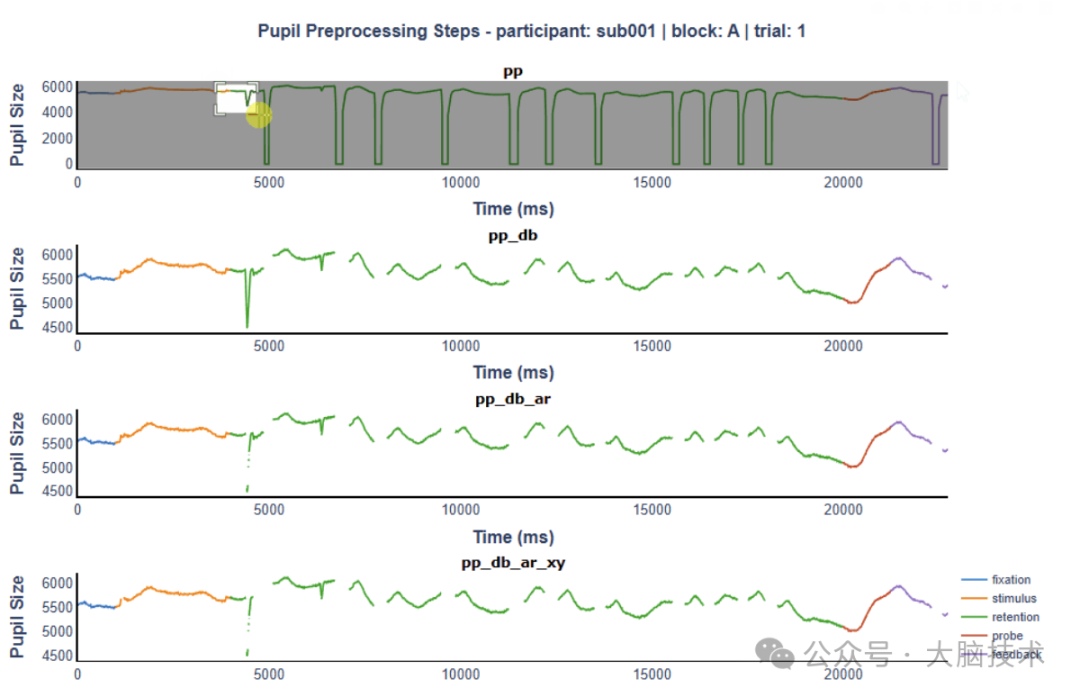
Eye Movement Analysis MNE-Python Series Tutorial 2: Drawing Eye Movement Tracking HeatmapsIn this article, I will introduce the eye movement data analysis toolkit PupEyes, developed and shared on GitHub by Han Zhang (personal CV: https://hanzhang.cv/).PupEyes is a Python toolkit for preprocessing and visualizing eye movement data.It handles pupil size preprocessing and supports interactive visualization of pupil size and fixation data. It supports Eyelink and Tobii data, as well as any general eye tracking dataset that meets minimum format requirements.PupEyes implements various interactive visualizations using Plotly Dash. For example:Pupil data visualization: Check pupil preprocessing steps;Fixation visualization: Visualize fixation patterns;Area of Interest (AOI) drawing tool: Flexibly define interest areas.Installation method:It is recommended to create a separate environment using Anaconda, then activate the environment and run the following code:
pip install pupeyes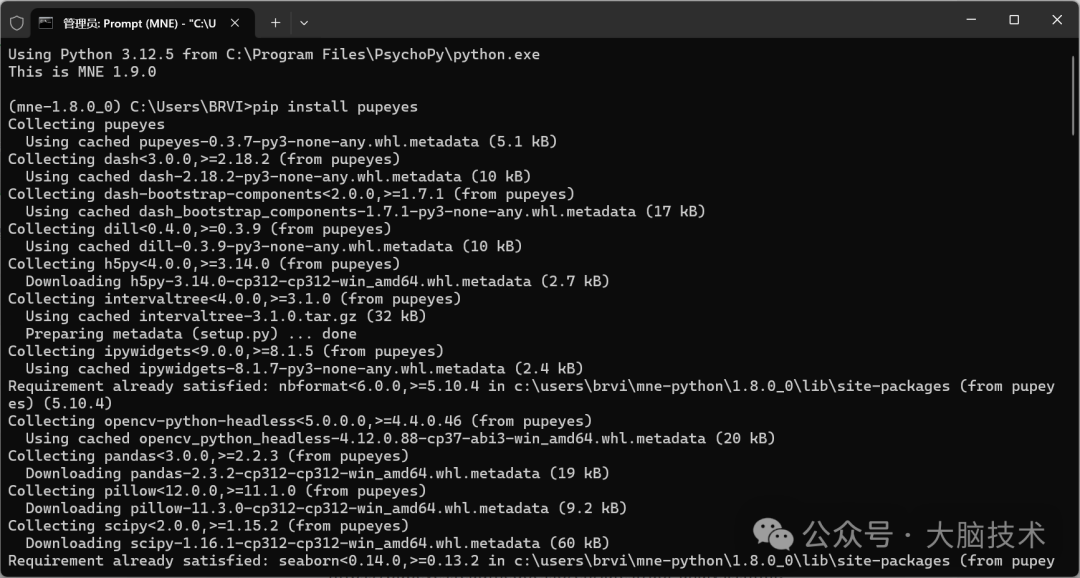 The official website tutorial is very detailed, and you can try running it.When marking data markers, pay attention to the requirements for start and end.1. Import Eyelink eye movement data:https://pupeyes.readthedocs.io/en/latest/read_data.html
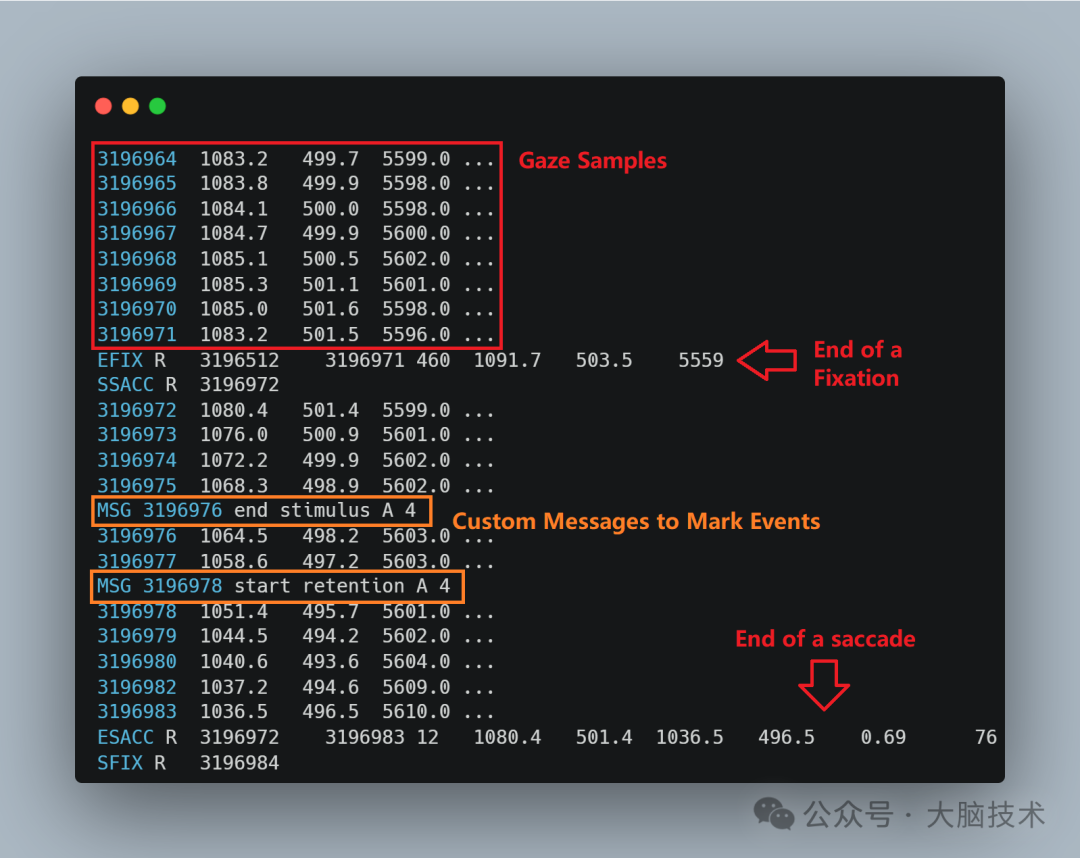 2. Pupil preprocessing:https://pupeyes.readthedocs.io/en/latest/pupil_preproc.html
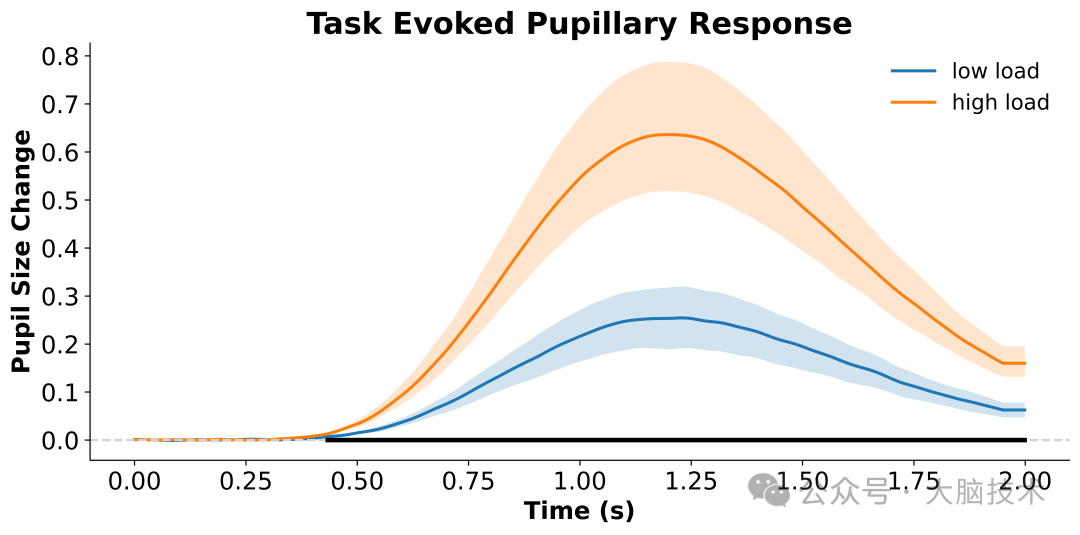
 3. Pupil data statistical analysis:https://pupeyes.readthedocs.io/en/latest/pupil_stats.html
 4. Fixation pattern visualization:https://pupeyes.readthedocs.io/en/latest/fixation_viewer.html
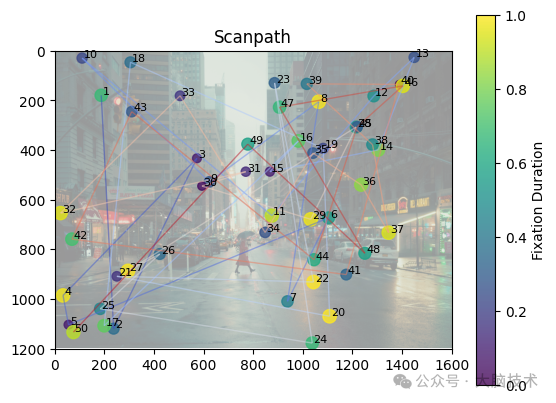 5. Drawing areas of interest:https://pupeyes.readthedocs.io/en/latest/aoi_analysis.html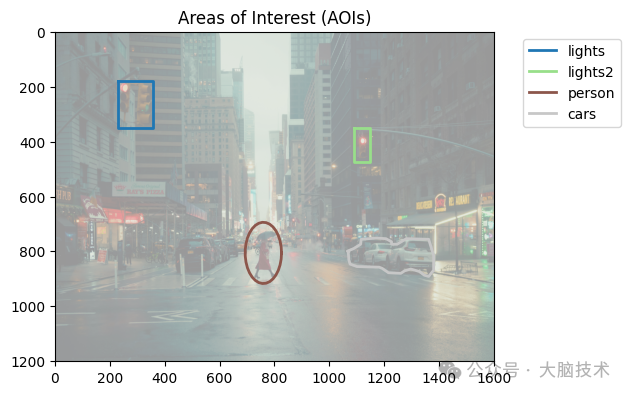
Recommended previous content:Psychology Software Installation Tutorials
Summary of Near-Infrared Brain Imaging Technology Data Analysis Toolbox Software URLs
Summary of EEG Data Analysis Software URLs
Directory of Statistical Software
Psychology Software Installation Series: MNE-Python Software Environment Installation
Psychology Software Series: E-prime 1.1 Installation Tutorial!
Psychology Software Series: PsychoPy Installation Tutorial!
Psychology Software Installation: OpenSesame Installation Tutorial and Initial Exploration
Psychology Software Installation: Psychtoolbox Installation Tutorial
Psychology Software Installation: SPSS 26 Installation Tutorial (Based on Windows 11)
Psychology Software Installation: R Language/RStudio Installation Tutorial (Based on Windows 11)
Psychology Software Installation: Statistical Modeling Analysis Software Mplus 8.3 (Based on Mac Version)
Research Drawing Software Installation: GraphPad Prism 10 for Mac
Psychology Software Installation: EEGLAB Installation Tutorial
Analysis Tutorial for Using Eye Trackers with Different EEG Devices
How to Synchronize Various EEG, Near-Infrared, and Eye Movement Devices
Multimodal Use Methods of Eye Movement Technology and EEG/Near-Infrared Technology
Synchronization of EyeLink Eye Tracker and NeuroScan EEG Equipment for Data Fusion Analysis Using EEGLAB
Joint Use of EyeLink Eye Tracker and Brain Products EEG and Data Fusion Analysis Using EEGLAB
Synchronization of EyeLink Eye Tracker and EGI EEG Equipment for Data Fusion Analysis Using EEGLAB
fNIRS Near-Infrared Brain Imaging Related
Summary of Near-Infrared Brain Imaging Data Processing Process
Introduction to fNIRS Technology
Design of Near-Infrared Brain Function Imaging Experiments
Introduction to Near-Infrared Brain Imaging and Experimental Design
Factors Affecting the Quality of Near-Infrared Optical Signals
Learning Record of Using the Near-Infrared Software NIRS-KIT
Learn about Homer3: Introduction and Usage
Summary of Near-Infrared Brain Imaging Technology Data Analysis Toolbox Software URLs
Suggestions for fNIRS Data Processing and Analysis
EEG Related Content
Basic Knowledge of EEG Signal Acquisition, Processing, and Analysis
Tutorial on Microstate Analysis of EEG Data
Understanding the Basics of EEG/ERP in One Article
Understanding the Brain Science Techniques for Researching the Human Brain
EEGLAB Data Preprocessing Basic Process GUI Practical Guide
Steps for EEG Data Preprocessing Using EEGLAB
Common Built-in Functions of EEGLAB
Basic Knowledge of the Brain
Basic Knowledge of the Brain: Understanding Your Brain
Basic Knowledge of the Brain: Understanding Brain Rhythm Electrical Signals
Basic Knowledge of the Brain: The Cerebral Cortex
Basic Knowledge of the Brain: The Left and Right Hemispheres of the Brain
Basic Knowledge of the Brain:Frontal Lobe and Its FunctionsBasic Knowledge of the Brain: The Location, Structure, and Function of the Parietal LobeBasic Knowledge of the Brain: The Occipital Lobe and Its FunctionsBasic Knowledge of the Brain: Different Cellular Structures of the Cerebral CortexBrain Activity Recording TechniquesA Free Brain Region Visualization WebpageBasic Knowledge of the Brain: The Central Nervous System

Welcome to add the WeChat assistant of the public accountWith her, you can discuss projects, talk about technology, build platforms, consult, introduce jobs, and so on.Please note (Name – Organization – Position – Cooperation Intent) when adding WeChat.(You can scan the QR code below to add the assistant’s WeChat)
For more brain science technology content, please join the paid knowledge community.

*Disclaimer*
This public account states that the rights to the original content belong to this service or the rights holder of this service. Without authorization from this service or the rights holder, no one may use (including but not limited to copying, disseminating, displaying, mirroring, uploading, downloading, reprinting, excerpting, etc.) or permit others to use the above intellectual property. Those who have been authorized to use the works by this service or the rights holder should use them within the scope of authorization and indicate the source of the author. Otherwise, legal responsibility will be pursued according to law.