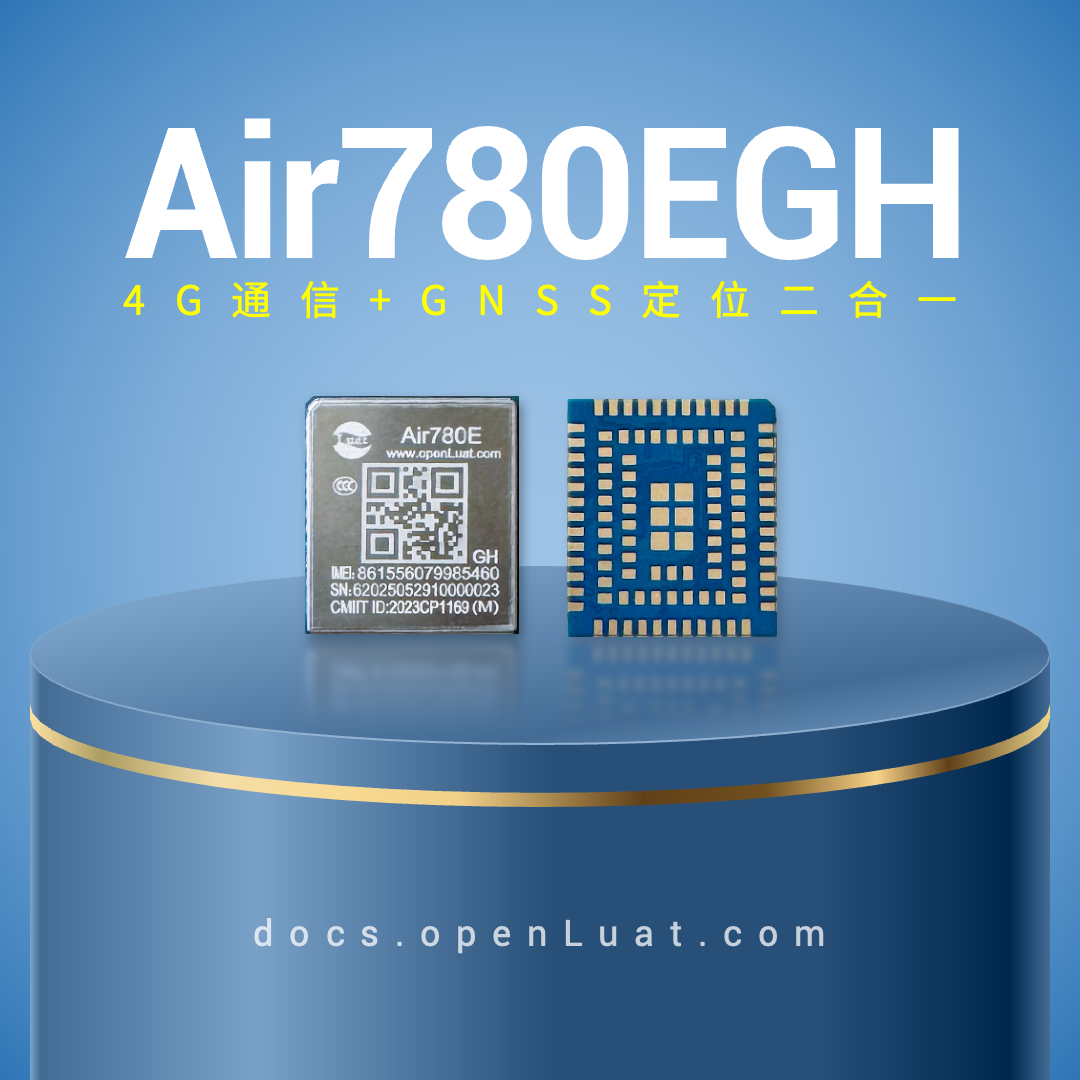
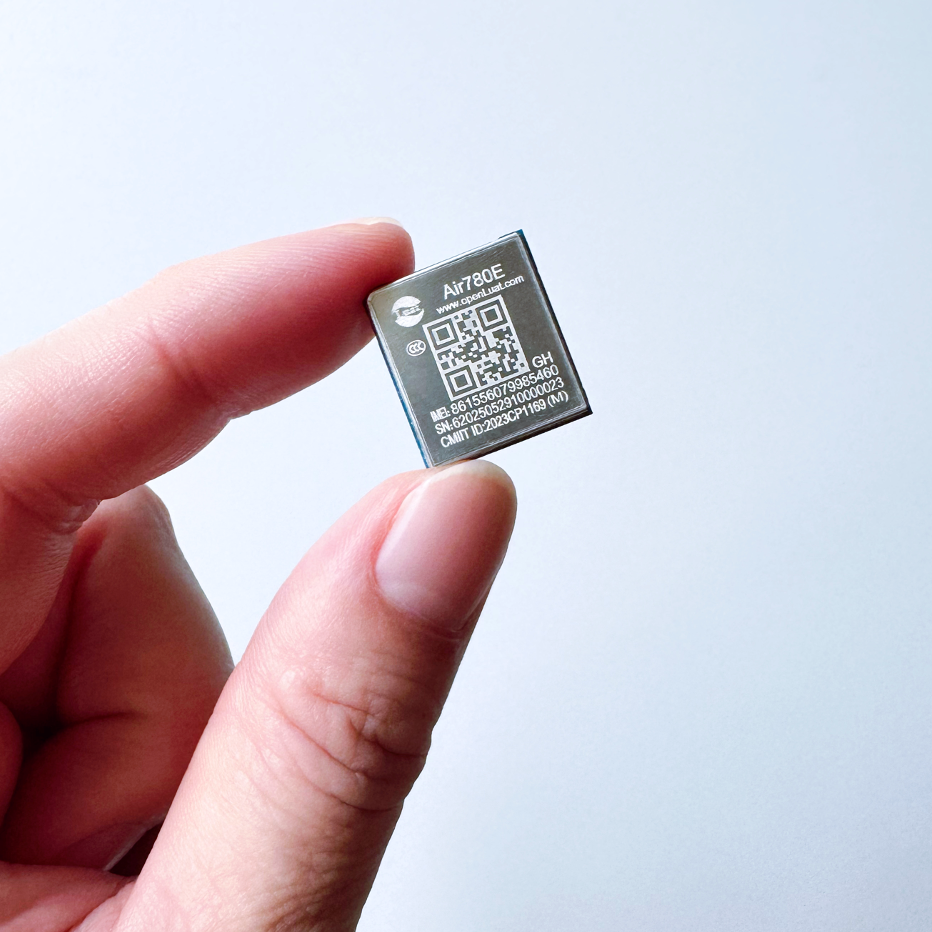
The Air780EGH is the flagship 4G-Cat.1 module from Hezhao in 2025 and features a dual function of 4G communication + GNSS positioning, in a classic 1618 package, supporting LuatOS secondary development.
The serial port serves as the primary communication interface for the Hezhao Air780EGH module, undertaking important functions such as control, data transmission, and peripheral communication— it is used in almost all 4G-Cat.1 application scenarios, especially in low-power IoT applications, where the design of the serial port involves sleep and power consumption, thus requiring sufficient attention in the design process.
This article mainly shares some key considerations in serial port design from a hardware design perspective, without delving deeply into software development.
1
Serial Port Related Pins
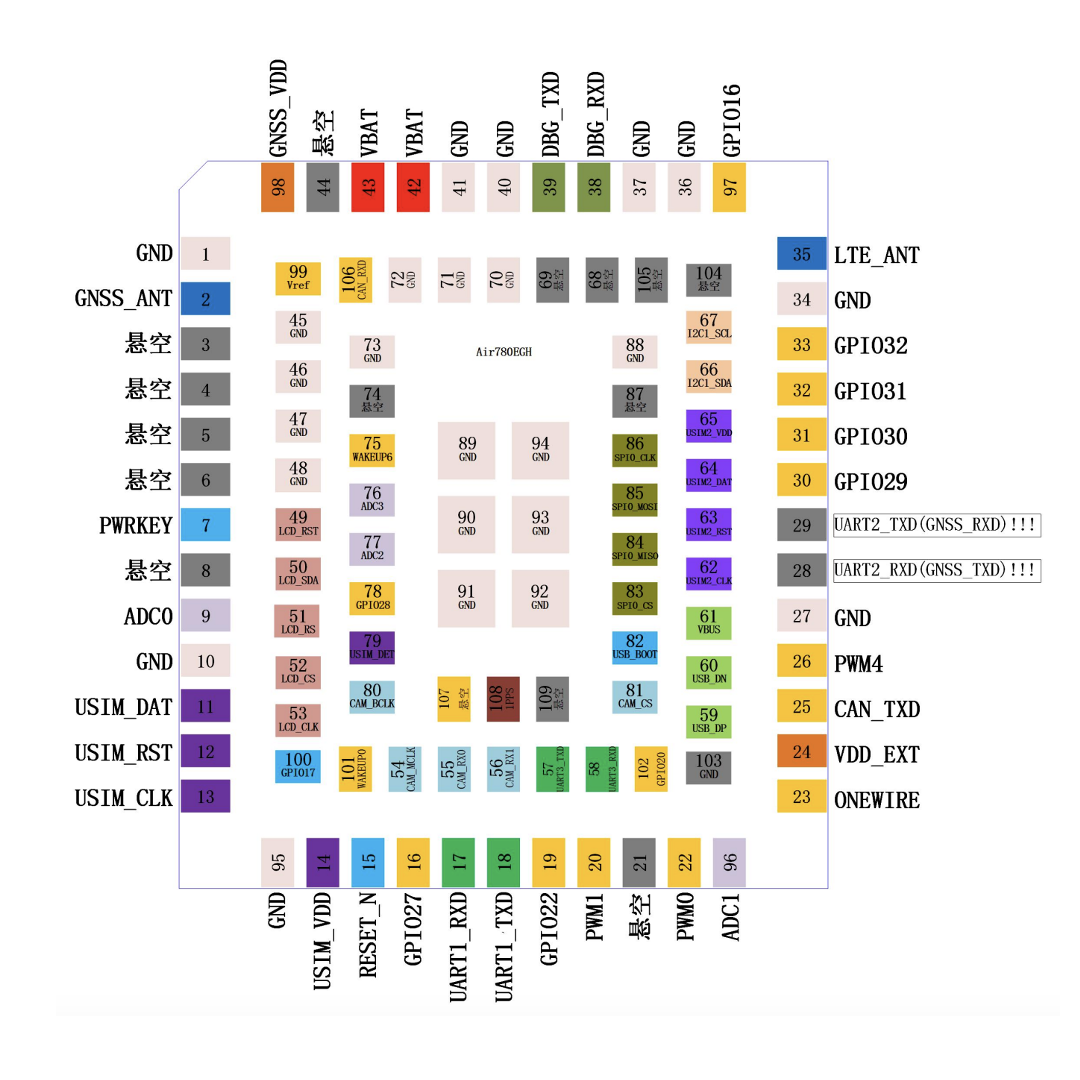
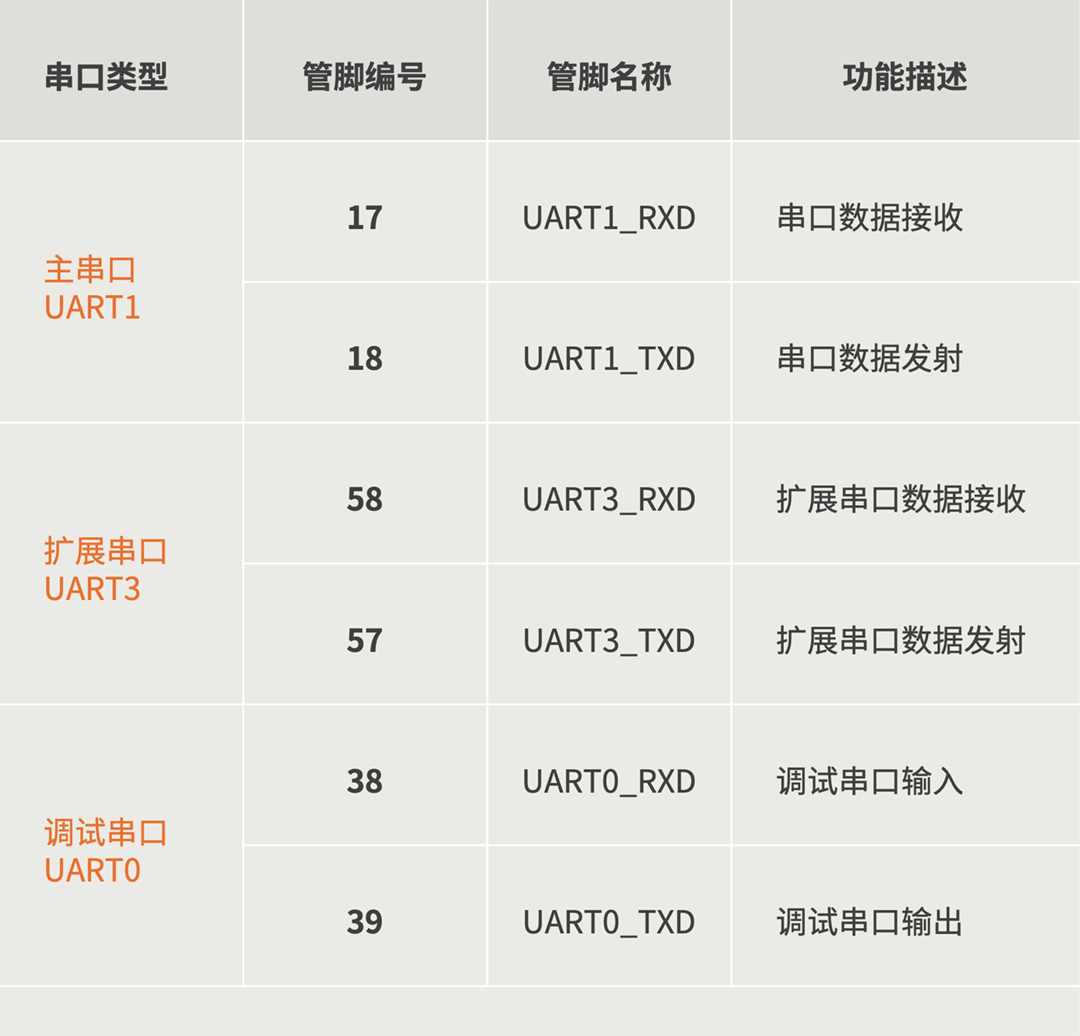
The Hezhao Air780EGH supports three serial ports, which are:
-
Main Serial Port UART1
-
Extended Serial Port UART3
-
Debug Serial Port UART0
The Air780EGH does not support AT command operations; UART1/UART3 are only for LuatOS secondary development.
The corresponding pins are as follows:
2
Serial Port Function Description
2.1 Main Serial Port Characteristics
The module’s data transmission is primarily achieved through the main serial port UART1, and it is recommended to use the main serial port for external communication and module control.
The main serial port UART1 has the following characteristics:
1) All are TTL level serial ports
All serial ports of the Air780EGH are TTL level serial ports, with levels of 3.0 (default)/1.8V. The two serial port level selections can be configured through pin 100 or secondary development code.
2) Only the main serial port supports the module’s sleep wake-up function (LPUART)
When the Air780EGH module is in sleep mode, all serial ports are in a closed state, and only the main serial port supports receiving serial data to wake up the module.
Note: When using baud rates other than 9600 for serial data transmission and reception to wake up, the first few bytes may be lost.
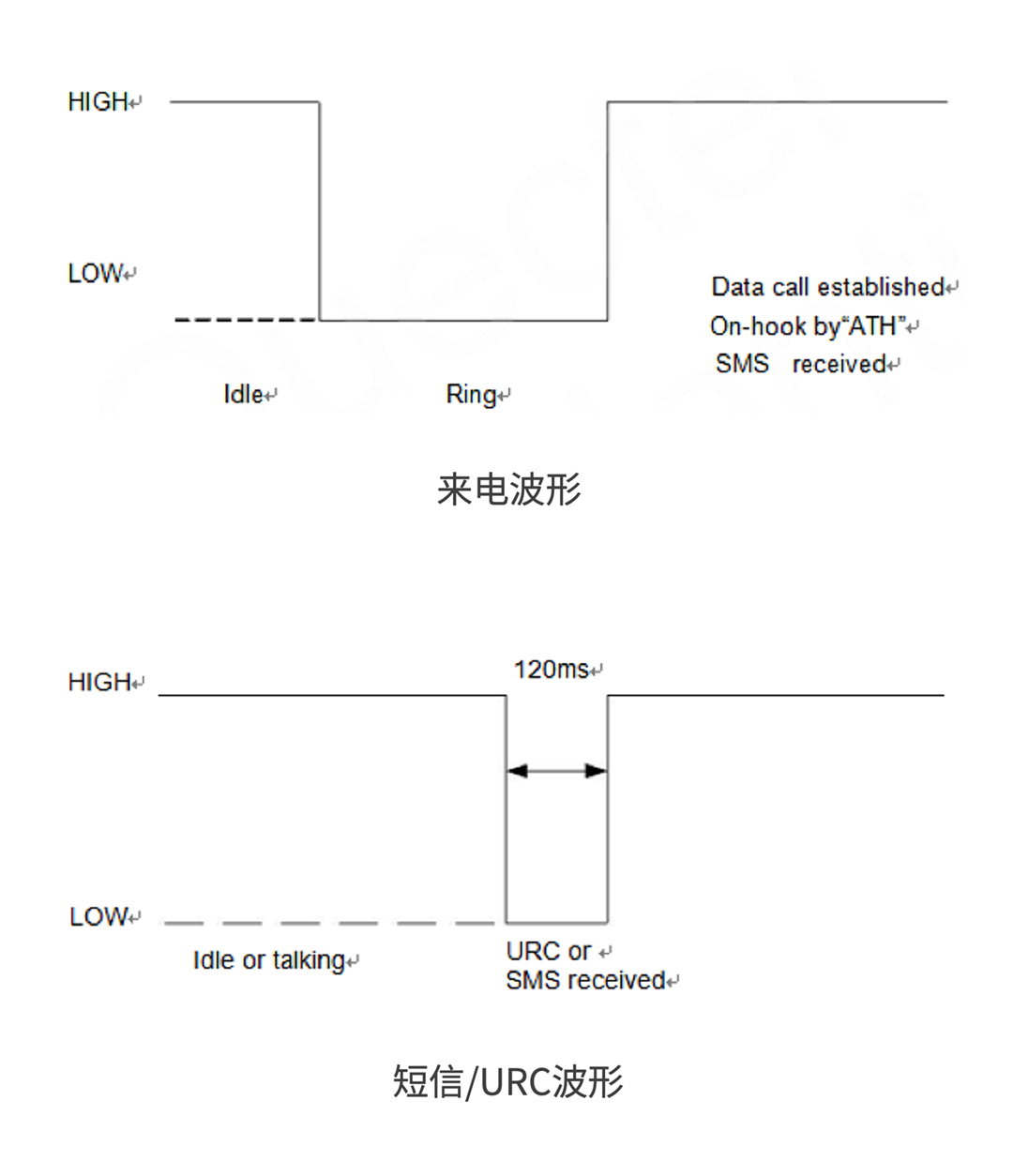
3) High level in standby state
2.2 Extended Serial Port
The extended serial port AUX_UART has the same electrical characteristics as the main serial port (but does not support the sleep wake-up function).
2.3 Debug Serial Port
The debug serial port UART0 is used to output the module’s running logs.
The debug serial port has a fixed baud rate of 921600 and cannot be changed; it is not recommended to connect any peripherals, but it is advisable to reserve test points during design.
The debug serial port log data has a specific protocol; if captured with a regular serial tool, it will display garbled characters. Only specialized debugging tools can be used; please contact official technical personnel if needed.
For OpenCPU secondary development applications:
The debug serial port can be configured for general serial port use, but it should be noted that even when configured as a general serial port, it will still output debug logs during the time before the software runs at startup, which may cause misoperation of connected peripherals. Similarly, configuring the debug serial port for GPIO use will also have this issue.
Therefore, do not use the debug serial port for other functions unless absolutely necessary.
3
Hardware Design Guidelines
3.1 Serial Port Connection Method
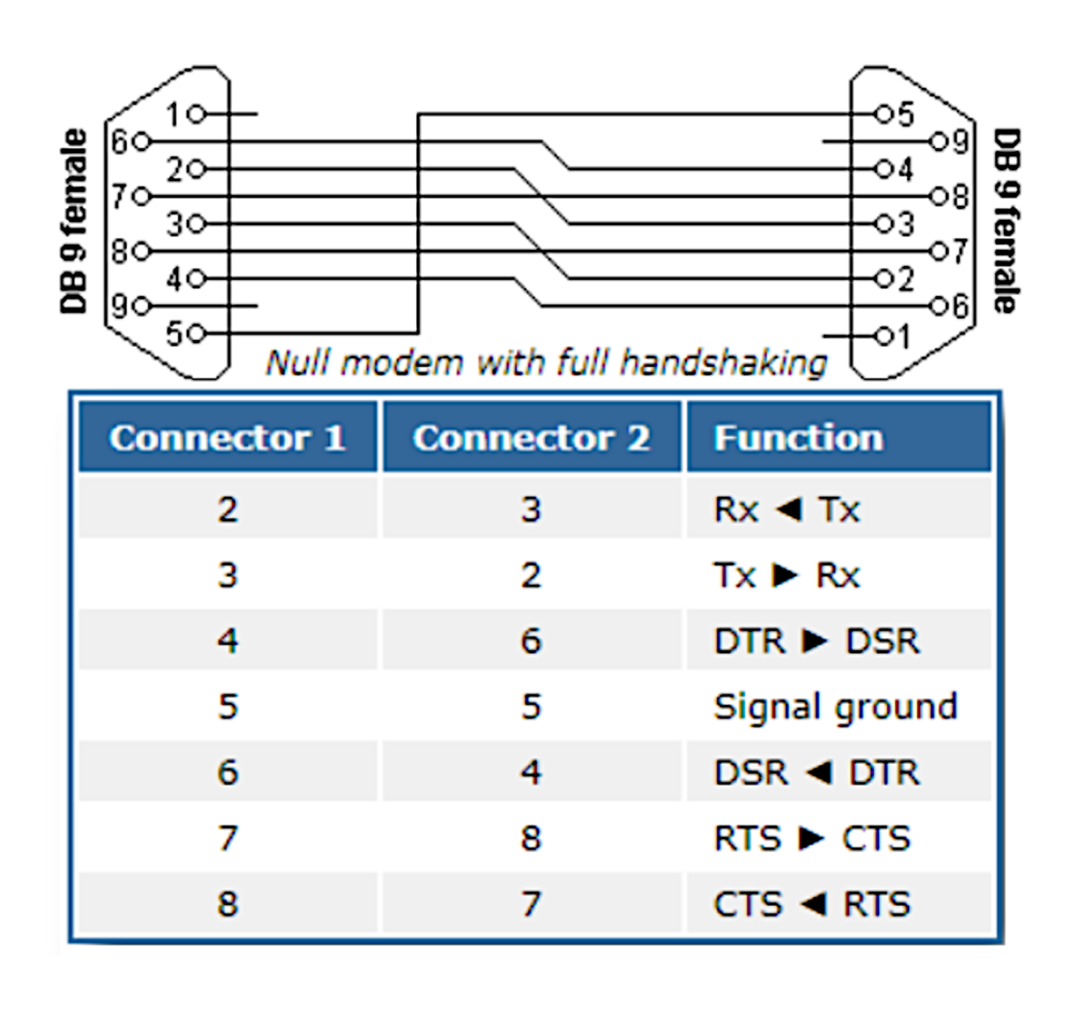
The model naming of the main serial port easily leads one to think of the RS232 standard DB9 interface, but it is not; the module’s serial port connection method differs from the standard RS232 connection method.
The standard RS232 serial port connection method is shown in the figure below, characterized by cross connections.
However, the module’s serial port follows the early HAYES company’s MODEM serial port standard, under which the functions of DTR/DSR/CTS/RTS signals differ.
Under the MODEM serial port standard, DTR/DSR/CTS/RTS are connected directly.
As shown in the figure below:
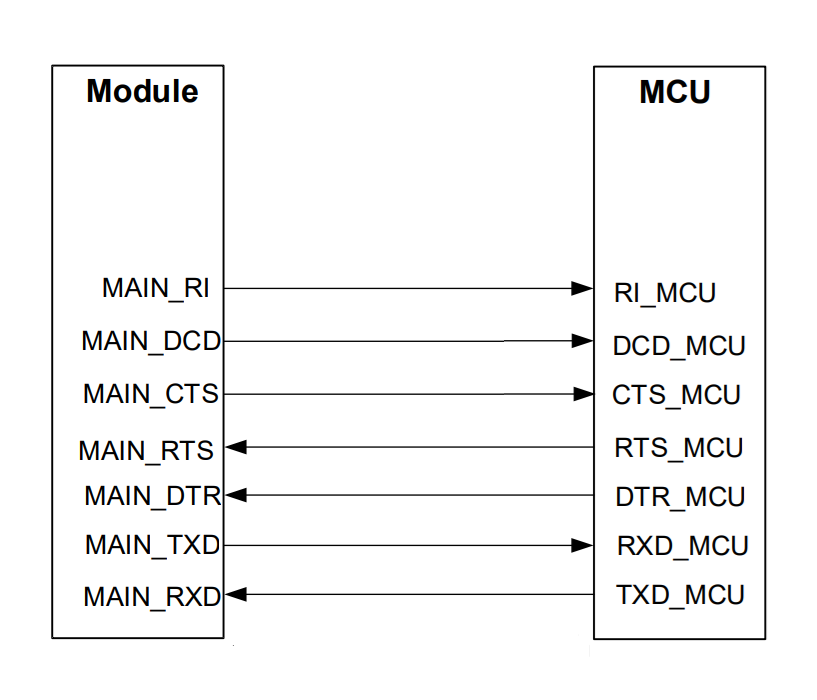
In the gradual evolution process, DCD/DSR/RI gradually evolved into other independent functions, retaining only the 5-wire serial port form with T/RX and flow control pins in IoT serial port applications.
However, the naming rules for CTS/RTS have been retained; although CTS/RTS are connected directly, in fact, the module’s CTS pin performs the standard RTS function, while the module’s RTS pin performs the standard CTS function.
The connection method is as follows:
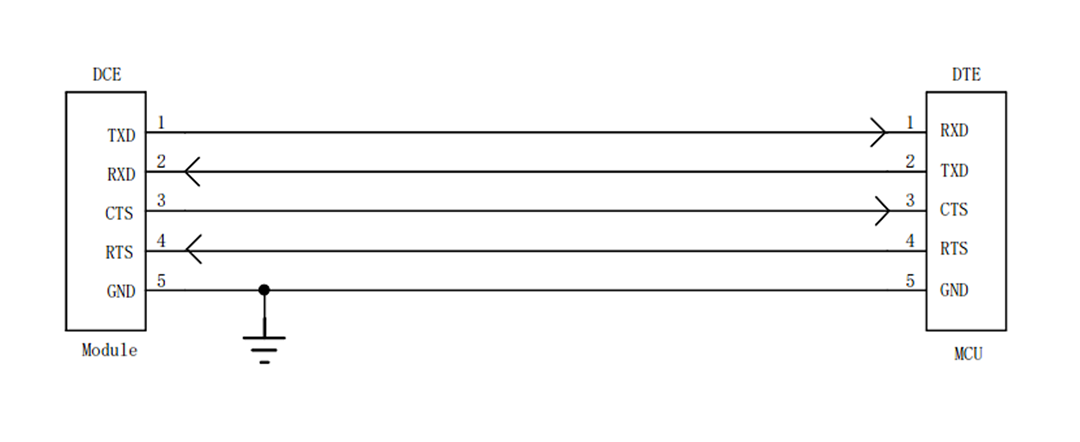
Even the flow control pins are not mandatory, resulting in a 3-wire serial port:
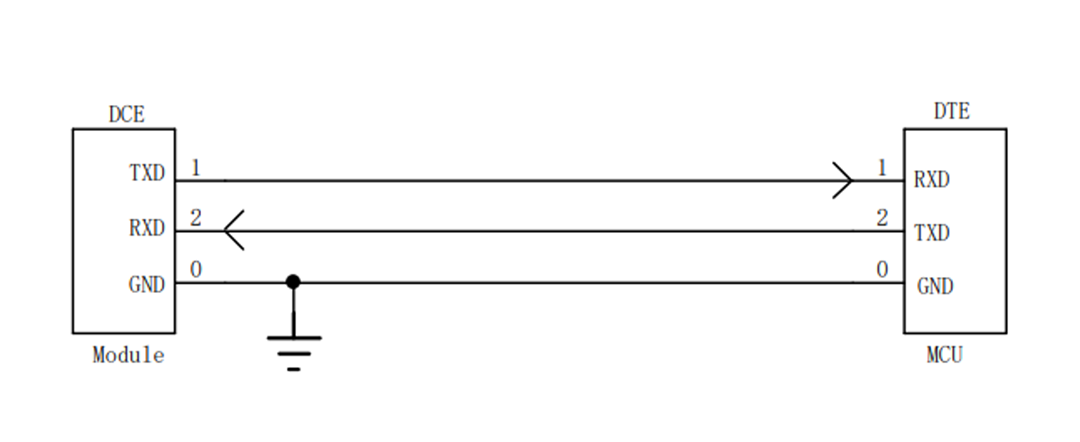
3.2 Serial Port Level Conversion
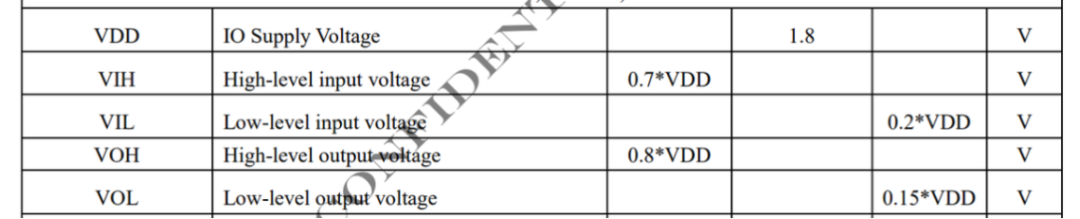
The Air780EGH’s serial port is a TTL level serial port, which has input and output discrimination thresholds, as shown in the figure below:
At the same time, the TTL level serial port of the external MCU or peripheral also has discrimination thresholds.
Generally speaking, the discrimination threshold of TTL levels depends on the high level of the IO power supply level VDD. If there is a large difference in the discrimination thresholds between both sides of the serial port, and one side’s high level output falls below the other’s high level discrimination threshold, misjudgment is likely to occur.
Although the Air780EGH can configure the serial port level through pm.iovol(), it only has two levels of 1.8V and 3.3V, which cannot cover all situations.
In cases where the levels of both sides of the serial port are inconsistent, a level conversion circuit must be added to convert the communication levels.
1) When the level difference between both module serial ports is small
For example, if the module’s serial port level is 3.3V and the MCU’s serial port level is 3.0V. According to the threshold shown in the figure, the module’s input high discrimination threshold is: 0.7×3.3=2.31V.
Therefore, the MCU’s high level output of 3V is above the module’s input high discrimination threshold, allowing for stable judgment. In this case, even if the MCU and module levels are inconsistent, direct connection will not cause communication issues.
Typically, in this case, no level conversion is needed; just connect a current-limiting resistor in series on the serial port TX/RX signal line.
The current-limiting resistor is used to reduce leakage caused by mismatched serial port levels; usually, a 1K resistor is connected in series, noting that the series resistor should not be too large, as it will affect the rise and fall times of the serial port signal, thus impacting the quality of the serial port signal.
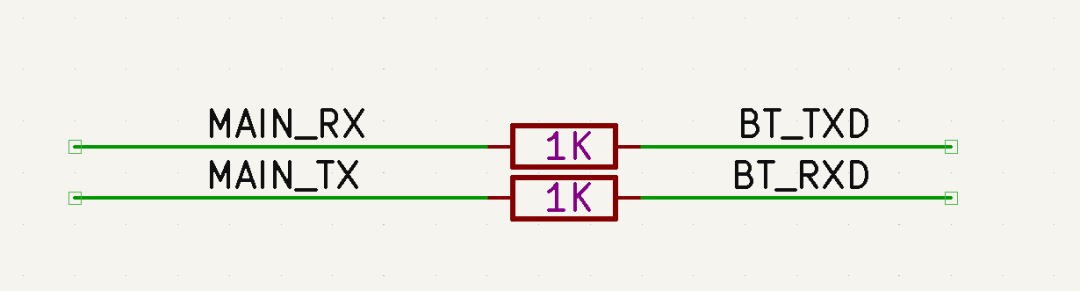
It is important to note:
Do not only look at the discrimination thresholds; also consider the voltage tolerance of the serial port. Even if it falls within the discrimination threshold, if one side’s high level exceeds the other’s IO voltage tolerance, then the series resistor method cannot be used, and a proper serial port level conversion must be added.
Generally speaking, the level difference between both sides should not exceed 0.5V.
2) Transistor Level Conversion Scheme
In cases where the serial port baud rate is not high (e.g., 115200), level conversion can be achieved using an NPN transistor.
-
Advantages: Low cost;
-
Disadvantages: At low levels, the saturation voltage drop of the transistor raises the level (usually around 0.1V, which does not affect communication); Switching speed is insufficient; it is not recommended to use this method for baud rates exceeding 460800.
Reference design and considerations are as follows:
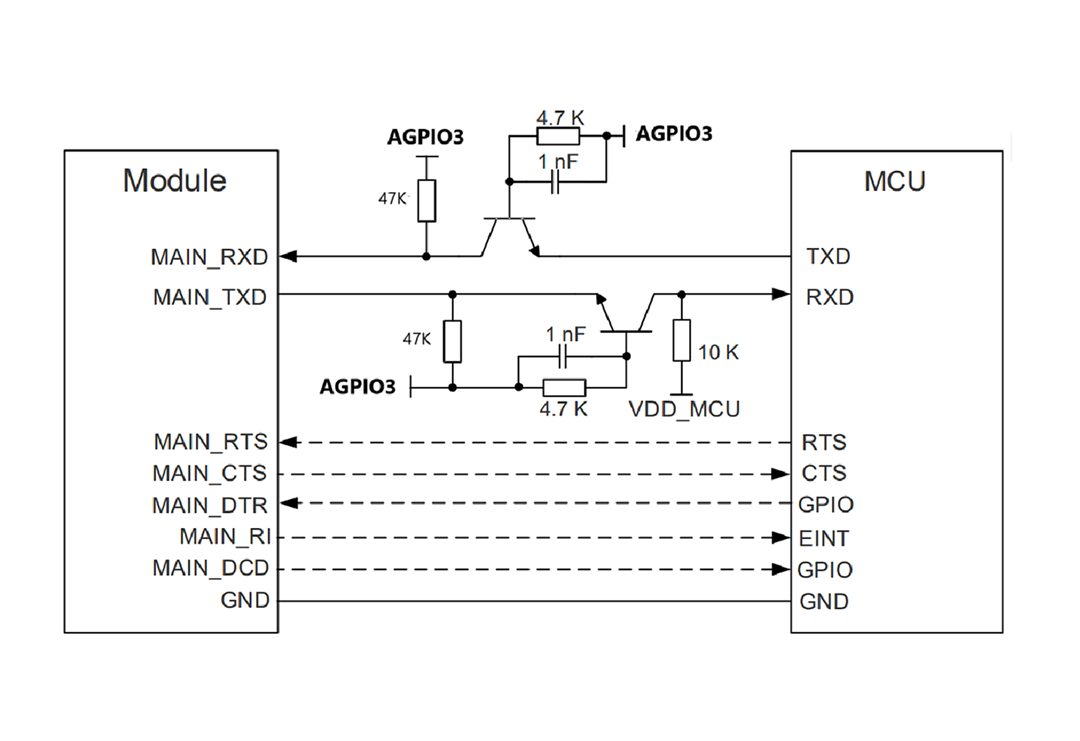
▼ Design Considerations ▼
-
RXD Pull-up Power Selection:
The above figure chooses AGPIO for pull-up instead of VDD_EXT power because VDD_EXT will be turned off during module sleep, causing a low level on RXD, and since the main serial port supports sleep wake-up, this low level will trigger an interrupt to wake the module, ultimately preventing the module from sleeping.
Therefore, in designs requiring sleep, do not use VDD_EXT power for pull-up on the serial port.
-
Transistor Base:
Use the reference level of the lower level side for pull-up; otherwise, it may be difficult to ensure the transistor can fully turn off.
-
Pull-up Resistors for RXD and TXD:
Increase as much as possible without affecting signal quality; this reduces sleep power consumption and lowers the driving load on AGPIO (all AGPIOs of the Air780EGH share a maximum driving current of 5mA).
-
For Transistor Selection:
There are no strict requirements for selection; a general 3904 NPN transistor can meet the requirements.
3) Level Conversion Chip Solution
If cost is not a concern, consider using level conversion chips, as they offer excellent speed and reliability.
For design, just pay attention to chip selection, and ensure the module side reference level uses AGPIO3; other references can follow the specific chip reference design without many considerations.
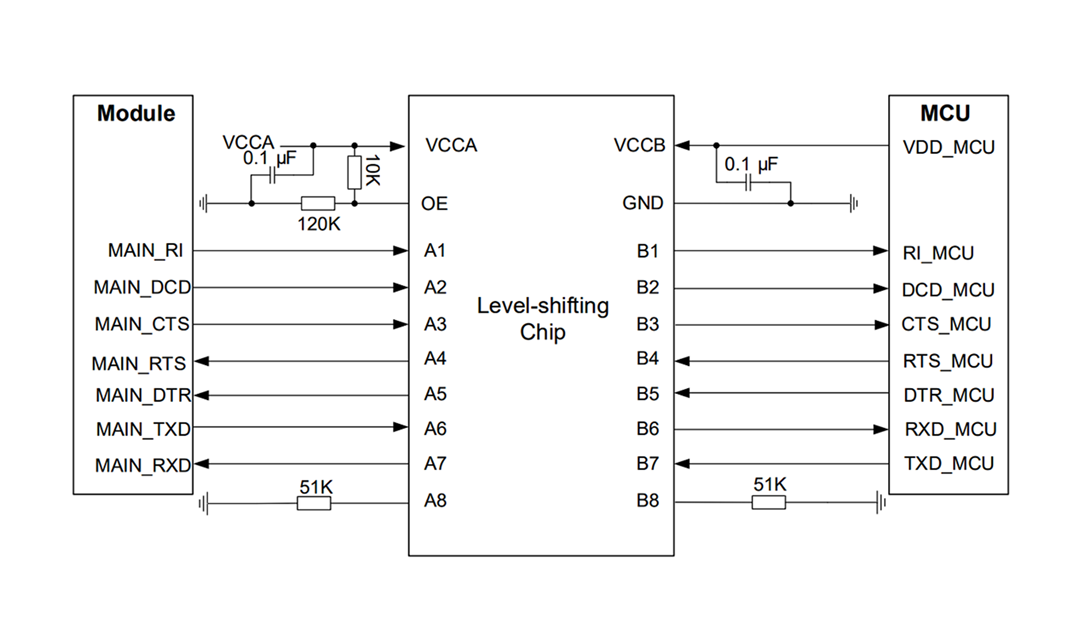
Considering that the price of level conversion chips is positively correlated with the number of channels, you can also use a dual-channel level conversion chip for TX/RX and use transistors or voltage dividers for other flow control signals to balance performance and cost.
▼ Level Conversion Chip Selection Reference ▼
-
TXS0102/TXS0104/TXS0108 series 2/4/8 channels, brand TI
-
RS0102/RS0104/RS0108 series 2/4/8 channels, brand Runstone
-
SGM4553 dual-channel, brand SGM Wei
-
The above are for reference only; please consider based on actual needs.

That’s all for today’s content~ If you have any questions regarding IoT development selection, feel free to join the technical exchange group or contact the person in charge for discussion.
For more of the latest development materials, please refer to the Hezhao documentation center:
—— docs.openluat.com

▼ Learn More About Hezhao ▼
4G + Positioning + WiFi + Bluetooth, Air8000 complete development board Air8101 core board + accessory board new products
Hezhao’s low-power 4G module adds four more hardcore new products