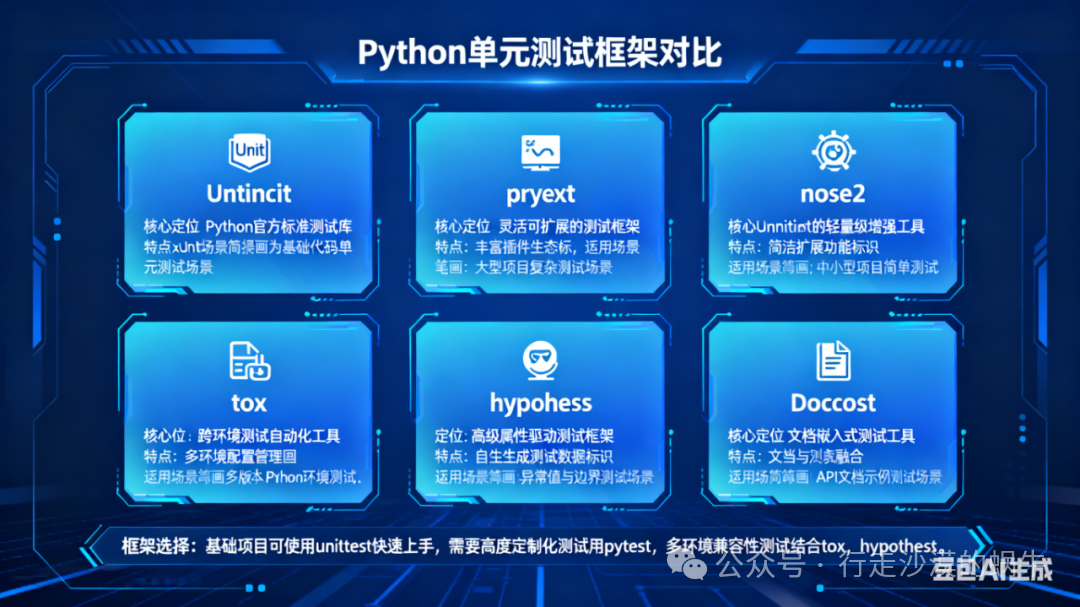
There are several mature unit testing frameworks in the Python ecosystem, covering various scenarios such as built-in lightweight, mainstream third-party, and specialized testing types. Below is a detailed introduction to the six most commonly used frameworks (including core features, usage examples, applicable scenarios, advantages, and disadvantages) to help you choose accurately based on project requirements:
1. unittest (Built-in Standard Library)
1. Core Positioning
The official built-in unit testing framework of Python (known as unittest2 in Python2), follows the xUnit standard (originating from Java JUnit), requires no additional installation, and is ready to use out of the box, making it the “basic version” of Python unit testing.
2. Core Features
Built-in and dependency-free: It belongs to the standard library and does not require pip install; it comes with the Python environment.
Standardized test case organization: Test cases must inherit from the unittest.TestCase class, and test methods must start with test_.
Comprehensive testing capabilities: Supports testing fixtures (setUp/tearDown), assertions, test suites, skipping cases, expected failures, and other core functionalities.
Strong compatibility: All third-party testing frameworks are generally compatible with unittest cases, resulting in low migration costs.
Flexible extension: Can be combined with tools like HTMLTestRunner_PY3, unittest-xml-reporting, etc., to generate visual reports.
3. Basic Usage Example
import unittest
class TestMath(unittest.TestCase):
    # Test fixture: initialize before each test case
    def setUp(self):
        self.a = 10
        self.b = 5
    # Test method: must start with test_
    def test_add(self):
        """Test addition"""
        self.assertEqual(self.a + self.b, 15)  # Built-in assertion
    def test_divide(self):
        """Test division (assert exception)"""
        with self.assertRaises(ZeroDivisionError):  # Verify that the specified exception is raised
            10 / 0
    # Skip case
    @unittest.skip("Temporarily not executing subtraction test")
    def test_subtract(self):
        self.assertEqual(self.a - self.b, 5)
if __name__ == "__main__":
    unittest.main()  # Execute test cases
4. Applicable Scenarios
-
Unit testing for small projects and script tools (no additional dependencies required).
-
Teams familiar with xUnit standards (e.g., teams transitioning from Java to Python).
-
Scenarios requiring compatibility across multiple environments with low dependencies (e.g., embedded Python environments).
5. Advantages and Disadvantages
| Advantages | Disadvantages |
|---|---|
| Built-in and dependency-free, ready to use | Syntax is relatively cumbersome (requires class inheritance, method name prefix enforced) |
| Strict standards, clear case structure | Redundant assertion methods (e.g., <span>assertEqual</span> instead of direct <span>==</span>) |
| Extremely strong compatibility, mature ecosystem | Does not support parameterization (requires manual looping or reliance on plugins) |
| Supports complex test suite organization | No default visual report (requires additional integration of tools) |
2. pytest (Mainstream Third-party Framework)
1. Core Positioning
The most popular Python unit testing framework currently, it is an “enhanced version” of unittest, known for its simplicity, flexibility, powerful features, and rich plugin ecosystem, widely adopted by large companies like Zhihu and Douban.
2. Core Features
Extremely simple syntax: No need to inherit classes; test functions/methods can be written directly, supporting both functional and object-oriented styles.
Natural assertions: No need to use specialized methods like self.assertEqual; use Python’s native assert statement directly (e.g., assert a + b == 15).
Powerful parameterization: Built-in @pytest.mark.parametrize allows for multiple sets of test data without additional code.
** Fixtures mechanism **: Replaces unittest’s setUp/tearDown, supporting more flexible pre/post-test logic (e.g., sharing database connections, dynamically generating test data).
Rich plugin ecosystem: Over 1000 official plugins, supporting HTML reports (pytest-html), parallel execution (pytest-xdist), code coverage (pytest-cov), API testing (pytest-requests), etc.
Fully compatible with unittest: Can directly execute unittest-written cases, with zero migration costs.
3. Basic Usage Example
(1) Installation
pip install pytest  # Core framework
pip install pytest-html pytest-cov  # Common plugins (report + coverage)
(2) Test case code (no need to inherit classes)
# Filename: test_pytest_demo.py
import pytest
# 1. Functional test case (most concise)
def test_add():
    assert 10 + 5 == 15  # Native assert assertion
# 2. Parameterized test case (automatically loops through multiple sets of data)
@pytest.mark.parametrize("a, b, expected", [(1,2,3), (4,5,9), (10, -2, 8)])
def test_parametrize_add(a, b, expected):
    assert a + b == expected
# 3. Fixtures (test fixtures, replacing setUp)
@pytest.fixture(scope="function")  # scope: function/class/module/session
def init_data():
    print("Precondition: initializing test data")
    return {"a": 10, "b": 5}
def test_use_fixture(init_data):
    assert init_data["a"] - init_data["b"] == 5
# 4. Skipping test case
@pytest.mark.skip(reason="Temporarily not executing")
def test_skip():
    assert 3 * 4 == 12
(3) Execution command (terminal)
pytest test_pytest_demo.py -v  # -v: verbose output
pytest test_pytest_demo.py --html=report.html  # Generate HTML report
pytest test_pytest_demo.py --cov=./  # Calculate code coverage
4. Applicable Scenarios
-
Medium to large projects, complex automated testing (e.g., API testing, UI testing).
-
Pursuing development efficiency (simple syntax, parameterization, fixtures).
-
Need for rich extension features (reports, parallel execution, coverage analysis).
-
Projects migrating from unittest (fully compatible, no need to modify old cases).
5. Advantages and Disadvantages
| Advantages | Disadvantages |
|---|---|
| Extremely simple syntax, high development efficiency | Requires additional installation (not built-in) |
| Native support for parameterization, fixtures | Excessive flexibility; teams need to establish standards (to avoid case confusion) |
| Extremely rich plugin ecosystem, comprehensive functionality | Some advanced plugins require a learning curve (e.g., fixture scope) |
| Compatible with unittest, doctest, and other frameworks | – |
| Supports flexible command-line filtering of cases | – |
3. nose / nose2 (unittest extension framework)
1. Core Positioning
nose is a lightweight extension framework of unittest, with the core goal of simplifying the usage of unittest (e.g., automatic case discovery, simplified assertions), but nose is no longer maintained (last updated in 2016), and its successor is nose2 (officially maintained, compatible with nose syntax).
2. Core Features
-
Fully compatible with unittest: Can directly execute unittest cases without modification.
-
Automatic case discovery: By default, recursively searches for all test_*.py or *_test.py files in the directory.
-
Simplified assertions: Supports simplified assertions like assert_equals, assert_true from nose.tools (more concise than unittest).
-
Plugin support: nose2 inherits the plugin ecosystem of nose, supporting report generation, parallel execution, coverage statistics, etc.
-
Compatible with some pytest syntax: Some cases can directly reuse pytest’s concise writing style.
3. Basic Usage Example
(1) Installation
pip install nose2 # Recommended to use nose2 (actively maintained)(2) Test case code (compatible with unittest and concise writing)
# Filename: test_nose_demo.py
from nose2.tools import assert_equals, assert_true
# 1. Compatible with unittest style
import unittest
class TestMath(unittest.TestCase):
    def test_add(self):
        self.assertEqual(1+1, 2)
# 2. Concise functional style
def test_subtract():
    assert_equals(5-3, 2)  # nose2 simplified assertion
def test_multiply():
    assert_true(3*4 >= 10)
(3) Execution command
nose2  # Automatically discover and execute all cases
ose2 test_nose_demo.py -v  # Execute specified file, verbose output
ose2 --with-html-report  # Generate HTML report (requires nose2-html-report plugin)
4. Applicable Scenarios
-
Maintenance of old nose projects (need to migrate to nose2).
-
Teams that do not want to learn pytest but wish to simplify unittest usage.
-
Small projects that require lightweight extensions and low learning costs.
5. Advantages and Disadvantages
| Advantages | Disadvantages |
|---|---|
| Compatible with unittest, low migration costs | <span>nose</span> has stopped maintenance, only <span>nose2</span> is active |
| Concise syntax, low learning costs | Plugin ecosystem is not as rich as pytest |
| Automatic case discovery, no need to manually organize suites | Functionality flexibility is lower than pytest |
| Lightweight, no unnecessary dependencies | Insufficient support for advanced features (e.g., complex fixtures) |
4. tox (Multi-environment testing framework)
1. Core Positioning
Not just a unit test execution framework, but an “automated testing environment management + multi-environment compatibility testing” tool, with the core goal of ensuring that code works properly under different Python versions and different dependency versions.
2. Core Features
-
Automatically manage virtual environments: Creates independent virtual environments for each test environment, automatically installs dependencies, avoiding environment pollution.
-
Multi-environment parallel testing: Supports executing tests simultaneously under Python 3.7/3.8/3.9/3.10, or different dependency versions (e.g., requests 2.x/3.x).
-
Compatible with mainstream testing frameworks: Can integrate unittest, pytest, nose2, etc., as an upper-level environment management tool.
-
Configuration-driven: Defines test environments, dependencies, and execution commands through a tox.ini file, without the need to write complex scripts.
3. Basic Usage Example
(1) Installation
pip install tox(2) Create configuration file tox.ini
[tox]
envlist = py37, py38, py39  # Python versions to test
skipsdist = true  # Skip packaging (only test source)
[testenv]
deps =  # Dependencies to install for each environment
    pytest
    pytest-html
commands =  # Test commands to execute in each environment
    pytest --html=report-{envname}.html  # Generate independent reports for different environments
(3) Execution command
tox # Automatically create 3 virtual environments and execute tests4. Applicable Scenarios
-
Open source projects (need to be compatible with multiple Python versions).
-
Enterprise-level projects (need to ensure stability under different production environment dependencies).
-
Multi-team collaborative projects (unified testing environment to avoid “works locally, fails online”).
5. Advantages and Disadvantages
| Advantages | Disadvantages |
|---|---|
| Automatically manage multiple environments, avoiding environment conflicts | Only responsible for environment management, needs to work with other testing frameworks to execute cases |
| Ensures multi-version compatibility, reducing online risks | Execution speed is slower (needs to create virtual environments, install dependencies) |
| Configuration-driven, easy to maintain | Learning costs are higher than simple testing frameworks |
| Supports CI/CD integration (e.g., GitHub Actions) | Small projects may not require multi-environment testing, which can be somewhat redundant |
5. hypothesis (Property-based testing framework)
1. Core Positioning
A specialized testing framework that focuses on “Property-Based Testing”. Unlike traditional “manually written test data”, it automatically generates a large number of boundary values and exceptional data to verify the stability of the code, suitable for discovering hidden boundary errors.
2. Core Features
-
Automatically generate test data: Supports generating various types of test data such as integers, strings, lists, dictionaries, including boundary values (e.g., 0, maximum value, negative numbers), and exceptional data (e.g., empty strings, None).
-
Intelligently reduce failing cases: If a test fails, it will automatically reduce to the smallest reproducible test data (e.g., if 1000 fails, it will try 500, 100, 10 until the smallest failing data is found).
-
Compatible with mainstream frameworks: Can seamlessly integrate with unittest, pytest as a supplementary testing tool.
-
Supports custom data generation: Can define custom data generation rules using the @given decorator (e.g., generating strings that match a regex).
3. Basic Usage Example
(1) Installation
pip install hypothesis(2) Used with pytest
import pytest
from hypothesis import given
import hypothesis.strategies as st
# Test the generality of the addition function (automatically generate 100 sets of integer data)
@given(a=st.integers(), b=st.integers())
def test_add_generic(a, b):
    assert (a + b) == (b + a)  # Verify the commutative property of addition (holds for any integers a and b)
# Test string concatenation (automatically generate strings, including empty strings and special characters)
@given(s1=st.text(), s2=st.text())
def test_string_concat(s1, s2):
    assert len(s1 + s2) == len(s1) + len(s2)
(3) Execution command
pytest test_hypothesis_demo.py # Automatically generate 100 sets of data to execute tests4. Applicable Scenarios
-
Testing of low-level libraries and utility classes (need to ensure stability when handling various inputs).
-
Testing of complex business logic (manually written test data may not cover all boundaries).
-
Supplementing traditional unit tests (discovering hidden bugs that were manually overlooked).
5. Advantages and Disadvantages
| Advantages | Disadvantages |
|---|---|
| Automatically generates a large amount of test data, covering more comprehensively | Not suitable for testing scenarios that depend on specific inputs (e.g., only accepting phone numbers) |
| Intelligently reduces failing cases, making debugging easier | Higher learning costs (need to understand data generation strategies) |
| Strong ability to discover hidden boundary bugs | Execution speed is slower (data generation + multiple tests) |
| Compatible with mainstream frameworks, no need to replace existing cases | In some scenarios, it may generate invalid data (manual filtering required) |
6. doctest (Built-in documentation testing framework)
1. Core Positioning
The built-in lightweight documentation testing framework of Python, with the core idea of “using the example code in the function/class docstring as test cases”, suitable for quick testing of simple functions.
2. Core Features
-
Built-in and dependency-free: It belongs to the standard library and requires no additional installation.
-
Integration of documentation and testing: Test cases are written in the docstring, serving as both documentation and tests, making maintenance easier.
-
Extremely simple syntax: No need to write separate test functions; interactive examples can be written directly in the documentation (e.g., >>> 1+1).
-
Supports automatic discovery: Can recursively find test cases in module docstrings.
3. Basic Usage Example
# Filename: test_doctest_demo.py
def add(a, b):
    """
    Addition function: returns the result of a + b
    Example:
    >>> add(1, 2)
    3
    >>> add(10, -5)
    5
    >>> add(0, 0)
    0
    """
    return a + b
def multiply(a, b):
    """
    Multiplication function: returns the result of a * b
    Example:
    >>> multiply(3, 4)
    12
    >>> multiply(2, 0)
    0
    """
    return a * b
if __name__ == "__main__":
    import doctest
    doctest.testmod()  # Execute test cases in docstring
(2) Execution command
python test_doctest_demo.py  # No output means tests passed
python test_doctest_demo.py -v  # Detailed output of test results
4. Applicable Scenarios
-
Quick testing of simple functions and utility classes (no need to write separate test files).
-
Documentation-driven development (DDD): Ensuring that example code in documentation is executable.
-
Lightweight testing of small scripts and libraries (no complex testing logic required).
5. Advantages and Disadvantages
| Advantages | Disadvantages |
|---|---|
| Built-in and dependency-free, ready to use | Only supports simple interactive example testing, does not support complex logic |
| Integration of documentation and testing, low maintenance costs | Does not support advanced features like fixtures, parameterization, etc. |
| Extremely simple syntax, no need to learn additional APIs | Error messages are unclear, making debugging difficult |
| Fast execution speed, suitable for quick validation | Not suitable for complex business logic or large projects |
7. Framework Selection Recommendations (Quick Decision Table)
| Project Scenario | Recommended Framework | Core Reason |
|---|---|---|
| Small scripts, low dependency requirements | unittest / doctest | Built-in and dependency-free, ready to use |
| Medium to large projects, pursuing efficiency | pytest | Simple syntax, rich plugins, comprehensive functionality |
| Maintenance of old nose projects | nose2 | Compatible with old code, low migration costs |
| Open source projects, multi-environment compatibility | tox + pytest | Automatically manage multiple environments, ensure compatibility |
| Low-level libraries, boundary testing | hypothesis + pytest | Automatically generate data, cover hidden bugs |
| Documentation-driven development | doctest | Integration of documentation and testing |
Summary
-
First choice for beginners: unittest (built-in and dependency-free) or pytest (simple and efficient, good ecosystem).
-
Mainstream in production environments: pytest (powerful features, flexible extensions) + tox (multi-environment compatibility).
-
Specialized needs: hypothesis (boundary testing), doctest (documentation testing).
-
Migration compatibility: nose2 (compatible with unittest), pytest (compatible with all framework cases).
Choose based on project scale, team familiarity, and functional requirements, with pytest being the currently most recommended general framework, balancing efficiency and extensibility.