A newcomer wrote the one-button start/stop in 60 lines, causing the CPU scan cycle to spike to 12 ms. The boss slammed the table, asking if this program could be sold?
Today, I will break down the 9 most commonly used “one-button start/stop” instructions using three real ladder diagrams—same button, same motor, but some can do it in 1 line while others crash in 10 lines. After reading this, if you still write 60 lines, I concede!
1. What problem does the one-button start/stop solve?
There is only 1 green button (I0.0) and 1 contactor (Q0.0) on site. Requirement: press once to start, press again to stop, and repeat. Essentially, it is a “ping-pong switch”—turning each button’s “rising edge” into a “flip” of the coil state.
2. 9 methods, from Bronze to King
All examples below are based on S7-1200/1500, with one diagram corresponding to one idea, which can be directly copied for use.
| Rank | Name | Lines | Pros and Cons | Applicable Scenarios |
|---|---|---|---|---|
| Bronze | Set/Reset (S/R) | 3 | Simple, most intuitive | Student assignments |
| Silver | Self-locking position instruction | 2 | Compact logic | Small standalone machines |
| Gold | Addition instruction | 3 | Expandable counting | When counting is needed |
| Platinum | Increment instruction INC | 2 | Fastest single-byte flip | High-speed scanning |
| Diamond | Counter CTU | 2 | Built-in completion bit | When a limited number of counts is needed |
| Star | Logical negation INV | 2 | One line reversal | Minimalist |
| King | SR/RS Reset Priority | 1 | Prevents double coils | Must use on site |
| King+ | SR/RS Set Priority | 1 | Prevents double coils | Must use on site |
| Legend | Single Trigger on Rising Edge | 1 | No jitter | Button debouncing |
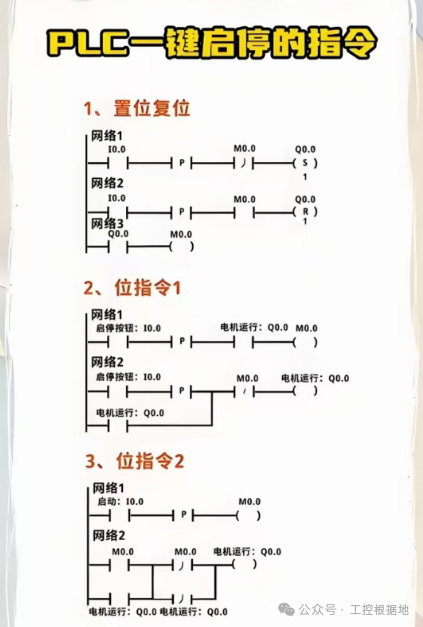
1️⃣ Set/Reset (S/R) — Newcomer’s favorite Ladder Diagram: Network 1: I0.0 rising edge → S Q0.0Network 2: I0.0 rising edge → R Q0.0Comment: Most intuitive, but may cause “set + reset” to occur simultaneously during button jitter, leading to motor twitching.
2️⃣ Self-locking position instruction — Classic 2 lines Ladder Diagram: Network 1: I0.0 rising edge → M0.0 negationNetwork 2: M0.0 → Q0.0Comment: Using M points as intermediate variables, the logic is clear, and the scan cycle is the shortest.
3️⃣ Addition instruction ADD — “Counting” Start/Stop Ladder Diagram: Network 1: I0.0 rising edge → VW0 = VW0 + 1Network 2: VW0 odd/even judgment → Q0.0 = VW0 & 1Comment: Quantifies button presses, can be expanded to “press 3 times to start, then 2 times to stop”.
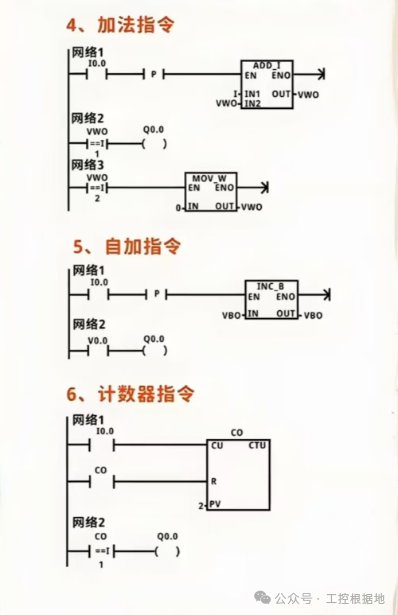
4️⃣ Increment instruction INC_B — Byte-level flip Ladder Diagram: Network 1: I0.0 rising edge → INC VB0Network 2: VB0 lowest bit → Q0.0Comment: Single-byte 0-255 cycle, fastest only requires 0.1 μs.
5️⃣ Counter CTU — Officially comes with a “completion bit” Ladder Diagram: Network 1: I0.0 rising edge → CU CTU C0 PV=2Network 2: C0 completion bit → Q0.0Comment: The counter comes with a reset, can be used for “stop after pressing 5 times” to prevent mistakes.
6️⃣ Logical negation INV — One line reversal Ladder Diagram: Network 1: I0.0 rising edge → INV VB0Network 2: VB0 lowest bit → Q0.0Comment: Extremely simple code, but not friendly for newcomers, easy to misread.
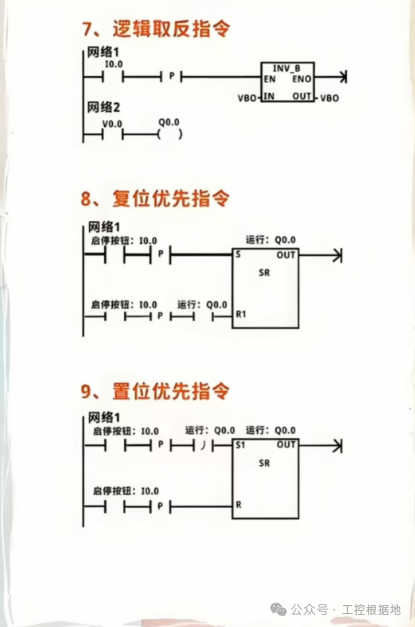
7️⃣ SR Reset Priority — On-site King Ladder Diagram: Network 1: SR Q0.0, S1=I0.0 rising edge, R=I0.0 rising edgeComment: Official library instruction, prevents double coils, reset priority, fault-safe.
8️⃣ RS Set Priority — Brother version Ladder Diagram: Network 1: RS Q0.0, S=I0.0 rising edge, R1=I0.0 rising edgeComment: Logic is opposite to SR, set priority, suitable for “start immediately upon power” scenarios.
9️⃣ Single Trigger on Rising Edge — Ultimate no-jitter solution Ladder Diagram: Network 1: I0.0 rising edge → Q0.0 negation(written in hardware interrupt OB40)Comment: Interrupt-level scanning, no fear of button jitter.
3. 5 Major Pitfalls on Site, Help You Avoid Them in Advance
| Pitfall | Phenomenon | Solution |
|---|---|---|
| Button jitter | Motor starts and stops erratically | Add 20 ms delay filtering or use interrupts |
| Double coils | Compilation error | Use SR/RS uniformly |
| Scan cycle doubles | 60 lines of code | Use position instructions or INC to reduce to 2 lines |
| Power-on misoperation | RS defaults to set | Switch to SR and add initial scan reset |
| Counter overflow | CTU up to 32767 | Set PV to 2, reset immediately after use |
4. 3 Real Cases of Playing with “One-Button Start/Stop”
Case 1: Remote Start/StopUsing SR instruction + Modbus TCP, a mobile app taps once to start, taps again to stop, with 0 wiring on site.
Case 2: FootswitchFootswitch signal jitter of 50 ms, using interrupt OB40 + rising edge negation, no faults for half a year.
Case 3: Foolproof CountingCTU set PV=5, the 5th button press stops and alarms, preventing misoperation.
With the same button, some can do it in 1 line, while others crash in 60 lines.It’s not that the function can’t be achieved, but the approach was not chosen correctly.

If you find this useful, please like and share to help more industrial control people avoid detours—more knowledge will be shared later, remember to follow!