Introduction
With the rapid development of domestic chip technology, Rockchip’s RK3588 processor has shown great potential in the embedded video surveillance field due to its powerful multimedia processing capabilities. This article will explore how to utilize the QT framework in conjunction with the RK3588 chip to implement an embedded surveillance system solution that simultaneously performs hardware decoding and GPU rendering of 16 channels of 1080P video streams, and analyze the adaptation of this solution on domestic hardware and operating systems.
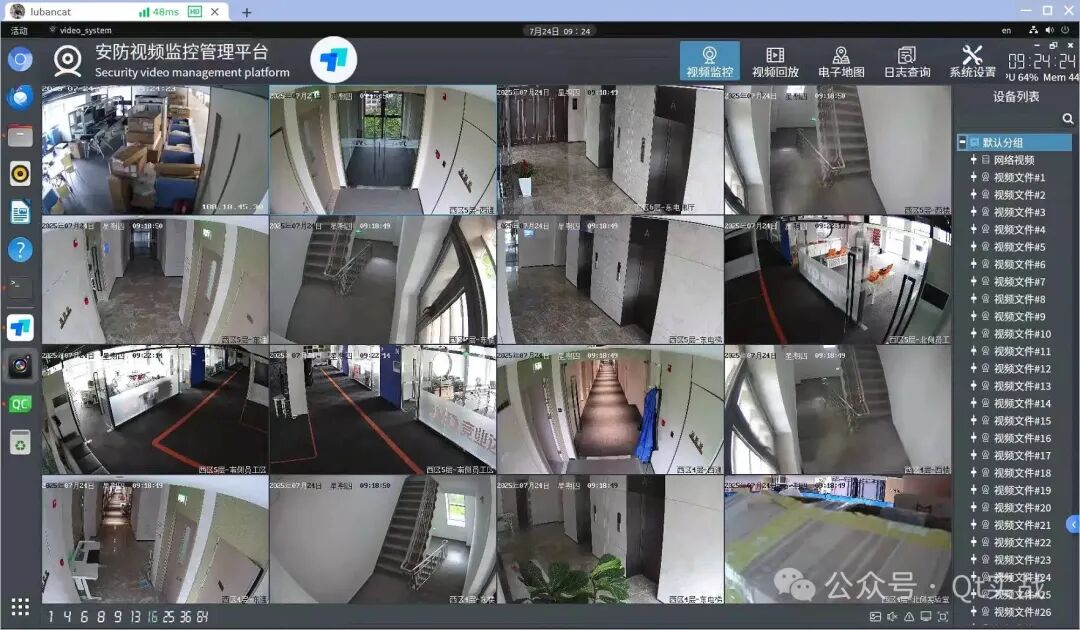
Overview of RK3588 Chip
The RK3588 is a new generation flagship processor launched by Rockchip, featuring an 8-core 64-bit architecture (4×Cortex-A76 + 4×Cortex-A55), equipped with an ARM Mali-G610 MP4 GPU and a 6TOPS NPU, providing excellent video encoding and decoding capabilities:
- Supports 8K@60fps video decoding and 8K@30fps encoding
- Supports various formats including H.264/H.265/VP9/AV1, etc.
- Multi-channel video decoding capability: supports up to 32 channels of 1080P@30fps decoding
- Built-in independent NPU, supporting intelligent analysis functions
System Architecture Design
Hardware Platform Selection
For the requirement of 16 channels of 1080P surveillance, the following domestic development boards can be selected:
- Firefly ROC-RK3588S-PC
- Rockchip official evaluation board RK3588 EVB
- Other domestic RK3588 development boards that meet specifications
Software Architecture
[Application Layer]
  ├── QT5.15+ GUI Interface
  ├── Video Analysis Module
  └── System Management Module

[Middleware]
  ├── QTMultimedia Plugin
  ├── MPP (Media Process Platform) Interface
  ├── OpenGLES/Vulkan Rendering
  └── DRM/KMS Display Output

[Lower Layer]
  ├── Linux Kernel (5.10+)
  ├── Rockchip BSP Driver
  └── Domestic Operating System Support (Optional)
Key Technology Implementation
1. Multi-channel Video Hardware Decoding
Utilizing the VPU (Video Processing Unit) of RK3588 to achieve 16-channel parallel decoding:
// Initialize decoder using Rockchip MPP library
MppCtx ctx;
MppParam param;
mpp_create(&ctx,¶m);
// Configure decoding parameters
MppDecCfg cfg;
mpp_dec_cfg_init(&cfg);
mpp_dec_cfg_set_s32(cfg,"base:out_mode", MPP_FRAME_OUT);
mpp_dec_cfg_set_s32(cfg,"base:width",1920);
mpp_dec_cfg_set_s32(cfg,"base:height",1080);
// Create 16 decoding instances
std::vector<mppctx> decoders(16);
for(auto& dec : decoders){
mpp_create(&dec,¶m);
mpp_init(dec, MPP_CTX_DEC, MPP_VIDEO_CodingAVC);
mpp_dec_cfg_setup(dec, cfg);
}</mppctx>2. Integration of QT and GPU Accelerated Rendering
Combining QT’s rendering framework with RK3588’s Mali GPU:
// Create OpenGL ES context
QSurfaceFormat format;
format.setRenderableType(QSurfaceFormat::OpenGLES);
format.setVersion(3,2);
QOpenGLContext* context = new QOpenGLContext;
context->setFormat(format);
context->create();

// Custom QQuickItem for GPU rendering
class VideoItem : public QQuickFramebufferObject {
    Q_OBJECT
public:
    Renderer* createRenderer() const override {
        return new VideoRenderer;
    }
};

class VideoRenderer : public QQuickFramebufferObject::Renderer {
public:
    void render() override {
        glClear(GL_COLOR_BUFFER_BIT);
        // Use GPU to draw video frames
        // ...
    }
};
3. Multi-channel Video Display Management
Implementing layout management and switching for 16 channels of video:
// Use QGridLayout to manage video windows
QGridLayout* grid = new QGridLayout;
for(int i = 0; i < 16; ++i) {
    VideoWidget* widget = new VideoWidget(i); // Custom video display widget
    grid->addWidget(widget, i/4, i%4); // 4x4 layout
}

// Dynamic layout switching
void switchLayout(int mode) {
switch(mode) {
case 1: // Single screen
    showSingleStream(0);
    break;
case 16: // 16 screens
    showAllStreams();
    break;
// Other layouts...
}
}
Adaptation to Domestic Operating Systems
Supported Operating Systems
- Kylin OS: Adapted for the ARM64 version of Kylin Linux
- UnionTech UOS: Supports the ARM architecture version of UnionTech OS
- OpenHarmony: Portable to OpenHarmony 3.2+ version
- Other Domestic Linux Distributions: Such as Deepin, NeoKylin, etc.
Key Adaptation Points
-
Display System Adaptation:
- Supports DRM/KMS direct display output
- Adapts to the window management system of domestic OS
Hardware Acceleration Integration:
# On domestic systems, install Rockchip's GPU driver
sudo apt install rockchip-mali-g610
QT Environment Configuration:
# When cross-compiling QT, configure EGLFS and LinuxFB support
./configure -opengl es2 -eglfs -linuxfb -xplatform linux-aarch64-gnu-g++
Performance Optimization Strategies
-
Decoder Resource Allocation:
- Allocate independent decoding channels for each video
- Set appropriate decoding buffer sizes
Memory Management:
// Use Rockchip's DRM memory allocation
drm_handle_t handle;
drm_fd = open("/dev/dri/card0", O_RDWR);
drmIoctl(drm_fd, DRM_IOCTL_MODE_CREATE_DUMB, &create);
Rendering Optimization:
- Use Vulkan instead of OpenGL ES for better performance
- Implement zero-copy texture uploads
Power Management:
# Configure RK3588's DVFS strategy
echo performance > /sys/devices/system/cpu/cpufreq/policy0/scaling_governor
Adaptation to Other RK Series Chips
This solution can be extended to other Rockchip processors:
| Chip Model | Max Supported Channels (1080P) | Remarks |
|---|---|---|
| RK3588 | 32 channels | Flagship model |
| RK3568 | 16 channels | Mid-high end |
| RK3399 | 8 channels | Previous generation flagship |
| RK3328 | 4 channels | Entry-level |
Key adjustments for adapting to different chips include:
- Number of MPP decoder instances
- Memory bandwidth configuration
- Rendering pipeline parameters
System Function Expansion
-
Intelligent Analysis Integration:
// Call RK3588 NPU for video analysis rknn_input inputs[1]; inputs[0].index = 0; inputs[0].buf = video_frame_data; inputs[0].size = frame_size; rknn_inputs_set(ctx, 1, inputs); rknn_run(ctx, nullptr); -
PTZ Control:
// Control PTZ via serial port QSerialPort port; port.setPortName("ttyS2"); port.setBaudRate(9600); port.write(ptz_command); -
Storage Management:
- Supports local SD card storage
- Supports network storage (NAS)
- Supports domestic encrypted storage solutions
Development Environment Setup
-
Cross-compilation Toolchain:
sudo apt install gcc-aarch64-linux-gnu g++-aarch64-linux-gnu -
QT Cross-compilation:
./configure -prefix /opt/qt5-arm64 -xplatform linux-aarch64-gnu-g++ make -j8 && make install -
Rockchip SDK Integration:
- Download RK3588 Linux SDK
- Integrate MPP, DRM, and other libraries
Conclusion
The embedded surveillance system solution based on QT and RK3588 fully utilizes the powerful multimedia processing capabilities of domestic chips, achieving efficient hardware decoding and GPU accelerated rendering of 16 channels of 1080P video. This solution not only offers superior performance but also fully supports domestic operating systems, providing a reliable choice for autonomous and controllable security monitoring. With the continuous upgrade of the Rockchip series chips, this architecture can be easily extended to applications with higher channel counts or higher resolutions.
Future Prospects
- Increase support for AV1 encoding
- Integrate more complex AI analysis functions
- Optimize energy efficiency to adapt to more application scenarios
- Enhance support for more domestic operating systems
Through continuous optimization and innovation, the QT+RK3588 solution is expected to become the mainstream technical route for domestic embedded surveillance systems.