Python Beginner 01 – Introduction to Programming, Understanding Computer Languages and Program Execution

1. Introduction to Python
Python is a programming language commonly used as the first programming language for beginners.
1. What is a Programming Language
Programming (verb) means writing programs, which is essentially telling the computer to perform a series of tasks using code.
A language (noun) is a means of communication.
Thus, a programming language is a language of program code with fixed syntax rules used to communicate with computers.
For example, it’s like teaching a novice how to cook a dish. You would detail each step in Chinese: first wash the vegetables, then chop them, heat the pan, and finally cook.
Similarly, programming involves breaking down complex tasks into simple steps and using the syntax and rules of the programming language to instruct the computer on how to execute these steps.
Procedure MultiplyUsingLoop
Input: a, b
result = 0
abs_b = abs(b)
for i in range(abs_b):
    result += a
if b < 0:
    result = -result
return result
Since programming translates human thought into a language that computers can understand, why are there various languages like Python, C, C++, and Java?
This is because the commands that computers can recognize and execute are called instructions, and the format of these instructions is binary code (composed only of 0s and 1s). However, programming directly in 0s and 1s is very difficult for humans, making smooth communication with computers challenging.
Therefore, to facilitate programmers in writing programs, programming languages act as intermediaries. The code we write ultimately gets converted into machine instructions (0s and 1s) that the CPU can execute, and the translation tools (compilers/interpreters) complete this conversion.
This tool can be understood as a translation tool, such as interpreters and compilers.
2. Python and PyCharm
Python is just a programming language that is easy to learn, readable, and extensible, making it one of the most popular programming languages.
Here are the results of calculating 1 + 2 in different programming languages:
# Python
print(1 + 2)
/* Java */
public class Main {
public static void main(String[] args) {
System.out.println(1 + 2);
}
}/* C++ */
#include <iostream>
using namespace std;
int main() {
cout << 1 + 2 << endl;
return 0;
}As can be seen, the Python code is the shortest for the same functionality. However, the computer still cannot directly run this code. We know the syntax and rules corresponding to the Python language, but the computer has not learned this language, so we need to download the Python interpreter to the computer before we can run this code. It’s like humans and computers needing to learn the same foreign language to communicate.
PyCharm is an integrated development environment (IDE) for Python that provides rich features such as code auto-completion, error checking, code formatting, debugging, etc., making Python development more efficient.
Of course, you can also use Notepad instead of PyCharm. It’s like taking a photo; whether using a regular camera or a beauty camera, both will call the camera to take a picture.
Most operating systems (like Windows) do not come with Python pre-installed and require manual installation; some Linux and macOS systems may have Python pre-installed, but the version may not be the latest, so it is recommended to install the official version based on development needs.
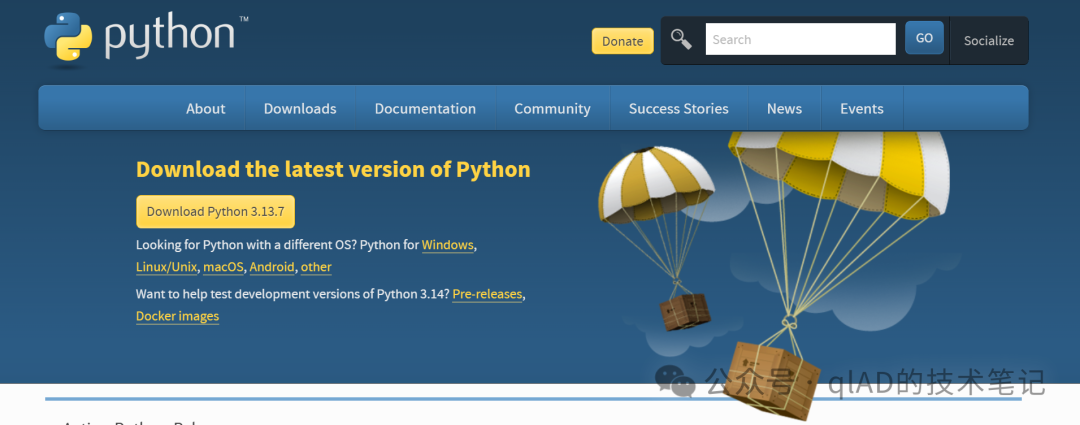
To summarize:
1. Programmers write programs (.py files) using the syntax and rules corresponding to Python.
2. However, the computer does not recognize the program you wrote; you need to download the Python interpreter software to successfully run the .py file (to be translated into instructions).
3. Finally, to write programs efficiently, the PyCharm tool is generally used.
2. How to Write and Run Python Programs
We will not cover syntax and rules here; just experience the feeling of programming. After you have installed Python and PyCharm, follow these steps:
1. Notepad + Command Line Execution
1. Create a .py file, for example, test.py.
2. Right-click to open with Notepad, and paste the following code into the test.py file:
import math
import time
import sys

def main():
    A = 0.0
    B = 0.0
    # Clear screen ANSI escape code
    print("\x1b[2J", end="")

    while True:
        # Initialize array
        z = [0.0] * 1760
        b = [' '] * 1760

        j = 0.0
        while j < 6.28:
            i = 0.0
            while i < 6.28:
                c = math.sin(i)
                d = math.cos(j)
                e = math.sin(A)
                f = math.sin(j)
                g = math.cos(A)
                h = d + 2
                D = 1.0 / (c * h * e + f * g + 5.0)
                l = math.cos(i)
                m = math.cos(B)
                n = math.sin(B)
                t = c * h * g - f * e

                x = int(40 + 30 * D * (l * h * m - t * n))
                y = int(12 + 15 * D * (l * h * n + t * m))
                o = x + 80 * y
                N = 8 * ((f * e - c * d * g) * m - c * d * e - f * g - l * d * n)

                if 22 > y > 0 and 0 < x < 80 and D > z[o]:
                    z[o] = D
                    # Ensure N is within valid range
                    idx = int(N) if N > 0 else 0
                    if idx >= len(".,-~:;=!*#$@"):
                        idx = len(".,-~:;=!*#$@") - 1
                    b[o] = ".,-~:;=!*#$@"[idx]

                i += 0.02
            j += 0.07

        # Move cursor to the top of the screen
        print("\x1b[H", end="")

        # Output characters
        for k in range(1761):
            if k % 80 == 0:
                print()
            else:
                print(b[k], end="")
            A += 0.00004
            B += 0.00002

        # Control frame rate to avoid outputting too fast
        time.sleep(0.05)
        # Flush output buffer
        sys.stdout.flush()

if __name__ == "__main__":
    try:
        main()
    except KeyboardInterrupt:
        # Capture Ctrl+C, restore terminal settings
        print("\x1b[0m")
        sys.exit(0)
3. First, navigate to the directory where the test.py file is located in the command line, and then run the test.py file:
# First switch to the directory where the file is located, for example, Desktop
cd C:\Users\YourUsername\Desktop

# Then run the program
python test.py
Besides using the command line, you can also right-click the file and select to run it with Python.
4. Running Result
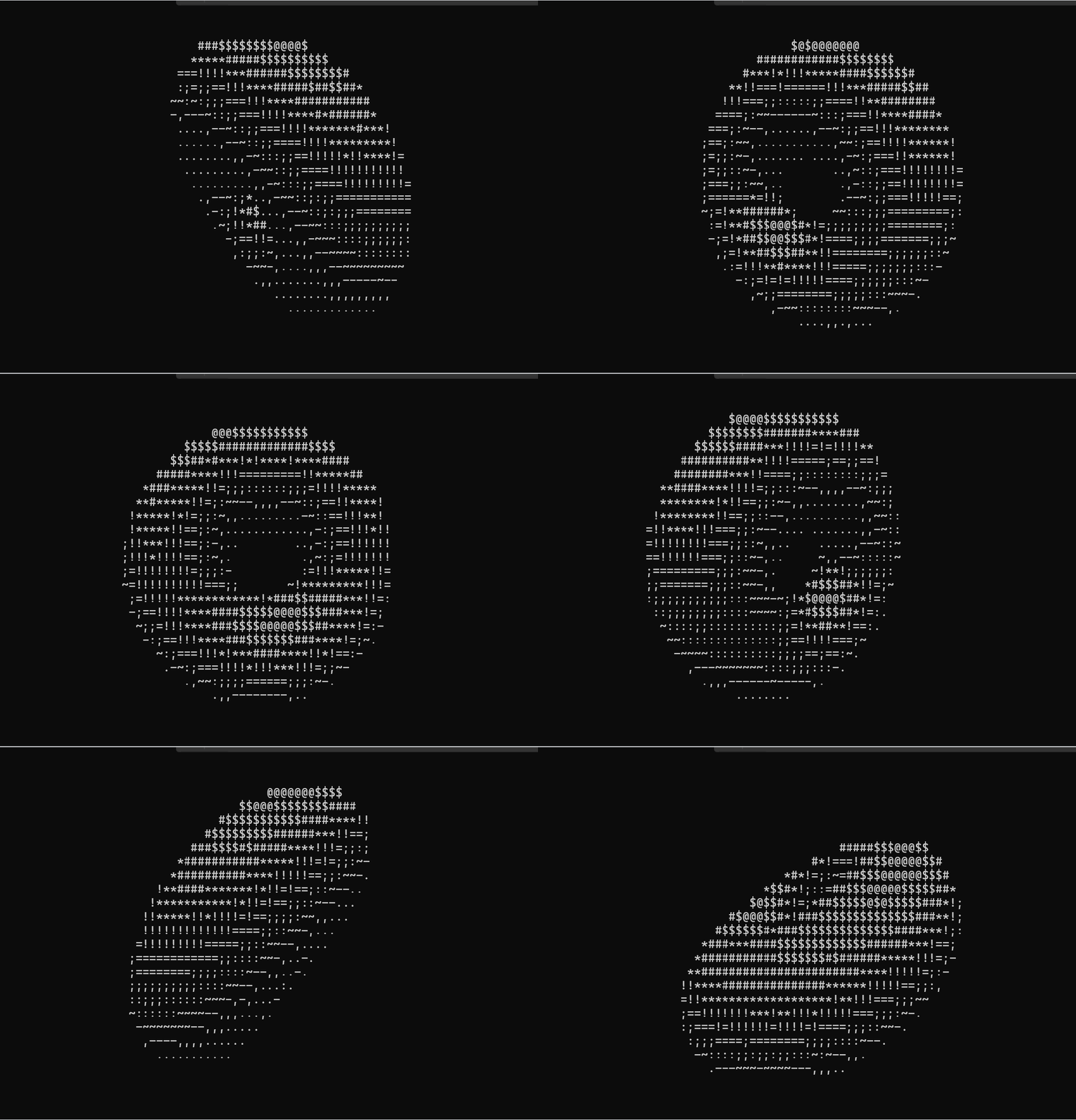
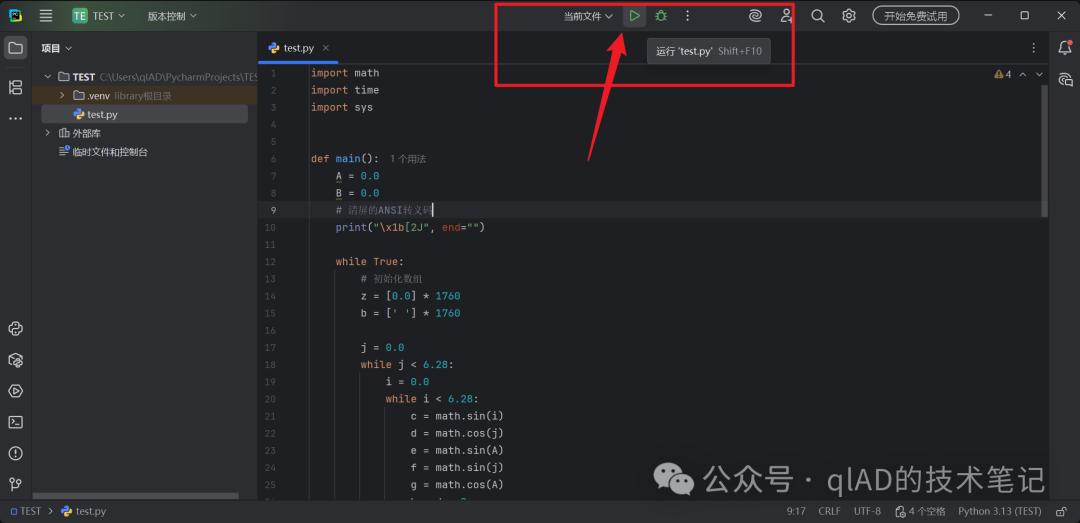
2. Running in PyCharm
1. Create a new project.
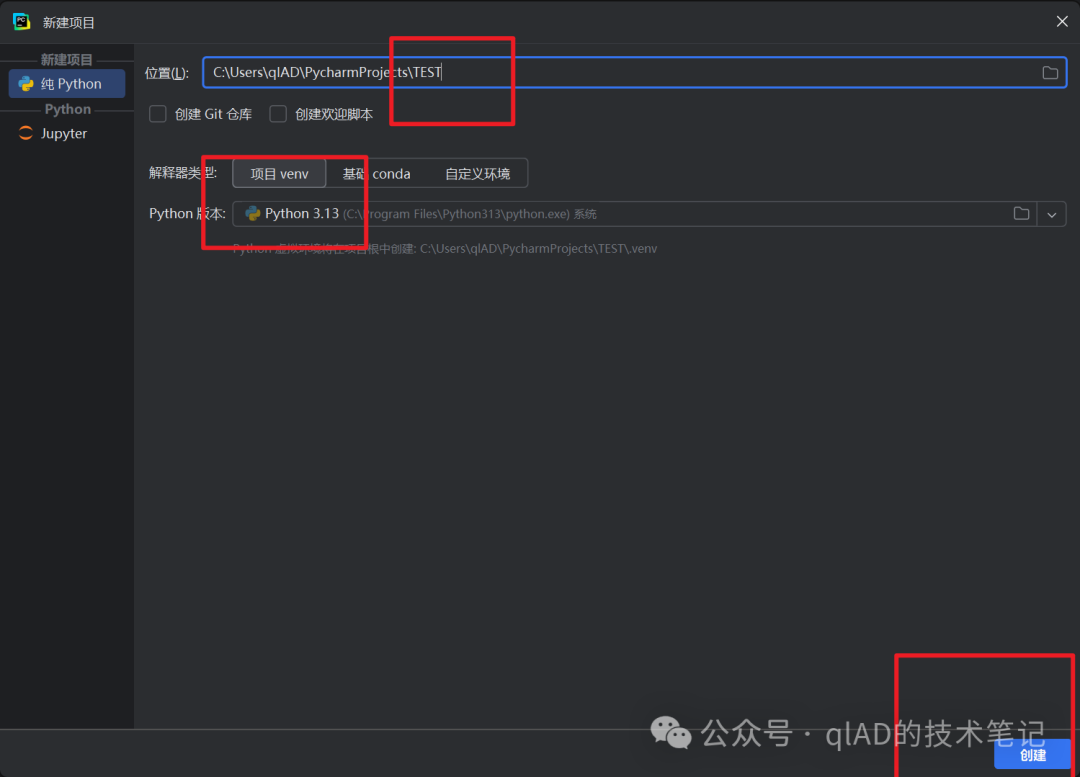
2. Add a .py file.
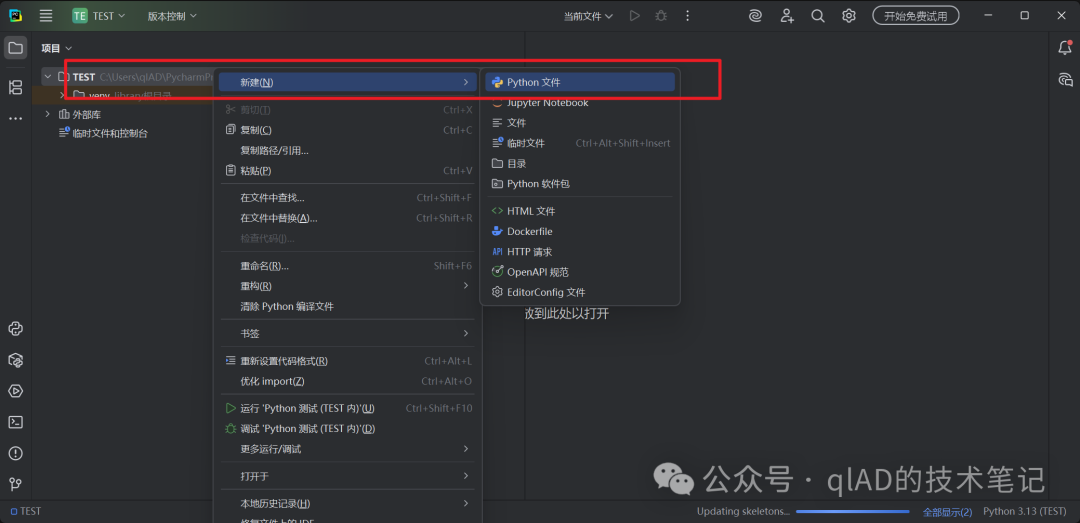
3. Paste the code and run it.
3. The Process from Program Birth to Execution
The entire process can be roughly divided into three steps:
- 1. Source code is converted into binary instructions.
- 2. The operating system loads the instructions into memory.
- 3. The CPU executes the instructions line by line.
1. From Source Code to Binary Instructions
No matter what programming language, it is a foreign language for both computers and humans, and computers cannot read it directly. It needs to go through a conversion process from code to binary instructions. The tools used for this conversion are mainly divided into two types: compilation and interpretation.
Compilation: Converts source code into binary instructions and saves it as a binary file, such as a C++ .exe file.
Interpretation: Converts source code into binary instructions and then runs it, such as Python’s .py files.
Here is an example of machine code corresponding to C language:
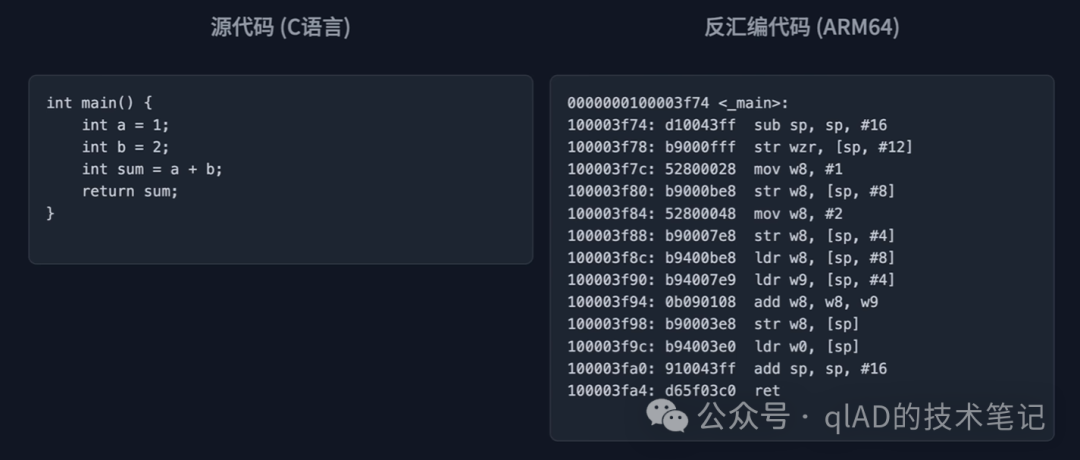
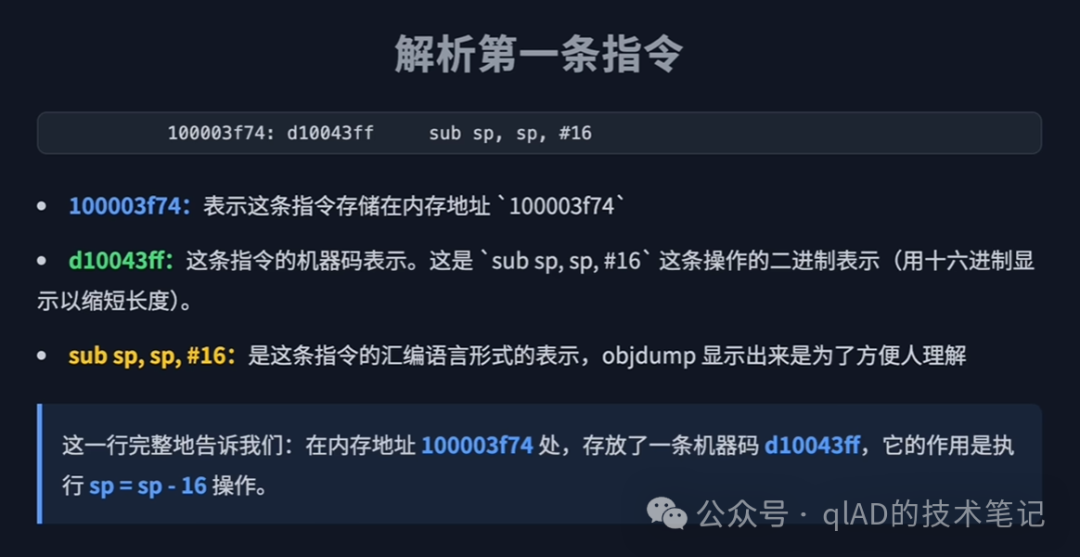
The first line <span>d10043ff</span> is a machine code instruction, but to shorten the length, it is represented in hexadecimal instead of binary.
2. Program Loading into Memory
Why do computers need memory modules?
To run faster, computers have two types of storage hardware: hard drives and memory modules. Memory modules are faster, so they are used to run programs. This is also why the more applications run, the higher the memory usage.
Since memory modules are faster, why do we still need hard drives?
This is because the data stored on hard drives is permanent and cheaper, while the data stored in memory modules is temporary. When you close an application in the background, the memory usage decreases, and some data is lost.
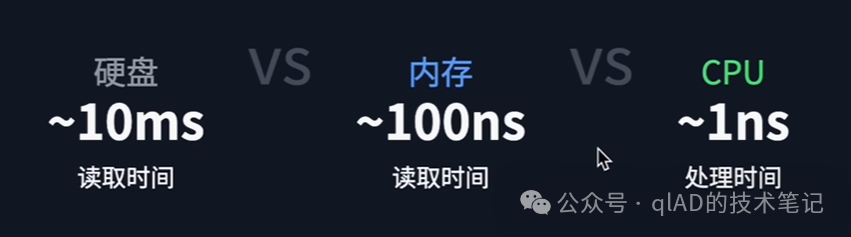
Why doesn’t the CPU directly load instructions into itself for execution, given that it runs the fastest?
Because CPUs are expensive, to use resources efficiently, memory acts as a buffer.
The hard drive is a “warehouse” where programs are stored when not in use; memory is a “workbench” where programs are moved when they need to run; the CPU is the “worker” that only works on the workbench.
For a more detailed introduction to memory, you can refer to this article:Memory Layout of C++ Programs – Code Segment, Global/Static Segment, Stack Segment, and Heap Segment[1]
3. CPU Executes Instructions
How the CPU executes instructions involves core knowledge of computer architecture (such as registers, ALU, control units, etc.), which is quite complex and will be discussed in future articles.
4. Some Other Questions
1. Why Can’t Programming Be Done in Chinese?
Programming consists of two steps: 1. Writing code 2. Translating it into binary. So why can’t we directly use Chinese, English, French, etc., to represent code and then translate it into binary? Isn’t it redundant to learn the syntax rules of a programming language?
This is because natural languages like Chinese and English are too complex. For example, if you want the program to output “You are handsome,” there are multiple ways to express it:
| Type | Expression |
|---|---|
| Tsundere Version | Compliment me on my handsomeness |
| Polite Version | Please output “You are handsome” on the screen |
The complexity of natural languages does not allow for precise translation by a translator; on the contrary, the representation of code is often simpler and clearer than natural language, making it easier to translate.
Keywords in programming languages (like if, for) are designed as unambiguous symbol systems, while the complexity of natural languages (multiple meanings, flexible grammar) is not conducive to precise logical expression.
There are programming languages in Chinese, such as Easy Language (which looks like classical Chinese).
2. Can Information Really Be Stored Using Only 0s and 1s?
Although they are just two simple numbers, through different combinations, 0s and 1s can store any information.
You can see what information the following 0s and 1s represent by converting binary to Chinese:
111001101000100010010001111001011001011010011100111001101010110010100010111001001011110110100000Online tool for converting binary to Chinese[2]
Reference Links
<span>[1]</span> Memory Layout of C++ Programs – Code Segment, Global/Static Segment, Stack Segment, and Heap Segment: https://www.qladgk.com/blog/memory-layout-cpp<span>[2]</span> Online tool for converting binary to Chinese: https://onetools.online/zh/binary-translator