Table of Contents
- 1. Introduction
- 2. Overall Process
- 3. Position in the System
- 4. Writing C Source Code
- 5. Writing Makefile
- 6. Compile, Load, View, Unload
- 6.1 Compile Module
- 6.2 Load Module
- 6.3 View Module and Logs
- 6.4 Unload Module
- 6.5 View Logs Again
- 7. Common Errors and Troubleshooting
- 7.1 insmod Error: invalid module format
- 7.2 Nothing in dmesg
- 7.3 System Freezes or Crashes
- 8. Conclusion
1. Introduction
Hello, future kernel developer! Are you curious about how operating systems communicate directly with hardware? Kernel Modules are one of the keys to uncovering this secret. They act like dynamic “plugins” that allow you to extend the functionality of the Linux kernel without recompiling the entire kernel or rebooting the system.
This article is tailored for beginners like you, who have basic knowledge of Linux command line and C programming. Our goal is very clear: to create a module that prints “Hello, World!” in the kernel log. This is the simplest and most classic introductory practice that allows you to experience the complete lifecycle of a kernel module: Code → Compile → Load → Verify → Unload.

2. Overall Process
Before we start coding, let’s quickly go through the complete steps:
- Write Source Code: Create a
<span>hello_world.c</span>file, which contains the core logic of the module. - Write Build Script: Create a
<span>Makefile</span>file that tells the kernel’s build system how to compile our code. - Compile Module: Run the
<span>make</span>command in the terminal to generate the<span>hello_world.ko</span>module file. - Load Module: Execute the
<span>sudo insmod hello_world.ko</span>command to “install” the module into the currently running kernel. - View Logs: Check the kernel logs for our expected output using
<span>sudo dmesg</span>or<span>sudo journalctl -k</span>. - Unload Module: Execute the
<span>sudo rmmod hello_world</span>command to safely remove the module from the kernel.
3. Position in the System
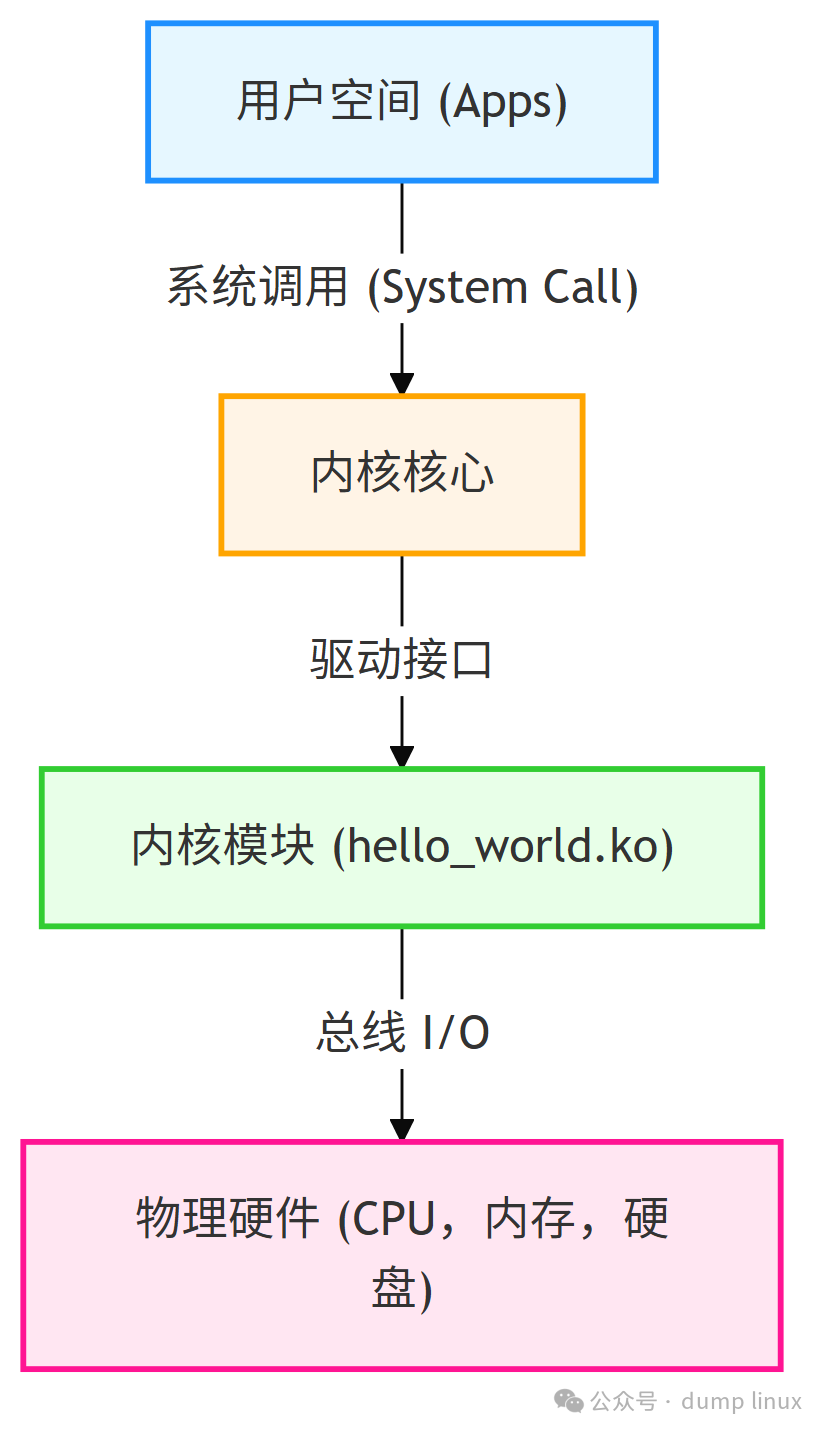
To better understand kernel modules, imagine your computer system as a three-layer architecture:
- User Space: The top layer, where all the applications you use daily run, such as browsers, text editors, terminals, etc.
- Kernel Space: The middle core layer, which is the “brain” of the operating system, responsible for managing hardware resources, scheduling processes, handling system calls, etc.
- Hardware: The bottom layer, including your CPU, memory, hard drives, and various peripherals.
Our kernel module code runs in the Kernel Space, which is the critical bridge connecting user programs to physical hardware.
System Layer Diagram:
4. Writing C Source Code
Create a <span>hello_world.c</span> file in your working directory and copy the following code into it. This code is well-commented and includes a little Easter egg: you can pass a custom message when loading the module.
/* hello_world.c - A beginner-friendly "Hello World" kernel module */

/* Required headers */
#include <linux/init.h>      // Includes __init and __exit macros
#include <linux/module.h>    // Includes core functions and data structures needed for loading modules
#include <linux/kernel.h>    // Includes printk.h, which contains printk, pr_info, etc.
#include <linux/moduleparam.h> // Allows the module to receive parameters

/* --- Module Metadata --- */
MODULE_LICENSE("GPL"); // License declaration to avoid kernel taint warnings
MODULE_AUTHOR("Your Name <[email protected]>");
MODULE_DESCRIPTION("A simple, beginner-friendly Hello World kernel module");
MODULE_VERSION("0.1");

/* --- Module Parameters ---
 * Defines a string parameter named msg, which can be passed a string when loading the module, defaulting to "Hello, World!"
 * For example: sudo insmod hello_world.ko msg="Hello, World!"
 * The permission field determines the access rights of the /sys/module/hello_world/parameters/msg node, which can be read to get the message content.
 */
static char *msg = "Hello, World!";
/* Register parameter, "charp" indicates it is a character pointer (string)
 * 0644 is the permission for the /sys/module/hello_world/parameters/msg node generated after loading the module, which is used to view the module parameter value.
 */
module_param(msg, charp, 0644);
MODULE_PARM_DESC(msg, "The messages printed during module loading");

/* --- Initialization Function ---
 * This function is called when the module is loaded into the kernel by the insmod command.
 */
static int __init hello_init(void)
{
    /* pr_info is a kernel log printing macro that outputs at the KERN_INFO log level.
     * pr_info is a modern and recommended macro wrapper for printk(KERN_INFO, ...).
     */
    pr_info("Hello, Kernel! The message is: %s\n", msg);

    // Return 0 indicates successful module loading. A non-zero return value indicates failure.
    return 0;
}

/* --- Cleanup Function ---
 * This function is called when the module is removed from the kernel by the rmmod command.
 */
static void __exit hello_exit(void)
{
    pr_info("Goodbye, Kernel!\n");
}

/* --- Register Entry and Exit ---
 * Tell the kernel which functions to call when the module is loaded and unloaded.
 */
module_init(hello_init);
module_exit(hello_exit);
Code Explanation:
<span>MODULE_LICENSE("GPL")</span>: Must specify. It tells the kernel that your module follows the GNU General Public License. If the license field is missing, you will get an error<span>missing MODULE_LICENSE()</span><span> when compiling the kernel module.</span><span>__init</span>and<span>__exit</span>: These macros are hints to the kernel.<span>__init</span>tells the kernel that the<span>hello_init</span>function is executed only once during initialization, and its memory can be reclaimed after loading. The same applies to<span>__exit</span>.<span>pr_info(...)</span>: The recommended kernel log printing function, which automatically sets the log level to<span>KERN_INFO</span>, making it easier to categorize and view logs.<span>module_param(msg, charp, 0644)</span>: This is a very useful feature that allows you to pass parameters from the command line when loading the module, greatly enhancing the module’s flexibility. The<span>0644</span>permission means any user can read this parameter value through<span>/sys/module/hello_world/parameters/msg</span>.

5. Writing Makefile
Kernel modules cannot be compiled directly with <span>gcc</span> like regular C programs. They need to use the kernel’s built-in build system kbuild. In the same directory as <span>hello_world.c</span>, create a file named <span>Makefile</span> with the following content:
# Tell kbuild that we want to compile hello_world.c into a module named hello_world.ko
obj-m += hello_world.o

# KDIR points to the build directory of the kernel source or headers
# Scenario 1: Using the system's built-in kernel, you need to install the headers first (Debian/Ubuntu example):
# sudo apt update && sudo apt install -y linux-headers-$(shell uname -r)
KDIR := /lib/modules/$(shell uname -r)/build
# Scenario 2: Using manually compiled kernel source, replace with your custom source path, here is an example for WSL2
# KDIR := $(HOME)/WSL2-Linux-Kernel

# PWD is the absolute path of the current working directory
PWD := $(shell pwd)

# all is the default make target for compiling the kernel module
all:
	$(MAKE) -C $(KDIR) M=$(PWD) modules

# clean is the clean target for deleting all files generated during the compilation process
clean:
	$(MAKE) -C $(KDIR) M=$(PWD) clean
Makefile Explanation:
<span>obj-m += hello_world.o</span>: Defines the compilation target.<span>m</span>represents module, and<span>obj-m</span>indicates to kbuild to compile<span>hello_world.o</span>into a loadable kernel module (<span>.ko</span>file).<span>-C $(KDIR)</span>: The<span>make</span>command’s<span>-C</span>option changes the build process to the kernel source/header directory<span>$(KDIR)</span>to execute (<span>KDIR</span>represents Kernel Directory).<span>M=$(PWD)</span>: Tells kbuild to return to the current project directory<span>$(PWD)</span>to compile our module after completing the kernel directory build (<span>PWD</span>represents Present Working Directory).
Important Note: Before compiling, ensure that you specify the header files that match the current kernel version.

All preparations are ready! Now open the terminal, navigate to the project directory where <span>hello_world.c</span> and <span>Makefile</span> are located, and let’s witness the miracle.
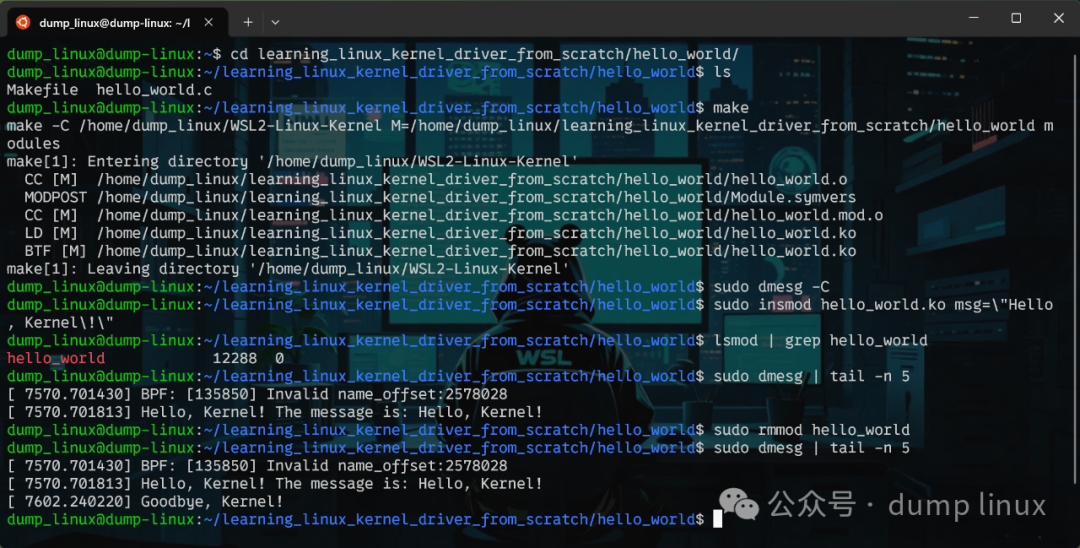
6.1 Compile Module
make
Upon successful execution, a <span>hello_world.ko</span> file and some intermediate files will be generated in the current directory. The <span>.ko</span> file is the compiled kernel module.
6.2 Load Module
# Use the default message "Hello, World!"
sudo insmod hello_world.ko

# Or, pass a custom message, adding these three slashes to prevent message truncation
sudo insmod hello_world.ko msg="Hello, Kernel!"
<span>sudo</span>is required because loading/unloading kernel modules is a privileged operation.
6.3 View Module and Logs
# Confirm if the module has been successfully loaded
lsmod | grep hello_world

# View the latest messages in the kernel log ring buffer
sudo dmesg | tail -n 5

# Or use journalctl (better on systemd systems, output with timestamps)
sudo journalctl -k -n 5
If all goes well, you should see the output “Hello, Kernel! The message is: Hello, World!” in the logs.
6.4 Unload Module
sudo rmmod hello_world
Note:
<span>rmmod</span>command is followed by the module name (<span>hello_world</span>), not the file name (<span>hello_world.ko</span>).
6.5 View Logs Again
# View the latest logs to confirm unload information
sudo dmesg | tail -n 5

# Or, monitor kernel logs in real-time, which is very useful for debugging
sudo dmesg -w
This time, you will see the output “Goodbye, Kernel!” printed by the <span>hello_exit</span> function.
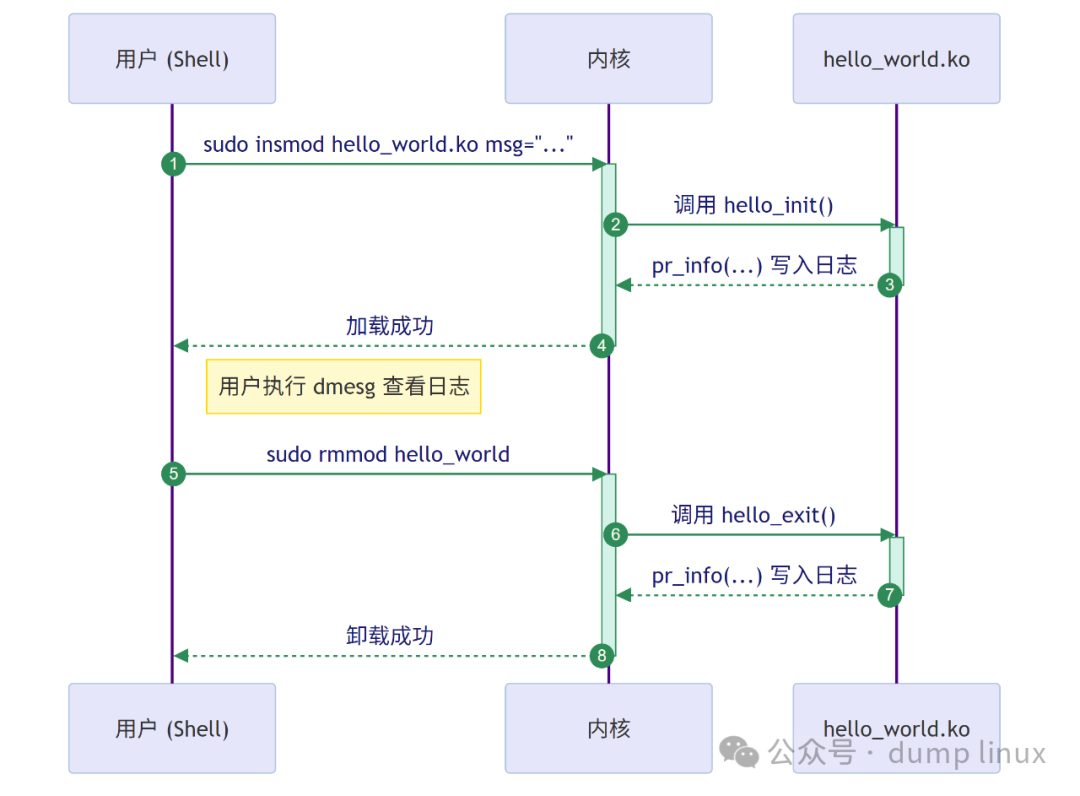
Timeline: Module Lifecycle
This diagram vividly depicts the interaction process between all the commands and the kernel:
7. Common Errors and Troubleshooting
7.1 insmod Error: invalid module format
- Cause: The kernel header version used to compile the module does not match the currently running kernel version.
- Solution: Check to ensure the versions match, then run
<span>make clean && make</span>to recompile.
7.2 Nothing in dmesg
- Cause: The log level is filtered by the system, or the logs are flushed too quickly.
- Solution: Ensure you are using
<span>pr_info</span>or higher-level macros. Use<span>journalctl -k -f</span>/<span>dmesg -w</span>to track log output in real-time to avoid missing information.
7.3 System Freezes or Crashes
- Cause: This is the most severe case, indicating illegal operations in the module (such as accessing a null pointer).
- Solution: Check the source code, especially the pointer-related code, to avoid accessing null pointers and out-of-bounds access.
8. Conclusion
Congratulations! You have successfully compiled and run your first Linux kernel module, and you understand the core processes and concepts behind it.
Next Challenge:
- Add an
<span>int</span>type<span>module_param</span>, for example called<span>repeat</span>. In the<span>hello_init</span>function, print the message multiple times based on the value of<span>repeat</span>. - Run the
<span>modinfo hello_world.ko</span>command to view detailed information about the module and confirm that the metadata you wrote, such as<span>MODULE_AUTHOR</span>, is displayed correctly.
The world of kernel programming is vast and profound; this is just the beginning of your great journey. Stay curious, proceed with caution, and enjoy your exploration!