Dear friends, you must be very curious about what configuration allows the Linux system to dynamically open and close specific ports. I was also quite surprised when I saw this configuration online. Can the system really dynamically switch specific ports?The answer is yes, and this technology is known as port knocking. This is a method to open ports on a firewall from the outside by generating connection requests on a predefined set of ports. It is a security measure. Specifically, the port knocking technique requires users to access a series of hidden ports in a predefined order before attempting to connect to a specified port. This technique effectively hides the actual service ports by adding an extra verification step at the network layer, reducing the risk of brute-force attacks.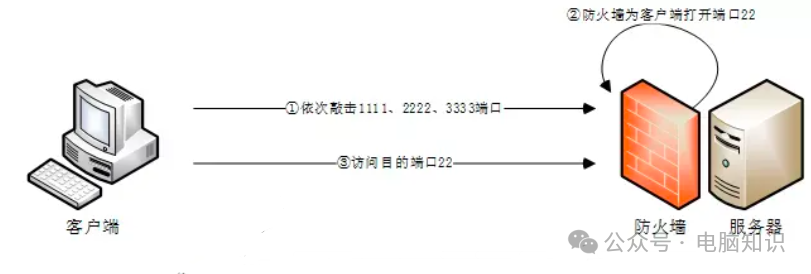
In Linux, this is implemented through the Knockd service, which dynamically adds iptables rules to hide the ports opened by the system. It uses a custom sequence of port numbers to “knock” and open the service ports that need to be accessed, allowing external access. When not in use, it uses the custom port numbers to “close the door,” shutting down the ports and stopping external listening. The main purpose is to prevent attackers from scanning the system for potential exploitable services, as the protected ports will appear closed unless the attacker sends the correct knocking sequence.
There are plenty of configuration tutorials available online, but here is a brief introduction for your learning reference.
1. Installation
apt-get install knockd # or yum install knockd2. Configuration
The configuration file is located at /etc/knockd.conf.
[options] UseSyslog[openSSH] # Define the sequence of ports for knocking sequence = 1111,2222,3333 # Set the timeout; too short may cause errors. This timeout refers to the interval between knocking ports, default is 5 seconds, can be adjusted based on actual conditions seq_timeout = 5# Set the command to execute after a successful knock command = /sbin/iptables -A INPUT -s %IP% -p tcp --dport 22 -j ACCEPT tcpflags = syn[closeSSH] sequence=3333,2222,1111 seq_timeout=5 command=/sbin/iptables -D INPUT -s %IP% -p tcp --dport 22 -j ACCEPT tcpflags=syn[openHTTPS] sequence=12345,54321,24680,13579 seq_timeout=5 command=/usr/local/sbin/knock_add -i -c INPUT -p tcp -d 443 -f %IP% tcpflags=synAnother configuration that needs to be modified is /etc/default/knockd.
# control if we start knockd at init or not# 1 = start# anything else = don't start# PLEASE EDIT /etc/knockd.conf BEFORE ENABLINGSTART_KNOCKD=1# command line optionsKNOCKD_OPTS="-i eth0"Find the line START_KNOCKD=0. Uncomment it and set the value to 1. Next, uncomment the line KNOCKD_OPTS=”-i eth1″ and replace the default value with the active network interface of the system. To check your network interfaces, simply run the ip addr or ifconfig command.
Configuration Explanation
-
openSSH is the setting for opening ports, closeSSH is for closing ports.
-
The sequence accesses the ports in order, and the command is executed based on the conditions. For example, here it accesses ports 1111, 2222, 3333 in sequence, using TCP by default.
-
The command is executed when knockd detects that the sequence of port accesses is complete, which here is to open or close SSH external access through iptables.
3. Start
systemctl start knockdsystemctl enable knockd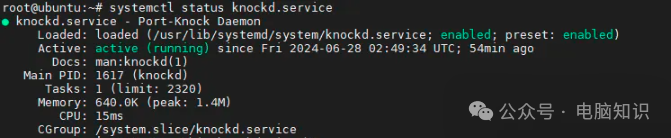
4. Usage
To use port knocking, you can use the knock command line tool or other similar tools:
knock 1111 2222 3333After completing the knocking, your local IP address will be allowed to access the specified port on the remote server, usually the SSH server port, thus achieving the knocking. Closing the door is the same; first run the knock command with the IP address and corresponding ports, which will trigger the rules and automatically remove the configurations from the firewall.