What is MindsDB?
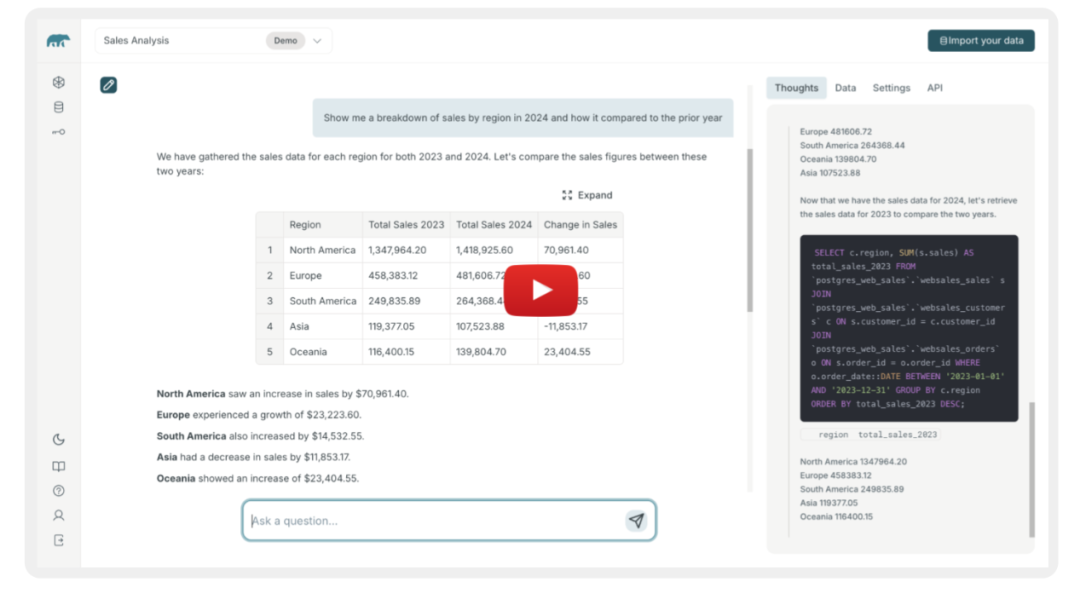
MindsDB is essentially an open-source AI-SQL server that can be deployed locally or in the cloud. It connects data from various databases, data warehouses, and even SaaS applications, allowing you to ask it questions as if you were chatting with a person—”What were the top-selling products last month?” It will provide you with an answer immediately. Imagine eliminating the need to write extensive SQL, run ETL processes, and create visualizations in BI tools; you can simply converse to get results.
What Pain Points Does It Address?
| Traditional Pain Points | MindsDB Solutions |
| Data FragmentationEnterprise data is scattered across multiple systems like MySQL, PostgreSQL, Snowflake, Google Sheets, etc., requiring tool switching for queries. | Connect: Built-in connectors for hundreds of data sources, allowing you to link all data to a single virtual database with one click. |
| Time-consuming ETLData cleaning, transformation, and synchronization require writing scripts and scheduling tasks. | Jobs: Supports scheduled synchronization/transformation tasks, automatically unifying the latest data into views. |
| High Analysis ThresholdBusiness users cannot write complex SQL and must rely on data analysts. | Chat & Agents: Built-in AI assistants allow users to ask questions in natural language, translating them into SQL and executing them in the background. |
| Complicated Model DeploymentMachine learning models require separate deployment, monitoring, and API integration. | MCP (Model Context Protocol): Integrates models and data, allowing direct calls to models in SQL, eliminating the deployment step. |
How Easy Is It to Set Up?
- 1. Docker Desktop (Recommended)
docker run -p 47334:47334 -p 47335:47335 mindsdb/mindsdbIn just a few seconds, the MindsDB Server will be up and running. Open your browser to
<span>http://localhost:47334</span>to see the UI. - 2. Standard Docker (More Flexible)
docker pull mindsdb/mindsdb
docker run -d -p 47334:47334 -p 47335:47335 mindsdb/mindsdb
You will need to configure volume mounts and environment variables yourself, suitable for deployment on cloud servers or Kubernetes.
- 3. Local pip Installation (For Developers)
pip install mindsdb
mindsdb start
Start directly from the command line, and experiment with Jupyter Notebook.
Basic Usage Process
| Step | Action | Tip |
| 1. Connect Data | In the UI → Data Sources → Add MySQL, PostgreSQL, CSV, Google Sheets, etc. | Use <span>mindsdb</span> username/password, and don’t forget to enable external access for the corresponding database. |
| 2. Create View | <span>CREATE VIEW unified_sales AS SELECT * FROM mysql.sales UNION SELECT * FROM snowflake.sales;</span> |
The view acts as a “data lake without ETL,” automatically querying across databases. |
| 3. Model Building | <span>CREATE MODEL sales_forecast FROM unified_sales PREDICT sales_amount USING XGBoost;</span> |
Simply write SQL, and MindsDB will train and save the model in the background. |
| 4. Chat | In the Chat page, enter: “What were the top three products sold in Beijing last month?” | The AI will translate the natural language into <span>SELECT … FROM unified_sales WHERE city='北京' ORDER BY sales_amount DESC LIMIT 3;</span> and return the results. |
| 5. Deploy API | <span>SELECT * FROM mindsdb.predict_sales WHERE ...;</span> or call via MCP. |
Can be directly embedded into business systems, calling models like a regular database. |
Pros and Cons Overview
| Pros | Cons |
| 🎯 All-in-One: Covers data connection, unification, and AI inference. | ⚙️ Resource Intensive: Running large models locally requires CPU/GPU resources. |
| 🗂 Multi-source Support: Hundreds of data sources, covering most common enterprise systems. | 📚 Learning Curve: Although there is a UI, familiarizing oneself with the mixed SQL + AI syntax takes time. |
| 🤖 Natural Language: Business users can converse directly, lowering the technical barrier. | 🔧 Limited Customization: Advanced model tuning can only be done through SQL parameters, lacking flexibility compared to pure Python frameworks. |
| 🚀 Quick Deployment: One-click start with Docker, easily switch between cloud and local. | 📈 Community Size: Compared to mature commercial BI tools, the community ecosystem is still growing. |
In Summary
If you often face fragmented tasks in your company like “Where is the data, how to query it, and how to deploy models?” you can consider MindsDB as a “chatbot for data.” It integrates connection, unification, and response into one, saving a lot of manual ETL, SQL tuning, and model deployment time. For business users, insights can be obtained directly through natural language conversations; for technical teams, deep customization is still possible through SQL, Python, and MCP. The only caveat is that computational requirements and community maturity are still in the growth phase, but its open-source nature allows you to expand it at any time.
Project Address: https://github.com/mindsdb/mindsdb