Learning to use Qinheng Micro Bluetooth TMOS ...... by Jin ChenIntroduction
In the Qinheng Micro Bluetooth chip EVT, there is a Task Management System (TMOS) designed for Bluetooth applications, which can be simply understood as a minimal “operating system” (though it is not an operating system). It serves as the scheduling core, handling multitasking switching.
To run Bluetooth on the Qinheng Micro RISC-V Bluetooth chip, one must learn to use TMOS, so in this article, we will learn about the usage of TMOS.
I am Jin Chen, with the same name across the internet, striving to write each series of articles well, without exaggeration or compromise, treating the knowledge we learn seriously. Jin Chen, with diligence, can break stones!
1. Basic Introduction
In the official EVT, there is a “Qinheng Low Power Bluetooth Software Development Reference Manual” in the BLE example folder, which contains basic usage instructions for TMOS:
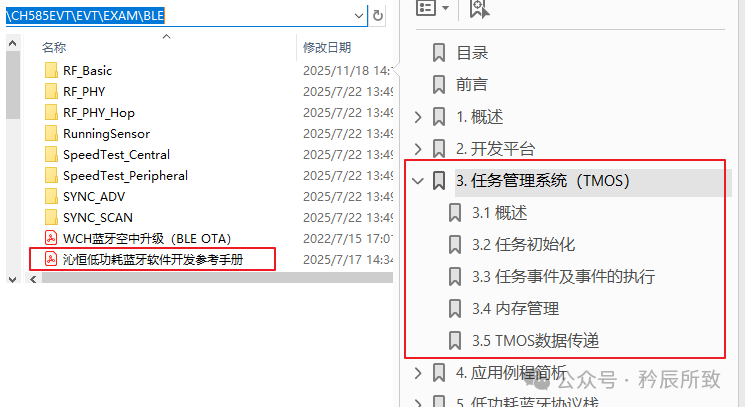
Users can register tasks (Task) to add custom events (Event) to the TMOS task list, which will be scheduled and executed by TMOS.
Each Task can have a maximum of 15 custom events, with 0x8000 reserved for system message passing, which is fixed for each task and cannot be defined by the user. Each task is distinguished by a 16-bit variable; if a certain bit is set, it indicates that the event is running.
In simple terms, a TASK can manage 15 custom tasks and can establish multiple tasks. Generally, similar or related tasks are grouped under the same task for processing.
For example, for a certain TASK, its event definitions are as follows:
/* hal task Event */
#define LED_BLINK_EVENT       0x0001
#define HAL_KEY_EVENT         0x0002
#define HAL_REG_INIT_EVENT    0x2000
#define HAL_TEST_EVENT        0x4000
Additionally, the message passing event is fixed for all tasks:
#define SYS_EVENT_MSG (0x8000) // A message is waiting eventTo understand this in detail, we will test it according to the process described later in this article.
1.1 Does TMOS need to be initialized?
It should be noted that TMOS tasks are specifically designed for Bluetooth, and can only be registered normally after <span>BLE_LibInit()</span>.
In the Bluetooth example, <span>BLE_LibInit()</span> is placed in the <span>CH58x_BLEInit</span> function at the beginning of the project:
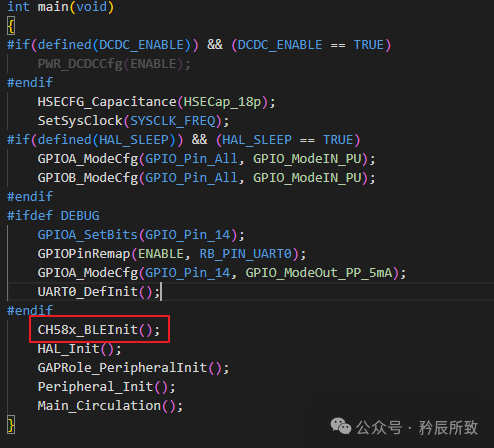
If you want to use TMOS without running Bluetooth, you still need to initialize <span>BLE_LibInit()</span>, as it requires the Bluetooth library.
1.2 Usage Process
The process of using TMOS is as follows:
- 1. System initialization: including
<span>CH58X_BLEInit()</span>(which internally calls<span>BLE_LibInit()</span>) to initialize the Bluetooth protocol stack; - 2. Task registration: register tasks using
<span>TMOS_ProcessEventRegister()</span>. This step must be done after<span>BLE_LibInit()</span>, otherwise registration will fail and return 0xFF (error); Example:<span>halTaskID = TMOS_ProcessEventRegister(HAL_ProcessEvent);</span> - 3. Start task events: use
<span>tmos_start_task</span>to add tasks. Example:<span>tmos_start_task(halTaskID, HAL_REG_INIT_EVENT, 800);</span> - 4. Event handling logic: implement the event trigger handling logic in
<span>HAL_ProcessEvent</span>. - 5. Call
<span>TMOS_SystemProcess()</span>in the main loop: this is the core function of the TMOS task scheduler, which must be continuously called for the system to poll and execute task events.
2. Usage Instructions
The official document “Qinheng Low Power Bluetooth Software Development Reference Manual” also contains all the API descriptions related to TMOS. It is best to learn based on the document instructions and examples.
In practical applications, we recommend modifying the official examples to create your own applications at the application layer, so some initialization aspects can generally follow the official initialization framework without needing modification.
Here, we focus on how to apply TMOS after initialization.
2.1 Usage Example
The relevant functions of TMOS are declared in the Bluetooth library <span>CH58xBLE_LIB.h</span>.
We will introduce the API functions needed according to the usage process, along with example explanations.
Task Registration:
The returned <span>tmosTaskID</span> is a <span>uint8_t</span> data type (0xFF indicates an error, others are task IDs), with the parameter being a callback function pointer.
//typedef uint8_t                 tmosTaskID;
//@return  0xFF - error,others-task id
extern tmosTaskID TMOS_ProcessEventRegister( pTaskEventHandlerFn eventCb );
Example (from the slave device’s existing task):
//Peripheral_TaskID is initialized to 0xFF by default; if successful, it changes to something else, not FF
Peripheral_TaskID = TMOS_ProcessEventRegister(Peripheral_ProcessEvent);
Start Task:
Starting a task means activating the task events defined within it (a task can have 15 custom events).
There are two functions to start task events: one starts immediately, and the other starts after a delay of time*625μs:
//Immediately start the event corresponding to taskID; called once, executed once.
bStatus_t tmos_set_event( tmosTaskID taskID, tmosEvents event );
//Start the event corresponding to taskID after a delay of time*625μs; called once, executed once.
BOOL tmos_start_task( tmosTaskID taskID, tmosEvents event, tmosTimer time );
The reason for the delay being time*625μs is that the TMOS system clock unit is 625us.
Tasks are executed once per call; if it is a looping task, it needs to be restarted.
Example (adding your test event after the slave’s <span>SBP_START_DEVICE_EVT</span>):
#define SBP_START_DEVICE_EVT    0x0001
#define SBP_PERIODIC_EVT        0x0002
#define SBP_READ_RSSI_EVT       0x0004
#define SBP_PARAM_UPDATE_EVT    0x0008
#define SBP_PHY_UPDATE_EVT      0x0010
#define MY_TEST_EVT             0x0400
#define RTC_EVT                 0x0020
...
tmos_set_event(Peripheral_TaskID, SBP_START_DEVICE_EVT);
tmos_start_task(Peripheral_TaskID, RTC_EVT, 1600);
tmos_set_event(Peripheral_TaskID, MY_TEST_EVT);
Event Handling
During task registration, the parameter points to the callback function, and our event handling is executed within the callback function, structured as follows:
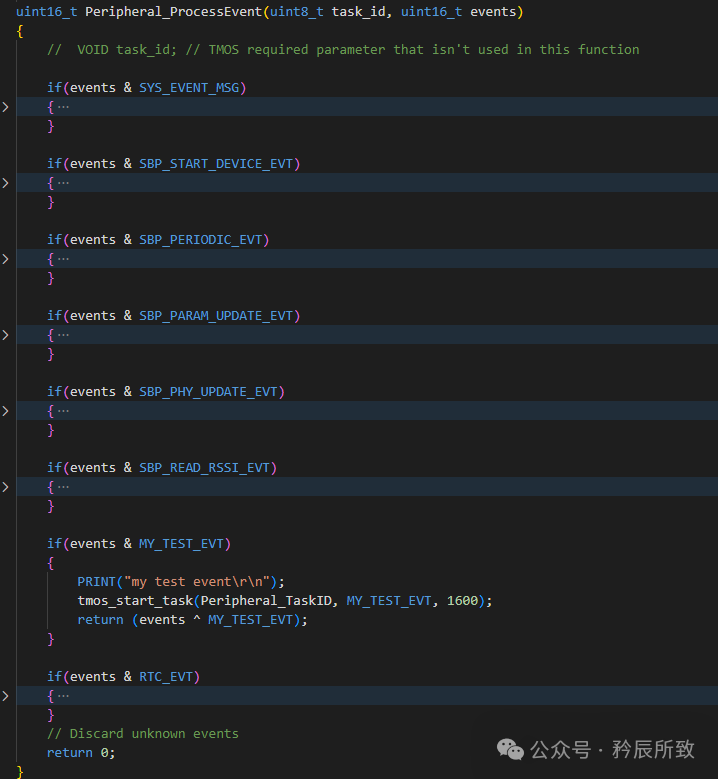
Here, <span>SYS_EVENT_MSG</span> is a system-reserved message passing event, which is fixed for every task!!!
A message is an event with data used for passing data between layers of the protocol stack, supporting the addition of multiple messages simultaneously.
Above, we directly created a periodic printing event based on the slave example for testing; the writing structure follows the example.
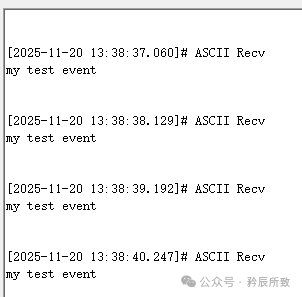
Let’s take a look at the test results (for clarity, I turned off the part where the slave receives and prints the scanned data):
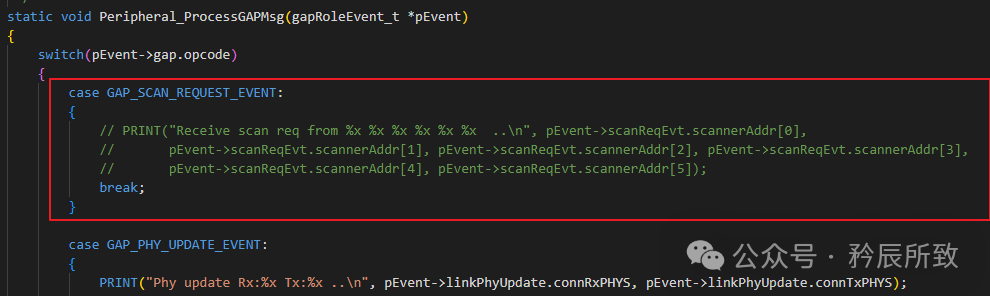
Test results (printing test data once per second):
2.2 New Example Test
Although the usage example has been shown above, it was modified from the slave example. However, to test message passing without affecting the Bluetooth slave task’s message reception, I decided to write a simple example separately that does not run Bluetooth, only tests TMOS.
This can be implemented directly in main.c, and the code will be placed together with the next section on message passing, so just look below to avoid repeating code.
2.3 Message Passing
Now that we have set up the example, let’s test the message passing between two tasks. Here is the code; after reviewing the code and results, we will discuss some points to note:
#include "CONFIG.h"
#include "HAL.h"
#include "observer.h"


__attribute__((aligned(4))) uint32_t MEM_BUF[BLE_MEMHEAP_SIZE / 4];

#if(defined(BLE_MAC)) && (BLE_MAC == TRUE)
const uint8_t MacAddr[6] = {0x84, 0xC2, 0xE4, 0x03, 0x02, 0x02};
#endif

#define message_len  20

#define TASK1_TEST_EVENT      0x0001
#define TASK1_SEND_EVENT      (0x0001<<1)
#define TASK2_TEST_EVENT      0x0001

static uint8_t MYTEST1_TaskID = INVALID_TASK_ID; // Task ID for internal task/event processing
static uint8_t MYTEST2_TaskID = INVALID_TASK_ID; // Task ID for internal task/event processing


__HIGH_CODE
__attribute__((noinline))
void Main_Circulation()
{
    while(1)
    {
        TMOS_SystemProcess();
    }
}

uint16_t Task1_ProcessEvent(uint8_t task_id, uint16_t events)
{
    //  VOID task_id; // TMOS required parameter that isn't used in this function
    if(events & SYS_EVENT_MSG)
    {
        uint8_t *msg;
        uint8_t received_message[message_len];
        msg = tmos_msg_receive(MYTEST1_TaskID); // Receive message
        if (msg != NULL) {
            tmos_memcpy(received_message, msg, message_len); // Copy message content to local buffer
            tmos_msg_deallocate(msg); // Free the memory occupied by the message
            PRINT("111 Received message: %s\r", received_message); // Print received message content
        } else {
            PRINT("111 receive error\r\n");
        }
        return (events ^ SYS_EVENT_MSG);
    }

    if(events & TASK1_TEST_EVENT)
    {
        PRINT("11111, goto task1 send event..\r\n");
        tmos_start_task(MYTEST1_TaskID, TASK1_SEND_EVENT, 1600);
        return (events ^ TASK1_TEST_EVENT);
    }

    if(events & TASK1_SEND_EVENT)
    {
        PRINT("111 send msg to task2 ..\r\n");
        PRINT("111 back to task1 test event ..\r\n");
        uint8_t *msg;
        uint8_t message[message_len] = "Hello, TMOS!";
        msg = tmos_msg_allocate(message_len); // Allocate memory
        if (msg != NULL) {
            tmos_memcpy(msg, message, message_len); // Copy message content to allocated memory
            tmos_msg_send(MYTEST2_TaskID, msg); // Send message to receiving task
            /*
            You can send to yourself, but cannot send to two tasks simultaneously,
            uncommenting will not cause an error, but only TASK2 will receive the message
            */
            // tmos_msg_send(MYTEST1_TaskID, msg);
            PRINT("111 send OK\r\n");
        } else {
            PRINT("111 send error\r\n");
        }

        tmos_start_task(MYTEST1_TaskID, TASK1_TEST_EVENT, 1600);
        return (events ^ TASK1_SEND_EVENT);
    }
    // Discard unknown events
    return 0;
}

uint16_t Task2_ProcessEvent(uint8_t task_id, uint16_t events)
{
    //  VOID task_id; // TMOS required parameter that isn't used in this function

    if(events & SYS_EVENT_MSG)
    {
        uint8_t *msg;
        uint8_t received_message[message_len];
        msg = tmos_msg_receive(MYTEST2_TaskID); // Receive message
        if (msg != NULL) {
            tmos_memcpy(received_message, msg, message_len); // Copy message content to local buffer
            tmos_msg_deallocate(msg); // Free the memory occupied by the message
            PRINT("222 Received message: %s\r", received_message); // Print received message content
        } else {
            PRINT("222 receive error\r\n");
        }
        return (events ^ SYS_EVENT_MSG);
    }

    if(events & TASK2_TEST_EVENT)
    {
        PRINT("22222\r\n");
        tmos_start_task(MYTEST2_TaskID, TASK2_TEST_EVENT, 1600);
        return (events ^ TASK2_TEST_EVENT);
    }
    // Discard unknown events
    return 0;
}


int main(void)
{
    HSECFG_Capacitance(HSECap_18p);
    SetSysClock(SYSCLK_FREQ);

    GPIOA_SetBits(GPIO_Pin_14);
    GPIOPinRemap(ENABLE, RB_PIN_UART0);
    GPIOA_ModeCfg(GPIO_Pin_15, GPIO_ModeIN_PU);
    GPIOA_ModeCfg(GPIO_Pin_14, GPIO_ModeOut_PP_5mA);
    UART0_DefInit();

    PRINT("%s\n", VER_LIB);
    CH58x_BLEInit();
    HAL_Init();

    MYTEST1_TaskID = TMOS_ProcessEventRegister(Task1_ProcessEvent);
    MYTEST2_TaskID = TMOS_ProcessEventRegister(Task2_ProcessEvent);

    tmos_start_task(MYTEST1_TaskID, TASK1_TEST_EVENT, 1600);
    tmos_start_task(MYTEST2_TaskID, TASK2_TEST_EVENT, 1600);

    Main_Circulation();
}

/******************************** endfile @ main ******************************/
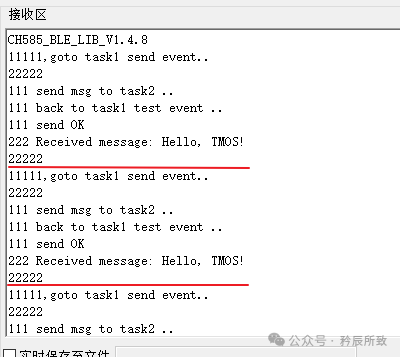
Test results:
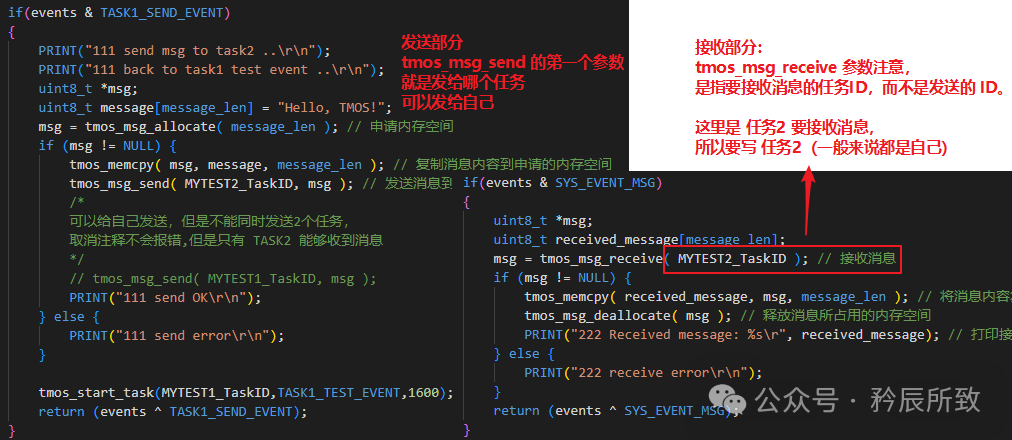
The above code can be directly run; just note that the parameter for the receive function <span>tmos_msg_receive</span> must be clear, which is the task ID of the task that is to receive the message:
3. Precautions
As usual, this section provides supplementary notes, referencing my own tests, experiences from predecessors, and the Qinheng Micro official forum, and will be kept updated.
3.1 Supported Sleep Times by TMOS
The maximum time for TMOS tasks is 23.5 hours.
The minimum sleep time is officially set at around 1ms, but in reality, the crystal oscillator requires about 2ms to stabilize, so it is recommended to have a longer minimum interval. As for how many ms can be used at least, I have not tested, as in practical use, it is unlikely to have such a short task cycle. Interested parties can test it themselves.
This time is derived through the following path <span>CH58x_BLEInit</span> -> when sleep is enabled, there will be an operation similar to an idle callback function, executing <span>cfg.idleCB = CH58x_LowPower;</span>.
The <span>CH58x_LowPower</span> function is called when TMOS is in sleep mode, and within this function, the following code exists:
/ If the sleep time is less than the minimum sleep time or greater than the maximum sleep time, do not sleep
    if ((time_sleep < SLEEP_RTC_MIN_TIME) ||
        (time_sleep > SLEEP_RTC_MAX_TIME)) {
        SYS_RecoverIrq(irq_status);
        return 2;
    }
It defines the minimum and maximum sleep times, and you can check the relevant macro definitions I have provided:
#if (CLK_OSC32K==1)
#define FREQ_RTC    32000
#else
#define FREQ_RTC    32768
#endif

#define RTC_MAX_COUNT             0xA8C00000

#define CLK_PER_US                  (1.0 / ((1.0 / FREQ_RTC) * 1000 * 1000))

#define US_TO_RTC(us)               ((uint32_t)((us) * CLK_PER_US + 0.5))

#define SLEEP_RTC_MIN_TIME                  US_TO_RTC(1000)

#define SLEEP_RTC_MAX_TIME                  (RTC_MAX_COUNT - 1000 * 1000 * 30)
Ultimately calculated:
SLEEP_RTC_MIN_TIME = 33SLEEP_RTC_MAX_TIME = 2 770 000 000
This value is the number of RTC clock cycles (the tick count of a 32768 Hz clock).
Converted to real time:
33 / 32768 ≈ 1.01 ms2 770 000 000 / 32768 ≈ 84 555 s ≈ 23.5 h
3.2 Other Notes
- 1. The TMOS system clock unit is 625us, based on the RTC clock.
- 2. TMOS functions cannot be called within interrupts.
- 3. TMOS and the low-power Bluetooth protocol stack use the same allocated memory, and task allocation consumes memory. The Bluetooth protocol stack uses some, and the remaining is available for TMOS.Therefore, task registration is limited, mainly related to the chip’s memory.A senior has personally tested that:CH592 supports registering about 25 tasks,CH585 supports registering 64 tasks (0~63).This personal test is for reference only; in practical applications, it is certainly not advisable to use that many.
- 4. During Bluetooth usage, do not execute tasks in a single TMOS task that exceed half the connection interval duration, as it will affect Bluetooth communication.Understanding the connection interval can refer to the blog post:Detailed Explanation of BLE Bluetooth Connection ParametersSimilarly, in interrupts, do not execute tasks exceeding half the connection interval duration.
- 5. When calling delay execution functions in the code executed during event activation,
<span>tmos_start_task</span>the delay time is based on the current event activation time point.Thus, there are no specific requirements for the placement of the delay execution function call<span>tmos_start_task</span>in the code executed during activation.
Conclusion
In this article, we introduced the usage of TMOS. For applications, it can be said to be very convenient, with detailed explanations of the usage process and examples provided in the text.
The official use of TMOS has already implemented many complex management and scheduling, including automatic management during low-power Bluetooth sleep, which is quite convenient. Besides the APIs mentioned in the text, there are also some like <span>tmos_memcmp</span><span> and </span><code><span>tmos_memcpy</span> functions that save more memory space than standard C library functions. You can refer to the official “Qinheng Low Power Bluetooth Software Development Reference Manual,” located in the BLE example directory of the downloaded EVT package.
That’s all for this article. Thank you, everyone!