Microcontroller development engineers and electronics enthusiasts deal with various digital circuits daily. In addition to using tools like multimeters and oscilloscopes for circuit debugging, logic analyzers are also essential.
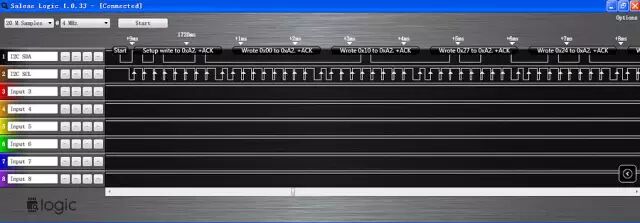
A logic analyzer is an instrument that collects and displays digital signals from a test device using a clock, primarily for timing analysis.Unlike oscilloscopes, logic analyzers do not display continuous analog waveforms but only show two levels of states (logic 1 and 0).After setting the reference voltage, the logic analyzer compares the collected signals with a voltage comparator, where signals above the reference voltage are considered logic 1, and those below are logic 0.This allows the measured signals to be displayed as continuous high and low level waveforms in chronological order, facilitating analysis and debugging for the user.Using a logic analyzer, one can easily set signal trigger conditions to start sampling, analyze the timing of multiple signals, capture signal interference spikes, and decode level sequences according to rules to complete communication protocol analysis.Logic analyzers are mainly divided into two categories based on their hardware functionality and complexity: standalone (single-unit) logic analyzers and PC-based virtual logic analyzers.Standalone logic analyzers integrate all software and hardware into one instrument, making them user-friendly. In contrast, virtual logic analyzers require a computer to utilize its powerful computing and display capabilities for data processing and visualization.Professional logic analyzers typically have numerous sampling channels, ultra-fast sampling speeds, and large storage depths, but their expensive prices are often unaffordable for individuals.As a commonly used development tool for engineers, many entry-level logic analyzer designs are available. Although their overall functionality may not compare to high-end professional instruments, achieving specific functions at a lower cost is also a very successful design.The logic analyzers discussed in this article mainly refer to these entry-level designs.PC-based parallel port logic analyzers were once mainstream, but in recent years, computer systems have gradually stopped being equipped with parallel ports, making this design obsolete, only retaining educational value.Another type of logic analyzer is based on low-speed microcontrollers. Many enthusiasts have designed their own devices using common microcontrollers like PIC and AVR. However, these microcontroller-based logic analyzers share a common weakness: their sampling speed is too slow, usually not exceeding 1MHz.Entry-level logic analyzers based on USB IO chips are currently the most popular.For example, Saleae Logic and similar products like USBee. These products mainly use a USB IO chip, such as Cypress’s CY7C68013A-56PVXC, where all signal triggering and processing tasks are handled by software on the computer, and the hardware part is merely a data logger.The maximum sampling speed is 24MHz. They can sample an “unlimited number” of signals since all data is stored on the computer.Currently, the maximum number of channels is generally 8, and increasing the number of channels proportionally reduces the maximum sampling speed. These products are simple in construction, easy to use, and inexpensive, making them excellent tools for debugging microcontroller development work.Its main drawbacks are the sampling speed of only 24MHz and 8 channels, which are insufficient for analyzing high-speed parallel buses.Further designs require the addition of components like FPGA and SRAM to address the issues of insufficient speed and channel count.Next, we will take the Saleae logic analyzer as an example to briefly introduce its features and usage by sampling and analyzing the I2C bus waveform and PWM waveform.First, we will introduce the process of using the logic analyzer to sample the data writing process of the microcontroller to the I2C device AT24C16.1 Hardware Connection1. First, connect the GND of the logic analyzer to the GND of the target board to ensure a common ground.2. Select the signals to be sampled, which are the SDA and SCL of the AT24C16, connecting SDA to channel 1 (Input 1) of the logic analyzer and SCL to channel 2 (Input 2).3. Connect the logic analyzer to the USB port of the computer, and Windows will recognize the device, displaying the USB device identifier in the lower right corner of the screen.2 Software Usage:1. Run the Saleae software; at this point, the hardware of the logic analyzer is connected to the computer, and the software will display [Connected].2. Set the number of samples and speed; since I2C is a low-speed communication, the speed does not need to be too high, so we set it to 20M Samples @ 4M Hz, which allows continuous sampling for 5 seconds.3. Set the protocol by clicking the “Options” button in the upper right corner, find analyzer1, and set it to the I2C protocol, as shown in the figure below.4. Press the “Start” button to begin sampling.3 Data AnalysisAfter sampling is complete, the waveform can be viewed, as shown in the figure below. Since we set it for I2C analysis, it not only displays the waveform but also shows the decoded byte content according to the I2C protocol.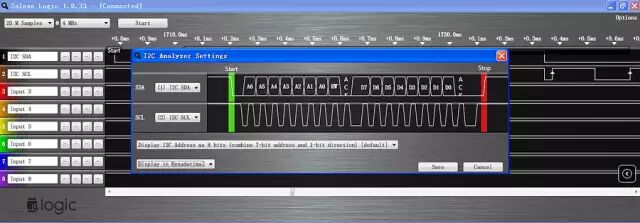 The microcontroller writes to the AT24C16 at address 0x00, writing numbers like 10000. The waveform starts with a “start” signal, followed by the AT24C16 identifier 0xA2, the write address 0x00, and data 0x10, 0x27, etc. Since writing is done byte by byte, 0x2710 = 10000 indicates successful sampling.Hovering over the waveform and clicking the left mouse button allows for zooming in. The result is shown in the figure below; after the “start” condition, at the high level of the 8 consecutive pulses of SCL, the corresponding signal of SDA is 10100010, which is 0xA2, and the high level of the 9th pulse is 0, indicating an ACK flag.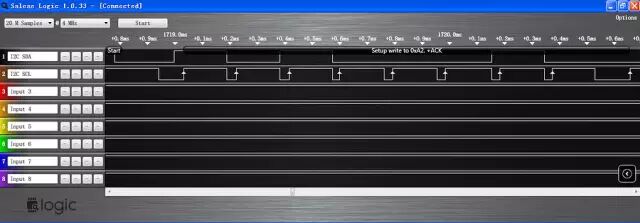
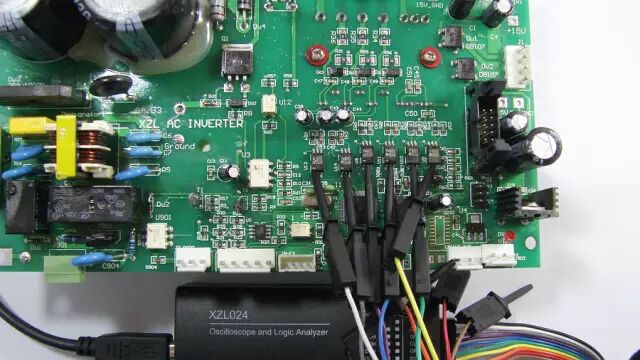
 The above briefly introduces the process of using a logic analyzer for I2C analysis, demonstrating that the operation is very simple.Next, we will introduce how to use the logic analyzer to sample the 6-channel PWM waveforms of a three-phase AC motor driver.4 Hardware Connection1. First, connect the GND of the logic analyzer to the GND of the target board to ensure a common ground, as shown in the figure below.2. Select the signals to be sampled, which are the output pins of the microcontroller’s 6-channel PWM waveforms, connecting them to channels 1 (Input 1) to 6 (Input 6) of the logic analyzer, and rename the channels to Utop, Ubottom, Vtop, Vbottom, Wtop, WBottom, representing the upper and lower arms of the three outputs.3. Connect the logic analyzer to the USB port of the computer, and Windows will recognize the device, displaying the USB device identifier in the lower right corner of the screen.
 5 Software Usage1. Run the Saleae software; at this point, the hardware of the logic analyzer is connected to the computer, and the software will display [Connected].2. Set the number of samples and speed; the PWM frequency is 15kHz, so we set it to 2M Samples @ 4MHz.3. Set the trigger conditions; the default “—-” is sufficient.4. Press the “start” button to begin sampling.6 Data AnalysisAfter sampling is complete, the waveform can be viewed, as shown in the figure below.
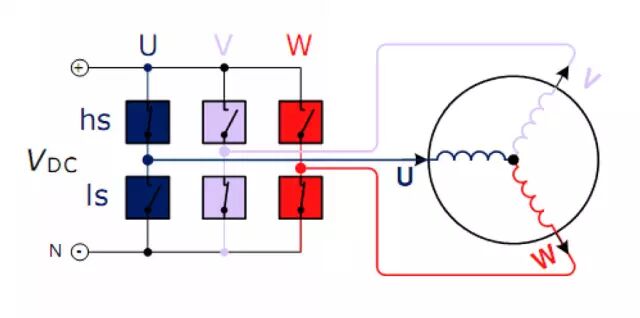
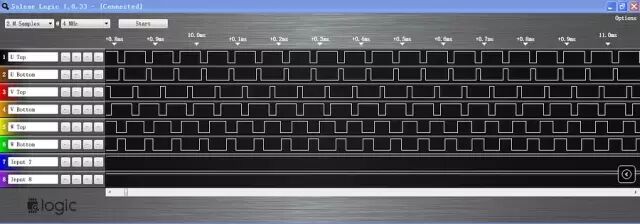 Typical three-phase motor drive PWM is complementary, meaning the states of the upper and lower waveforms of a signal group are opposite, controlling the states of the upper and lower switches of the bridge arm to avoid short circuits caused by simultaneous conduction, as shown in the typical three-phase motor drive circuit below.
 Hovering over the waveform and clicking the left mouse button repeatedly allows for zooming in, as shown in the figure below.
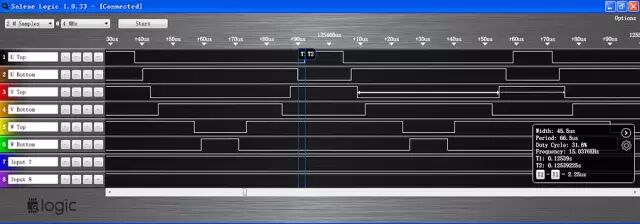 Marking lines at the falling edge of UBottom and the rising edge of UTop, the display box in the lower right corner shows T2-T1=2.25μs, which is the time difference between turning off and turning on, professionally referred to as “dead time”.Additionally, the PWM width is 45.5μs, the period is 66.6μs, the duty cycle is 31.6%, and the frequency is 15.0376kHz, among other information. This represents a typical SVPWM waveform of a three-phase motor inverter.The above two examples briefly introduce the use of logic analyzers, hoping to provide assistance and inspiration to developers.