 In today’s rapidly advancing technology, computers as productivity tools have long integrated into our lives. Surely, everyone has encountered slow booting and lagging issues with their computers. If you search online for solutions, you will often see recommendations to replace your hard drive with a solid-state drive. So, when you search for solid-state drives in shopping apps, you are bombarded with terms like SATA, M.2, PCIe, AHCI, NVMe…
What do these parameters mean? How can you choose a solid-state drive that suits your needs among the myriad of products? Today, we bring you a brief introduction to the bus, protocol, and interface of solid-state drives, turning you into a solid-state drive expert.

 Bus (BUS)
-
The bus is the pathway for data exchange between different functional components of a computer. For solid-state drives, the bus is the route data takes from the solid-state drive to the CPU.
- The bus is based on physical principles, thus it has a certain limit on its carrying capacity.
- The total amount of data transmitted by the bus in a unit of time is called bandwidth.
There are three types of buses for solid-state drives: SATA bus, PCIe bus, and SAS bus. Their transmission rates and bandwidth data are shown in the table below.
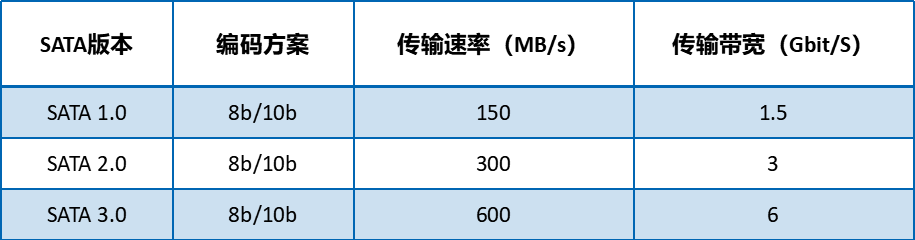
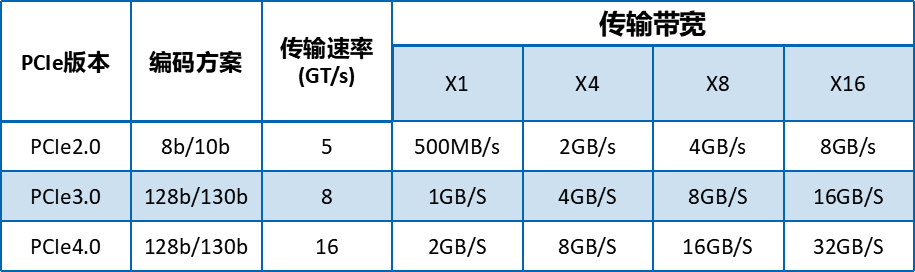
(The transmission bandwidth of the PCIe bus is commonly expressed in speed units, where X indicates how many times X1)
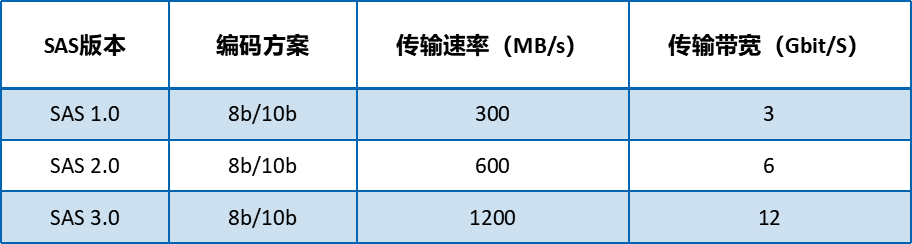
The data in the above table is a bit complex, and the SAS bus is commonly used in servers, so we won’t expand on that. The buses we commonly deal with in daily life are SATA3.0, PCIe3.0, and PCIe4.0. Let’s illustrate with a simple example: when a car is driving on the road, there are three roads: SATA3.0, PCIe3.0, PCIe4.0, as shown below.
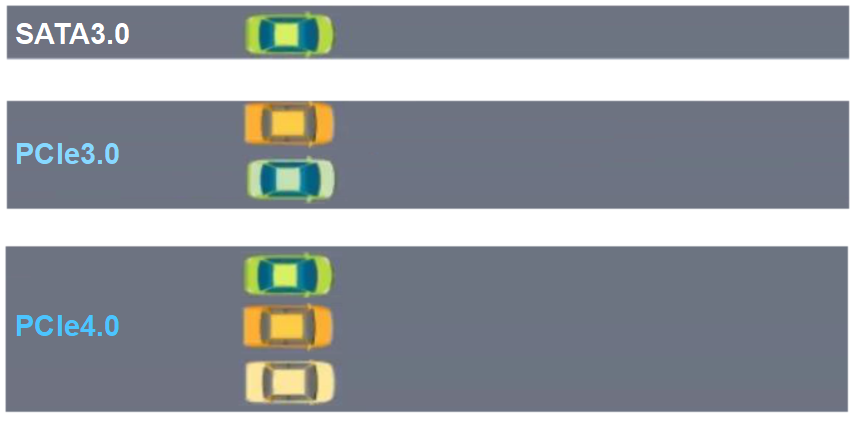
It can be seen that, within the same time frame, the SATA3.0 bus transmits the least vehicles, like a country road. The PCIe3.0 and PCIe4.0 buses transmit more vehicles, representing two wider roads, with PCIe4.0 being the widest.
In summary, we can simply understand the data transmission speed performance as:PCIe4.0 is the big brother, PCIe3.0 is the second brother, and SATA3.0 is the younger brother.

Protocol (Protocol)
-
A protocol is a set of rules agreed upon by both parties for communication, including how to connect and how to identify each other.
-
When two electronic devices want to transmit data effectively, they must have the same or compatible protocols.
-
Efficient protocols require hardware support.
There are three protocols involved with solid-state drives: AHCI protocol, NVMe protocol, and SCSI protocol. The SCSI protocol is commonly used in servers and will not be discussed here. The protocols commonly involved in solid-state drives in daily life are AHCI and NVMe. Their specific principles are quite complex, but we will still use the example of vehicles on the road for explanation: the AHCI protocol is like a speed limit sign of 30, while NVMe is like a speed limit sign of 60.
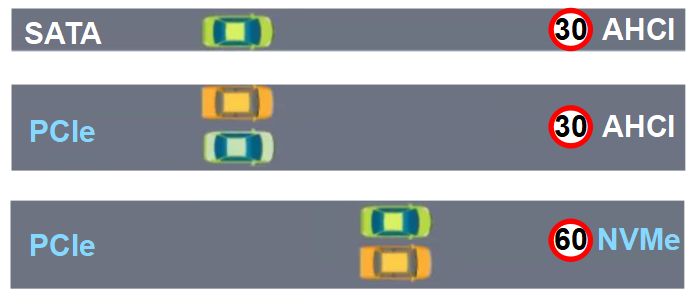
As shown in the image above, the AHCI protocol can be used with both SATA and PCIe buses. Although the PCIe bus represents a “wider” road, the speed increase of the PCIe bus compared to the SATA bus is limited by the AHCI protocol.
The NVMe protocol can be used with the PCIe bus. The “high-speed” NVMe protocol combined with the “wide” PCIe bus greatly increases the data transmission speed.
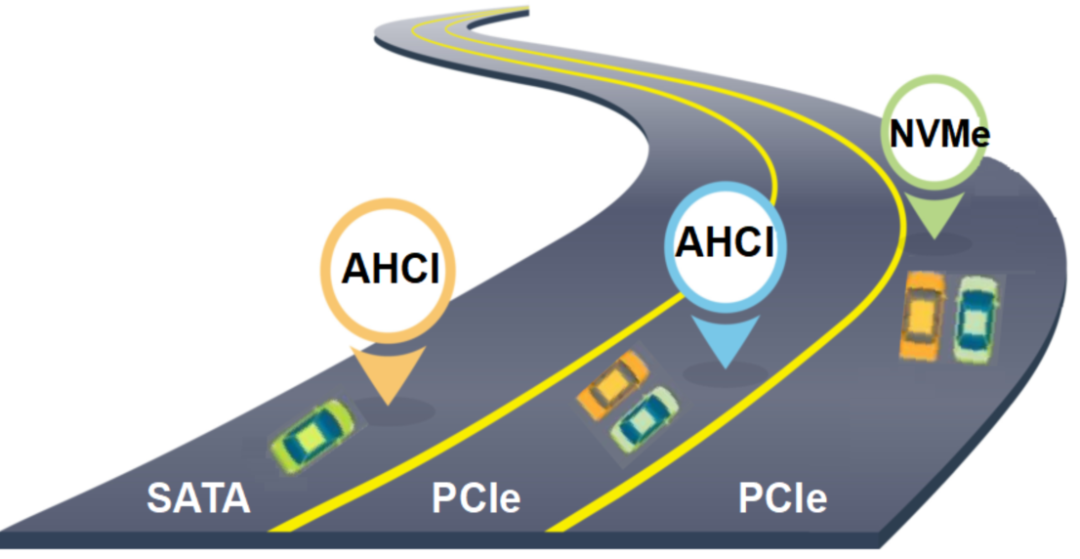
In summary, we can simply understand the data transmission speed performance as:NVMe protocol transmits data faster than AHCI protocol.
Interface (Interface)
- The interface is the bridge between the hard drive and the motherboard.
- The interface, bus, and protocol in solid-state drive products complement each other. The theoretical speed limit of the solid-state drive interface can be judged by the carrying capacity of the bus.
- The actual speed of the interface is also related to materials and craftsmanship.
The following image summarizes common solid-state drive interfaces and their corresponding protocol bus situations.
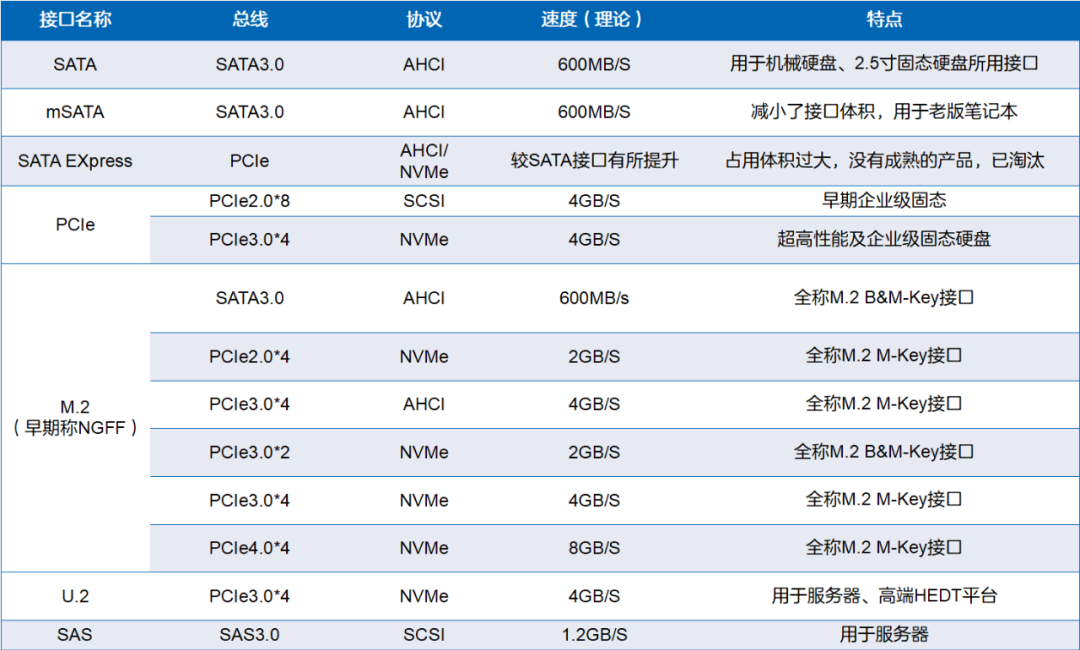
Key points to note in this table include:
-
PCIe can serve as both a data-carrying bus and an interface. When acting as an interface, it is referred to as a PCIe slot.
-
The SATA bus can only use the AHCI protocol, while the PCIe bus can use the AHCI, NVMe, and SCSI protocols.
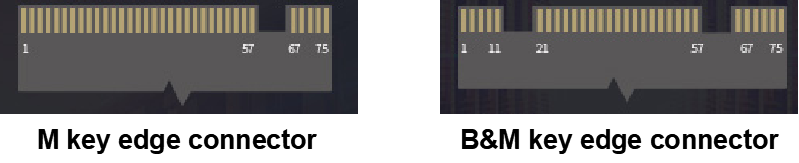
- For M.2 interfaces, there are B&M-Key and M-Key interfaces, which often have distinguishing notches. Typically, B&M-Key hard drives have notches on both sides, while M-Key solid-state drives have a notch on the right side. However, it is essential to note that one cannot simply determine the type of M.2 interface based solely on the position of the notch.
Conclusion
Today, we introduced the concepts of bus, protocol, and interface of solid-state drives, summarized as follows:
-
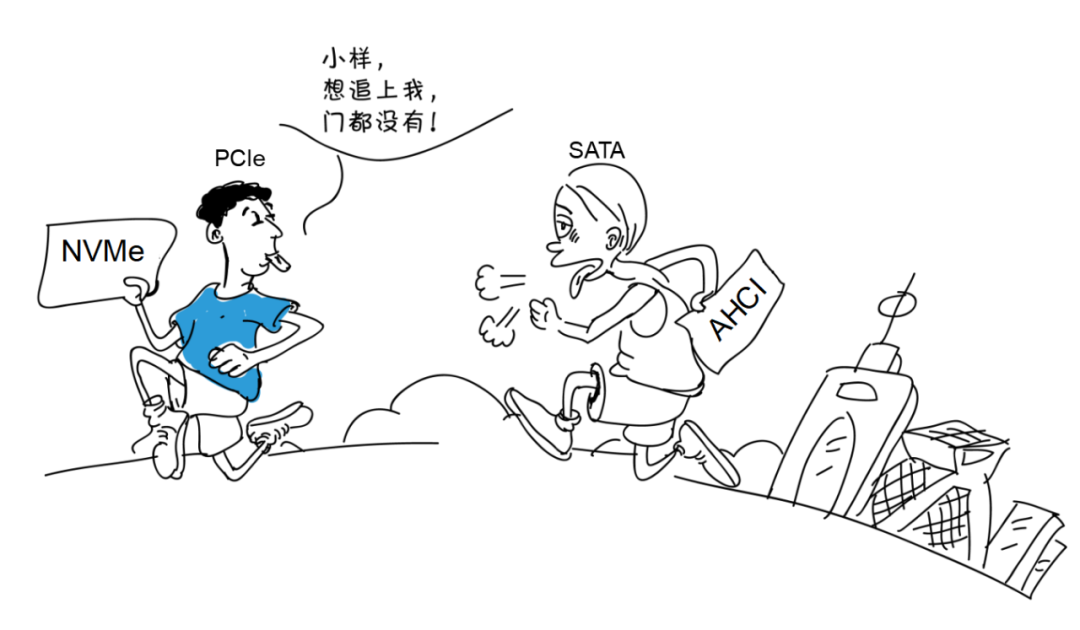
The PCIe bus has a stronger data transmission capability than the SATA bus.
-
The NVMe protocol has a higher transmission speed than the AHCI protocol.
-
Different interfaces have corresponding buses and protocols, and the theoretical speed of the interface can be judged by the bus type.
So, how do you choose a solid-state drive that suits your computer? Knowing these concepts, the following three steps will guide you to a solution:
Step 1: Understand the interface and protocol types supported by your computer’s motherboard.
Step 2: Refer to the table summarized earlier to check the bus types supported by your computer’s interface.
Step 3: Find a solid-state drive that meets the specified criteria, and choose based on price and actual needs.
 The above selection method is how to choose a solid-state drive that matches your computer. However, the actual transmission speed and quality of solid-state drives are also related to the following concepts:
- Sequential read/write speed & 4K random read/write speed
- Flash memory chip quality
- Cache
- Hard drive controller
Do you know the meanings of these concepts? How do they affect the quality of solid-state drives? How can we choose a better quality solid-state drive? If you’re interested, please give us a thumbs up, and if there’s enough interest, we’ll tell you how to assess the quality of a solid-state drive through these parameters in the next issue~ That concludes today’s brief introduction. We welcome everyone to leave comments and discuss in the comment section.
Source: ZTE Documentation
Hot Articles:
Video Analysis: Tesla’s Latest Central Computing Module (CCM)
2021-12-05
Why is a radio called a “semiconductor”?
2021-12-04
Engineer Reflects on Car Repairs: A Brief Discussion on Fault Isolation
2021-12-08
Common Misunderstandings in Using Transistor Switches
2021-12-07
Design Considerations for Relay Circuit Drivers
2021-12-06