Background
A fan raised a request while conducting a geographic information census: they wanted to batch add vector data from multiple databases under several folders and merge them into one based on the same name. As shown in the geographic database below.
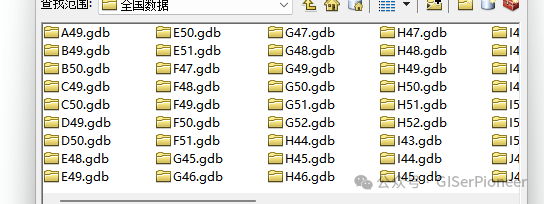
Below is the content of the database:
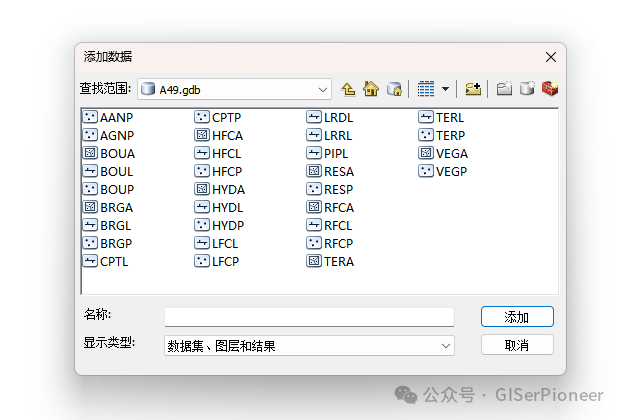
Merge into one file. The fan mentioned they wanted to learn this part, but they had no programming experience. Although I recommended learning programming, this small task shouldn’t affect their work progress, so I decided to help them out and write one.
This request is relatively simple, and there are multiple ways to implement it. Recently, I have been working on ArcGIS AddIn development, so I wrote a script to merge into a union.gdb database.
Prerequisites
Environment: ArcMap 10.8.2, Visual Studio (recommended 2019 or compatible version), ArcGIS Desktop SDK 10.8.
ArcObjects SDK: Ensure that the ArcGIS Desktop SDK is installed, which includes the ArcObjects .NET library.
Permissions: Users must have read permissions for the directory and GDB, and write permissions for the merge operation.
Development Tools: Configure the ArcGIS Add-in template in Visual Studio.
Implementation Steps
Create an Add-in Project:
- • Create a project using the ArcGIS Add-in template in Visual Studio.
- • Add a button as the tool entry point.
Write Plugin Logic:
- • Use ArcObjects to traverse the directory and find .gdb files.
- • Extract vector layers from the GDB and add them to the map.
- • Detect layers with the same name and use GeoProcessor to perform the merge.
Packaging and Deployment:
- • Compile the project to generate the .esriAddIn file.
- • Install and test in ArcMap.
AddIn Code
using System;
using System.Collections.Generic;
using System.Text;
using System.IO;
using System.Windows.Forms;
using ESRI.ArcGIS.ArcMapUI;
using ESRI.ArcGIS.Carto;
using ESRI.ArcGIS.DataSourcesGDB;
using ESRI.ArcGIS.Geodatabase;
using ESRI.ArcGIS.GeoDatabaseUI;
using ESRI.ArcGIS.Geoprocessing;
using ESRI.ArcGIS.esriSystem;


namespace AddInHelloWorld
{
   public class MergeGDBLayersAddin : ESRI.ArcGIS.Desktop.AddIns.Button
   {
       public MergeGDBLayersAddin()
       {
       }
       private string _folderPath; // Store the user-selected directory path

       protected override void OnClick()
       {
           try
           {
               // Get the current map document and data frame
               IMxDocument mxDoc = ArcMap.Application.Document as IMxDocument;
               IMap map = mxDoc.FocusMap;

               // Pop up folder selection dialog
               using (FolderBrowserDialog folderDialog = new FolderBrowserDialog())
               {
                   folderDialog.Description = "Select the directory to traverse";
                   if (folderDialog.ShowDialog() != DialogResult.OK)
                   {
                       MessageBox.Show("No directory selected!", "Error", MessageBoxButtons.OK, MessageBoxIcon.Error);
                       return;
                   }

                   string folderPath = folderDialog.SelectedPath;
                   _folderPath = folderDialog.SelectedPath;
                   ArcMap.Application.StatusBar.Message[0] = "Starting to traverse directory: " + folderPath;

                   // Store layer names and paths
                   Dictionary<string, List<string>> layerDict = new Dictionary<string, List<string>>();

                   // Traverse the directory
                   ProcessDirectory(folderPath, map, layerDict);

                   // Merge layers with the same name
                   MergeDuplicateLayers(map, layerDict);

                   // Refresh the map and directory tree
                   mxDoc.ActiveView.Refresh();
                   mxDoc.UpdateContents();

                   MessageBox.Show("Processing completed!", "Information", MessageBoxButtons.OK, MessageBoxIcon.Information);
               }
           }
           catch (Exception ex)
           {
               MessageBox.Show("An error occurred: " + ex.Message, "Error", MessageBoxButtons.OK, MessageBoxIcon.Error);
           }
       }

       private void ProcessDirectory(string folderPath, IMap map, Dictionary<string, List<string>> layerDict)
       {
           try
           {
               // Find all subdirectories
               foreach (string dir in Directory.GetDirectories(folderPath))
               {
                   if (dir.EndsWith(".gdb", StringComparison.OrdinalIgnoreCase))
                   {
                       ProcessGDB(dir, map, layerDict);
                   }
                   // Recursively traverse subdirectories
                   ProcessDirectory(dir, map, layerDict);
               }
           }
           catch (Exception ex)
           {
               ArcMap.Application.StatusBar.Message[0] = "Error traversing directory " + folderPath + ": " + ex.Message;
           }
       }

       private void ProcessGDB(string gdbPath, IMap map, Dictionary<string, List<string>> layerDict)
       {
           try
           {
               // Open the file geodatabase
               IWorkspaceFactory wsFactory = new FileGDBWorkspaceFactoryClass();
               IWorkspace workspace = wsFactory.OpenFromFile(gdbPath, 0);
               IFeatureWorkspace featureWorkspace = workspace as IFeatureWorkspace;
               IEnumDataset enumDataset = workspace.get_Datasets(esriDatasetType.esriDTFeatureClass);

               IDataset dataset;
               while ((dataset = enumDataset.Next()) != null)
               {
                   IFeatureClass featureClass = dataset as IFeatureClass;
                   if (featureClass != null)
                   {
                       string fcName = dataset.Name;
                       string fcPath = Path.Combine(gdbPath, fcName);

                       // Record layer path
                       if (layerDict.ContainsKey(fcName))
                       {
                           layerDict[fcName].Add(fcPath);
                       }
                       else
                       {
                           layerDict.Add(fcName, new List<string> { fcPath });
                           // Add layer to the map
                           IFeatureLayer featureLayer = new FeatureLayerClass();
                           featureLayer.FeatureClass = featureClass;
                           featureLayer.Name = fcName;
                           map.AddLayer(featureLayer);
                           ArcMap.Application.StatusBar.Message[0] = "Layer added: " + fcName;
                       }
                   }
               }
           }
           catch (Exception ex)
           {
               ArcMap.Application.StatusBar.Message[0] = "Error processing geodatabase " + gdbPath + ": " + ex.Message;
           }
       }

       private void MergeDuplicateLayers(IMap map, Dictionary<string, List<string>> layerDict)
       {
           try
           {
               // Initialize GeoProcessor
               IGeoProcessor2 gp = new GeoProcessorClass();
               gp.OverwriteOutput = true;

               foreach (var pair in layerDict)
               {
                   string fcName = pair.Key;
                   List<string> fcPaths = pair.Value;

                   if (fcPaths.Count > 1) // Layers that need to be merged
                   {
                       ArcMap.Application.StatusBar.Message[0] = "Merging layer: " + fcName;

                       // Set output path (temporary workspace)
                       string unionGdb = GetUnionGdb(_folderPath);
                       string outputPath = Path.Combine(unionGdb, fcName + "_Merged");

                       // Execute merge
                       IVariantArray parameters = new VarArrayClass();
                       parameters.Add(string.Join(";", fcPaths)); // Input layer paths
                       parameters.Add(outputPath); // Output path

                       IGeoProcessorResult result = gp.Execute("Merge_management", parameters, null);
                       if (result.Status == esriJobStatus.esriJobSucceeded)
                       {
                           // Add merged layer to the map
                           IWorkspaceFactory wsFactory = new FileGDBWorkspaceFactoryClass();
                           IFeatureWorkspace featureWorkspace = wsFactory.OpenFromFile(unionGdb, 0) as IFeatureWorkspace;
                           IFeatureClass mergedFc = featureWorkspace.OpenFeatureClass(fcName + "_Merged");
                           IFeatureLayer mergedLayer = new FeatureLayerClass();
                           mergedLayer.FeatureClass = mergedFc;
                           mergedLayer.Name = fcName + "_Merged";
                           map.AddLayer(mergedLayer);

                           // Remove original layers with the same name
                           IEnumLayer enumLayer = map.Layers; // Get layer enumerator
                           ILayer layer;
                           List<ILayer> layersToRemove = new List<ILayer>(); // Store layers to be removed
                           enumLayer.Reset();
                           while ((layer = enumLayer.Next()) != null)
                           {
                               if (layer.Name == fcName && layer is IFeatureLayer)
                               {
                                   layersToRemove.Add(layer);
                               }
                           }

                           // Remove layers
                           foreach (ILayer layerToRemove in layersToRemove)
                           {
                               map.DeleteLayer(layerToRemove);
                           }

                           ArcMap.Application.StatusBar.Message[0] = "Merged layer " + fcName + " to " + outputPath;
                       }
                       else
                       {
                           ArcMap.Application.StatusBar.Message[0] = "Failed to merge layer " + fcName;
                       }
                   }
               }
           }
           catch (Exception ex)
           {
               ArcMap.Application.StatusBar.Message[0] = "Error merging layers: " + ex.Message;
           }
       }
       private string GetUnionGdb(string folderPath)
       {
           try
           {
               string unionGdbPath = Path.Combine(folderPath, "union.gdb");

               // Check if union.gdb exists
               if (!Directory.Exists(unionGdbPath))
               {
                   // Create union.gdb
                   IWorkspaceFactory wsFactory = new FileGDBWorkspaceFactoryClass();
                   IWorkspaceName workspaceName = wsFactory.Create(folderPath, "union", null, 0);
                   unionGdbPath = Path.Combine(folderPath, "union.gdb");
                   ArcMap.Application.StatusBar.Message[0] = "Created union.gdb at: " + unionGdbPath;
               }

               return unionGdbPath;
           }
           catch (Exception ex)
           {
               throw new Exception("Failed to create or access union.gdb: " + ex.Message);
           }
       }
       private string GetScratchGdb()
       {
           // Get temporary file geodatabase
           IScratchWorkspaceFactory scratchWsFactory = new ScratchWorkspaceFactoryClass();
           IWorkspace scratchWorkspace = scratchWsFactory.DefaultScratchWorkspace;
           return scratchWorkspace.PathName;
       }
       protected override void OnUpdate()
       {
       }
   }
}
Code Explanation
Directory Traversal: Uses Directory.GetDirectories to recursively traverse the directory and find subdirectories ending with .gdb.
GDB Processing: Uses ArcObjects’ IWorkspaceFactory and IFeatureWorkspace to open the GDB and list vector feature classes.
Layer Addition: Adds feature classes to the map using IFeatureLayer and IMap.AddLayer.
Layer Merging: Merges layers with the same name using the GeoProcessor’s Merge_management tool, outputting to GDB (union.gdb).
User Interaction: Uses FolderBrowserDialog to allow users to select the directory path, and MessageBox to display processing results or errors.
Error Handling: Includes exception handling to ensure plugin stability and provide user-friendly prompts.
For those needing the source code project, please leave a message or private message. For those needing the plugin results, please leave a message or private message.
Due to the lack of project data, I wrote some simple data for testing. Please use the tool with caution and consider this a disclaimer.