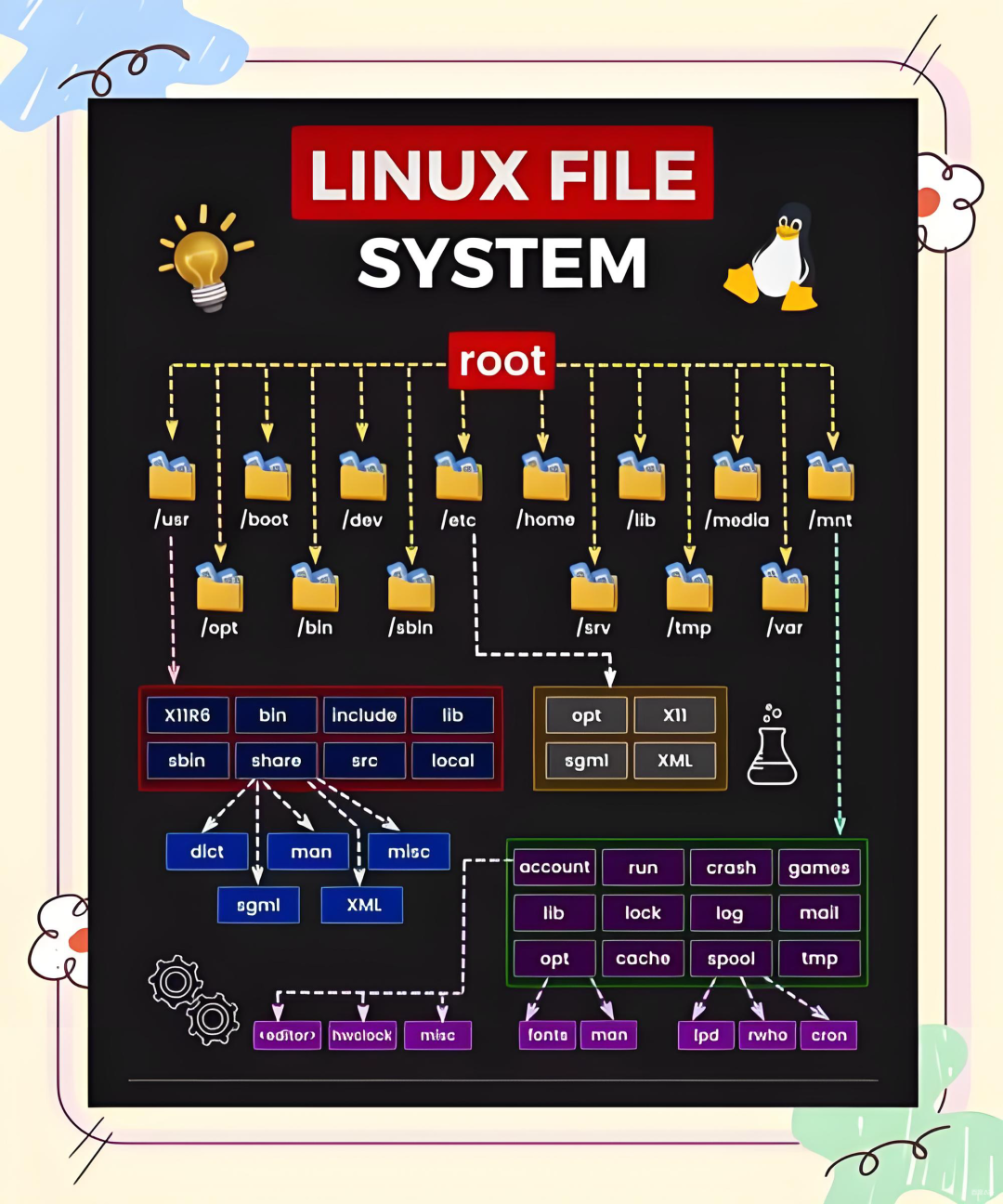
/etc Directory
/etc/profile # Configure environment variables Aliases
/etc/bashrc # Aliases
1. /etc/profile
This file sets environment information for every user on the system (it is executed when each user logs in for the first time).
2. /etc/profile.d
This directory is actually a subdirectory of /etc/profile, storing configuration files for new environments, facilitating the classification and use of new environment configurations.
3. /etc/bashrc
This file is executed for every user running a bash shell (it is read when the bash shell is opened).
4. ~/.bash_profile
This file is dedicated to each user’s shell information (it is executed once when the user logs in. It sets some environment variables and executes the user’s .bashrc file).
5. ~/.bashrc
This file contains bash information specifically for each user’s bash shell (it is read when logging in and each time a new shell is opened).
6. ~/.bash_logout
This file is executed each time the user logs out of the system or exits the bash shell.
7. /etc/motd
This file is used to store welcome messages. To edit, use the vi editor and input (disconnect and reconnect to the terminal to see changes).
8. /etc/issue
Both /etc/issue and /etc/issue.NET are files that store welcome messages for Linux terminal logins. The usage of /etc/issue is quite similar to that of /etc/motd.
The main difference is:
When a network user or a user logging in via serial port accesses the system, the content of /etc/issue is displayed before the login prompt, while the content of /etc/motd is displayed after the user successfully logs in. (When we log into terminal tty1~tty6 using ctrl+alt+f1~f7, the prompt strings displayed are written in /etc/issue, which can be viewed using vi /etc/issue).
There is also an /etc/issue.NET file, which is used by telnet remote login programs. By default, the contents of /etc/issue and /etc/issue.NET are the same, but can be modified as needed.
#cat /etc/issue
The difference between /etc/issue.net and /etc/issue:
/etc/issue and /etc/issue.net are both welcome messages displayed before logging into the system.
However, /etc/issue is displayed during local terminal logins, while /etc/issue.net is displayed during remote logins. Additionally, /etc/issue.net does not support escape characters.
Whether to display welcome messages during remote logins also depends on the ssh configuration file, /etc/ssh/sshd_config’s Banner field.
It is generally advisable to avoid exposing system version information to others.
>/etc/issue>/etc/issue.netThe pwconv command
The pwconv command is used to enable user shadow passwords. In Linux systems, user and group passwords are stored in files named passwd and group, located in the /etc directory. For system operation, these files must be readable by anyone, which poses a security risk. Shadow passwords move the passwords into the /etc/shadow and /etc/gshadow files, which are only readable by system administrators, while replacing the original passwords with the character ‘x’, effectively enhancing system security.
The pwunconv command, on the other hand, reverses the function of pwconv, disabling user shadow passwords. It moves passwords from the shadow file back to the passwd file, which lowers system security, as anyone can read the contents of passwd, while only the root user has read/write access to the shadow file.
9. /etc/fstab Automatic Mounting on Boot
[root@xuegod63 ~]# mount /dev/sr0 /mnt/[root@xuegod63 ~]# echo "/dev/sr0 /mnt iso9660 defaults 0 0" >> /etc/fstab10. /etc/rc.local Commands for Startup
Configuration Analysis of /etc Directory Files
1. /etc/profile
This file is primarily used to set environment information for each user on the system. It is automatically executed when each user first logs into the system and can be used to configure environment variables and set aliases.
2. /etc/profile.d
This directory is actually a subdirectory of /etc/profile, and its purpose is to store configuration files for new environments. This design greatly facilitates the classification management and use of new environment configurations.
3. /etc/bashrc
This file will execute corresponding operations for each user running a bash shell. When the bash shell is opened, this file will be read and can also be used to set aliases.
4. ~/.bash_profile
This is the shell information configuration file dedicated to each user. When the user logs into the system, this file is executed once. Its functions include setting necessary environment variables and executing the user’s .bashrc file.
5. ~/.bashrc
This is the configuration file used specifically for each user’s bash shell. It is read when the user logs into the system and each time a new shell is opened.
6. ~/.bash_logout
This file is executed when the user logs out of the system or exits the bash shell.
7. /etc/motd
This file is used to store welcome messages. To edit, use the vi editor, and after inputting, disconnect and reconnect to the terminal to see the changes take effect.
8. /etc/issue and /etc/issue.NET
These two files are both storage files for welcome messages displayed during Linux terminal logins. The usage of /etc/issue is quite similar to that of /etc/motd, with the main difference being that when a network user logs into the system via serial port, the content of /etc/issue is displayed before the login prompt, while the content of /etc/motd is displayed after the user successfully logs in.
For example, when we log into terminal tty1 using ctrl + alt + f1~f7, the prompt strings displayed are stored in the /etc/issue file, which can be viewed using the command vi /etc/issue.
Additionally, the /etc/issue.NET file is used for telnet remote login programs. By default, the contents of /etc/issue and /etc/issue.NET are the same, and users can modify them according to their needs.
Common Escape Characters
- \d: Represents the date of the local time.
- \l: Used to display the interface of which terminal.
- \m: Displays the hardware level (e.g., i386, i486, i586, i686, etc.).
- \n: Displays the network name of the host.
- \o: Displays the domain name.
- \r: Displays the version of the operating system. For example, #cat /etc/issue may display CentOS release 6.1 (Final) Kernel \r on an \m, where \r and \m are escape characters.
Other Configuration Files
~/.bash_logout If you need the system to perform some operations after logging out, you can write them in this file (this file is hidden).
~/.bash_history Command history file, all commands used will be recorded in this file. They are first cached in memory and then written to this file for storage.
Content adapted from Yikou Linux, please delete if infringing.