In the world of the Linux operating system, system calls serve as the “bridge” for user-space programs to interact with kernel-space, determining how programs access hardware resources and execute core operations. The “system call hook” technology acts like an intelligent “observation station” and “control valve” on this bridge—capable of real-time monitoring of the program’s kernel interaction behavior, while also modifying the call flow as needed, providing critical leverage for security protection, performance optimization, and functional expansion.
From intercepting illegal file operations by malicious programs to pinpointing performance bottlenecks in complex systems, and even implementing custom functions in specific scenarios like printer management, system call hooks play an irreplaceable role. However, the technical logic behind it is not simple: from user-space LD_PRELOAD hijacking to kernel-space system call table modifications, each implementation method is associated with the underlying mechanisms of the Linux kernel, and hides the balancing challenges of compatibility, security, and performance.
This article will start from kernel principles, dissect the execution flow of system calls, and guide you through understanding the implementation logic of different levels of hook technology. Coupled with practical cases of security detection and performance optimization, we will outline the pitfalls and coping strategies in practice. Whether you are a Linux developer, a security researcher, or a technology enthusiast looking to delve into kernel technology, you will find a clear path from theory to practice here.
1. Review of Linux System Calls
1.1 What is a System Call
In the Linux system, a system call is an important mechanism for user-space programs to interact with the kernel, providing a safe and controlled way for user-space programs to request various services from the operating system. In simple terms, it is like a citizen (user-space program) needing assistance from the government (kernel) for certain tasks, such as requesting resources or executing special tasks, which must be done through the “formal channel” of system calls. For more details, please refer to this article “Comprehensive Analysis of Linux System Calls: The Bridge Connecting Users and Kernels”.
From a programming perspective, a system call is similar to a function call, except that a normal function call occurs within user-space, while a system call transitions from user-space to kernel-space, invoking functions within the kernel. For example, when we call the open function in a user-space program to open a file, we are actually initiating a system call that requests the kernel to perform the file opening operation.
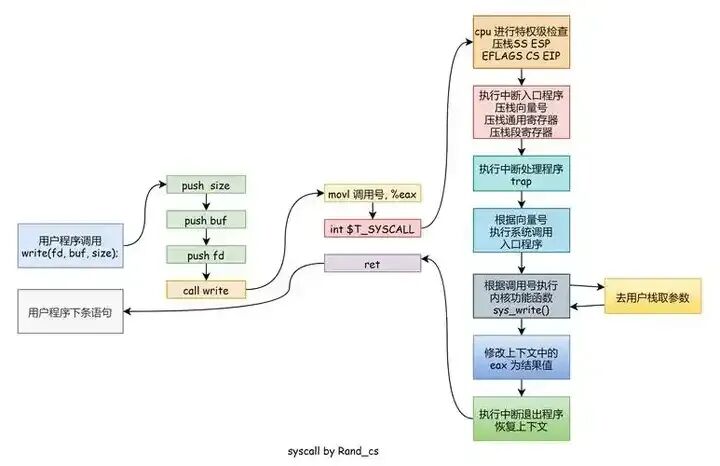
1.2 The Principle of System Calls
The implementation of system calls relies on specific hardware and software mechanisms. In x86 architecture Linux systems, system calls are primarily triggered by the syscall instruction. When a user-space program executes code that requires a system call, it will execute the syscall instruction, which raises an exception, causing the CPU to switch from user-space to kernel-space. At the same time, the CPU saves the state of the registers in user-space so that it can resume execution in user-space after the system call is completed.
In kernel-space, the kernel determines which system call service the user program is requesting based on the system call number. The system call number acts like a “service number”; each system call has a unique number associated with it. For example, in Linux, the system call number for the fork system call is 2. The kernel uses this number to find the corresponding system call handler function and executes that function to fulfill the user request.
During the execution of the system call handler function, parameter passing and other operations are also involved. The user-space program passes the parameters required for the system call to the kernel, and the kernel performs the corresponding operations based on these parameters. For instance, the open system call requires parameters such as the file name and open mode, and the kernel uses these parameters to complete the file opening operation. Once the system call is processed, the kernel returns the result to the user-space program and restores the previously saved register state, allowing the CPU to switch back to user-space, where the user-space program continues executing subsequent code.
1.3 Why System Calls are Necessary
The Linux kernel has a set of subroutines designed to implement system functions, known as system calls. System calls are very similar to ordinary library function calls, except that system calls are provided by the operating system core and run in kernel-space, while ordinary function calls are provided by function libraries or the user and run in user-space.
Generally, processes cannot access the kernel. They cannot access the memory space occupied by the kernel or call kernel functions. This is determined by the CPU hardware (which is why it is called “protected mode”). To interact with processes running in user-space, the kernel provides a set of interfaces. Through these interfaces, applications can access hardware devices and other operating system resources. This set of interfaces acts as a messenger between applications and the kernel, where applications send various requests, and the kernel is responsible for fulfilling these requests (or temporarily suspending the applications). In fact, this set of interfaces is primarily designed to ensure system stability and reliability, preventing applications from acting recklessly and causing major issues.
System calls add an intermediate layer between user-space processes and hardware devices, which serves three main purposes:
- It provides a unified hardware abstraction interface for user-space. For example, when needing to read a file, the application does not need to care about the type of disk and medium, or even the type of file system where the file is located.
- System calls ensure system stability and security. As intermediaries between hardware devices and applications, the kernel can adjudicate access based on permissions and other rules. For instance, this can prevent applications from incorrectly using hardware devices, stealing resources from other processes, or performing other actions that could harm the system.
- Each process runs in a virtual system, and providing such a common interface between user-space and the rest of the system is also for this consideration. If applications could freely access hardware while the kernel was unaware, it would be nearly impossible to implement multitasking and virtual memory, and of course, good stability and security could not be achieved. In Linux, system calls are the only means for user-space to access the kernel; apart from exceptions and interrupts, they are the only legitimate entry points to the kernel.
2. Introduction to Hook Technology
2.1 Concept of Hook Technology
Hook technology, literally understood, is like setting up “intersections” on the “highway” of program execution. It is a programming technique that allows developers to insert custom code at specific points or events in a program. It is akin to a grand performance where, although you cannot change the core plot of the script (the core logic of the original code), you can arrange special performances (insert custom code) at certain key scenes (specific program points) to extend, modify, or monitor the entire performance (program behavior).
For example, in a file operation program, we can use hook technology to insert a segment of custom code to check file permissions before executing the file reading function, ensuring that only users with the appropriate permissions can read the file, without modifying the original core logic of file reading. At the operating system level, hook technology also has wide applications. For instance, message hooks in Windows systems can intercept messages in the system, and when specific messages (like keyboard input messages or mouse click messages) occur, custom code can be inserted for processing. Some keylogging software utilizes message hooks to record user keyboard inputs.
2.2 Common Types of Hooks
① Function Hook: The principle is to replace or wrap the original function, inserting custom logic before and after the function execution. For example, in a mathematical calculation program, there is an original function add_numbers that calculates the sum of two numbers. We can use function hook technology to create a new function hooked_add_numbers, in which we first output some debugging information, then call the original add_numbers function for calculation. The code example is as follows (C++):
#include <iostream>
#include <string>

// Original function
int add_numbers(int a, int b) {
    std::cout << "Original function add_numbers called, calculating: " << a << " + " << b << std::endl;
    return a + b;
}

// Save pointer to original function
int (*original_add_numbers)(int, int) = add_numbers;

// Hook function - insert custom logic before and after function execution
int hooked_add_numbers(int a, int b) {
    // Insert custom logic before function execution
    std::cout << "===== Hook Pre-Logic =====" << std::endl;
    std::cout << "Debug Info: About to call add_numbers function" << std::endl;
    std::cout << "Parameter values: a = " << a << ", b = " << b << std::endl;

    // Check if parameters are valid
    if (a < 0 || b < 0) {
        std::cout << "Warning: Parameters contain negative numbers!" << std::endl;
    }

    // Call original function
    int result = original_add_numbers(a, b);

    // Insert custom logic after function execution
    std::cout << "===== Hook Post-Logic =====" << std::endl;
    std::cout << "Debug Info: add_numbers function call completed" << std::endl;
    std::cout << "Calculation result: " << result << std::endl;

    // Modify or enhance the result
    int enhanced_result = result * 2;
    std::cout << "Enhanced result (×2): " << enhanced_result << std::endl;

    return enhanced_result;
}

// Function hook management class
class FunctionHookManager {
public:
    static void install_hook() {
        std::cout << "Installing function hook..." << std::endl;
        original_add_numbers = add_numbers;  // Save original function address
        // Replace function pointer (may require more complex memory operations in actual applications)
        // Here simplified to directly use the new function
    }

    static void uninstall_hook() {
        std::cout << "Uninstalling function hook..." << std::endl;
        // Restore original function
    }

    static bool is_hooked() {
        return true;  // In actual implementation, need to check if hook is installed
    }
};

int main() {
    std::cout << "=== C++ Function Hook Example ===" << std::endl;

    // 1. Directly call original function
    std::cout << "\n1. Directly calling original function:" << std::endl;
    int result1 = add_numbers(3, 5);
    std::cout << "Direct call result: " << result1 << std::endl;

    // 2. Install hook and call
    std::cout << "\n2. Calling after installing hook:" << std::endl;
    FunctionHookManager::install_hook();

    // Use hook function
    int result2 = hooked_add_numbers(4, 6);
    std::cout << "Hook call result: " << result2 << std::endl;

    // 3. Test negative case
    std::cout << "\n3. Testing boundary condition:" << std::endl;
    int result3 = hooked_add_numbers(-2, 8);
    std::cout << "Hook call result: " << result3 << std::endl;

    // 4. Uninstall hook
    std::cout << "\n4. Uninstalling hook:" << std::endl;
    FunctionHookManager::uninstall_hook();

    // 5. Call original function directly again
    std::cout << "\n5. Directly calling original function after uninstalling hook:" << std::endl;
    int result4 = add_numbers(2, 3);
    std::cout << "Direct call result: " << result4 << std::endl;

    return 0;
}
② Event Hook: The main principle is to listen for specific events and execute corresponding handler functions when the event is triggered. For example, in web development with JavaScript, when a user clicks a button on a webpage, this is a click event. We can use event hook technology to listen for this click event and execute a segment of custom JavaScript code when the button is clicked, such as popping up an alert box. The code example is as follows:
<!DOCTYPE html>
<html lang="en">
<head>
    <meta charset="UTF-8">
</head>
<body>
    <button id="myButton">Click me</button>
    <script>
        // Get button element
        const button = document.getElementById('myButton');
        // Register click event hook
        button.addEventListener('click', function () {
            alert('You clicked the button!');
        });
    </script>
</body>
</html>
③ Message Hook: Typically at the operating system level, used to intercept specific messages and perform custom processing. In Windows systems, message hooks can intercept various system messages, such as keyboard messages and mouse messages. For example, to intercept keyboard messages, when a user presses a key on the keyboard, the system generates a keyboard message. We can set up a message hook to capture this keyboard message and perform custom processing, such as logging the key value pressed by the user. Below is a simple C++ code example (using Windows API):
#include <windows.h>
#include <stdio.h>

HHOOK hHook;

LRESULT CALLBACK KeyboardProc(int nCode, WPARAM wParam, LPARAM lParam) {
    if (nCode >= 0 && wParam == WM_KEYDOWN) {
        KBDLLHOOKSTRUCT* p = (KBDLLHOOKSTRUCT*)lParam;
        printf("Key value: %d\n", p->vkCode);
    }
    return CallNextHookEx(hHook, nCode, wParam, lParam);
}

int main() {
    hHook = SetWindowsHookEx(WH_KEYBOARD_LL, KeyboardProc, NULL, 0);
    MSG msg;
    while (GetMessage(&msg, NULL, 0, 0)) {
        TranslateMessage(&msg);
        DispatchMessage(&msg);
    }
    UnhookWindowsHookEx(hHook);
    return 0;
}
2.3 Uses of Hooks
-
Enhancing functionality: Adding extra behavior to existing functionality without modifying the original code. For example, in a music playback software, the original function is to play music. By using hook technology, we can insert custom code in the music playback function to display lyrics or song recommendations while the song is playing, without making large-scale modifications to the core playback logic of the music software.
-
Logging: Recording relevant information when key functions or events occur, which is very helpful for debugging and tracking the execution process of the program. For instance, in a database operation program, we can hook the database query function to log the SQL statements and execution times before and after the function executes. When issues arise, these log entries can help quickly locate the problem.
-
Permission control: Performing permission checks before specific operations. For example, in a file management system, we can hook the file deletion function to check whether the current user has permission to delete the file before executing the delete operation. If the user lacks permission, the operation is blocked, and the user is notified.
-
Performance monitoring: Measuring function execution time, resource usage, etc. For example, we can hook a complex algorithm function to log timestamps before and after the function executes, calculating the time difference to obtain the function’s execution time, and also record memory usage and other resource information during the function’s execution.
3. Implementation of Hook Technology in Linux System Calls
3.1 Hook Implementation Based on Function Pointers
In Linux systems, function pointers are pointer variables that point to functions, and they can be assigned and passed like ordinary variables. The core idea of hook implementation based on function pointers is to modify the function pointer to point to our custom function, thereby inserting custom logic before and after the execution of the original function. For example, suppose there is a simple program that includes an original file reading function original_read, which reads data from a specified file. Now we want to log the relevant information of the read operation before each file read.
First, define the original file reading function and our custom hook function:
#include <stdio.h>
#include <stdlib.h>

// Original file reading function
ssize_t original_read(int fd, void *buf, size_t count) {
    return read(fd, buf, count);
}

// Custom hook function
ssize_t hooked_read(int fd, void *buf, size_t count) {
    printf("About to read file, file descriptor: %d, bytes to read: %zu\n", fd, count);
    ssize_t result = original_read(fd, buf, count);
    printf("File read complete, actual bytes read: %zd\n", result);
    return result;
}
Then, at an appropriate location in the program, replace the original function pointer original_read with the custom hook function pointer hooked_read:
int main() {
    // Replace original read function pointer with hooked_read function pointer
    original_read = hooked_read;

    int fd = open("test.txt", O_RDONLY);
    if (fd == -1) {
        perror("open");
        return 1;
    }

    char buffer[1024];
    ssize_t bytes_read = original_read(fd, buffer, sizeof(buffer));
    if (bytes_read == -1) {
        perror("read");
    } else {
        buffer[bytes_read] = '\0';
        printf("Read content: %s\n", buffer);
    }

    close(fd);
    return 0;
}
In this example, by modifying the function pointer original_read to point to the hooked_read function, when calling original_read in the main function, the hooked_read function is actually executed. In the hooked_read function, we first output the relevant information of the read operation, then call the original original_read function to complete the file reading operation, and finally output the completion information. This method is simple to implement and does not require complex linking or loading mechanisms, making it very practical in some simple scenarios. However, it also has limitations, such as only being applicable in situations where we can directly access and modify the function pointer. If the function is in a shared library and does not provide a suitable interface to modify the function pointer, this method may not be applicable.
3.2 Implementing Hook Using LD_PRELOAD Environment Variable
LD_PRELOAD is an environment variable in Linux systems that allows us to preload specified shared libraries when a program runs. By utilizing this feature, we can rewrite system call functions to implement hook functionality. Suppose we want to hook the system’s printf function to add a custom prefix before the output content. First, create a custom shared library file hook_printf.c:
#include <stdio.h>
#include <dlfcn.h>

// Define our custom printf function
int printf(const char *format, ...) {
    // Get pointer to original printf function
    typedef int (*original_printf_t)(const char *, ...);
    static original_printf_t original_printf = NULL;
    if (!original_printf) {
        original_printf = (original_printf_t)dlsym(RTLD_NEXT, "printf");
    }

    // Add custom prefix before output content
    original_printf("[Custom Prefix] ");

    // Call original printf function to output content
    va_list args;
    va_start(args, format);
    int result = original_printf(format, args);
    va_end(args);

    return result;
}
Then, compile this source file into a shared library:
gcc -shared -fPIC -o hook_printf.so hook_printf.c -ldlNext, when running the program that needs to be hooked, set the LD_PRELOAD environment variable:
LD_PRELOAD=./hook_printf.so your_programThus, when your_program runs, it will first load our custom hook_printf.so shared library. In this shared library, we have rewritten the printf function. When the program calls printf, it actually calls our custom printf function. In the custom printf function, we first call the original printf function to output the custom prefix, and then call the original printf function to output the content that the program originally intended to output. The advantage of using LD_PRELOAD to implement hooks is that it does not require modifying the source code of the target program and can hook existing shared library functions in the system, making it widely applicable. However, it also has some drawbacks, such as dependency on environment variables. If the target program has restrictions or cleanup operations on environment variables, it may lead to hook failures, and this method may also affect the normal operation of other programs that depend on the same shared library functions.
3.3 Hook Based on Kernel Modules (Discussed from a Feasible Perspective)
From a technical principle perspective, kernel modules are code blocks that can be dynamically loaded and unloaded into the Linux kernel. Hooking based on kernel modules involves modifying the execution flow of kernel functions within the kernel module to implement hooks for system calls. The implementation steps are roughly as follows:
- Write kernel module code: In the code, find the entry point of the system call function to be hooked. This requires a deep understanding of the kernel source code, as the implementation and location of system call functions may vary across different kernel versions. For example, if we want to hook the open system call, we need to find the definition of the sys_open function in the kernel source code.
- Modify the system call function: This can be done by replacing function pointers or modifying function code. A common method is to use the kprobes mechanism in the kernel. Kprobes is a dynamic probing mechanism provided by the kernel that allows custom code to be inserted at specified locations in kernel functions. By using kprobes, we can insert custom processing logic before and after the execution of the sys_open function. For instance, before executing the sys_open function, we can check whether the current process has special permissions to access the file; if not, we return an error message.
- Compile and load the kernel module: Compile the written kernel module code into a kernel module file (.ko file), and then use the insmod command to load it into the kernel. Once loaded, the hook logic in the kernel module will take effect.
However, hooking based on kernel modules also faces many challenges. On one hand, kernel development has a high threshold, requiring a deep understanding of kernel mechanisms, memory management, interrupt handling, etc. A slight mistake in writing kernel module code can lead to kernel crashes. On the other hand, due to the continuous updates and changes in kernel versions, the written kernel module may have poor compatibility across different kernel versions, requiring extensive adaptation work for different kernel versions. Additionally, from a security perspective, loading and running kernel modules usually require high permissions, and if maliciously exploited, they can pose serious threats to system security. Therefore, in practical applications, kernel module-based hook technology needs to be used with caution, generally reserved for specific scenarios requiring deep customization and optimization of system-level functions, such as developing high-performance network device drivers that need to hook network-related system calls to implement special network protocol handling.
4. Application Cases of Hook Technology in Real Scenarios
4.1 Performance Monitoring and Optimization
In a large distributed database system, to enhance system performance, the development team decided to optimize database query operations. They used hook technology to insert performance monitoring code before and after the execution of the database query function (such as mysql_query). Before executing the query function, they recorded the current timestamp, and after the query execution was completed, they recorded the timestamp again. By calculating the difference between the two timestamps, they could obtain the execution time of the query operation. For example:
#include <mysql/mysql.h>
#include <stdio.h>
#include <time.h>

// Original mysql_query function pointer
typedef int (*original_mysql_query_t)(MYSQL *mysql, const char *query);
original_mysql_query_t original_mysql_query = NULL;

// Custom hook function
int hooked_mysql_query(MYSQL *mysql, const char *query) {
    clock_t start, end;
    double cpu_time_used;

    start = clock();

    // Call original mysql_query function to execute query
    int result = original_mysql_query(mysql, query);

    end = clock();
    cpu_time_used = ((double) (end - start)) / CLOCKS_PER_SEC;

    printf("Query statement: %s, execution time: %f seconds\n", query, cpu_time_used);

    return result;
}

int main() {
    // Get original mysql_query function pointer
    original_mysql_query = (original_mysql_query_t)dlsym(RTLD_NEXT, "mysql_query");

    // Assume MYSQL object has been initialized
    MYSQL mysql;
    mysql_init(&mysql);
    mysql_real_connect(&mysql, "localhost", "user", "password", "database", 0, NULL, 0);

    // Execute query operation
    hooked_mysql_query(&mysql, "SELECT * FROM users");

    mysql_close(&mysql);
    return 0;
}
Through this method, the development team collected a large amount of query execution time data. After analysis, they found that certain complex queries took too long due to improper index usage. Therefore, they optimized these query statements by adding appropriate indexes. After using hook technology to monitor the performance of the optimized queries, they found that the query execution time was significantly reduced, and the overall performance of the database system improved significantly.
4.2 Security Protection and Intrusion Detection
In an enterprise-level web server environment, to prevent malicious attacks, system administrators used hook technology to detect illegal system calls. They focused on file operation-related system calls, such as open and write. By hooking these system call functions, they checked the parameters and the current process’s permissions before the function executed. For example, for the open system call, if a process attempts to open a sensitive configuration file with write permissions, and that process does not have the corresponding permissions, it is deemed an illegal operation, and relevant information is recorded while blocking the execution of the operation. Below is a simple example code (using LD_PRELOAD implementation):
#include <stdio.h>
#include <stdlib.h>
#include <dlfcn.h>
#include <fcntl.h>

// Original open function pointer
typedef int (*original_open_t)(const char *pathname, int flags, mode_t mode);
original_open_t original_open = NULL;

// Custom hook function
int hooked_open(const char *pathname, int flags, mode_t mode) {
    // Check if it is a sensitive file and opened with write permissions
    if (strstr(pathname, "sensitive_config.conf") && (flags && O_WRONLY || flags && O_RDWR)) {
        // Check current process permissions
        if (geteuid() != 0) {
            printf("Detected illegal operation: process attempting to open sensitive file with write permissions, process ID: %d, file name: %s\n", getpid(), pathname);
            return -1; // Block operation
        }
    }

    // Call original open function
    if (!original_open) {
        original_open = (original_open_t)dlsym(RTLD_NEXT, "open");
    }
    return original_open(pathname, flags, mode);
}

// Redirect open function
__attribute__((constructor)) void init_hook() {
    void *handle = dlopen("libc.so.6", RTLD_NOW | RTLD_GLOBAL);
    if (!handle) {
        fprintf(stderr, "Unable to load libc.so.6: %s\n", dlerror());
        exit(EXIT_FAILURE);
    }

    original_open = (original_open_t)dlsym(handle, "open");
    if (!original_open) {
        fprintf(stderr, "Unable to get original open function: %s\n", dlerror());
        dlclose(handle);
        exit(EXIT_FAILURE);
    }

    // Replace with hook function
    int (*new_open)(const char *, int, mode_t) = hooked_open;
    if (dlsym(handle, "open") != NULL) {
        ((void (*)(void)) original_open) = new_open;
    }
}
Through this method, they effectively prevented some malicious attacks attempting to tamper with sensitive files, ensuring the secure and stable operation of the web server.
4.3 Debugging and Troubleshooting
During the development of a complex multi-threaded network application, developers encountered program crashes. Due to the complexity of the program logic, it was difficult to directly locate the problem. Therefore, they used hook technology to hook some key system call functions, such as send and recv, used for sending and receiving network data. By inserting logging code into these functions, they obtained information about the function’s parameters, return values, and execution times. For example:
#include <stdio.h>
#include <stdlib.h>
#include <dlfcn.h>
#include <sys/socket.h>
#include <arpa/inet.h>
#include <unistd.h>

// Original send function pointer
typedef ssize_t (*original_send_t)(int sockfd, const void *buf, size_t len, int flags);
original_send_t original_send = NULL;

// Custom hook function
ssize_t hooked_send(int sockfd, const void *buf, size_t len, int flags) {
    printf("About to call send function, socket: %d, data length to send: %zu\n", sockfd, len);

    // Call original send function
    if (!original_send) {
        original_send = (original_send_t)dlsym(RTLD_NEXT, "send");
    }
    ssize_t result = original_send(sockfd, buf, len, flags);

    printf("send function execution complete, return value: %zd\n", result);
    return result;
}

// Redirect send function
__attribute__((constructor)) void init_hook() {
    void *handle = dlopen("libc.so.6", RTLD_NOW | RTLD_GLOBAL);
    if (!handle) {
        fprintf(stderr, "Unable to load libc.so.6: %s\n", dlerror());
        exit(EXIT_FAILURE);
    }

    original_send = (original_send_t)dlsym(handle, "send");
    if (!original_send) {
        fprintf(stderr, "Unable to get original send function: %s\n", dlerror());
        dlclose(handle);
        exit(EXIT_FAILURE);
    }

    // Replace with hook function
    ssize_t (*new_send)(int, const void *, size_t, int) = hooked_send;
    if (dlsym(handle, "send") != NULL) {
        ((void (*)(void)) original_send) = new_send;
    }
}
By analyzing this log information, developers discovered that under high concurrency, data sending failures occurred due to network buffer overflow, ultimately leading to program crashes. After identifying the problem, they adjusted the network buffer size and optimized the data sending logic, successfully resolving the program crash issue.