When we learn any programming language, the first program is often the classic “Hello World”. Linux system programming is no exception! Today, I will guide you step by step to complete your first program in a Linux environment and understand the principles behind it. (The following demonstration uses the Ubuntu 22.04 distribution)
🆚 Linux vs Windows: Comparison of Programming Environments
| Steps | Windows Environment | Linux Environment |
|---|---|---|
| Create File | Create using VSCode GUI | Create using vi/gedit command line |
| Write Code | Write using VSCode editor | Write using terminal or text editor |
| Compile Code | Click compile button | Compile using command line |
| Run Program | Click run button | Run using command line |
🚀 Getting Started: Create Your First Linux Program
Step 1: Create Source File
In Linux, we have multiple ways to create a source file:
Method 1: Using vi Editor (Recommended for Learning)
vi hello.cMethod 2: Using gedit GUI Editor
gedit hello.cStep 2: Write Hello World Code
Enter the following code in the opened editor:
#include <stdio.h>

int main() {
    printf("Hello, World!\n");
    return 0;
}
Code Explanation:
- •
<span>#include <stdio.h></span>: Includes the standard input-output library, allowing us to use the<span>printf</span>function - •
<span>int main()</span>: The main function of the program, which every C program must have - •
<span>printf("Hello, World!\n")</span>: Prints “Hello, World!” on the screen,<span>\n</span>indicates a newline - •
<span>return 0</span>: Tells the system that the program has ended normally
Step 3: Save File
- • vi Editor: Press
<span>ESC</span>, type<span>:wq</span>, then press Enter - • gedit Editor: Click the save button or press
<span>Ctrl+S</span>
🔧 Compile Program: From Source Code to Executable File
First, ensure that the GCC compiler is installed
sudo apt install gccWhat is GCC? GCC (GNU Compiler Collection) is a compiler that primarily converts high-level programming language source code into machine code. You can think of it as clicking the “compile” button in Windows, which actually executes the GCC command.
Compilation Method 1: One-Step (Recommended for Beginners)
gcc hello.c -o helloCommand Explanation:
- •
<span>gcc</span>: Calls the GCC compiler - •
<span>hello.c</span>: The source file to be compiled - •
<span>-o hello</span>: Specifies the output executable file name as<span>hello</span>
Compilation Method 2: Step-by-Step Compilation (Understanding the Compilation Process)
# Step 1: Compile to generate object file
gcc -c hello.c -o hello.o

# Step 2: Link object file to generate executable file
gcc hello.o -o hello
Step-by-Step Compilation Explained:
- •
<span>gcc -c hello.c -o hello.o</span>: - •
<span>-c</span>: Tells GCC to only compile and assemble, not link - •
<span>hello.o</span>: The generated object file
🤔 Why Use Step-by-Step Compilation?
Scenario Comparison:
Direct Compilation (suitable for single files):
gcc file1.c file2.c -o program- • Each modification requires recompiling all files, suitable for small projects
Step-by-Step Compilation (suitable for multi-file projects):
# First compile all files
gcc -c file1.c -o file1.o
gcc -c file2.c -o file2.o
gcc file1.o file2.o -o program

# If only file1.c is modified, just:
gcc -c file1.c -o file1.o  # Recompile the modified file
gcc file1.o file2.o -o program # Relink- • Only recompiles modified files, saving time, suitable for large projects (of course, typing becomes cumbersome with many files, later we will use cmake for automatic compilation)
🎯 Run Your Program
After successful compilation, run the program:
./helloYou should see the output:
Hello, World!Note: The preceding<span>./</span> is important; it tells the system to look for the executable file in the current directory.
💡 Complete Process Demonstration
Let’s walk through the complete process in the terminal:
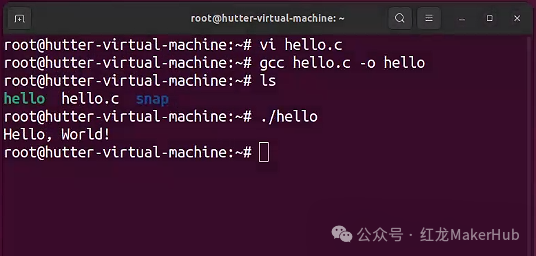
# 1. Create source file
vi hello.c

# 2. Write the following code (press i in vi to enter edit mode, input code)

#include <stdio.h>
int main() {
    printf("Hello, World!\n");
    return 0;
}

# 3. Save and exit (press ESC, type :wq, press Enter)

# 4. Compile program
gcc hello.c -o hello

# 5. Run program
./hello

# 6. Check result
Hello, World!
🎉 Congratulations!
By now, you have successfully completed:
- • ✅ Created a C program in a Linux environment
- • ✅ Understood the principles of compilation
- • ✅ Mastered the basic usage of the GCC compiler
- • ✅ Run your first Linux program
Remember: Practicing hands-on is the best way to learn programming. Don’t be afraid of making mistakes; every error is an opportunity to learn!
Recommended Articles:
Common Linux Commands: An Essential Guide from Beginner to Efficient Development
Detailed Notes from Zero to Advanced in C++ (Basic Edition)
Git Installation and Configuration Tutorial (Beginner Friendly)