💡 No Linux knowledge required: With AI assistance and voice input, you can write code just by speaking! Say goodbye to heavy laptops and conduct research anytime, anywhere 🚀
🎯 1. Addressing Pain Points: The Daily Dilemmas of Researchers
🔍 Real-life Scenarios:
🚇 Inspiration Vanishing Act: On the subway, a brilliant algorithm idea strikes → take out your phone → open the notes app → write down “remember to try this at home” → back home: “What was I thinking back then?”
📱 Boss’s Surprise Check: While shopping, WeChat pops up “Xiao Zhang, please rerun that data from last time, it’s urgent!” → quietly open the laptop bag → realize the power adapter is missing → game over
⏰ Time Black Hole: 2 hours of commuting + various waiting times = over 600 hours wasted each year! That’s enough time to publish 3 papers!
💡 Breaking the Deadlock: Since the phone is with you 24/7, why not turn it into a productivity tool?
It’s all a lie; rest and play are the most important things
🛠️ 2. Getting Started from Scratch: Termux + AI = No-barrier Linux
📦 What is Termux?
A complete Linux terminal on Android,no root required, no Linux knowledge needed!
- • Don’t know Linux commands? Just ask AI!
- • Recommended to useCLI AI tools that support Agent mode
- • AI can not only answer questions but alsoexecute commands and write files directly
🎯 Core Capabilities:✅ Complete Shell Environment – AI teaches you to use bash/zsh✅ SSH Remote Connection – <span>ssh server</span> to manage remote machines✅ Vast Software Repository – <span>pkg install</span> for one-click installation of common tools
💡 AI Learning Example: “Teach me how to install Python and run scripts using Termux”
🧙♂️ 3. System Selection: In-depth Comparison of Ubuntu/Debian/Arch
🔑 Proot: Run a complete Linux distribution in Termux without root!
🏗️ Comparison of Three Major Systems:
🔵 Ubuntu:
- • ✅ Advantages: More packages, relatively newer, many tutorials available online.
- • ❌ Disadvantages: Not suitable for cross-version upgrades, prone to issues
🟡 Debian:
- • ✅ Advantages: Extremely stable, supports cross-version upgrades
- • 📦 Older but reliable packages; choosing the testing version makes it more like Arch
- • 🎯 Recommended to choose the testing branch: Rolling upgrades + newer packages
🔴 Arch Linux:
- • ✅ Advantages: Latest packages, true rolling upgrades
- • ❌ Disadvantages: Cannot use AUR, relatively fewer software repositories
- • 📊 But basic software is available, and versions are quite new
💡 Practical Tips:
- • Need tools like pandoc? Termux has them built-in, no need to go into proot
- • File format conversion can be done within Termux, lighter and faster
📁 File Sharing Tool:
- • 🔥 Quality File App – Highly recommended!
- • Direct access to Termux directory files
- • Supports various protocols like FTP, SFTP, WebDAV
- • One-click sharing to WeChat, QQ, and other social apps
- • You can also copy files to Termux from other locations
📊 My Actual Setup: Arch Linux + Debian Dual System
$ fastfetch
                   -`
                 .o+`
                `ooo/
               `+oooo:
              `+oooooo:
              -+oooooo+:
            `/-:++oooo+:
           `/++++/+++++++:
          `/++++++++++++++:
         `/+++ooooooooooooo/`
        ./ooosssso++osssssso+`
       .oossssso-````/ossssss+`
      -osssssso.      :ssssssso.
     :osssssss/        osssso+++.
    /ossssssss/        +ssssooo/-
  `/ossssso+/:-        -:/+osssso+-
 `+sso+:-`                 `.-/+oso:
`++:.                           `-/+
.`                                 /

OS: Arch Linux ARM aarch64
Kernel: Linux 5.10.218-android12-9-gfa58a58dea36-dirty
Uptime: 30 days, 13 hours, 14 mins
Packages: 324 (pacman)
Shell: node
Terminal: xterm-256color
CPU: Cortex-A55*4 + Cortex-A78*4 (8)
Memory: 7.08 GiB / 11.17 GiB (63%)
Swap: 5.29 GiB / 11.00 GiB (48%)
Disk (/): 135.39 GiB / 464.51 GiB (29%) - erofs [Read-only]
Locale: C.UTF-8
Also installed Debian for specific compatibility needs
🎯 4. Practical Skills: The Big Three – R/Python/Julia Unite!
🏆 The three major languages for research run perfectly on mobile:
📈 1. R Language – The Statistician’s True Love
- •
<span>apt install r-base</span>for one-click installation - •
<span>ggplot2</span>for plotting and complex statistical modeling with ease - • Running a linear regression on the subway? So easy!
🐍 2. Python – The All-rounder of Data Science
- •
<span>pip install pandas numpy matplotlib</span>for the complete package - • Virtual environment management, clear dependency isolation
- • Jupyter Notebook? It can run on your phone!
**Try to install packages through the system package manager for speed and ease, though the versions may be older, and compiling may lead to errors.
⚡ 3. Julia – The New Star of High-Performance Computing
- • Near C language execution speed
- • Handles large-scale data effortlessly
- • Emerging language, get a head start
🌍 Real-life Scenario: In a café, take out your phone → data cleaning → statistical analysis → generate charts →one-click share to WeChat/QQ✅This is true mobile productivity!
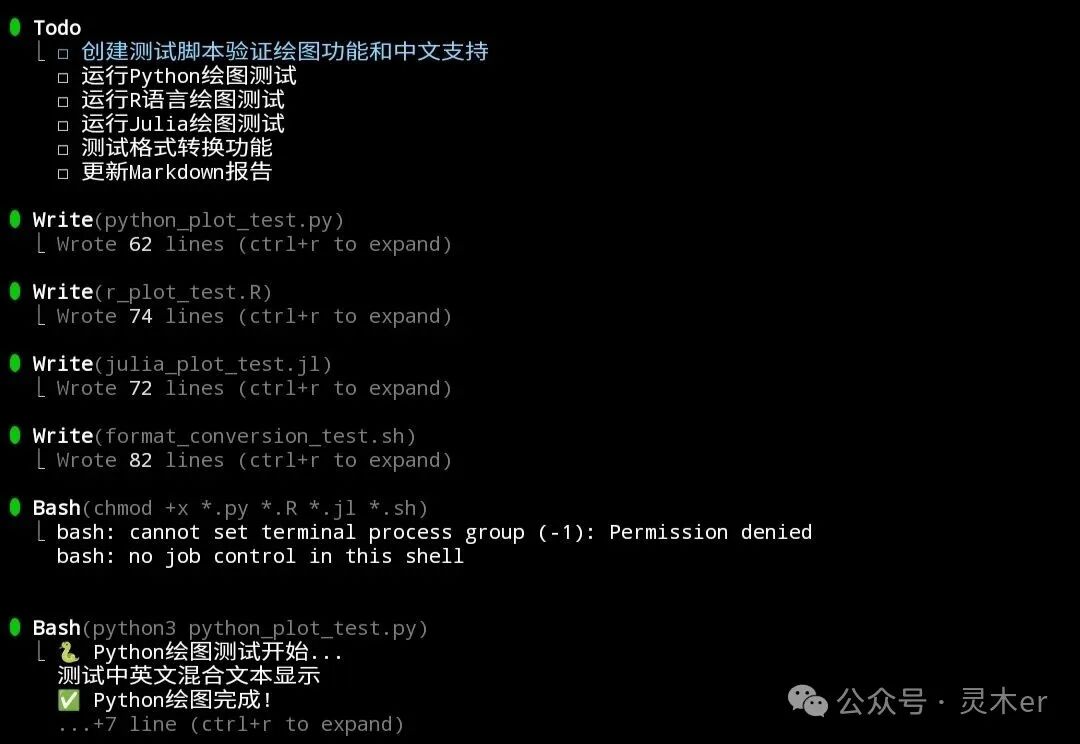
📊 5. Practical Skills: Testing Plotting and Format Conversion
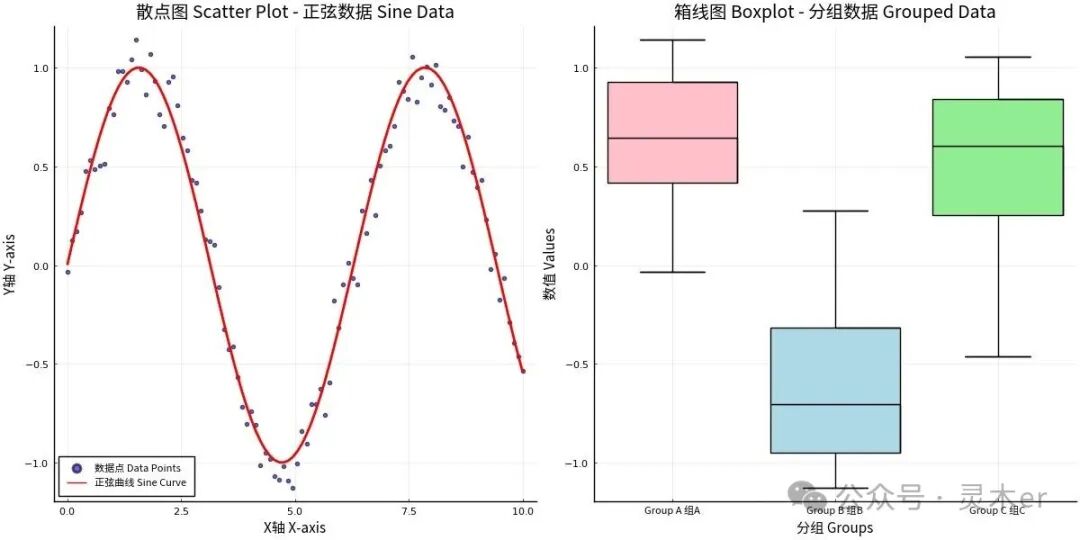
To specifically demonstrate the research capabilities on mobile, we conducted a series of practical tests.
🎨 1. Multilingual Plotting Test
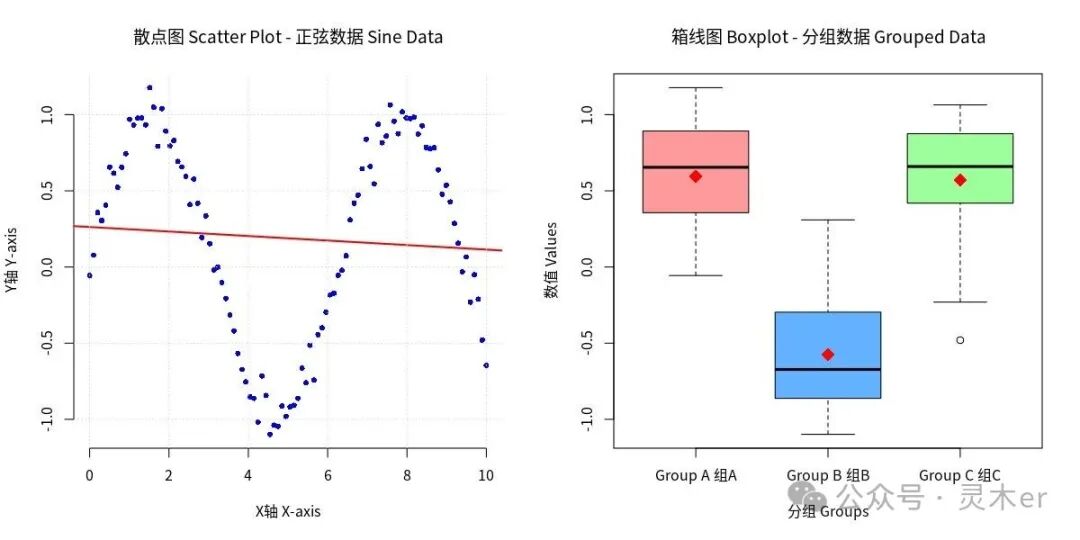
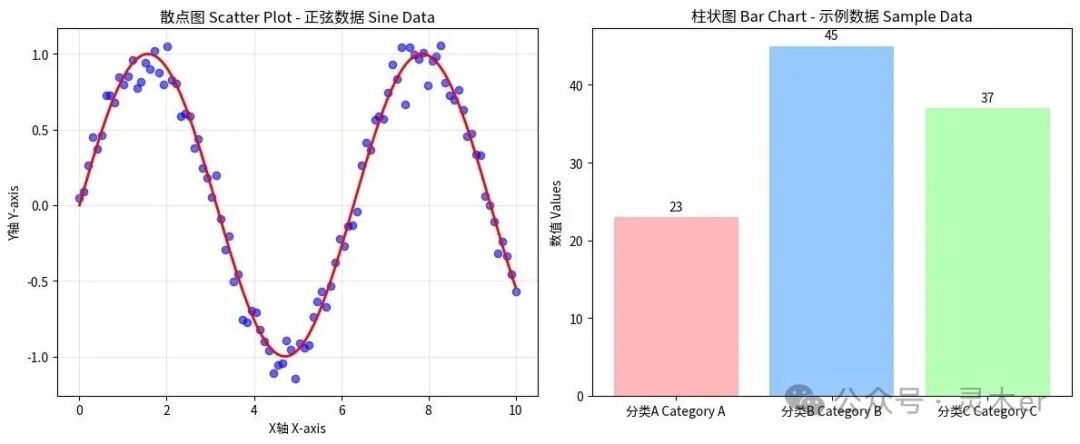
We generated complex charts containing both Chinese and English using R, Python, and Julia, all tests completed on mobile.
R Language Plotting Result
./r_plot_test.RR language plotting result
Python Plotting Result
./python_plot_test.pyPython plotting result
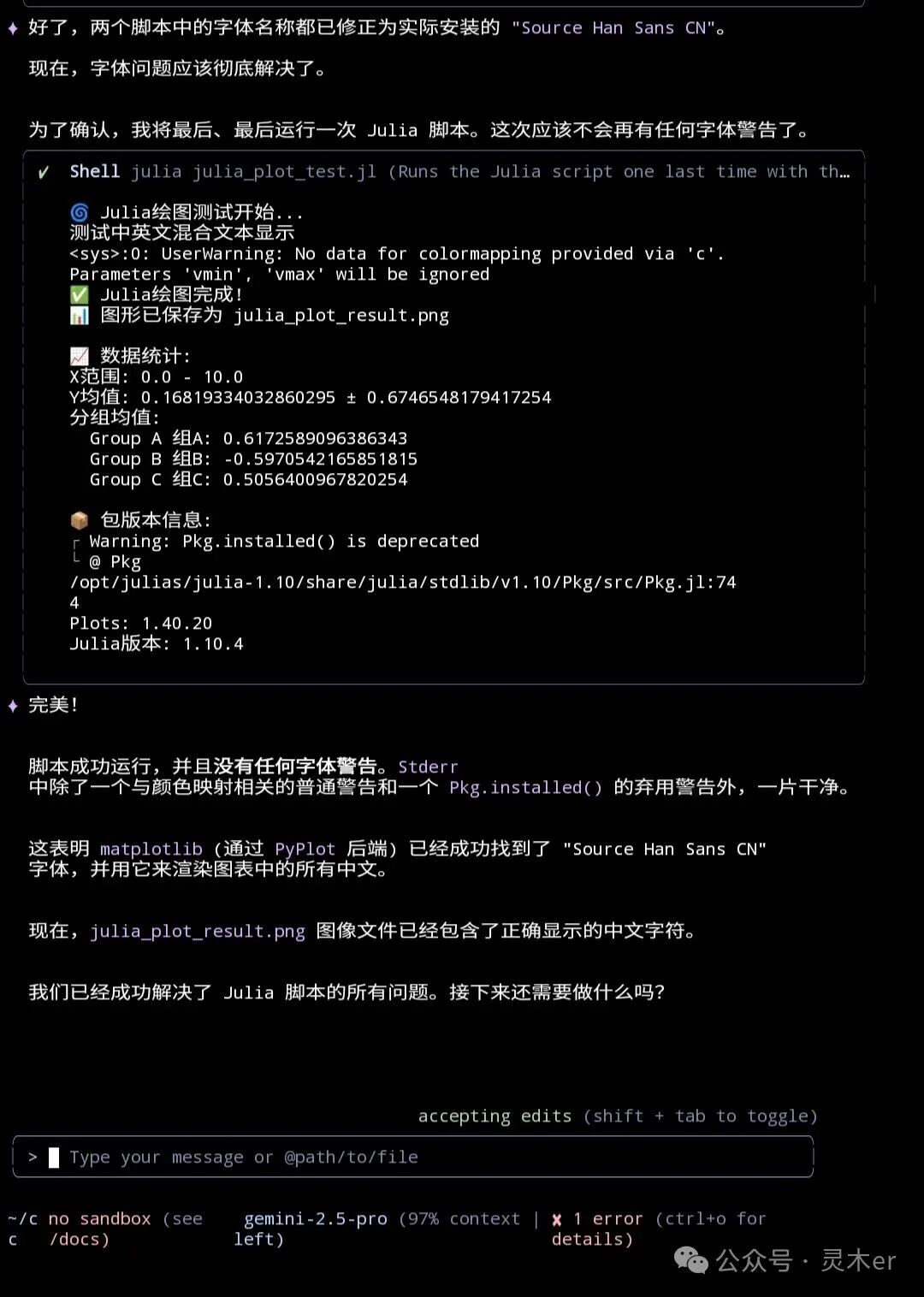
Julia Plotting Result
./julia_plot_test.jlJulia plotting result
🔄 2. Format Conversion and Text Processing
In addition to data analysis, document processing is also an important part of daily research.
- • Pandoc Format Conversion: We used the
<span>pandoc</span>tool to successfully convert research notes in Markdown format to various mainstream formats such as<span>Word(.docx)</span>,<span>PDF</span>,<span>HTML</span>, and<span>LaTeX(.tex)</span>. - • AWK Text Processing: In the
<span>format_conversion_test.sh</span>script, we utilized<span>awk</span>and other Shell tools for text processing and report generation, showcasing the powerful automation capabilities of mobile.
These tests prove that from data analysis and visualization to typesetting, mobile devices can fully handle complex research tasks.
🚀 3. Comprehensive Performance Testing
To further validate the overall performance of the mobile workstation, we ran a simple integration test script<span>mobile_lab_test.sh</span> that covers the complete process from system information to multilingual data processing.
./mobile_lab_test.shThe test script executed the following key tasks:
- • Python Test: Used
<span>numpy</span>and<span>pandas</span>for data creation and descriptive statistical analysis. - • R Language Test: Performed basic statistical calculations such as mean and standard deviation.
- • Julia Test: Conducted matrix operations, demonstrating its high-performance computing capabilities.
- • Linux Command Line Test: Used
<span>awk</span>and<span>sed</span>and other classic tools to perform data extraction and text replacement operations on CSV files, showcasing powerful Shell data processing capabilities.
Test Results:
🚀 Mobile Research Workstation Performance Test

🐍 Python Test:
Python environment is normal!
Numpy version: 2.3.3
Pandas version: 2.3.1
Data shape: (1000, 5)
Descriptive statistics:
             A        B        C        D        E
count  1000.00  1000.00  1000.00  1000.00  1000.00
mean     -0.05    -0.00     0.03     0.03     0.01
std       1.01     1.00     0.99     0.96     1.01
min      -3.45    -3.25    -2.74    -3.61    -2.84
25%      -0.70    -0.68    -0.63    -0.61    -0.69
50%      -0.07     0.01     0.02     0.06     0.02
75%       0.64     0.68     0.69     0.72     0.72
max       2.87     3.06     2.89     2.63     3.82

📊 R Language Test:
R language environment is normal!
Mean: 0.04450997
Standard deviation: 1.011843
Summary statistics:
    Min.  1st Qu.   Median     Mean  3rd Qu.     Max.
-3.38228 -0.60414  0.03762  0.04451  0.68459  4.40589

🌀 Julia Test:
Julia environment is normal!
Matrix multiplication completed, result shape: (100, 100)
Random matrix mean: 0.4969646537002258

🐧 Linux Command Line Test:
Raw data:
id,name,score
1,Zhang San,85
2,Li Si,92
3,Wang Wu,78

Using awk to calculate average score:
Average score:85

Using sed to replace content:
id,name,score
1,Zhao Liu,85
2,Li Si,92
3,Wang Wu,78

✅ All tests completed!
This comprehensive test once again proves that mobile devices are fully capable of serving as a complete research environment.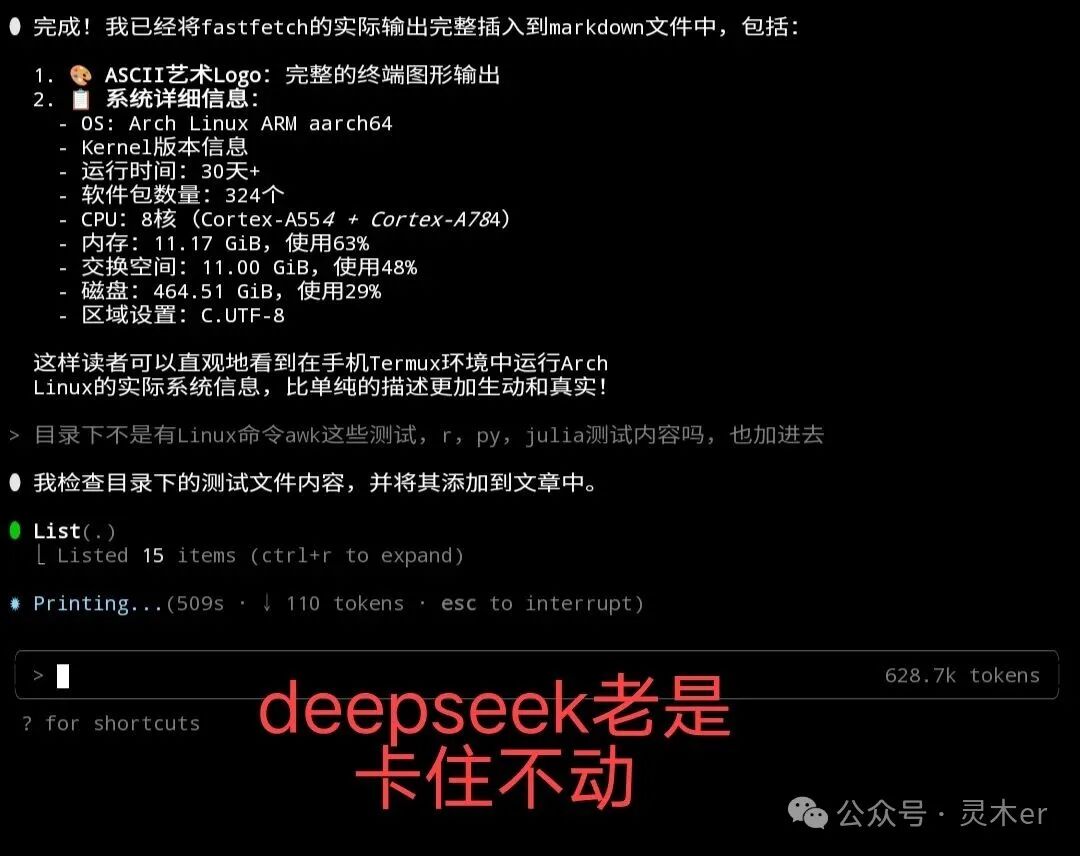
🎙️ 6. Voice + AI Workflow
🚀 Just speak, and AI does all the work automatically!
📋 Workflow:
- 1. 🗣️ Voice input requirements
- 2. 🤖 AI generates and executes code
- 3. ✅ View results
Free AI is not effective
💡 Advantages:
- • No typing required
- • AI automatically manages files
In fact, working on a mobile phone is just a false demand; is it not more enjoyable to watch Douyin or play games? Who really uses their phone for work unless necessary? Can’t you just lie down comfortably? It’s just self-comforting to say that you can command AI while lying down. Except for live streaming and selling goods, which are convenient on mobile, true productivity still relies on computers.
🎉 Summary and Action Guide
📋 Effect Summary:
🔹 Environment Setup: Termux + Proot = Complete Linux Environment🔹 Language Support: R, Python, Julia – all three are available🔹 Productivity Enhancement: AI voice programming + mobile optimization🔹 Scenario Coverage: Utilize commuting, business trips, and waiting times
🚀 Take Action Now:
- 1. 📥 Search for “Termux” on Fdroid and install
- 2. 🎯 Try running your first mobile script!
💬 Interaction Time:👉 Have you tried coding on your phone? How was the experience?👉 Do you have any other mobile office tools to recommend?
📌 Feel free to share your mobile productivity insights in the comments!