 Search on WeChat
 Technical Training
Introduction
Recently, the price of Siemens PLC has increased significantly, causing quite a stir in the industrial control sector. Not only has the price risen, but there are also shortages, forcing many to change their plans. It is reported that a chip replacement has been completed recently, and supply is expected to resume soon, along with a price adjustment.
This incident indirectly reflects Siemens’ large market share in the industrial control field. For upper computer developers, when using Siemens PLC as the lower computer, how should we communicate with it?
Siemens PLC supports many communication protocols, mainly divided into two types: serial communication and Ethernet communication. Data communication can also be achieved through OPC.
Serial Communication
Siemens PLC supports serial communication. The S7-200 and S7-200 Smart series have integrated serial ports, but from S7-1200 to S7-1500, they have gradually phased them out. If needed, it can be added through expansion modules. This phenomenon is actually an inevitable result of industrial development. The advantage of serial communication is its simplicity and low cost, but the disadvantage is very obvious: low transmission efficiency. The early serial communication of Siemens was mainly Profibus DP communication, but the upper computer cannot directly communicate with Siemens PLC via Profibus DP. Therefore, the commonly used serial communication solutions for Siemens PLC are as follows:
- PPI communication: PPI communication is only for S7-200 and S7-200 Smart series PLCs; other models do not support it.
- Modbus RTU Master: Siemens PLC has good support for the Modbus protocol, where the PLC acts as a Slave (i.e., secondary) and the upper computer acts as a Master (i.e., primary).
- Modbus RTU Slave: Here, the PLC acts as a Master (i.e., primary) and the upper computer acts as a Slave (i.e., secondary).
Ethernet Communication
Siemens PLC communication mainly relies on Ethernet communication. The Siemens communication protocols we commonly refer to are the S7 protocol and Profinet protocol. However, Profinet is a bus protocol, and currently, C# cannot directly communicate with Siemens PLC via Profinet. Therefore, the commonly used Ethernet communication solutions for Siemens PLC are as follows:
- S7 communication: This can be achieved from S7-200 to S7-1500, with many open-source or commercial libraries available, including http://s7.net, pronodave, libnodave, sharp7, or you can encapsulate your own communication library.
- Modbus TCP Server: Here, the PLC acts as a Server (i.e., server) and the upper computer acts as a Client (i.e., client).
- Modbus TCP Client: Here, the PLC acts as a Client (i.e., client) and the upper computer acts as a Server (i.e., server).
- Open Protocol Server: This refers to open TCP communication, where the PLC acts as a TCP Server (i.e., server) and the upper computer acts as a TCP Client (i.e., client).
- Open Protocol Client: This refers to the PLC acting as a TCP Client (i.e., client) and the upper computer acting as a TCP Server (i.e., server).
OPC Communication
OPC communication is a commonly used communication method in industrial control, mainly concerning the choice of OPC software and the selection of OPC DA and OPC UA. Therefore, the commonly used OPC communication solutions for Siemens PLC are as follows:
- PC Access series: Siemens developed PC-Access software for S7-200 and provided PC-Access Smart software for S7-200 Smart, which can directly achieve OPC DA communication.
- Simatic Net series OPC DA: Simatic Net is Siemens’ main OPC software that supports the entire Siemens series, mainly for OPC DA communication.
- Simatic Net series OPC UA: The new version of Simatic Net also starts to support OPC UA, mainly for OPC UA communication.
- KepServer series OPC DA: KepServer is also a commercial OPC software that is widely used domestically and supports the entire Siemens series, mainly for OPC DA communication.
- Simatic Net series OPC UA: The new version of KepServer also starts to support OPC UA, mainly for OPC UA communication.
S7 Communication Protocol
Among the various communication methods and protocols mentioned above, currently, using S7 communication is the most convenient and should be the most widely used. So what advantages does the S7 protocol have over other protocols?
The biggest advantage of using the S7 communication protocol is that there is no need to write PLC programs, and the S7 protocol has a strong encapsulation at the lower level, which has significant advantages in upper computer communication applications compared to other communication protocols.
Although there is no need to write PLC programs, some simple configurations are still required:
- Enable Put/Get
On the PLC side, you need to set the option to allow Put/Get communication access from remote objects. For Siemens 1200/1500 series, it must be checked to allow Put/Get access; for 200 Smart/300/400, it is not required.
- Remove optimization access for DB blocks
For projects developed on S7-1200/1500 based on Boto, if you need to communicate with DB block data, you need to remove the optimized block access for DB. For 200 Smart/300/400, this is not required. If you want to communicate through tags, you can use OPC UA.
- Ensure the communication address is a valid address
Because most PLCs are based on storage areas, each address must belong to a certain storage area. As we all know, Siemens PLC has built-in storage areas such as I area, Q area, M area, T area, and C area, but there is no common DB storage area, which needs to be created by yourself. This means that if you want to read a DB address, you must create the DB storage area in advance. In addition, after creating the DB storage area, it does not have bytes by default. You need to add variables one by one to form a valid storage area. Therefore, the range of a DB storage area is limited and visible (you can see it through offsets).
S7 Protocol Boolean Operations
Many protocols have Boolean operations, but here the Boolean operation refers to register Boolean, such as DB100.DBX0.0. Many times, we read the value of DB100.DBB0 first and then write the bitwise operation result back to DB100.DBB0 to achieve the operation of DB100.DBX0.0, but this method has drawbacks.
First: Each time you operate on a Boolean value, you need to interact with the PLC twice.
Second: Safety and stability cannot be guaranteed, as you do not know whether the value of this byte has changed between reading and writing.
This problem also exists in the register bit operations of the Modbus protocol, such as 40001.05, and in the register bit operations of Mitsubishi and Omron, such as D100.06 and W12.04, which brings a lot of trouble to upper computer developers.
However, the S7 protocol supports direct bit operations, with dedicated message instructions to implement this functionality.
S7 Protocol PDU Reading
Most people know that the S7 protocol has limitations on the amount of data read in one go, but what exactly is the limit? How is it calculated?
The length of a single read in the S7 protocol is calculated based on the PDU, which is derived from the PLC itself. Different CPU models have different PDU values. You can refer to the following two images:
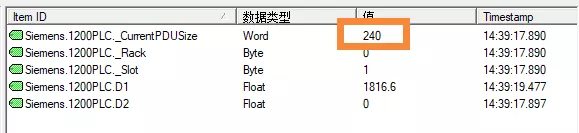
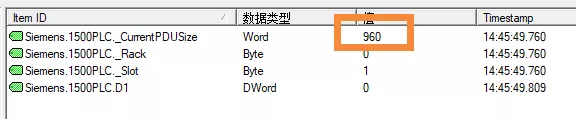
The PDU size of Siemens PLC is closely related to the CPU. Generally, there are three levels: 240, 480, and 960. Knowing the PDU, the byte length that can be read in one go is based on the PDU minus 18, where 18 refers to the header and footer bytes. Thus, we know that a typical PLC can read 222 bytes in one go (240-18=222), but for PLCs like S7-1516, we can read 942 bytes in one go (960-18=942). The longer the byte length that can be read in one go, the more it can improve the communication efficiency of the upper computer.
The previous method was tested through KepServer. In actual development, how to obtain the CPU’s PDU? In fact, during the second handshake of establishing the connection, the returned message contains the PDU value.
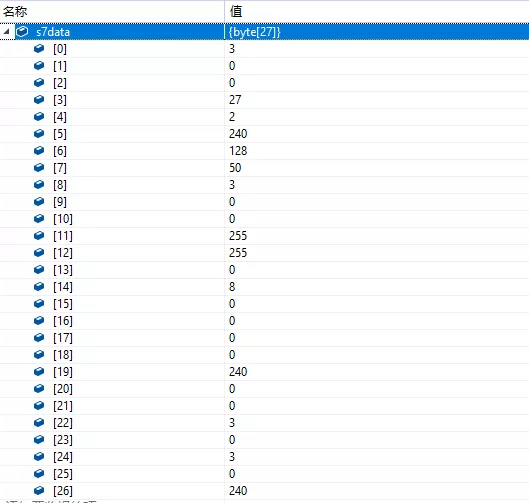
The length of the message returned during the second handshake is 27 bytes, and the last two bytes are the PDU value. The image above shows the message returned from the S7-1200 PLC, where the combination of 0 and 240 is 240.
For S7-1500, I also conducted a test, and the results are as follows. The returned result is 3 and 192, where the combination of 3 and 192 happens to be 960 (960=3*256+192).
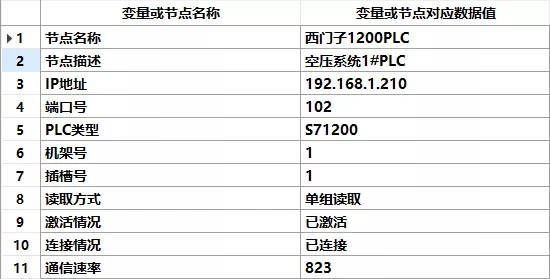
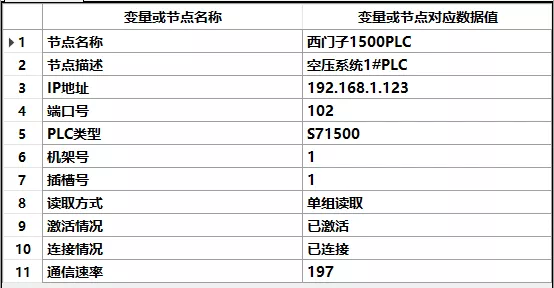
Although the PDU is limited by hardware, we can achieve large data reads through software methods, just by doing some encapsulation at the lower level. I did a test comparing the time taken to read 8000 bytes in the M area for both S7-1200 and S7-1500. The S7-1200 took over 800 ms, while the S7-1500 took only 200 ms, demonstrating the importance of hardware for communication.
S7 Protocol Multi-Group Reading
For many other communication protocols, when we encounter scattered data variables and need to read multiple storage areas or multiple different parts of a single storage area, we can only make a data request for each storage area or block. However, the Siemens S7 protocol can solve this problem.
The Siemens S7 protocol has a very powerful feature that allows simultaneous reading of many different storage areas, supporting up to 19 types, while the total reading length is still limited by the PDU.
Here we will use experimental testing as an example to experience the wonderful benefits of multi-group reading.
Assuming our communication group configuration is as follows:
Communication Group 01: Read 1 byte from I area starting at 0
Communication Group 02: Read 1 byte from Q area starting at 0
Communication Group 03: Read 200 bytes from M area starting at 0
Communication Group 04: Read 50 bytes from M area starting at 500
Communication Group 05: Read 60 bytes from M area starting at 1000
Communication Group 06: Read 20 bytes from DB100 starting at 0
Communication Group 07: Read 20 bytes from DB100 starting at 20
Communication Group 08: Read 20 bytes from DB100 starting at 40
Communication Group 09: Read 20 bytes from DB100 starting at 60
We use the commonly used S7-1200 PLC to configure the above 9 communication groups through configuration software and start communication testing. Initially, we choose the single group reading method, reading each group sequentially, with results showing a time of about 200 ms, which is relatively normal.
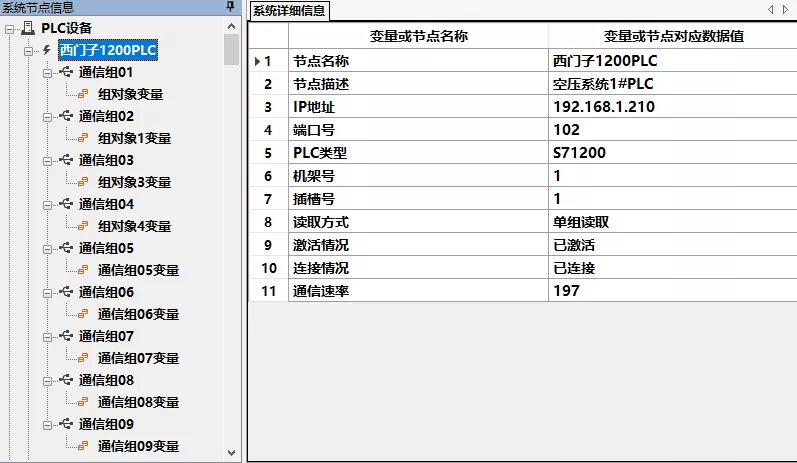
Next, we changed the reading method to multi-group reading, and the results were as follows:
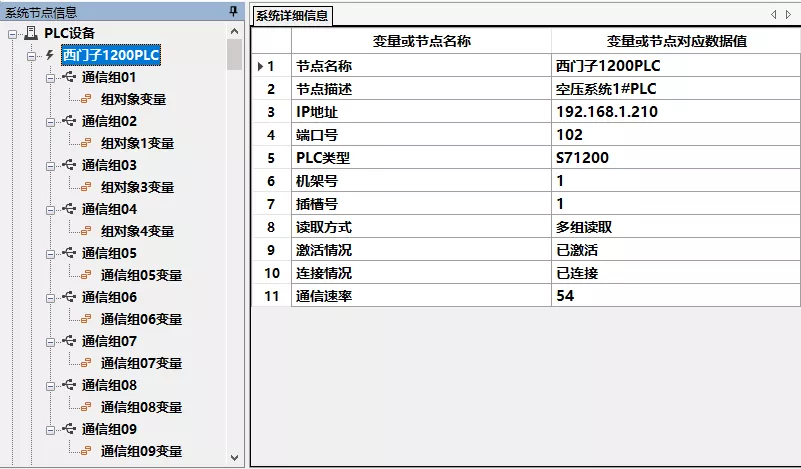
The results show that multi-group reading is very important for projects with scattered storage areas, significantly improving communication efficiency.
Conclusion
Through the series of shares above, I believe everyone has a deeper understanding of Siemens PLC communication. I hope everyone can practice more.
Each communication method has its own advantages and disadvantages. Understanding various communication methods and protocols allows you to choose the appropriate communication method for different scenarios and provide the most reasonable solution.
HISTORY/Previous Recommendations
2021 Electrical Beginner Exam Question Bank Complete Version (including answers)
Inverter fault query and repair difficult? Just one click!
One click to review all electrical exam questions, do you not have this tool yet?
Which of the five major electrical drawing software (CAD, Eplan, CADe_simu…) do you pick?
Latest electrical version CAD drawing software, with super detailed installation tutorial!
Latest electrical drawing software EPLAN, with super detailed installation tutorial!
Common problems for beginners using S7-200 SMART programming software (with download link)
Super comprehensive electrical calculation EXCEL table, automatically generated! No need to ask for electrical calculations!
Bluetooth headsets, electrical/PLC introductory books are generously given away? Come and claim your electrical gifts!
Basic skills of PLC programming: Ladder diagram and control circuit (with 1164 practical cases of Mitsubishi PLC)
Still can’t understand electrical diagrams? The basics of electrical diagram recognition and simulation software are here; take them away to quickly get started with theory and practice!
12 free electrical video courses, 10GB software/electronic book materials, and 30 days of free electrical live courses are given away!
Don’t forget to like + see! 
 Tap “Read the Original” to learn PLC/electric courses for free.