Follow+Star PublicAccount, don’t miss out on exciting contentAuthor | strongerHuangWeChat Public Account | Embedded ColumnYou may not know what Modbus is, but in reality, Modbus is widely used in many industrial electronic systems.
What is Modbus?
Modbus is a communication protocol developed by Modicon (now Schneider Electric) in 1979 for PLCs, primarily used for networking communication between industrial electronic devices. Modbus is an application layer communication protocol that operates at the 7th layer of the OSI (Open Systems Interconnection) model. It provides client/server communication between devices connected over different types of buses or networks.Modbus consists of a Master (host) and up to 247 Slaves (devices).For more information about Modbus, you can refer to:https://modbus.org/
What is Modbus used for?
Modbus is an open communication protocol that you can apply to your devices without paying royalties.Modbus is a widely used standard communication protocol, and if your devices from different manufacturers all adhere to the Modbus standard protocol, they can communicate and transmit data.
How does Modbus work?
Modbus typically communicates over a UART serial port 485. The simplest communication between one master device and one slave device is done through the serial port Tx and Rx for data transmission.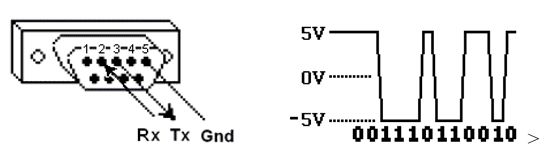 The underlying serial communication is the familiar “0” and “1” communication. On this basis, the Modbus communication protocol is added to facilitate protocol parsing and multi-device networking.In a master-slave configuration, each slave device has a unique address, allowing the master to communicate with the corresponding slave by parsing the slave address.
What is Modbus ASCII?
Modbus ASCII is one of the transmission methods in the Modbus protocol, and there is another method called Modbus RTU.After Schneider Electric acquired Modicon, they introduced the Modbus TCP protocol.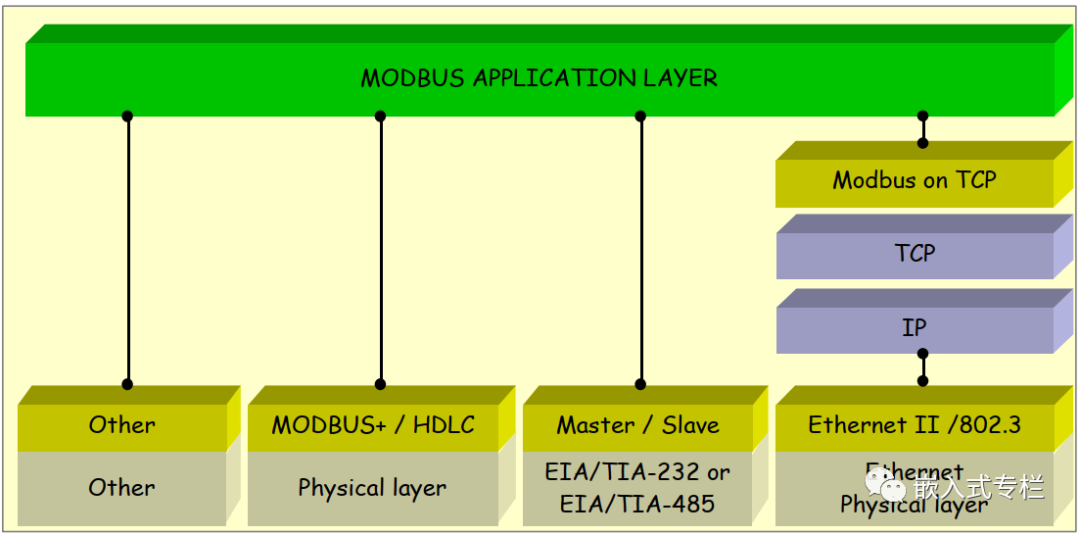 Protocol format:
What is a slave address?
A slave address (or slave station ID) is a unique address assigned to each slave device to facilitate identification during communication establishment by the master. The slave address is set at the factory.
What is a function code?
The function code is an element of the Modbus communication protocol, where the second byte sent by the master is the function code. This includes the read/write coil register contents you see.Here are some common function codes: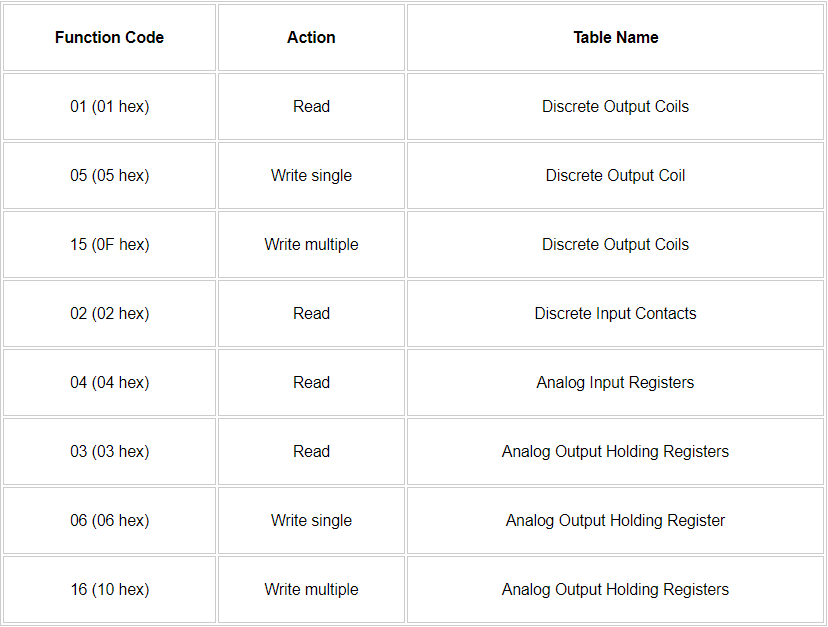
What is CRC?
Standard communication protocols generally include a checksum to ensure that the transmitted data is error-free.Checksums, CRC checks, etc., are common verification codes in embedded device communication protocols.Modbus uses CRC (Cyclic Redundancy Check), and the checksum information is located in the last two bytes of the message.Here is a recommended article to read: How to Implement a Custom Serial Communication Protocol?Reference:http://www.simplymodbus.ca/crc.xls
What is byte/word order?
Byte order refers to whether the high byte or low byte is stored (transmitted) first. For example, 0x1234 consists of two bytes, and during transmission, it is usually split into 0x12 and 0x34.In communication, byte order issues arise, but the Modbus specification does not precisely define how data is stored in registers.Since the Modbus standard protocol does not specify this, developers need to agree on whether to transmit the high byte or low byte first during development.
In conclusion
Modbus is a widely used standard communication protocol. Students in industrial automation, electronics, and embedded systems are encouraged to take the time to learn about it.Due to time constraints, this article only covers some basic content. For more information and specific details about the protocol, please visit the official website.https://modbus.org/(The public account does not support external links; please copy the link to your browser to open)———— END ———— ● Column “Embedded Tools”● Column “Embedded Development”● Column “Keil Tutorials”● Selected Tutorials from the Embedded ColumnFollow the public accountReply “Join Group” to join the technical exchange group according to the rules, reply “1024” to see more content.Click “Read the Original” to see more shares.