When Linux systems such as Ubuntu and OpenEuler fail to boot, and you see warnings like “BusyBox….” or “Entering emergency mode”, don’t panic. This usually indicates that there is an inconsistency in the file system that the system cannot automatically repair, requiring manual intervention. The error message is shown in the image below:
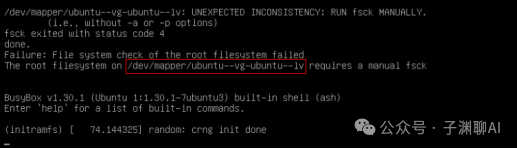
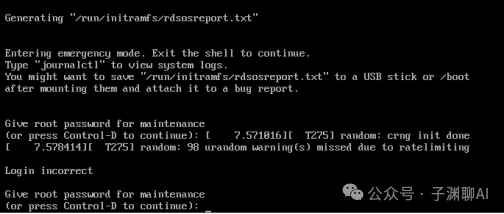
This type of issue typically arises from unexpected power outages, improper shutdowns (such as forced power cuts or kernel crashes), which can lead to file system inconsistencies and result in the boot failures described in this article.
Solution in Just Two Steps
1. Use fsck to Repair the File System
When prompted with “Give root password for maintenance”, enter the root user password.
Based on the error message, identify the device name that needs repair (usually the root partition, such as /dev/mapper/ubuntu–vg–ubuntu–lv in the image above), and use the following command:
fsck -y /dev/mapper/ubuntu--vg--ubuntu--lvWait for the command to run; it will scan and attempt to fix file system errors.
2. Reboot the System
Once the repair is complete, if you see the message “FILE SYSTEM WAS MODIFIED” along with the statistics of the file system check (such as files, blocks), it indicates a successful repair. Then, type exit to automatically reboot the system.
exit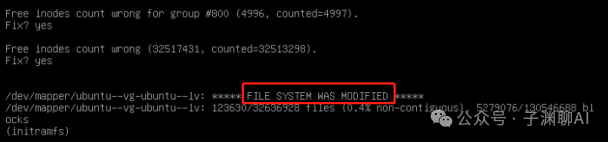
Preventive Recommendations:
While unexpected power outages or sudden failures are difficult to completely avoid, during daily operations, measures should be taken to prevent file system damage caused by such incidents. We can take the following actions to reduce risks:
1. Regularly perform file system checks (fsck).
2. Use an uninterruptible power supply (UPS) to handle unexpected power outages.
3. Develop the habit of using commands (shutdown and reboot) for shutting down and rebooting.
If fsck -y cannot repair the issue, or if the problem persists after repair, a more in-depth analysis may be required, or consider backing up data and reinstalling the system.
If you find this article helpful, please bookmark it. I am Ziyuan, and I will continue to share practical tips on operations and AI. Feel free to follow me!