Why Do Devices Need Accurate Time?
The importance of time synchronization in the IoT ecosystem is self-evident:
- • Data Timestamping Guarantee: Sensor data must have accurate timestamps for correct analysis and processing.
- • Security Authentication Mechanisms: Security mechanisms such as TLS certificate validation and JWT tokens rely on accurate time.
- • Logging and Debugging: Accurate timestamps make troubleshooting and system monitoring more efficient.
- • Scheduled Task Execution: Devices need to execute preset tasks at precise time points.
- • Distributed System Coordination: Time synchronization is a fundamental guarantee when multiple devices work together.
IoT devices typically do not have real-time clock (RTC) chips, or even if they do, they can drift significantly after long periods of operation. Therefore, calibrating time via the Network Time Protocol (NTP) becomes a necessary choice.
Basic Knowledge of NTP Protocol
What is NTP?
The Network Time Protocol (NTP) is a protocol used to synchronize clocks in computer networks, designed to synchronize time over variable-latency data networks.
How NTP Works
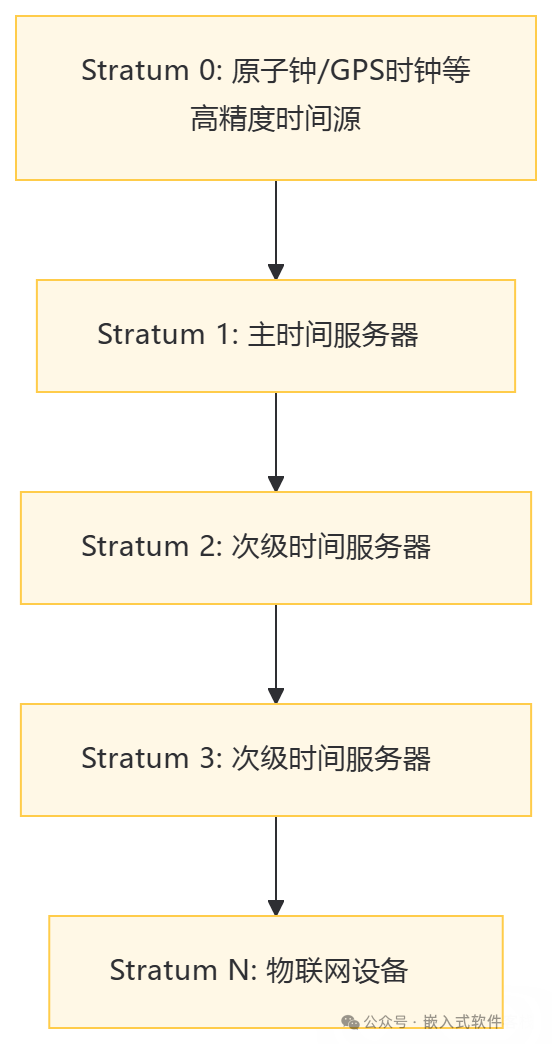
NTP organizes time servers in a hierarchical structure (Stratum):
- • Stratum 0: High-precision time sources such as atomic clocks and GPS clocks.
- • Stratum 1: Primary time servers directly connected to Stratum 0.
- • Stratum 2-15: Secondary time servers connected in a hierarchical manner.
NTP Communication Process
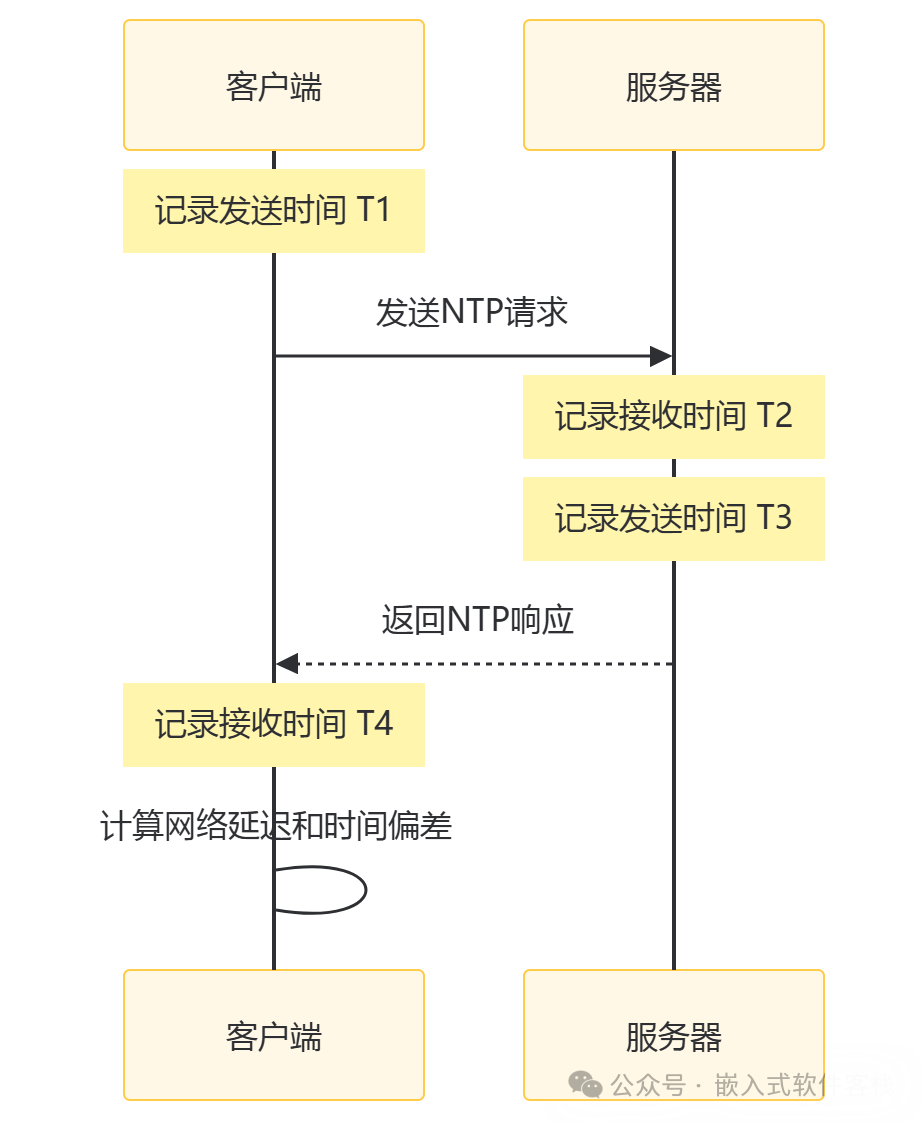
The time synchronization process between NTP clients and servers is as follows:
- 1. The client sends a request and records the send time T1.
- 2. The server receives the request and records the receive time T2.
- 3. The server sends a response and records the send time T3.
- 4. The client receives the response and records the receive time T4.
Using these four timestamps, the client can calculate:
- • Network Delay: ((T4-T1) – (T3-T2)) / 2
- • Time Offset: ((T2-T1) + (T3-T4)) / 2
NTP Packet Format
NTP uses the UDP protocol, with the default port being 123. The standard NTP packet format includes the following key fields:
- • LI (Leap Indicator)
- • VN (Version Number)
- • Mode
- • Stratum
- • Poll
- • Precision
- • Root Delay
- • Root Dispersion
- • Reference ID
- • Reference Timestamp
- • Originate Timestamp
- • Receive Timestamp
- • Transmit Timestamp
NTP Time Synchronization Implementation Solutions
There are several main solutions for implementing NTP time synchronization in IoT devices:
1. Standard NTP Client Implementation
A complete implementation of the NTP protocol, including complex clock filtering, selection, clustering, and combination algorithms. This method has the highest accuracy but also the highest resource requirements.
2. Simplified SNTP Implementation
The Simple Network Time Protocol (SNTP) is a simplified version of NTP, suitable for scenarios that do not require high-precision time synchronization.
3. HTTP Time Synchronization
Obtaining server time via HTTP requests, simple but with lower accuracy.
4. Custom UDP Time Synchronization
Developing a simplified version of UDP time requests to reduce protocol overhead.
5. Using Cloud Platform APIs
Utilizing time synchronization APIs provided by IoT cloud platforms.
Various Methods to Implement NTP Time Synchronization on ESP32
The ESP32 is a commonly used microcontroller in IoT development. Below are several methods to implement NTP time synchronization on the ESP32.
Method 1: Using the SNTP Component Provided by ESP-IDF
The ESP-IDF framework provides a built-in SNTP client component, which is very easy to use:
#include "esp_sntp.h"

void initialize_sntp(void)
{
    ESP_LOGI(TAG, "Initializing SNTP");
    sntp_set_operating_mode(SNTP_OPMODE_POLL);
    sntp_setservername(0, "pool.ntp.org");
    sntp_setservername(1, "ntp.aliyun.com");
    sntp_setservername(2, "ntp.tencent.com");
    sntp_init();

    // Wait for time acquisition
    time_t now = 0;
    struct tm timeinfo = { 0 };
    int retry = 0;
    const int retry_count = 15;

    while (sntp_get_sync_status() == SNTP_SYNC_STATUS_RESET && ++retry < retry_count) {
        ESP_LOGI(TAG, "Waiting for system time synchronization... (%d/%d)", retry, retry_count);
        vTaskDelay(2000 / portTICK_PERIOD_MS);
    }

    time(&now);
    localtime_r(&now, &timeinfo);

    // Set timezone
    setenv("TZ", "CST-8", 1);
    tzset();
}
Method 2: Using the NTP Client Library in the Arduino Framework
In the Arduino environment, you can use the NTPClient library:
#include <WiFi.h>
#include <NTPClient.h>
#include <WiFiUdp.h>

WiFiUDP ntpUDP;
// NTP server, update interval 60000ms (1 minute), timezone offset 28800 seconds (8 hours)
NTPClient timeClient(ntpUDP, "ntp.aliyun.com", 28800, 60000);

void setup() {
  Serial.begin(115200);
  WiFi.begin("SSID", "PASSWORD");

while (WiFi.status() != WL_CONNECTED) {
    delay(500);
    Serial.print(".");
  }

  timeClient.begin();
}

void loop() {
  timeClient.update();

  Serial.print("Current time: ");
  Serial.println(timeClient.getFormattedTime());

// Get Unix timestamp
unsigned long epochTime = timeClient.getEpochTime();
  Serial.print("Unix timestamp: ");
  Serial.println(epochTime);

delay(1000);
}
Method 3: Custom UDP Implementation of a Simplified NTP Client
For devices with extremely limited resources, a lightweight NTP client can be implemented:
#include <lwip/sockets.h>
#include <lwip/netdb.h>
#include <time.h>

#define NTP_PORT 123
#define NTP_PACKET_SIZE 48

// NTP time starts from 1900, while Unix time starts from 1970, with a difference of 70 years
#define SEVENTY_YEARS 2208988800UL

// Prepare NTP request packet
void prepare_ntp_packet(uint8_t *packet) {
    memset(packet, 0, NTP_PACKET_SIZE);
    // Set LI, VN, Mode
    packet[0] = 0b11100011; // LI=3, VN=4, Mode=3 (client)
}

// Send NTP request and get time
bool get_ntp_time(const char *ntp_server, time_t *epoch_time) {
    int sockfd;
    struct sockaddr_in server_addr;
    uint8_t ntp_packet[NTP_PACKET_SIZE];
    struct hostent *server;

    // Create UDP socket
    sockfd = socket(AF_INET, SOCK_DGRAM, IPPROTO_UDP);
    if (sockfd < 0) {
        return false;
    }

    // Set receive timeout
    struct timeval timeout;
    timeout.tv_sec = 5;
    timeout.tv_usec = 0;
    setsockopt(sockfd, SOL_SOCKET, SO_RCVTIMEO, &timeout, sizeof(timeout));

    // Get NTP server address
    server = gethostbyname(ntp_server);
    if (server == NULL) {
        close(sockfd);
        return false;
    }

    // Configure server address
    memset(&server_addr, 0, sizeof(server_addr));
    server_addr.sin_family = AF_INET;
    memcpy(&server_addr.sin_addr.s_addr, server->h_addr, server->h_length);
    server_addr.sin_port = htons(NTP_PORT);

    // Prepare NTP request packet
    prepare_ntp_packet(ntp_packet);

    // Send request
    if (sendto(sockfd, ntp_packet, NTP_PACKET_SIZE, 0,
               (struct sockaddr *)&server_addr, sizeof(server_addr)) < 0) {
        close(sockfd);
        return false;
    }

    // Receive response
    socklen_t server_len = sizeof(server_addr);
    if (recvfrom(sockfd, ntp_packet, NTP_PACKET_SIZE, 0,
                 (struct sockaddr *)&server_addr, &server_len) < NTP_PACKET_SIZE) {
        close(sockfd);
        return false;
    }

    close(sockfd);

    // Parse NTP response to get the transmitted timestamp (located in the last 8 bytes of the packet)
    uint32_t ntp_time_sec = ((uint32_t)ntp_packet[40] << 24) |
                           ((uint32_t)ntp_packet[41] << 16) |
                           ((uint32_t)ntp_packet[42] << 8) |
                           ntp_packet[43];

    // Convert to Unix timestamp (subtracting the seconds of 70 years)
    *epoch_time = ntp_time_sec - SEVENTY_YEARS;

    return true;
}

// Example usage
void app_main() {
    // Wait for WiFi connection...

    time_t epoch_time;
    if (get_ntp_time("pool.ntp.org", &epoch_time)) {
        // Set system time
        struct timeval tv;
        tv.tv_sec = epoch_time;
        tv.tv_usec = 0;
        settimeofday(&tv, NULL);

        // Set timezone
        setenv("TZ", "CST-8", 1);
        tzset();

        // Display current time
        struct tm timeinfo;
        localtime_r(&epoch_time, &timeinfo);
        char time_str[64];
        strftime(time_str, sizeof(time_str), "%Y-%m-%d %H:%M:%S", &timeinfo);
        printf("Current time: %s\n", time_str);
    } else {
        printf("NTP time synchronization failed\n");
    }
}
Method 4: Using HTTP to Get Network Time
For environments where UDP protocol cannot be used, time can be obtained via HTTP requests:
#include "esp_http_client.h"

esp_err_t http_time_sync(void)
{
    esp_http_client_config_t config = {
        .url = "http://worldtimeapi.org/api/timezone/Asia/Shanghai",
        .method = HTTP_METHOD_GET,
    };
    esp_http_client_handle_t client = esp_http_client_init(&config);

    esp_err_t err = esp_http_client_perform(client);
    if (err == ESP_OK) {
        int status_code = esp_http_client_get_status_code(client);
        if (status_code == 200) {
            int content_length = esp_http_client_get_content_length(client);
            char *buffer = malloc(content_length + 1);
            if (buffer) {
                int read_len = esp_http_client_read(client, buffer, content_length);
                buffer[read_len] = 0;

                // Parse JSON response to get timestamp
                // A JSON parsing library like cJSON is needed here
                cJSON *root = cJSON_Parse(buffer);
                if (root) {
                    cJSON *unixtime = cJSON_GetObjectItem(root, "unixtime");
                    if (unixtime && cJSON_IsNumber(unixtime)) {
                        time_t epoch = unixtime->valueint;
                        struct timeval tv = {
                            .tv_sec = epoch,
                            .tv_usec = 0
                        };
                        settimeofday(&tv, NULL);

                        // Set timezone
                        setenv("TZ", "CST-8", 1);
                        tzset();

                        cJSON_Delete(root);
                        free(buffer);
                        esp_http_client_cleanup(client);
                        return ESP_OK;
                    }
                    cJSON_Delete(root);
                }
                free(buffer);
            }
        }
    }

    esp_http_client_cleanup(client);
    return ESP_FAIL;
}
Common Issues and Solutions for NTP Time Synchronization
1. Network Delay and Time Accuracy
Problem: Network delay can affect the accuracy of NTP time synchronization.Solution:
- • Choose NTP servers that are geographically closer.
- • Implement multiple requests to take an average.
- • Consider using a local NTP server.
// Example of averaging multiple requests
time_t get_average_ntp_time(const char *server, int attempts) {
time_t total = 0;
int success = 0;
for (int i = 0; i < attempts; i++) {
time_t current;
if (get_ntp_time(server, ¤t)) {
total += current;
success++;
}
vTaskDelay(1000 / portTICK_PERIOD_MS);
}
return (success > 0) ? (total / success) : 0;
}2. Time Drift After Device Disconnection
Problem: After disconnection, the internal clock of the device will gradually drift away from the actual time.Solution:
- • Use an external RTC chip to maintain time.
- • Regularly synchronize time and record the last synchronization time.
- • Estimate the time drift rate when disconnected.
// Using RTC module to maintain time
#include "driver/i2c.h"
#include "ds3231.h" // Assuming using DS3231 RTC module

void sync_time_with_rtc(void) {
    struct tm rtc_time;
    ds3231_get_time(&rtc_time);

    time_t epoch = mktime(&rtc_time);
    struct timeval tv = {
        .tv_sec = epoch,
        .tv_usec = 0
    };
    settimeofday(&tv, NULL);
}

void update_rtc_from_ntp(void) {
    time_t now;
    time(&now);
    struct tm timeinfo;
    localtime_r(&now, &timeinfo);

    ds3231_set_time(&timeinfo);
}
3. Time Zone and Daylight Saving Time Handling
Problem: Different regions have different time zones, and some regions implement daylight saving time.Solution:
- • Use UTC time uniformly on the server side.
- • The client applies timezone offsets based on configuration.
- • Use POSIX TZ strings to handle complex timezone rules.
// Example of setting different time zones
void set_timezone(const char *tz_str) {
    setenv("TZ", tz_str, 1);
    tzset();
}

// Examples of common time zones
// Beijing Time: "CST-8"
// New York Time: "EST5EDT,M3.2.0,M11.1.0"
// London Time: "GMT0BST,M3.5.0/1,M10.5.0"