TpPen User Guide: A Brush Tool in Embedded GUI with Gradient and Cap Control
1. Introduction
In embedded GUI development, drawing lines, borders, and shape outlines is a fundamental requirement. The TinyPiXOS platform provides the <span>TpPen</span> class as a brush tool to define the line properties during drawing.
<span>TpPen</span> has core values:
- • Type Safety: Encapsulation avoids direct manipulation of the underlying graphics API
- • Ease of Use: Provides an intuitive API interface
- • Complete Functionality: Supports control of all line properties from basic to advanced
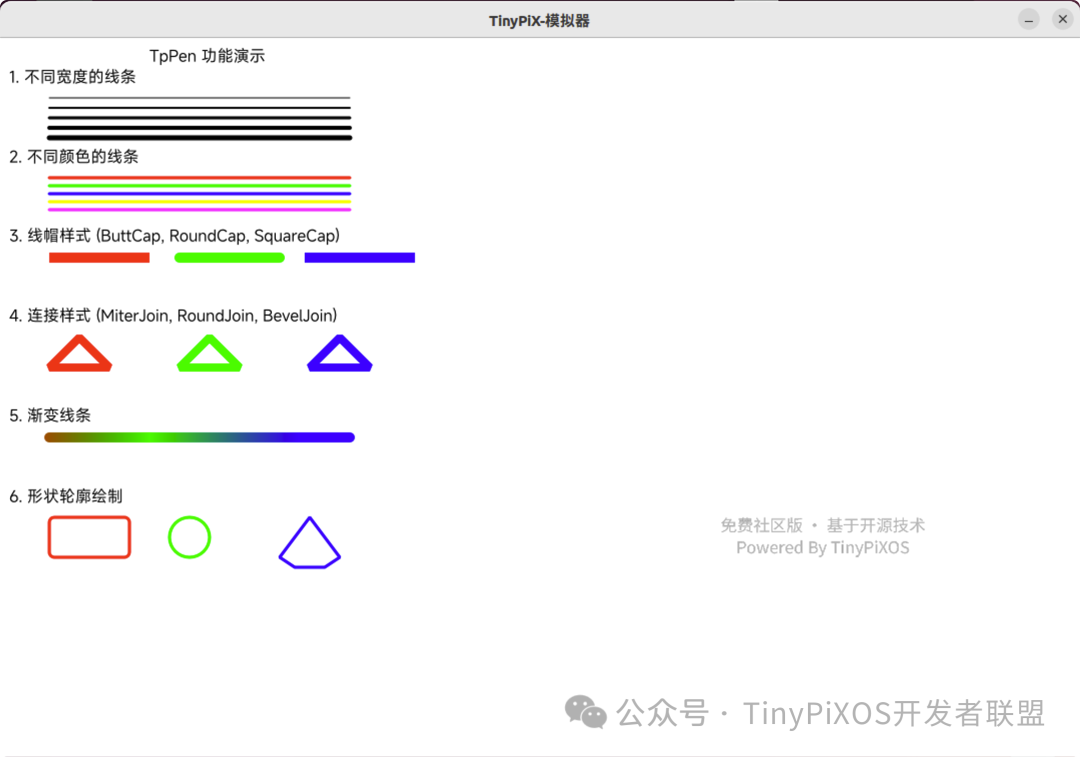
2. Introduction to Core Features of TpPen
2.1 Basic Property Settings
Brush Color
Manage brush color using the <span>setColor()</span> and <span>color()</span> methods:
TpPen pen;
pen.setColor(TpColors(255, 0, 0));  // Set to red

// Get current color
TpColors currentColor = pen.color();
The color is managed through an internal <span>TpBrush</span> object.
Brush Width
Control line thickness using the <span>setWidth()</span> and <span>width()</span> methods:
TpPen pen;
pen.setWidth(3);  // Set to 3 pixels wide

// Get current width
int32_t currentWidth = pen.width();
The width value is constrained to non-negative numbers.
Brush Style
Set line style (solid, dashed, etc.) using the <span>setStyle()</span> and <span>style()</span> methods:
TpPen pen;
pen.setStyle(Tp::PenStyle::SolidLine);  // Solid line
The default style is a solid line.
2.2 Advanced Properties
Cap Style
The cap style controls the shape of the line endpoints:
TpPen pen;
pen.setCapStyle(Tp::RoundCap);   // Round cap
pen.setCapStyle(Tp::ButtCap);    // Butt cap
pen.setCapStyle(Tp::SquareCap);  // Square cap
Join Style
The join style controls the shape at the line junctions:
TpPen pen;
pen.setJoinStyle(Tp::RoundJoin);   // Round join
pen.setJoinStyle(Tp::MiterJoin);   // Miter join
pen.setJoinStyle(Tp::BevelJoin);   // Bevel join
Dash Offset
The dash offset controls the starting position of the dashed pattern:
TpPen pen;
pen.setDashOffset(5.0f);  // Set offset to 5.0

// Get current offset
float offset = pen.dashOffset();
The default offset is 0.
2.3 Gradient Fill Support ⭐
<span>TpPen</span> supports setting gradient fills through <span>TpBrush</span>:
TpPen pen;
TpBrush gradientBrush;
// Configure gradient brush...
pen.setBrush(gradientBrush);

// Get current brush
TpBrush currentBrush = pen.brush();
This is a unique advantage of <span>TpPen</span> compared to traditional brushes, supporting linear and radial gradients.
3. Detailed Usage Methods
3.1 Creating a Brush
<span>TpPen</span> provides multiple constructors:
// Default constructor - black, 1 pixel wide, solid line
TpPen pen1;

// Specified color
TpPen pen2(TpColors(255, 0, 0));  // Red

// Specified color and width
TpPen pen3(TpColors(0, 0, 255), 3);  // Blue, 3 pixels wide
Default brush properties:
- • Width: 1 pixel
- • Color: Black RGB(0, 0, 0)
- • Style: Solid line
- • Cap: Round
- • Join: Round
3.2 Configuring Brush Properties
TpPen pen;

// Set basic properties
pen.setColor(TpColors(128, 128, 128));  // Gray
pen.setWidth(2);                         // 2 pixels wide
pen.setStyle(Tp::PenStyle::SolidLine);  // Solid line

// Set advanced properties
pen.setCapStyle(Tp::RoundCap);    // Round cap
pen.setJoinStyle(Tp::RoundJoin);  // Round join
3.3 Using in Drawing
<span>TpPen</span> is applied to drawing operations through <span>TpPainter</span>:
void MyWidget::onPaintEvent(TpPaintEvent *event)
{
    TpPainter *painter = event->painter();

    // Method 1: Directly set color
    painter->setPen(TpColors(255, 0, 0));

    // Method 2: Set complete pen object
    TpPen pen(TpColors(0, 0, 255), 2);
    pen.setCapStyle(Tp::RoundCap);
    painter->setPen(pen);

    // Draw lines
    painter->drawLine(10, 10, 100, 100);

    // Get current pen and modify
    painter->pen().setWidth(3);
    painter->drawLine(10, 50, 100, 50);
}
<span>TpPainter</span> internally maintains the current pen state.
4. Practical Application Scenarios
4.1 Drawing Separator Lines
Draw separator lines in menu components:
painter->setPen(_RGB(230, 235, 241));
painter->drawHLine(x1, x2, y);
4.2 Drawing Control Borders
Draw borders in checkboxes:
painter->pen().setColor(borderColor);
painter->pen().setWidth(linew);
painter->drawRect(batteryRect, borderRadius);
4.3 Drawing Circular Progress Bars
Use the pen in circular progress bars:
painter->setPen(_RGB(217, 217, 217));
painter->pen().setWidth(progressData->lineWidth);
painter->drawEllipse(circlePoint, circlePoint, radius, radius);
4.4 Drawing Line Components
Set line properties in the <span>TpLine</span> component:
paintCanvas->pen().setColor(lineData->color);
paintCanvas->pen().setWidth(lineData->width);
paintCanvas->drawHLine(startX, startX + length, startY);
5. Advanced Features
5.1 Gradient Brushes
Gradient brushes are implemented through <span>TpBrush</span>, supporting linear and radial gradients:
// Create linear gradient brush
TpLinearGradient linearGrad;
linearGrad.setStart(TpPointF(0, 0));
linearGrad.setFinalStop(TpPointF(100, 0));
linearGrad.setColorAt(0.0, TpColors(255, 0, 0));
linearGrad.setColorAt(1.0, TpColors(0, 0, 255));

TpBrush gradientBrush(&linearGrad);

TpPen pen;
pen.setBrush(gradientBrush);
During rendering, the gradient will be parsed and applied to the line stroke.
5.2 Line Style Enumeration
<span>Tp::PenStyle</span> defines the supported line styles. Currently, the main style used is <span>SolidLine</span> solid line style.
5.3 Visual Effects of Cap and Join Styles
The mapping relationships of different styles during rendering:
Cap Styles:
- •
<span>Tp::ButtCap</span>– Butt, line is truncated at the endpoint - •
<span>Tp::RoundCap</span>– Round, line endpoint is a semicircle - •
<span>Tp::SquareCap</span>– Square, line endpoint extends half a line width
Join Styles:
- •
<span>Tp::MiterJoin</span>– Miter, outer edges extend at the intersection
TinyPiXOS Developer Alliance
Source-level support + real projects: The TinyPiXOS Developer Alliance is recruiting, a community for domestic lightweight embedded device desktop operating systems.

Follow Us
-
• Official Website
-
www.tinypixos.com
-
• Developer Community:TinyPiXOS Developer Alliance
-
https://t.zsxq.com/JzbkN
-
• Bilibili Videos:TinyPiXOS Developer Alliance
-
https://space.bilibili.com/503916783
Thank you for your support and attention, please click to read the original text for more project information!