Follow our official account to keep the embedded knowledge flowing!
In resource-constrained IoT/embedded projects, if:
You don’t want to customize protocols and need to handle byte order, alignment, version compatibility, etc.;
You also don’t want to use heavy JSON, as a simple sensor data packet might consume hundreds of bytes;
You want to use the protobuf standard library, but it’s too large, then you can consider using nanopb.
Protocol Buffers is a language-agnostic, platform-neutral, extensible mechanism for serializing structured data developed by Google.
nanopb retains the powerful features of Protocol Buffers while compressing the code size to under 3KB and requiring less than 300 bytes of stack space.
https://github.com/nanopb/nanopb/
Zlib license
Official nanopb documentation: https://jpa.kapsi.fi/nanopb/docs/
1. Why Do Embedded Systems Need Efficient Serialization?
Suppose the project uses JSON to package and transmit data. A data packet containing 5 fields:
{"temp":25.6,"humi":60.5,"time":1234567890,"id":"NODE01","batt":3.7}This JSON string is 74 bytes. It doesn’t seem large, but considering: reporting data 10 times per second, each transmission consumes precious power, the cumulative communication burden can be significant.
Moreover, there will be maintainability issues:
- Spelling errors in field names are only discovered at runtime
- Adding new fields requires manual synchronization across multiple codebases
- There is no version management mechanism, and when old devices conflict with new protocols, they can only be forced to be compatible
Protocol Buffers
Protocol Buffers (hereafter referred to as protobuf) solves these problems:
- Binary encoding: The same data only requires about 30 bytes
- Strong type constraints: Field types are determined at compile time
- Version compatibility: Protocol evolution is managed through field numbering
However, Google’s official C++ implementation is difficult to run on MCUs:
- Code size: protobuf-lite compiles to over 300+ KB
- Memory allocation: Relies on C++ STL and dynamic memory
- Complex dependencies: Requires full C++11 compiler support
This cannot run on common MCUs with 64KB Flash and 20KB RAM.
The Design Philosophy of nanopb
nanopb is a protobuf library re-implemented specifically for embedded systems, with the core idea of:using compile-time generated static structures instead of runtime dynamic allocation
This brings several key advantages:
- Extremely small size: Core code is less than 3KB (encode + decode)
- No dynamic memory: Defaults to using stack or static allocation
- Pure C implementation: Compatible with all C89 and above standards
- Customizable: Can compile only the encoder or decoder
The following diagram shows a comparison between nanopb and other solutions:
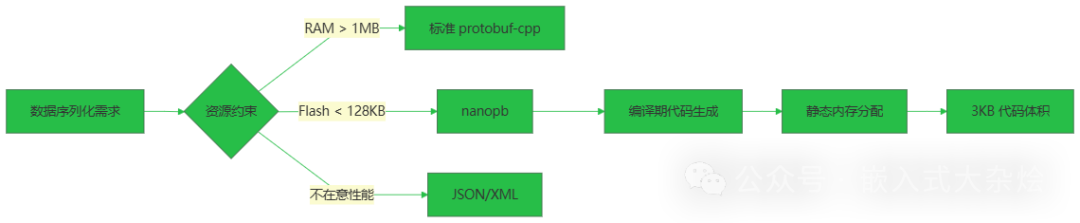
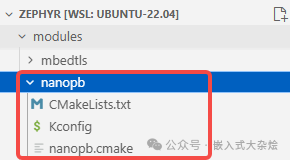
nanopb is also included in the module build system of the well-known embedded real-time operating system Zephyr:
2. The Core Mechanism of nanopb
From .proto to C Structures
The workflow of nanopb is divided into two stages: compile-time code generation and runtime encoding/decoding.
Assuming we have the following proto definition:
syntax = "proto3";

message SensorData {
    float temperature = 1;
    float humidity = 2;
    uint32 timestamp = 3;
}
After running the nanopb generator, two files will be generated:
sensor.pb.h – Defines the data structure:
typedef struct _SensorData {
    float temperature;
    float humidity;
    uint32_t timestamp;
} SensorData;

extern const pb_msgdesc_t SensorData_msg;
sensor.pb.c – Contains field description information (simplified illustration):
const pb_msgdesc_t SensorData_msg = {
    .field_info = SensorData_field_info,
    .field_count = 3,
    .largest_tag = 3,
    /* ... */
};
The key is the <span>pb_msgdesc_t</span> structure, which contains all the metadata required for encoding and decoding.
Memory Layout During Encoding
The data flow during encoding is as follows:
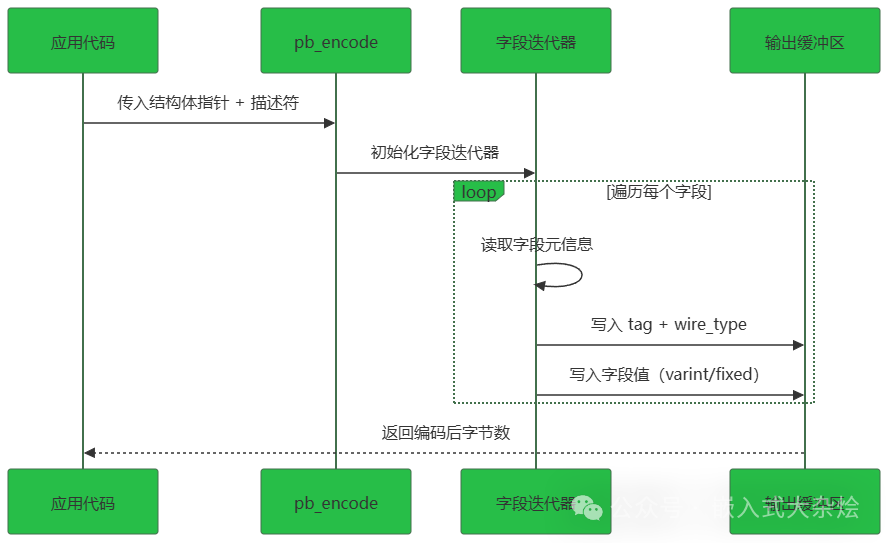
The core code is in the <span>pb_encode.c</span> file’s <span>pb_encode()</span> function:
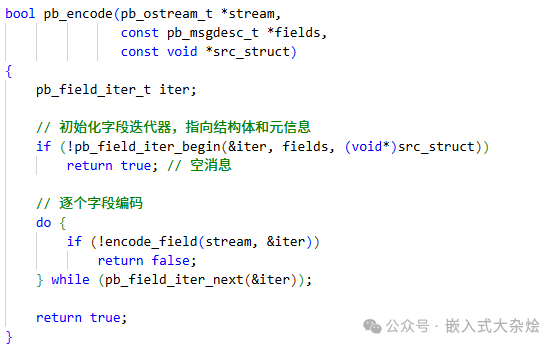
Note that there is no dynamic memory allocation here.<span>pb_field_iter_t</span> is a local variable on the stack, and all field information is read from the compile-time generated <span>field_info</span> array.
The Ingenuity of Variable-Length Encoding
protobuf uses varint to encode integers, which is key to saving space. The principle is: smaller integers use fewer bytes.
For example, the encoding of the number 300:
- Fixed 32 bits:
<span>0x0000012C</span>→ 4 bytes - varint:
<span>0xAC 0x02</span>→ 2 bytes
Implementation code:
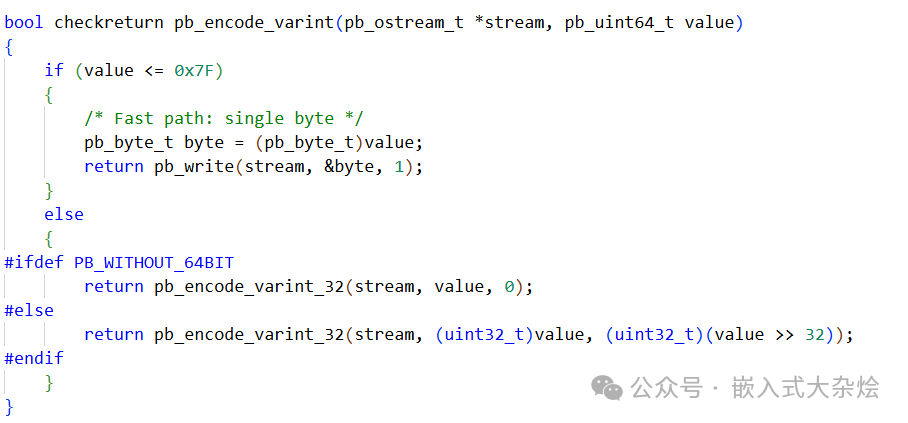
For most sensor data (temperature, humidity, counters), the values are small, and varint can save over 50% of space.
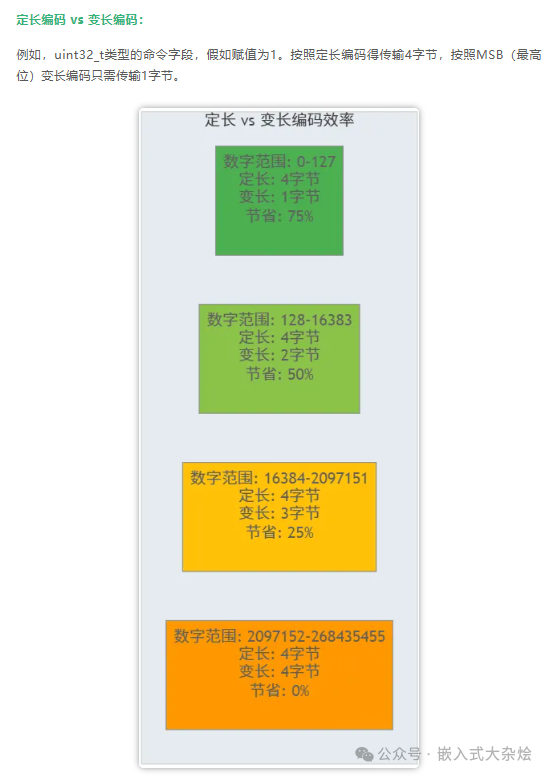
Variable-length encoding is widely used in protocol processing and is an effective means to improve protocol processing efficiency. In a previous article, we shared: Lightweight Communication Protocols in Embedded Systems!, which also compared fixed-length and MSB variable-length encoding/decoding in detail:
3. Usage Example
student.proto:
syntax = "proto2";

message Student
{
 required uint32 num      = 1;
 required uint32 py_score = 2;
 required uint32 c_score  = 3;
}
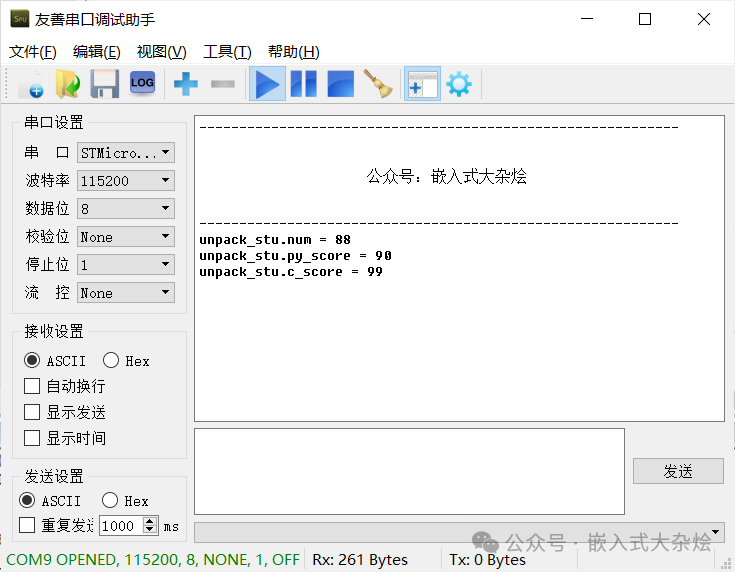
Application code:
void protobuf_test(void)
{
uint8_t buffer[64] = {0};
  Student pack_stu = {0};
pb_ostream_t o_stream = {0};
  Student unpack_stu = {0};
pb_istream_t i_stream = {0};

// Pack
  pack_stu.num  = 88;
  pack_stu.py_score = 90;
  pack_stu.c_score = 99;
  o_stream = pb_ostream_from_buffer(buffer, sizeof(buffer));
pb_encode(&o_stream, Student_fields, &pack_stu);

// Unpack
  i_stream = pb_istream_from_buffer(buffer, sizeof(buffer));
pb_decode(&i_stream, Student_fields, &unpack_stu);
printf("unpack_stu.num = %d\n", unpack_stu.num);
printf("unpack_stu.py_score = %d\n", unpack_stu.py_score);
printf("unpack_stu.c_score = %d\n", unpack_stu.c_score);
}
Important Experiences
Experience 1: Use <span>pb_ostream_t</span> to write directly to hardware buffers
Do not encode to a RAM buffer and then copy, but write directly to the DMA buffer:
// Custom output callback
bool uart_write_callback(pb_ostream_t *stream,
                         const pb_byte_t *buf,
                         size_t count)
{
    HAL_UART_Transmit_DMA(&huart1, (uint8_t*)buf, count);
    return true;
}

// Use custom stream
pb_ostream_t stream = {&uart_write_callback, NULL, SIZE_MAX, 0};
pb_encode(&stream, SensorData_fields, &msg);
This allows for zero-copy sending, saving half the memory and one copy time.
Experience 2: Targeted Compilation Options
If you only need to send data (sensor nodes), you can compile only the encoder:
// Define in compilation options
#define PB_ENCODE_ONLY
This can save an additional 1-2KB of Flash.
Experience 3: Handling Version Compatibility
When the protocol needs to add new fields, utilize the features of proto3:
message SensorData {
    float temperature = 1;
    float humidity = 2;
    uint32 timestamp = 3;
    string device_id = 4;
    float pressure = 5;  // New field
}
Old devices will not have the <span>pressure</span> field in the data they send, and the new server will automatically fill in the default value 0.0. New devices will send the <span>pressure</span> field, and the old server will automatically ignore it.No compatibility code is needed.
When Not to Use nanopb?
Although nanopb is powerful, the following scenarios are not recommended:
- Extremely resource-constrained (Flash < 8KB): Custom protocols are more suitable
- Real-time requirements are extremely high (microsecond-level response): Direct hardware register operations
- Need dynamic structures (uncertain number of fields): Consider MessagePack or CBOR
4. Conclusion
nanopb achieves a balance by compile-time code generation + static memory layout, compressing resource usage to a level suitable for embedded systems while retaining the powerful features of protobuf.
Three core points:
- 3KB code size: Suitable for the vast majority of MCUs
- No dynamic memory: Stack space is controllable, with no fragmentation risk
- Painless protocol evolution: The field numbering mechanism naturally supports version compatibility
Selected Articles:
Singleton Pattern: The Guardian of Global State Consistency in Embedded Systems
Embedded Programming Model | Observer Pattern
What are the Useful Compression Libraries in Embedded Applications?
Embedded Programming Model | Abstract Factory Pattern
Embedded Programming Model | Simple Factory Pattern
The Pinnacle Showdown between Linux and RTOS in the Embedded Field!
Advanced Guide to Embedded Software, Let’s Level Up Together!
Clickto read the original text and check out the popular embedded books I have selected for everyone!