Recently, there has been an overwhelming amount of reviews about the Nano Banana Pro online, leaving many viewers dazzled.
Most people are using it to generate various styles of images and interesting figurines, but honestly, I feel that it lacks significant practical value (just my personal opinion).
It’s similar to when AI first emerged; most reviews focused on the novelty it brought.
When the Sora APP was released, some even made bold claims that Sora would completely replace Douyin. I just laughed and thought, are you serious?
People are drawn to the novelty of AI-generated content. If you can’t use the tool to create something profound or useful, it will ultimately be a fleeting moment, swept into the dustbin of time once the novelty wears off.
However, as designers, how can we leverage Nano Banana Pro to optimize our workflows and enhance our efficiency in our daily work?
Today, we won’t be retouching photos, generating figurines, creating comics, or producing portraits. Instead, let’s explore the specific challenges we face in the design field that we need to address.
Background Image Generation
Let’s start with one of the most fundamental tasks for a designer: generating background materials. Often, we spend a lot of time searching for or creating background materials.
Now that Nano Banana Pro is here, let’s see how well it generates background images.
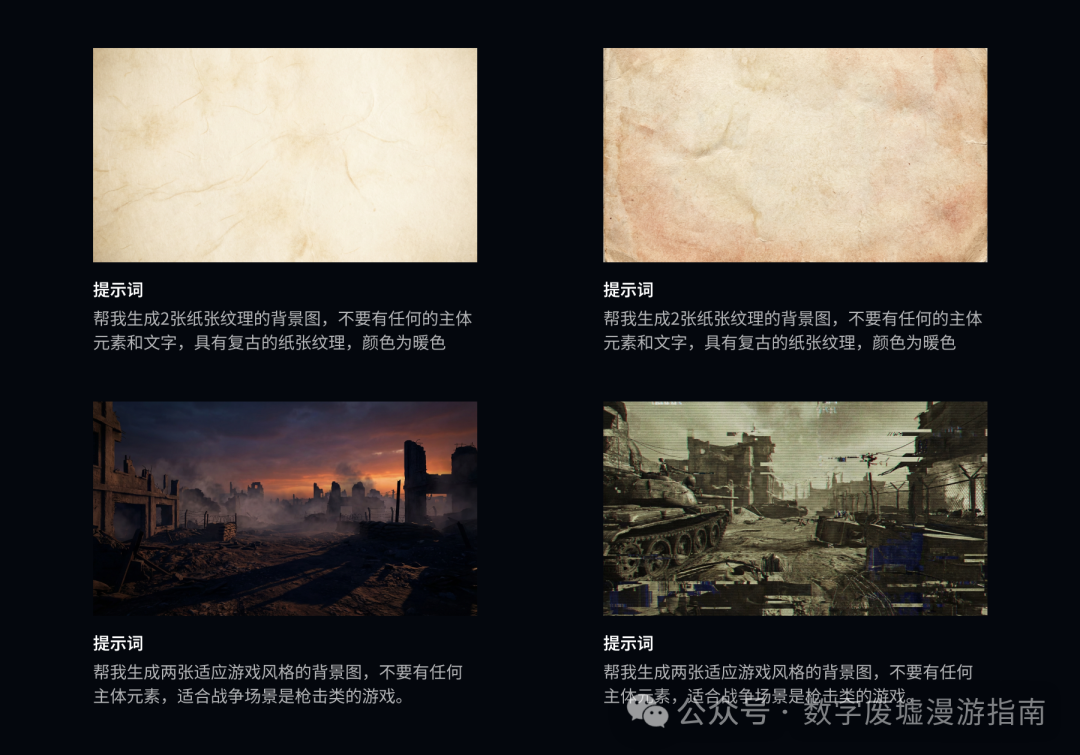
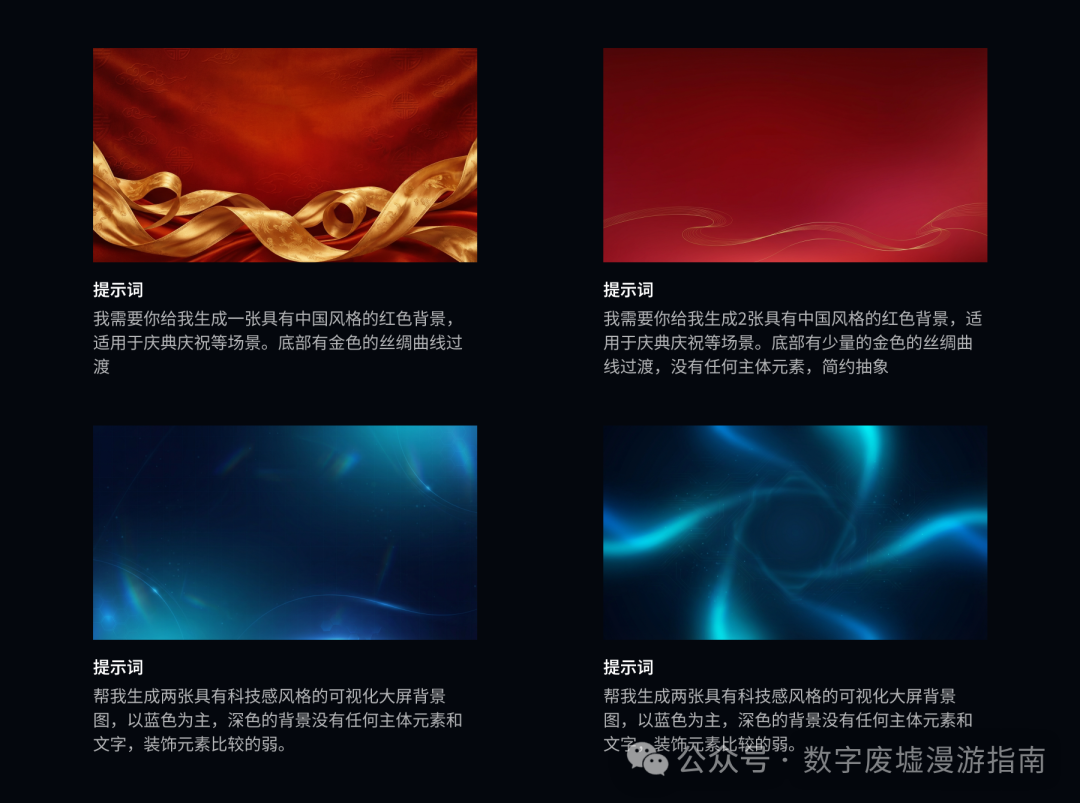
We can see that Nano Banana Pro is quite strong in following prompts. In the past, when I used AI tools to generate similar background images, I had to repeatedly draw cards, find reference images, and create base images to get a usable background.
Of course, these background images may not be immediately usable; designers still need to optimize them through masking and retouching before they can be applied in work.
3D Illustration
Next, let’s look at the need to generate exquisite 3D illustrations in our daily work, such as 3D devices used in visualization environments.
In the past, for similar illustrations, we needed to research a lot of device information, then model it using 3D modeling software, and finally render the finished product for use in the visualization interface.
Can we use Nano Banana Pro to quickly generate some 3D illustrations for our interface?
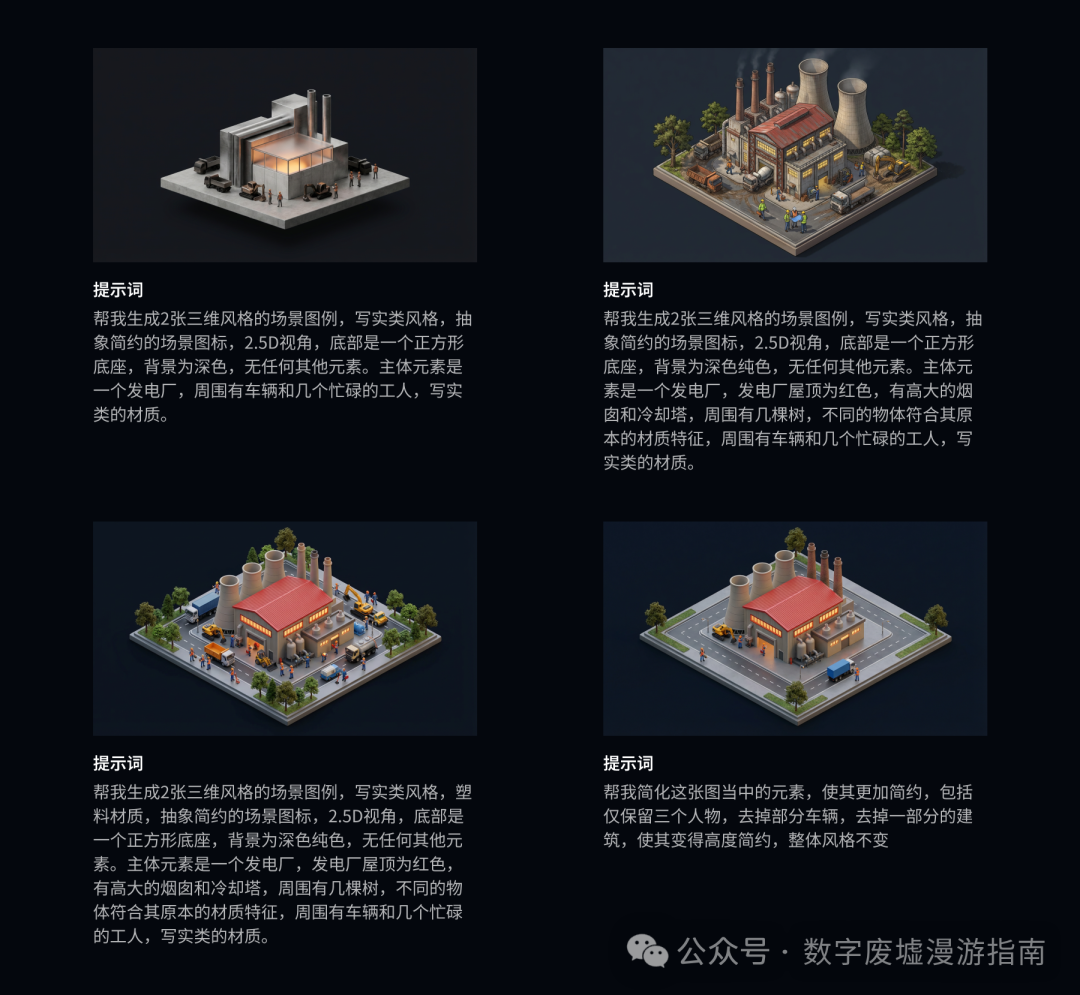
We can see that after a series of prompts, we finally determined the style we wanted. Then, based on this image, we simplified it by removing unnecessary elements through prompts to achieve our desired effect. We then extended this style to a series of other scene images.
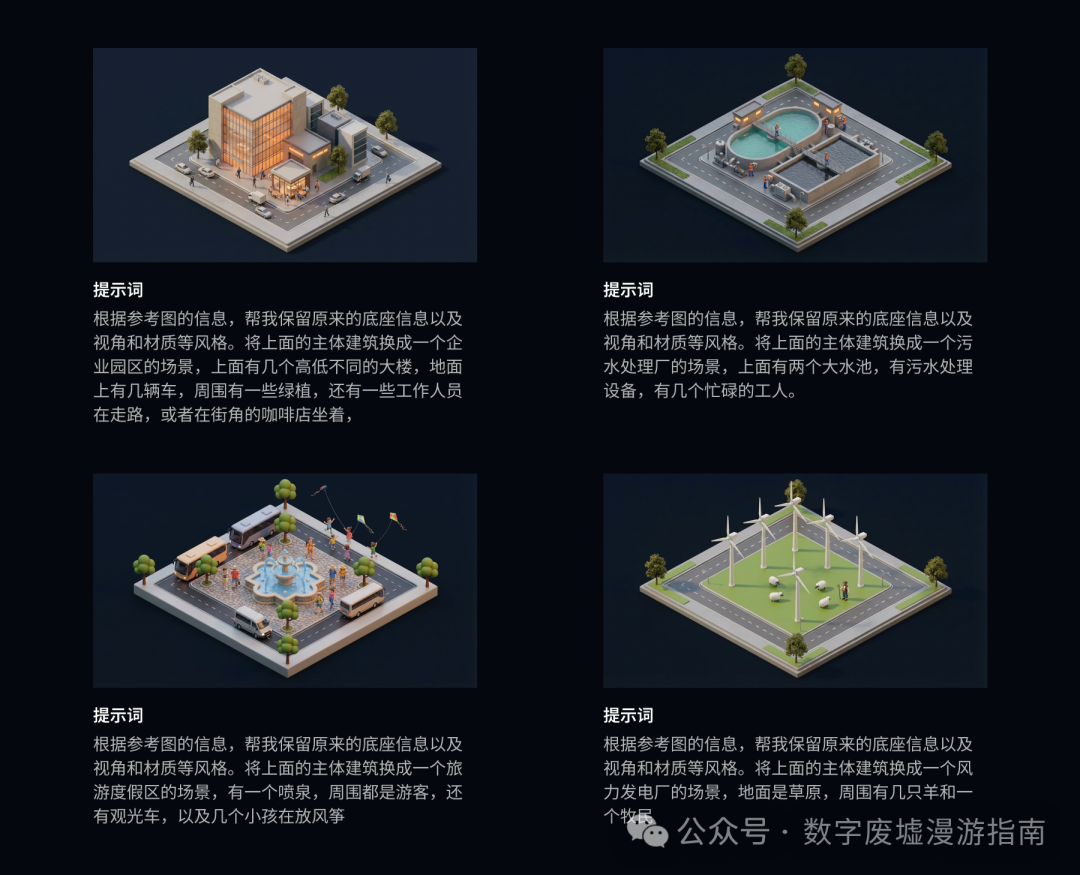
How strong is Nano Banana Pro’s adherence to prompts? The above four scene transitions were all successful in one go, without needing secondary prompts or fine-tuning.
This shows that our future AI generation will be more intuitive, and AI can understand human language.
Icon Generation
Similarly, we can generate various styles, such as blue tech-style icons for B-end scenarios, or 3D icons for UI. Next, let’s try creating an APP icon.
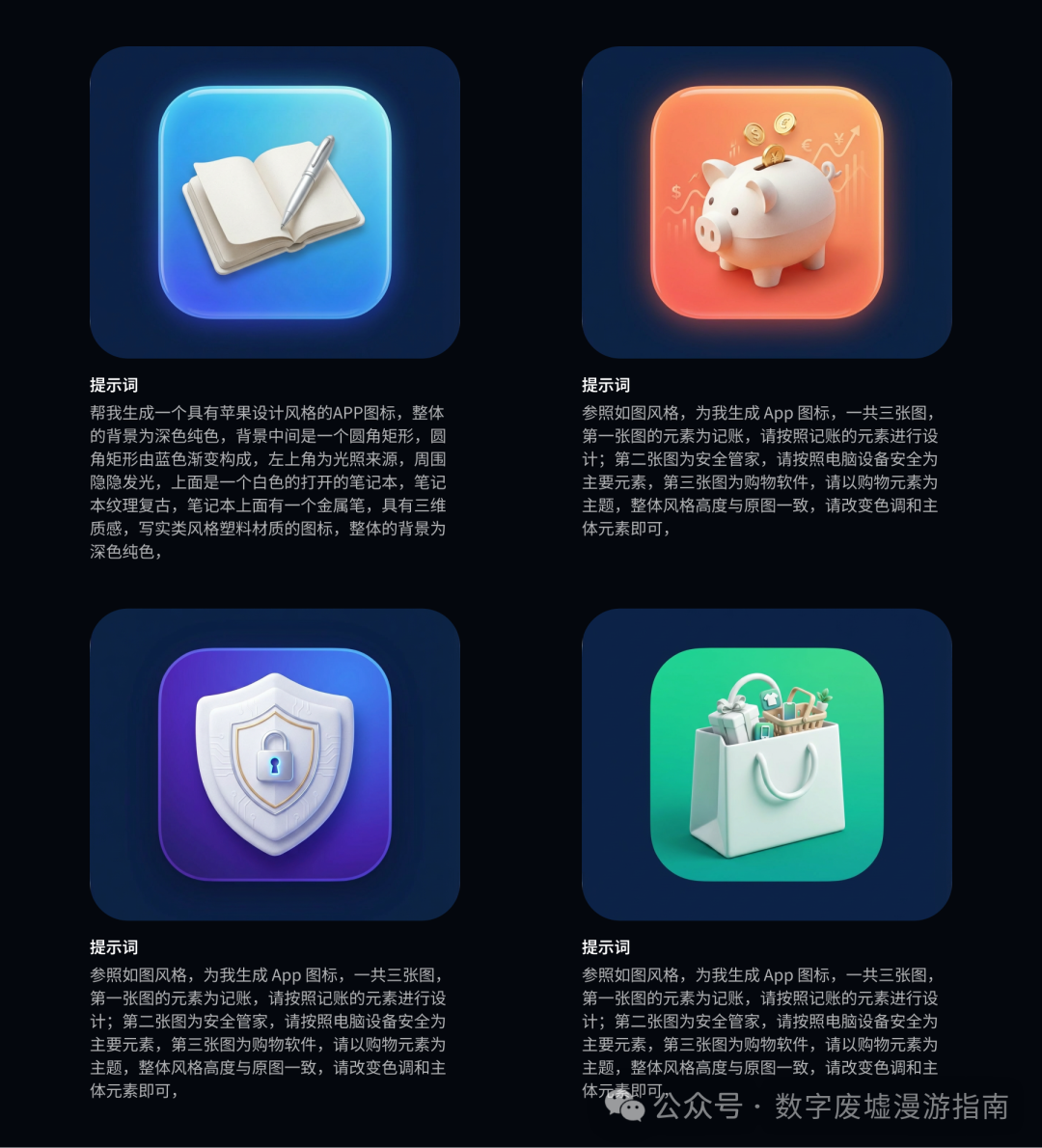
As before, for the first image’s style, we need to draw cards repeatedly to determine our final design direction.
For subsequent illustrations, we only need to reference the original image to change its main elements to ensure style consistency.
The four icons above can actually undergo a lot of abstraction and simplification, but due to the length of the article, we won’t elaborate further (actually, I’m just too lazy to do it, haha).
Design Draft Generation
In the evaluations above, most of the work is done by visual designers. So, what about interface generation for interaction designers or UI designers? Let’s try it out:
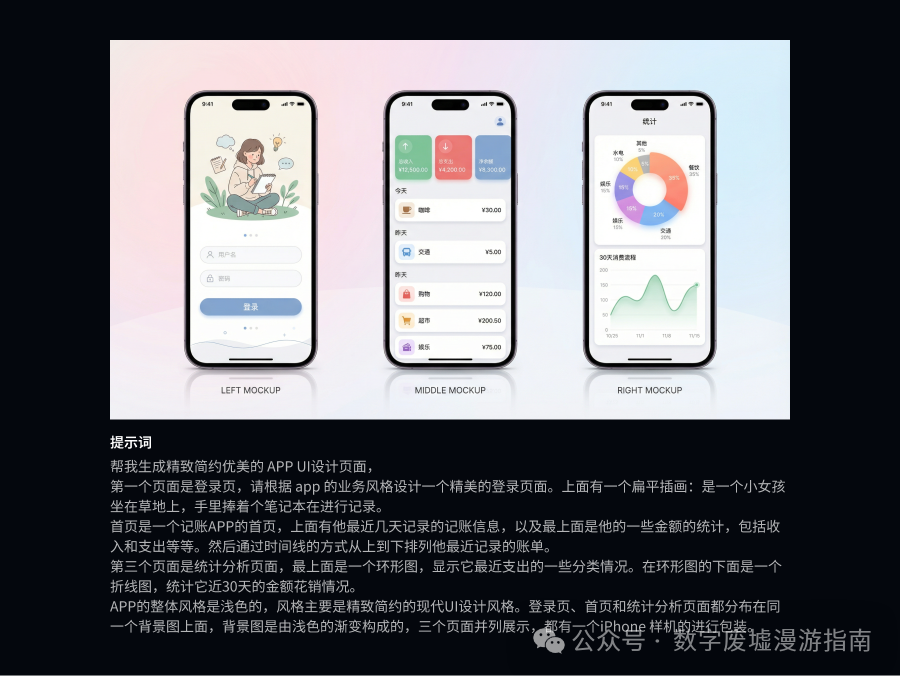
The UI interface above was generated directly through prompts. Although it has some rough details, the overall framework and logic are very clear, making it suitable for early exploration of UI design styles.
During the process of generating this UI, I had to draw many self-tests. The main difficulty was in describing the design style I wanted. I then used a base image to see if it could generate the desired effect through style transfer.
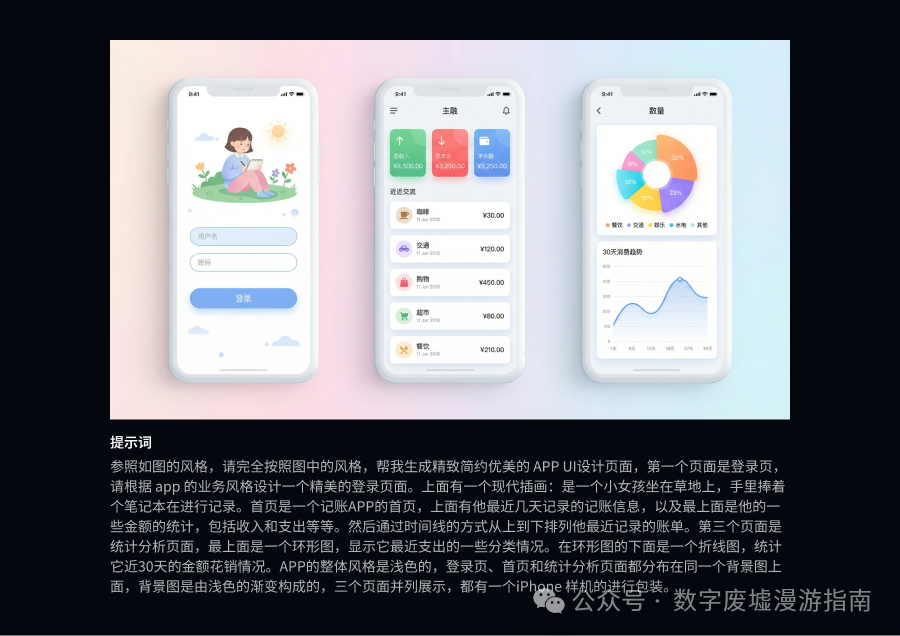
Unfortunately, my friend, it seems that it couldn’t achieve complete style transfer. My base image was a very minimalist modern APP, but it ended up adding some unnecessary details…
Design Draft Review
After generating the design draft, the question arises: can it provide feedback on my design draft? Can I use it to identify some issues in my design?
I reviewed the previously generated accounting APP page, and the review content is as follows:
📱 Accounting APP Design Draft Review Report
Some content omitted (WeChat says to avoid unreasonable citations)
📝 Summary Suggestions
Your design draft performs excellently in visual style and information presentation, but needs to supplement the core functional entry and interaction integrity:
Add Immediately: “Add Accounting” button (suggest placing it at the top or side of the homepage)
Improve Login Page: Add registration and password recovery options
Optimize Navigation: Ensure all main functions are in the bottom navigation bar
Detail Corrections: Check for duplicate issues in the “Entertainment” category
The overall design direction is correct; just supplementing key interaction elements can make it a complete accounting application!
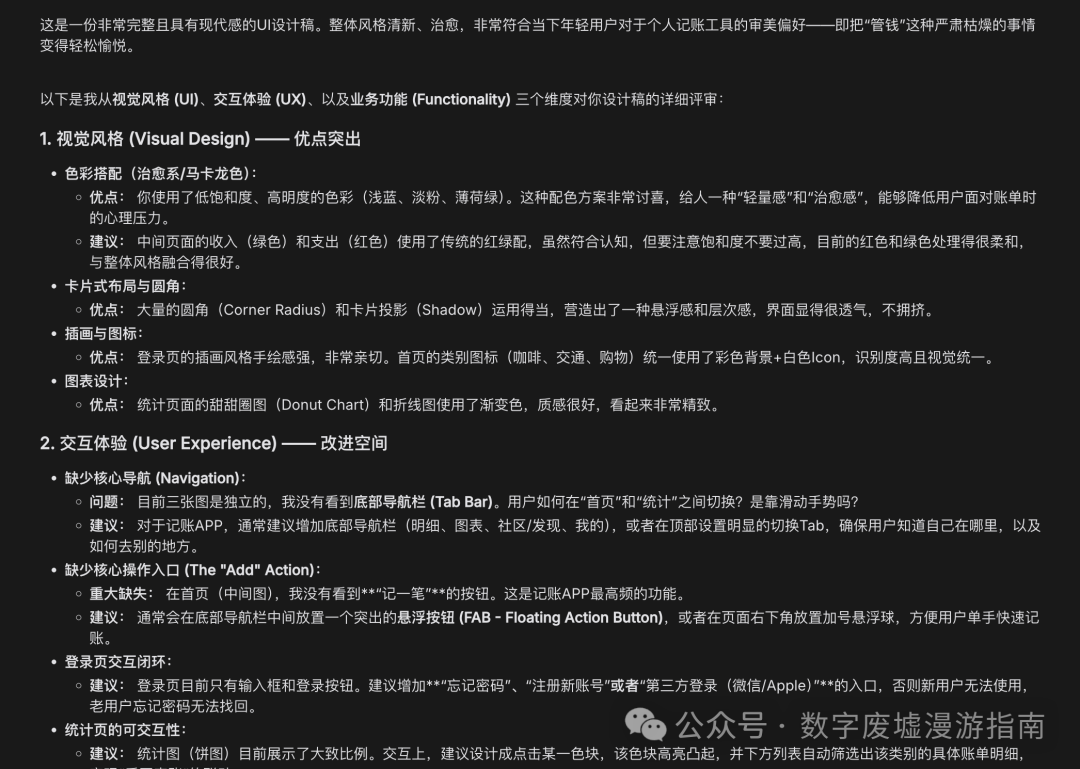
It pointed out some basic functional issues, which are not too problematic. Can I ask it to optimize based on these issues?
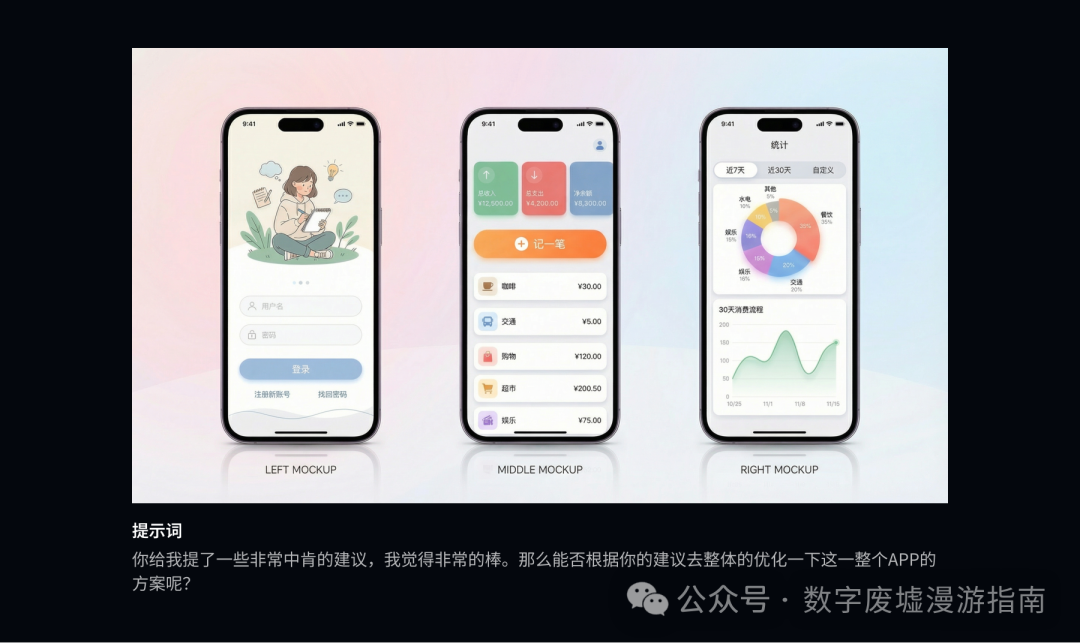
Well, the functionality was supplemented, but the style is still too outdated.
And has anyone noticed that the style of the generated APP resembles Material Design? But since Nano Banana is from Google, it has its father’s genes, so that’s not a problem.
The bad news is that it can already generate a visually acceptable UI design.
The good news is that there is still a lot of room for improvement if you want to use it and optimize it further.
In summary, the sky for experience designers has not fallen yet.
(Of course, if you directly use Gemini 3.0 to generate front-end web pages, that’s another story.)
Although it is a bit difficult to have it create original interface designs, can we generate different styles of interfaces? Next, I experimented with the homepage of YouDesign.
During the first test, because the prompts did not fully describe what to keep and what to change, it still went off track.
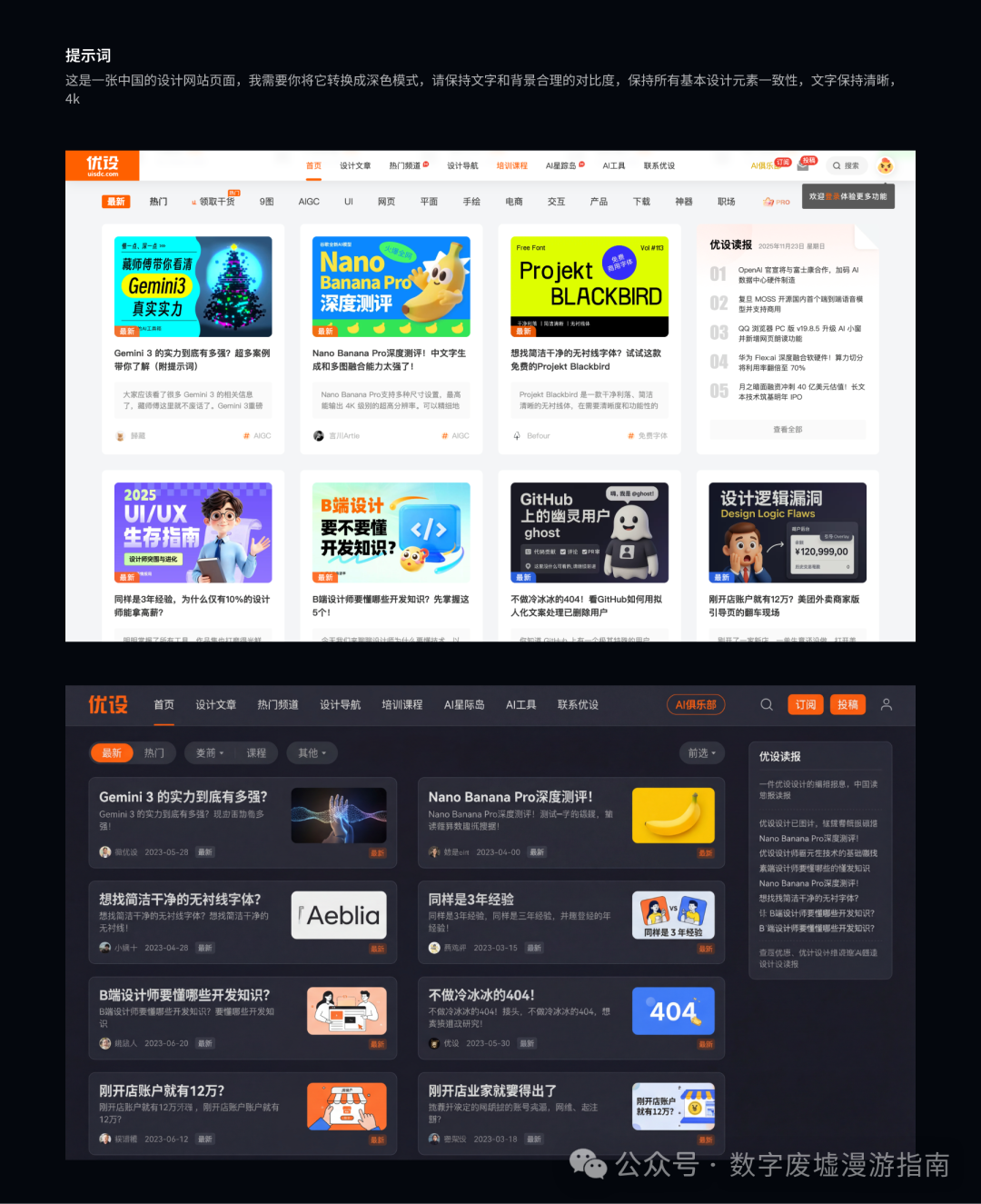
However, during the second generation, I clearly requested it to keep certain elements and change others. This time, the generated style was perfect,
including the cover image, which it replicated 1:1, and no details were lost.
Additionally, if you feel that the generated interface lacks clarity, be sure to add 4K; this will make your output results very exquisite.
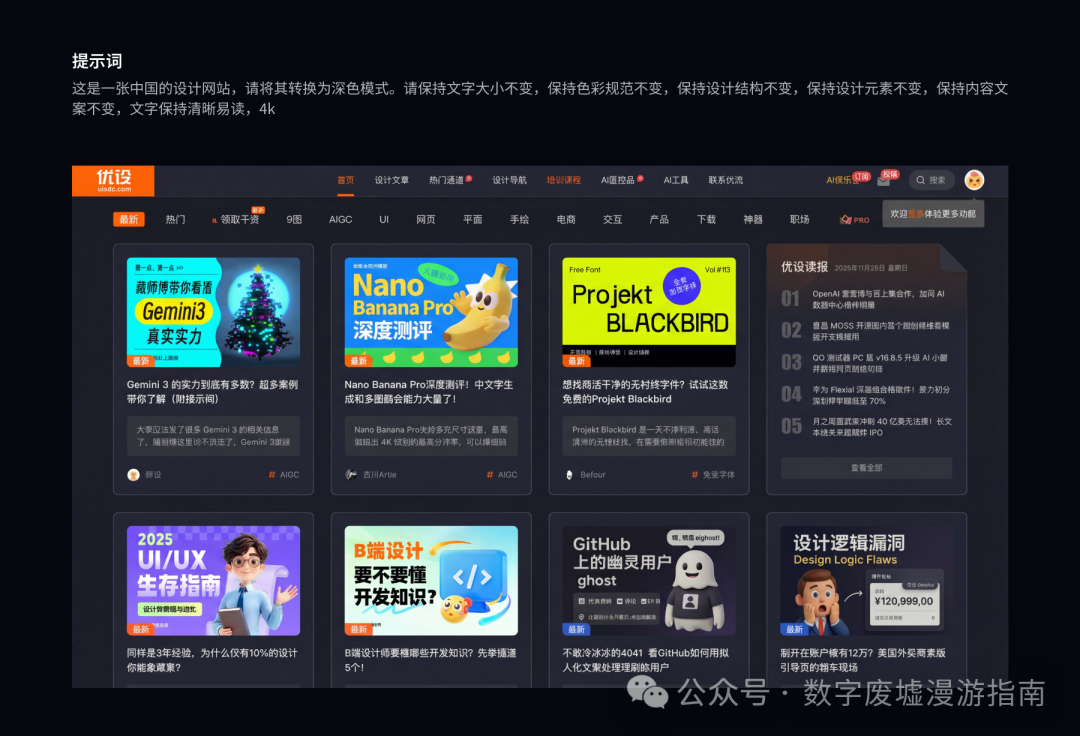
Good news, good news, YouDesign now has a dark mode!
Poster Generation
Next, we arrive at a scenario that the general public often uses, such as when we are hosting an event or a tea party and need to design some posters.
Previously, these posters required professional designers to create. With the emergence of tools like Canva, and now with intelligent AI generation tools,
let’s see how the poster generation quality is:
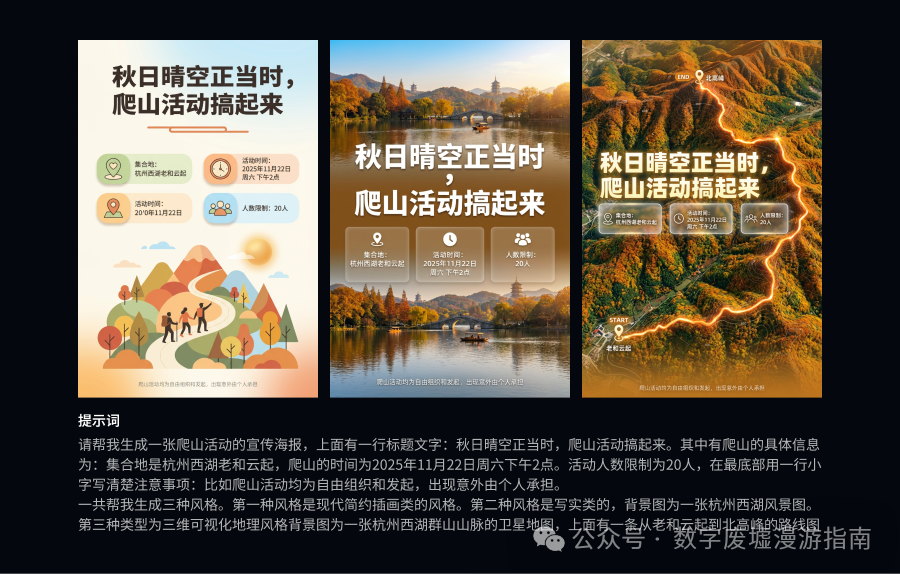
We can see that the generated poster is quite good; it is usable, but of course, there is still a lot of room for improvement. This was generated in one go without subsequent adjustments.
It can be seen that compared to the previous version of Nano Banana Pro, the handling of Chinese text has improved significantly, but when looking at the small text at the bottom, some characters are still distorted.
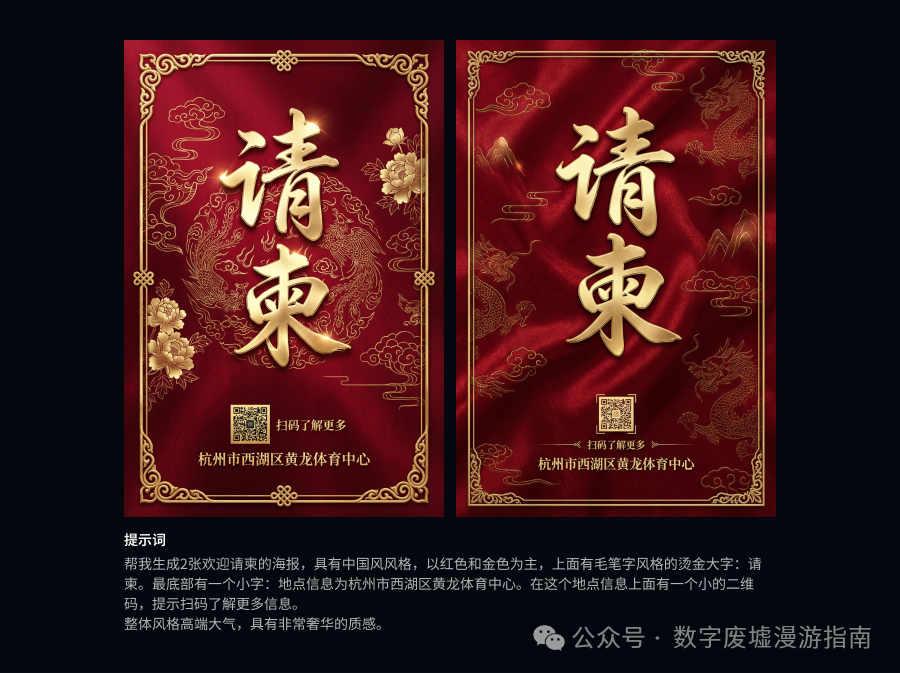
However, in the process of generating visually designed flat posters, Nano Banana Pro can completely replace junior or even intermediate graphic designers or enhance their design efficiency.
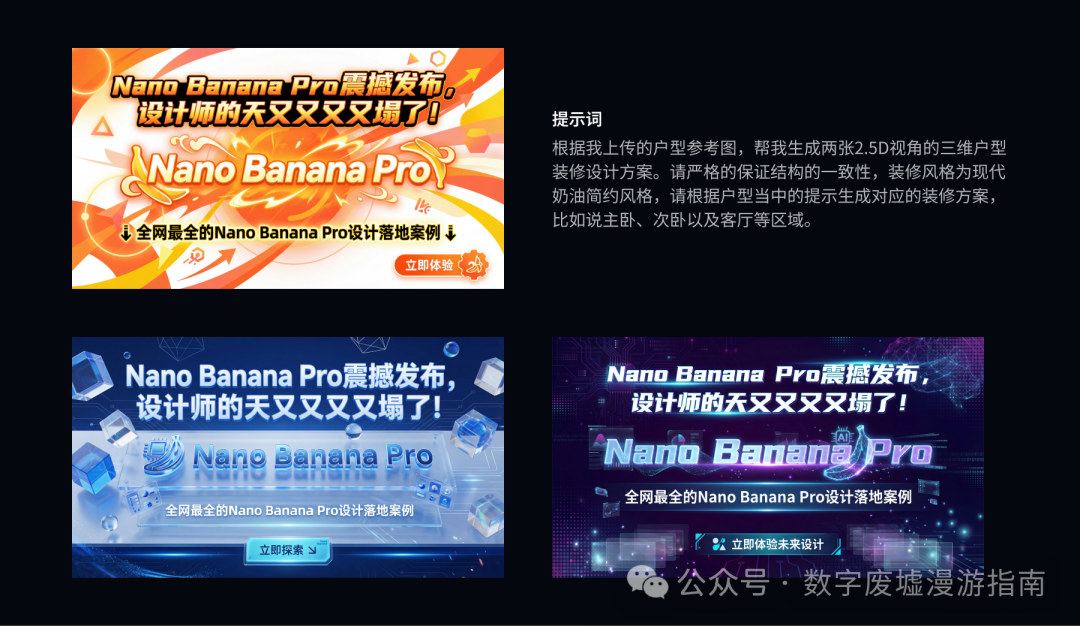
Next, let’s continue to look at the generation of banners.
During the first text generation, I felt that the overall generated style aesthetic was not what I wanted.
After multiple draws, the generated banner is usable, but if I were to use it in real work, I think my designer colleagues would shake their heads.
Brand Visuals
Next, let’s look at some capabilities in brand visuals:
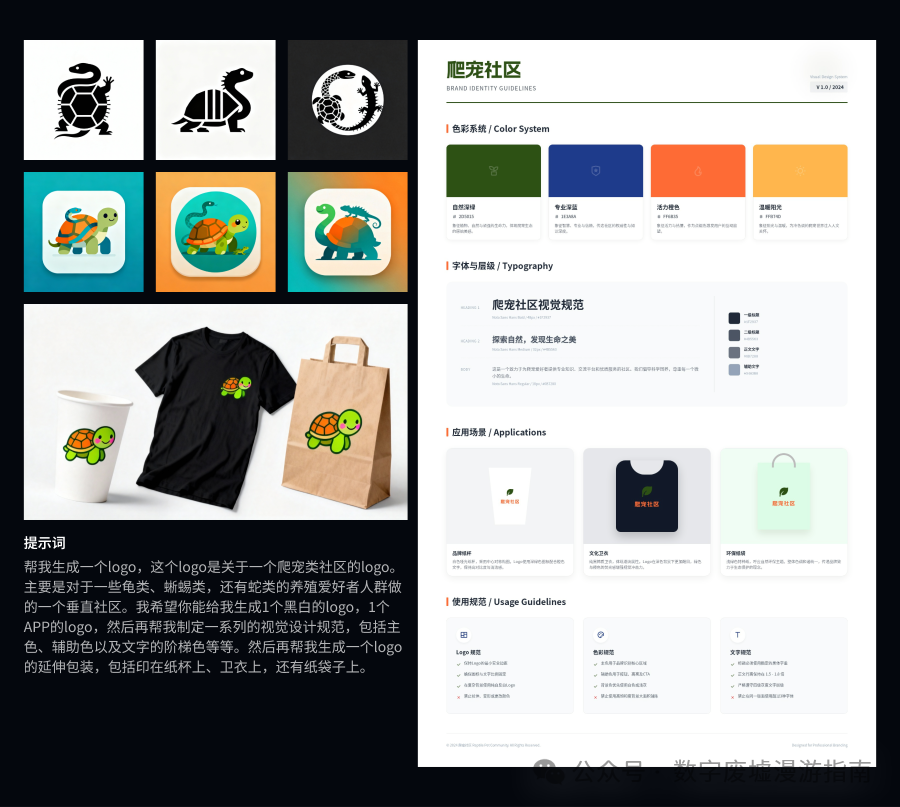
Well, it looks somewhat decent, but to really use it and meet client needs, it still requires repeated draws and a lot of trial and error to get the desired answer. At this stage, it can serve as a good source of inspiration.
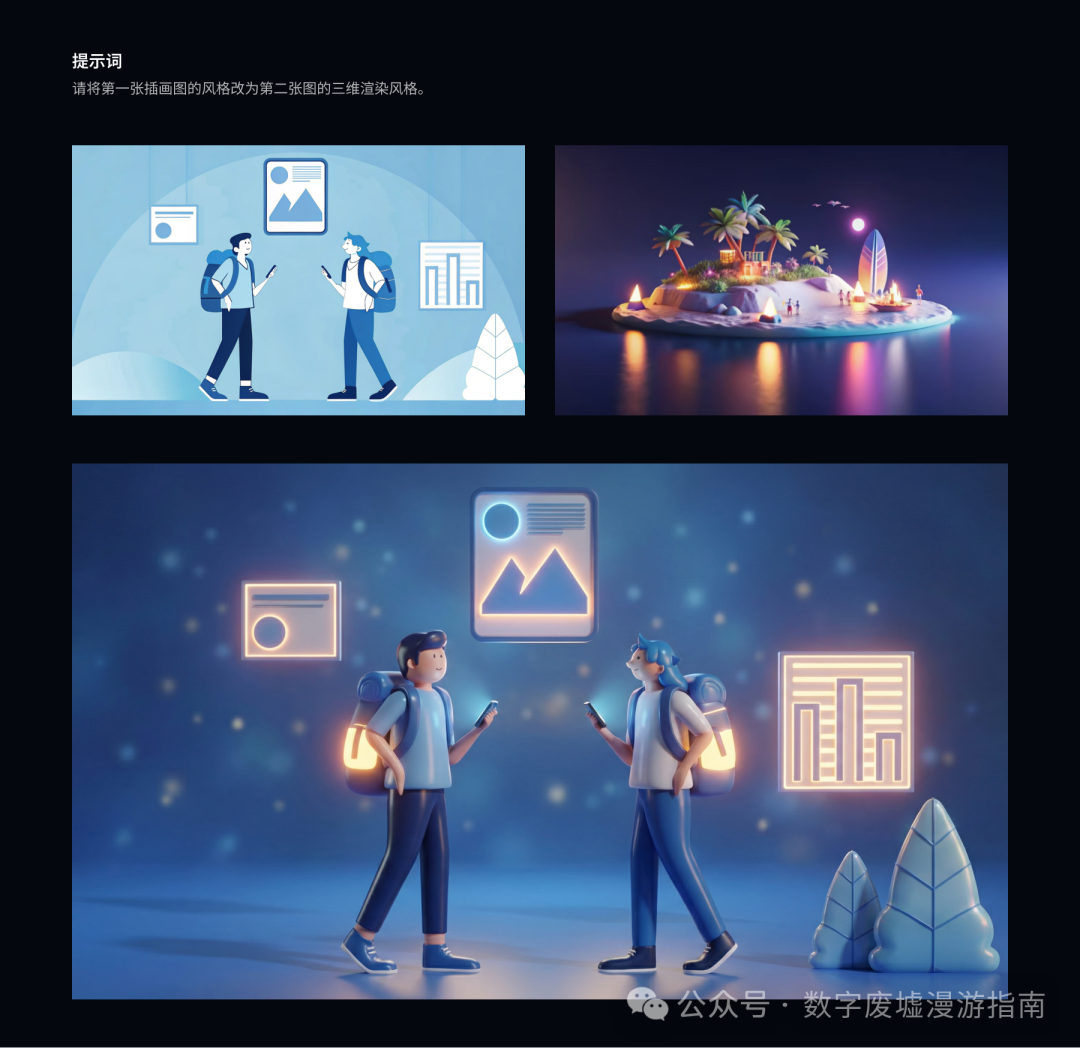
Next, let’s try generating illustrations. First, I generated two illustrations of different styles through Recraft,
then I let Nano Banana Pro perform style transfer. The generated effect has some imperfections in detail,
but after fine-tuning, it is still usable. I think Nano Banana Pro is excellent in style transfer.
Visualization Solutions
In a designer’s daily work, there is a very labor-intensive and time-consuming scenario, which is the core main visuals in visualization solutions.
Previously, this was usually achieved through hand-drawn illustrations, vector illustrations, or 3D modeling. Let’s explore if there are other ways to generate visualization solutions besides direct text generation (which is relatively simple and can be generated freely).
Those who have done a lot of AI generation know that controllability is one of the most challenging parts of AI generation. We usually need a lot of draws to finally obtain a usable design, which is very time-consuming and tests our patience.
Next, let’s experience the generation of a main visual solution for a login page through a complete workflow.
First, I generated a main visual for a login page purely through text, and let’s see how it turns out.
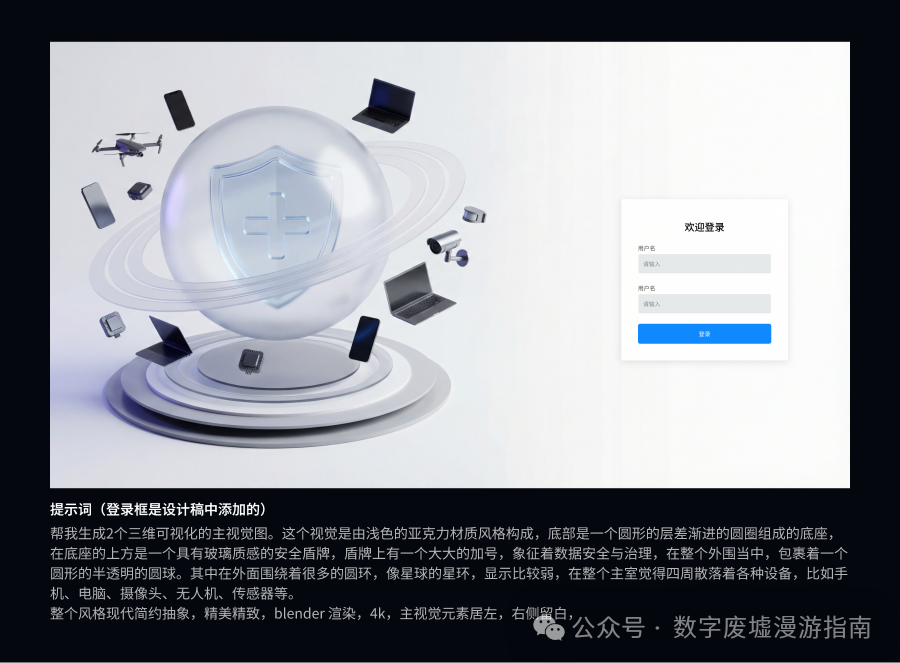
This solution was generated purely through text without drawing cards, and we can see that the main visual element is too large. We can certainly make it smaller. However, it is not the effect I wanted. Therefore, we can explore the next solution.
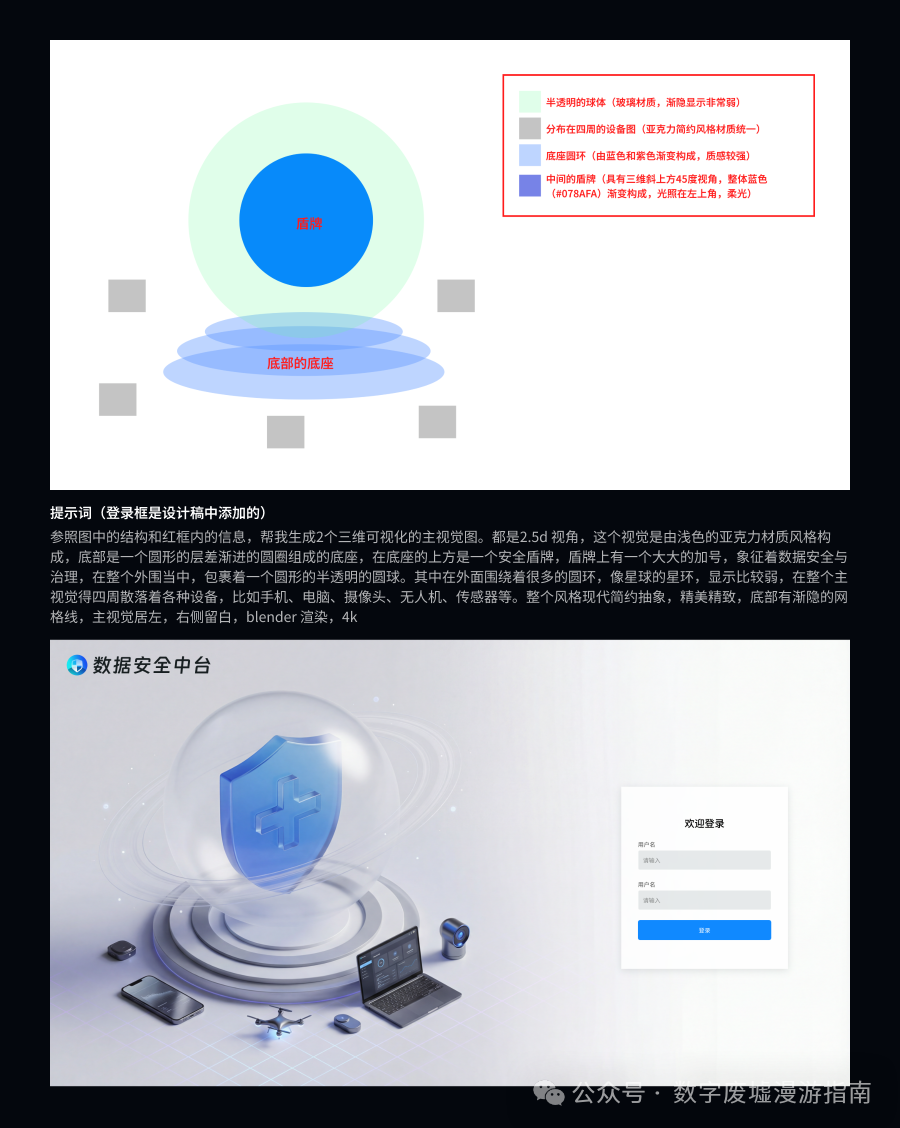
This time, I created a rough minimalist model framework in design software (this is very important; everyone can try this in actual operations. If you find a part difficult to control, you can sketch and annotate to help Nano Banana Pro establish a basic cognitive framework, which will greatly assist in subsequent image generation).
In the image, I also provided some explanations for category elements. Through this case, you can see that Nano Banana Pro’s adherence to specified prompts is already very strong. This generation was basically the result I wanted, and it was achieved in one draw. We can optimize some details through instructions.
However, I think we can further optimize the rendering style, as style is quite difficult to describe. Therefore, I used an image that I personally find visually appealing for style transfer (for demonstration purposes only; the image is sourced from the internet and is not for commercial use).
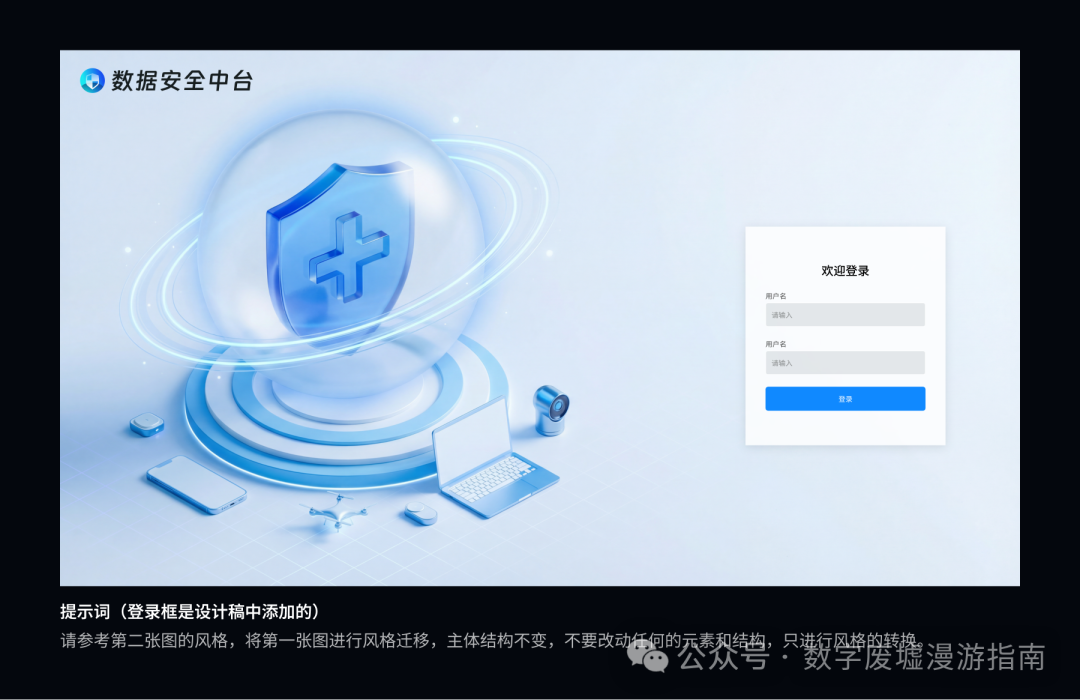
After one draw, the color tone is basically what I wanted, but the halo of the glass ball is a bit heavy. This can be adjusted later; I was too lazy to do it, but if anyone is interested, feel free to try.
However, it cannot just be static, so I also need to make it dynamic. Let’s try using the free Doubao.
Let’s see the effect; doesn’t it look quite good? Nano Banana Pro is impressive, and Doubao Seedream 4.0 is also impressive. (Please ignore the watermark in the video; I was too lazy to remove it).
Next, we have a concept often used in 3D visualization, where we might create various component 3D models. We need to understand the product. If an industrial product falls within the knowledge base of Nano Banana Pro, it will provide you with a very detailed product disassembly diagram:
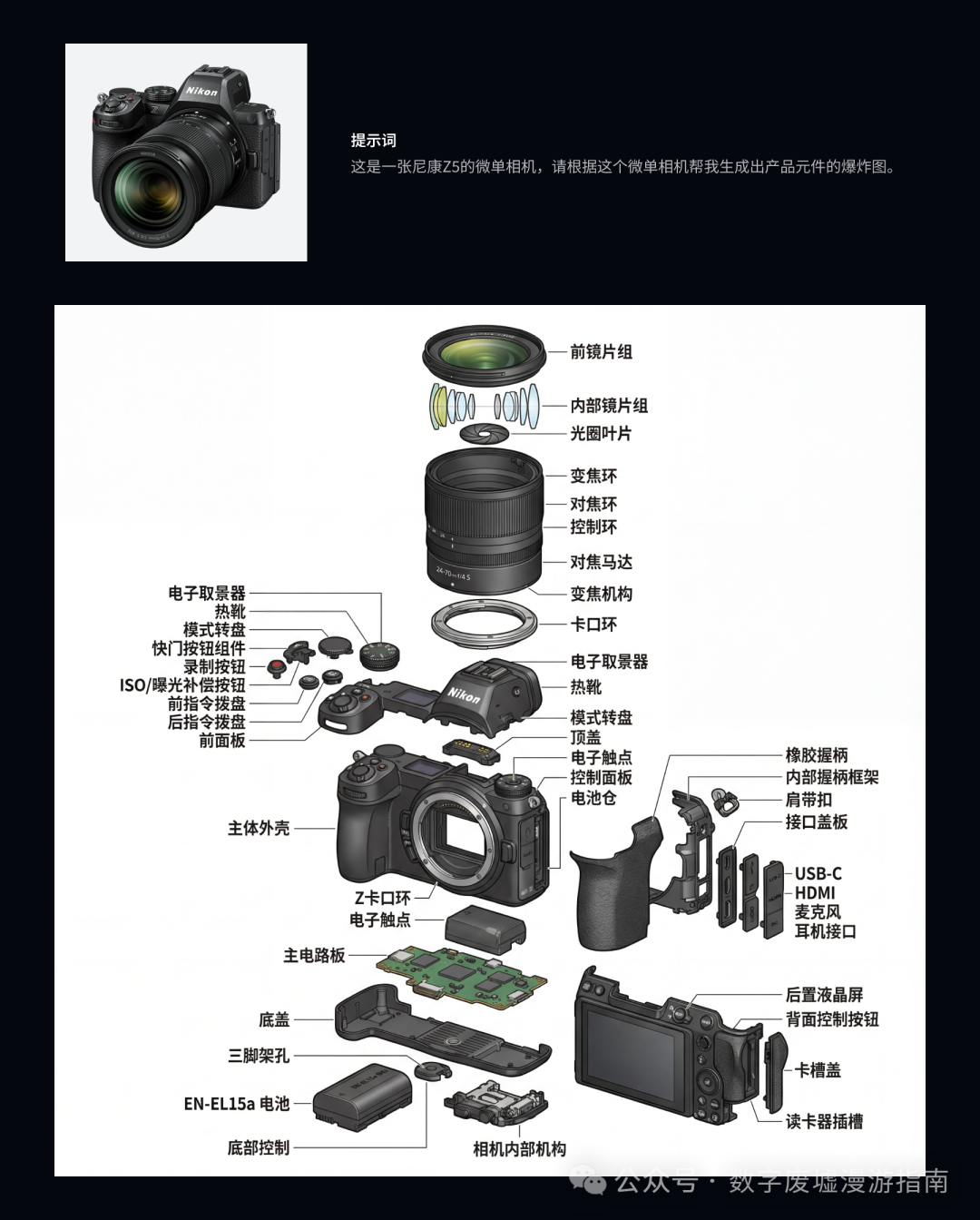
During the generation of the above disassembly diagram, I observed Nano Banana Pro’s reasoning process. It truly infers such photos based on the physical rules of the world and then generates them.
This means it can structure and visualize knowledge. For example, if you input a paper or your theoretical method, it can generate visual charts based on that.
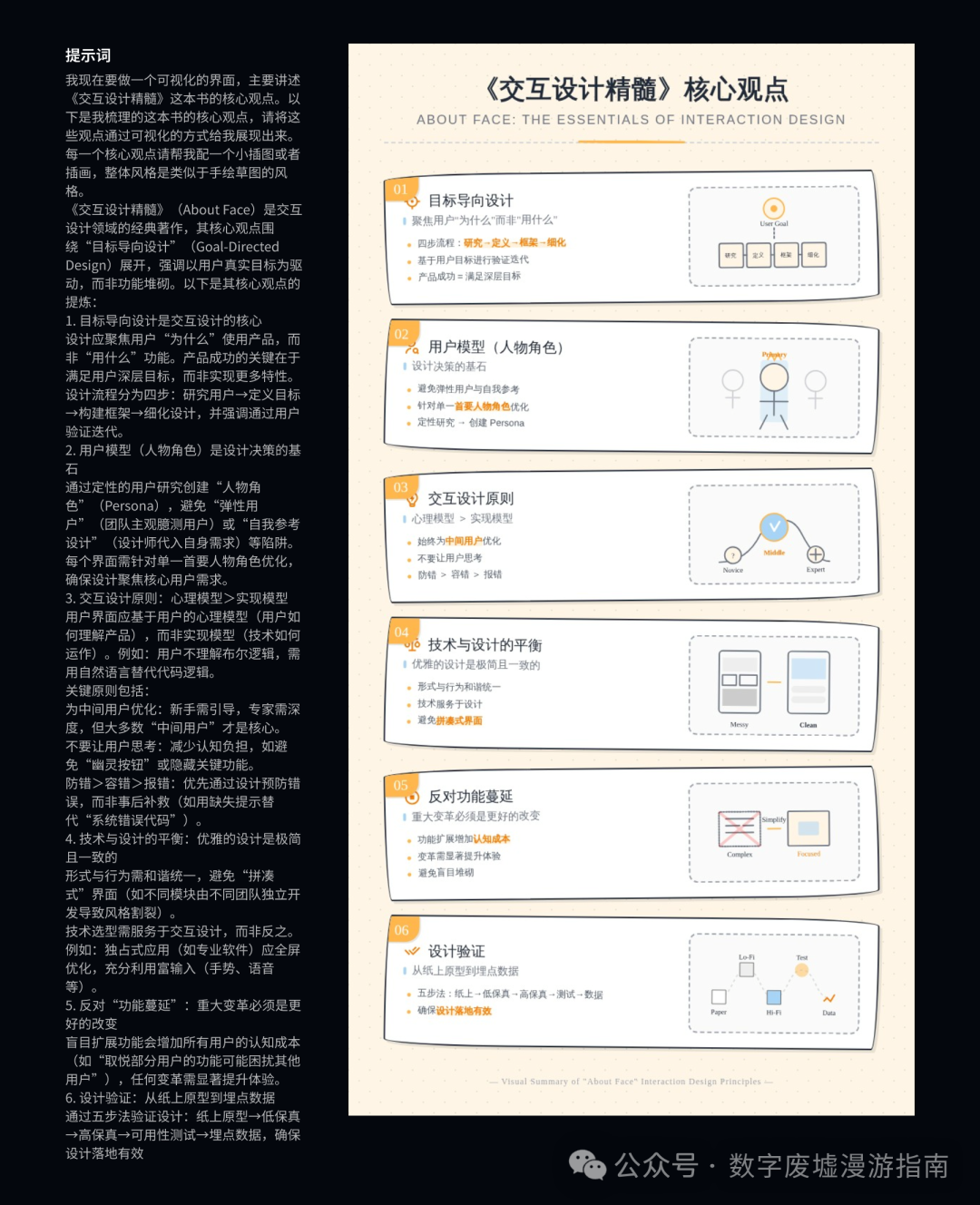
Based on the above generation, we can conclude that creating illustrations for PPTs or articles through text is no longer a problem.
E-commerce Design
Next, let’s try something in the e-commerce field.
I have a profound understanding that AI-generated images are far more important in the e-commerce field than in other industries.
This is because the material production time in e-commerce is tight, and the cycles are short, requiring large quantities to be produced, making it very suitable for AI workflows. Especially with the emergence of Nano Banana, it has shattered the previous comfy UI workflow (thankfully, I didn’t spend much effort learning it), and now it has reached the point where you can generate images and edit them just by speaking.
Product Promotion Image Creation
First, how to organically combine product images with background images is one of the most common operations in e-commerce design.
First, we casually find a cosmetic image online (I don’t even know which brand it is, non-commercial, just for testing), and then directly generate the product promotion image through prompts.
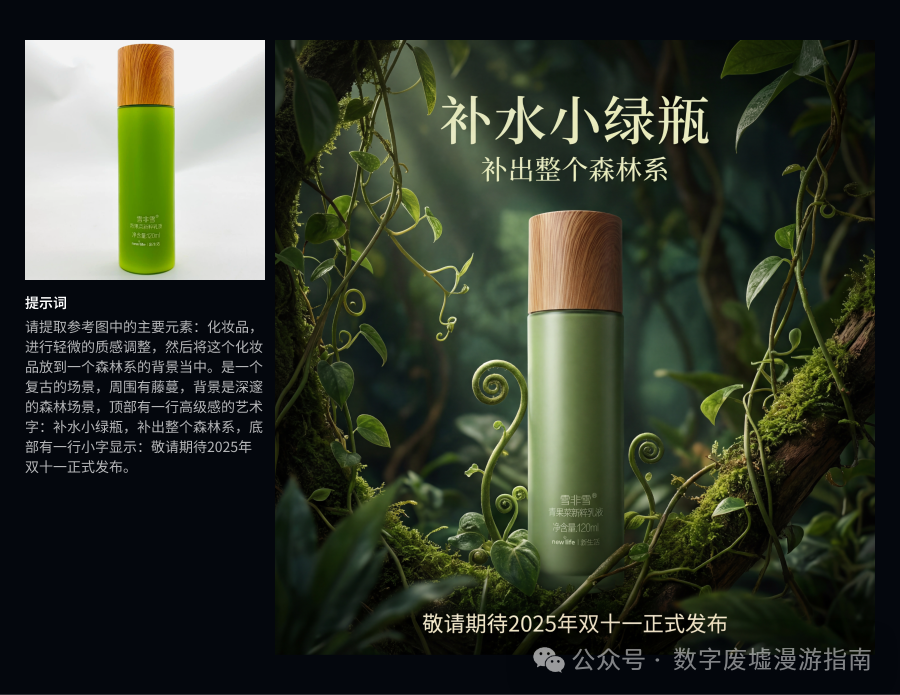
Honestly, when I saw this image generated successfully in one draw, I was stunned. This is so impressive, the atmosphere, the texture, what more could I ask for…
Model Style Transfer
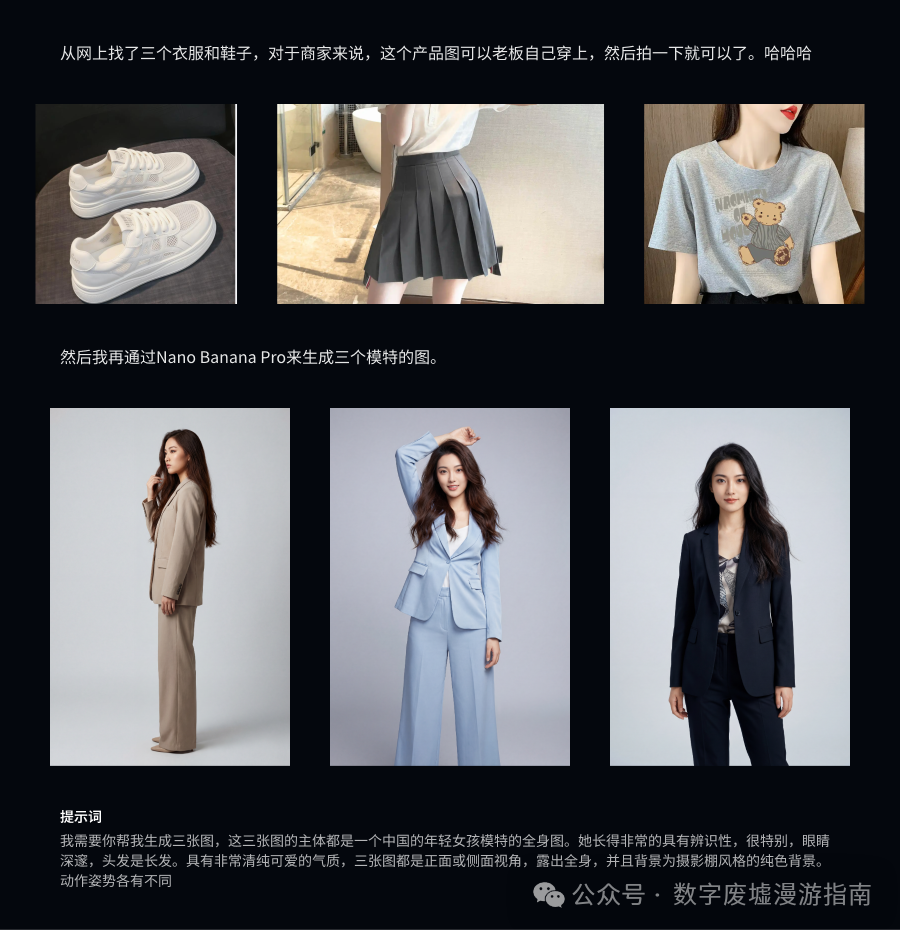
First, I casually found three clothing items, shoes, and a skirt online. For actual merchants, they only need to take casual photos of their products.
Then I used Nano Banana Pro to generate three Chinese models. As you can see, AI-generated characters are now almost perfect. Although they don’t have extra fingers, I carefully checked the hand details:
I found that this hand looks so much like a man’s hand???
Next, I used these images to generate the final product effect image. As you can see, the details of the products are basically perfectly restored, especially the clothes and shoes. The skirt may have some details that are not very complete, and it automatically filled in some extra styles. I think it can be fully used for e-commerce promotional product images.
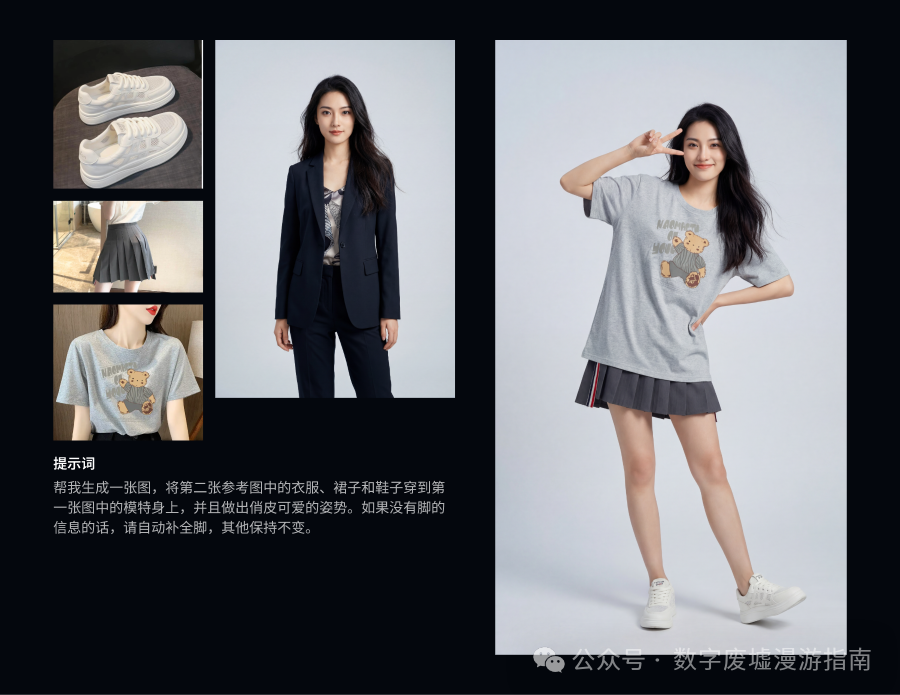
As for the outfit I matched, I thought it would look great, but after matching, it turned out to rely entirely on looks. Cover the face, and wow, what a rustic aesthetic…
Product Instruction Image
Next, I will evaluate generating product instruction images directly from an Excel spreadsheet.
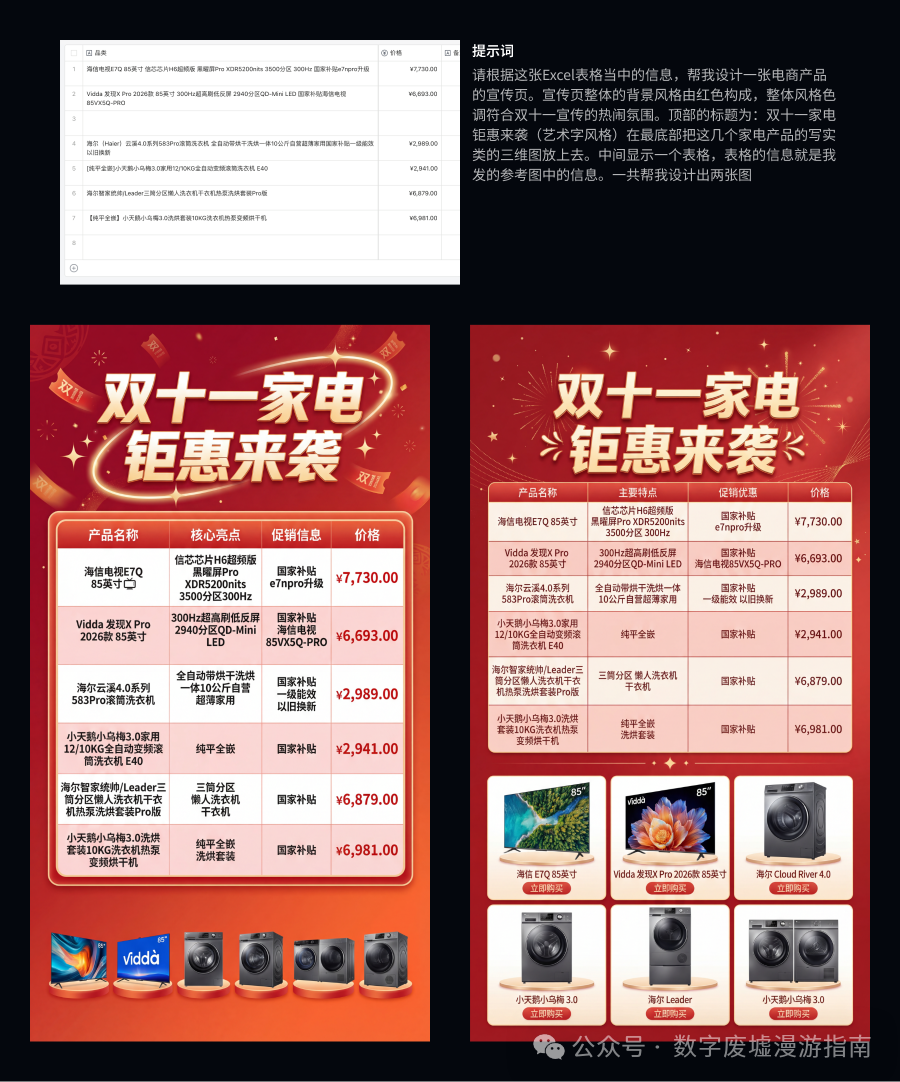
Everyone can take a look at the effect image above. Alright, I won’t say much more; it’s impressive, and I’m already tired of saying it…It even generated corresponding product images for me. I roughly looked at them, and these product images seem quite realistic.
This means that as long as you provide the requirements, it can even find materials by itself,
of course, the premise is that you need to understand this area and oversee the results; otherwise, the materials it finds may not be correct, and you won’t even notice.
In the e-commerce design field, Nano Banana Pro has killed the competition, and it has not only eliminated e-commerce designers but also graphic models. Sigh…
Interior Design
Next, let’s see how the effect images for interior design look.
Since I am not a professional in interior design and do not work in this industry, I simply tried to generate my desired style based on the floor plan and prompts. It serves as a very good source of inspiration for early renovation plans (
but if you look closely, some details in the floor plan are not perfect).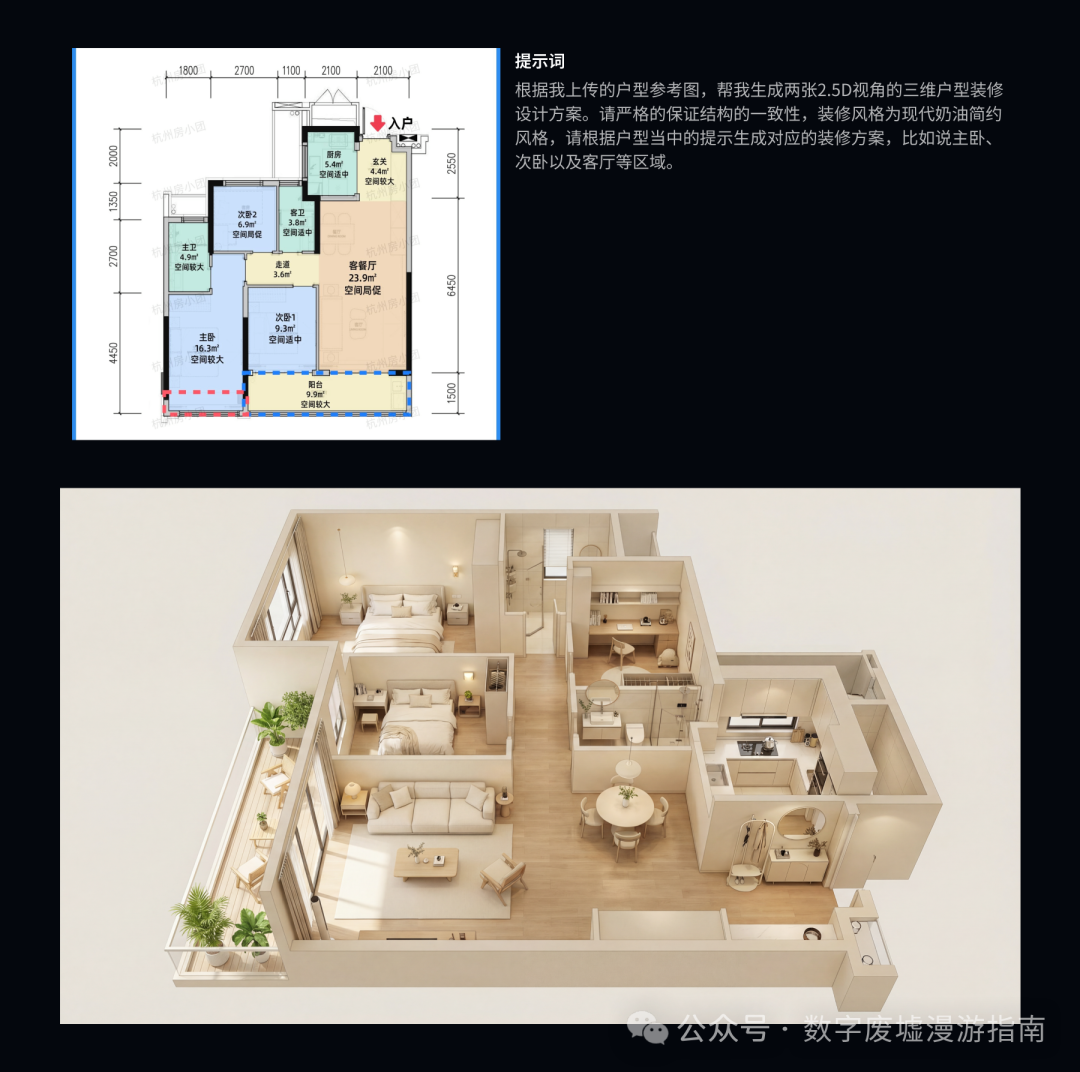
Resume Generation
First, I used Kimi AI to generate a fake designer resume. Of course, if you friends are using it in practice, you can copy and paste your organized resume information.
Then I used Nano Banana Pro to generate a “model-like” designer image, and finally threw everything to Nano Banana Pro:
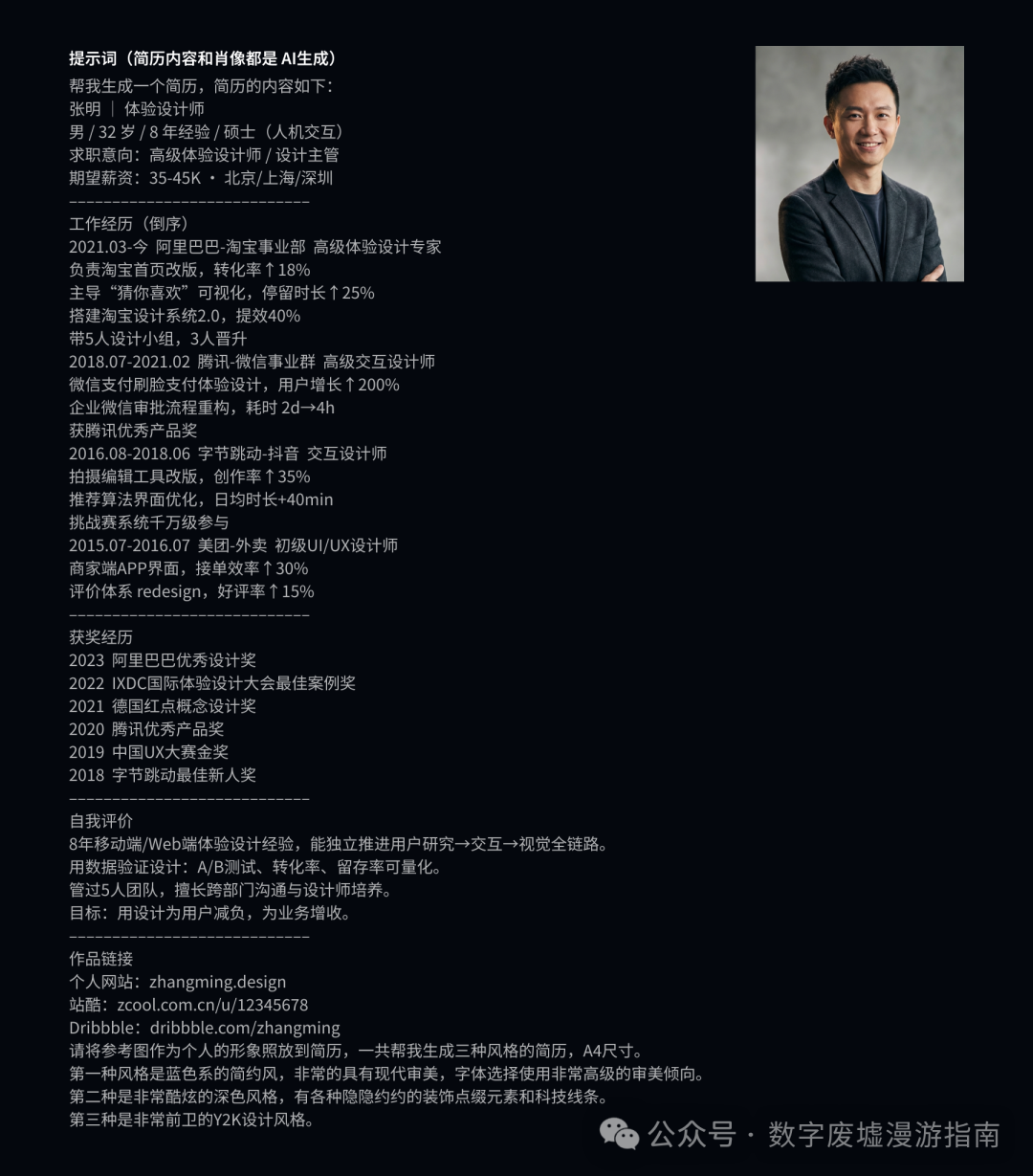
I had it generate three styles of resumes in black dimensions; let’s see how the final effect looks.
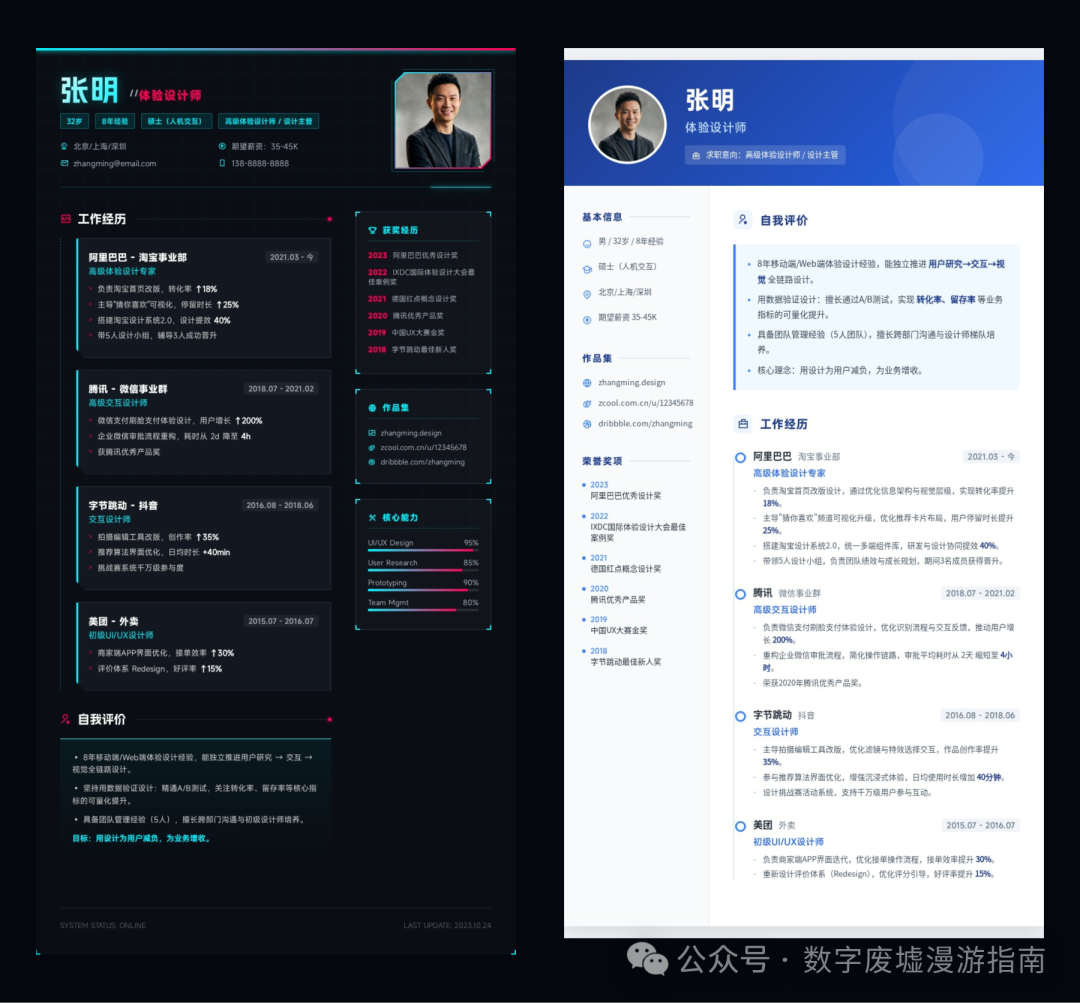
It feels somewhat right, but when you look at the details, it seems not quite right.
How should I put it? As a designer, the layout should be more coordinated than this, but the overall feel is similar.
The main issue is that all the resumes generated for me have incorrect dimensions; it seems it cannot understand A4 size.
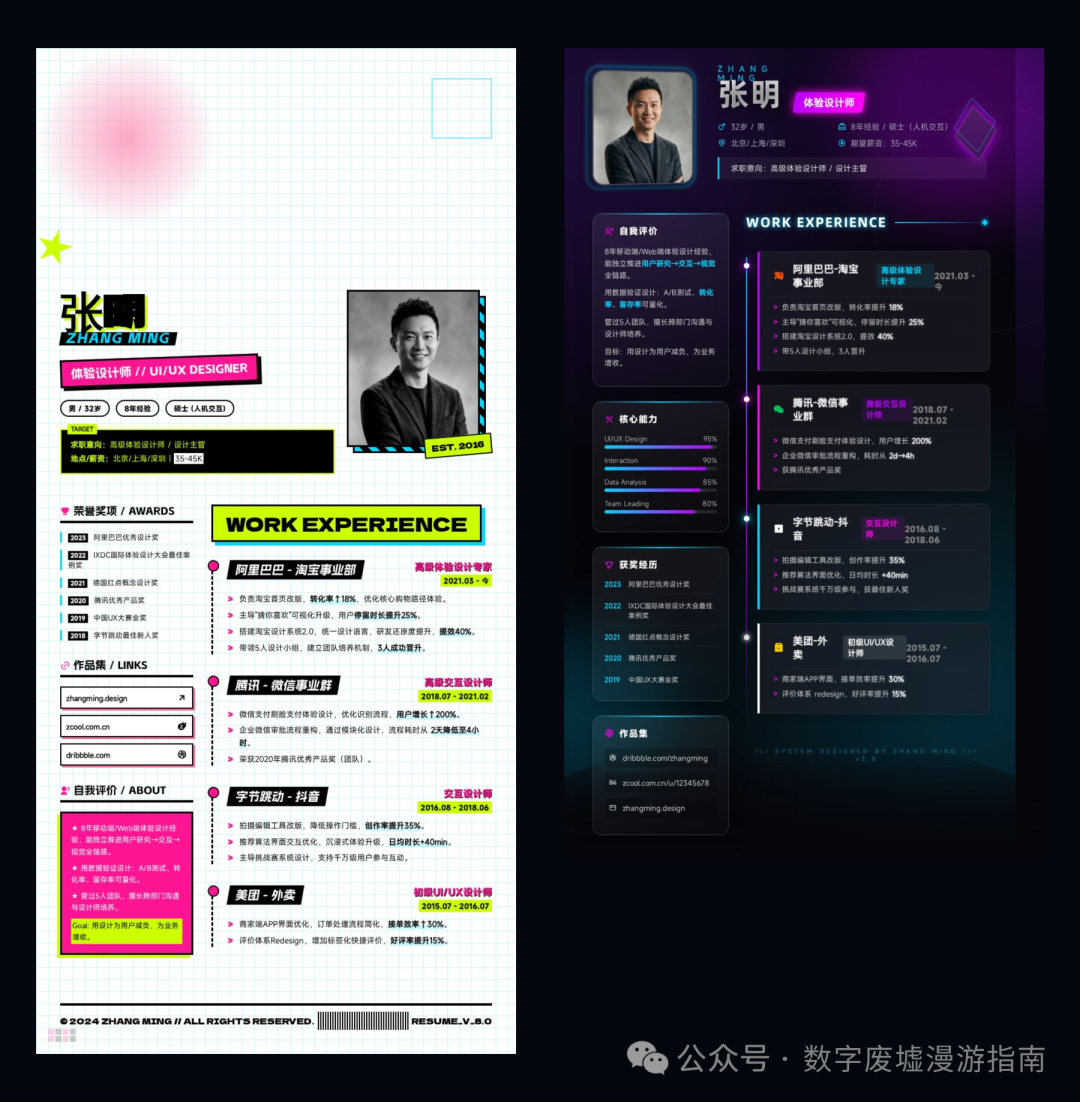
As you can see, the overall Y2K design effect is quite good, but I don’t understand why the character “Ming” in Zhang Ming became so blurry.
Of course, these resumes can be optimized through secondary modifications or by pointing out some issues in the resumes for it to refine repeatedly; we won’t elaborate further here.
Prompt Formula
At the end of the article, I will summarize some thoughts on prompts that I had during the usage process.
First, you need to clearly describe what style you want to achieve and the general framework, such as what the background should look like, where the main elements are positioned, and what the rendering style is.
Secondly, describe the essential elements needed in your image. For example, is it a computer or a motorcycle (????);
Finally, specify the output size information you need. For example, 4K resolution or a 16:9 ratio;
If you are editing a reference image, you need to clearly indicate which elements to change and which to keep. Always remember to add a final sentence:
Keep the rest unchanged
Otherwise, you will find that it will change some of your other elements.
Of course, the above are just some of my personal thoughts and experiences; more needs to be adjusted and optimized through practice.
As for generating comic colorings, figurines, structural diagrams, PPTs, various movie art photos, retouching photos, and coloring old photos, I won’t evaluate those as they are relatively simple, and there are many interesting cases shared by bloggers online that you can check out.
Finally, Where Can Nano Banana Be Used?
Here, I recommend several channels for using Nano Banana based on my own experience:
Google Labs
https://aistudio.google.com/
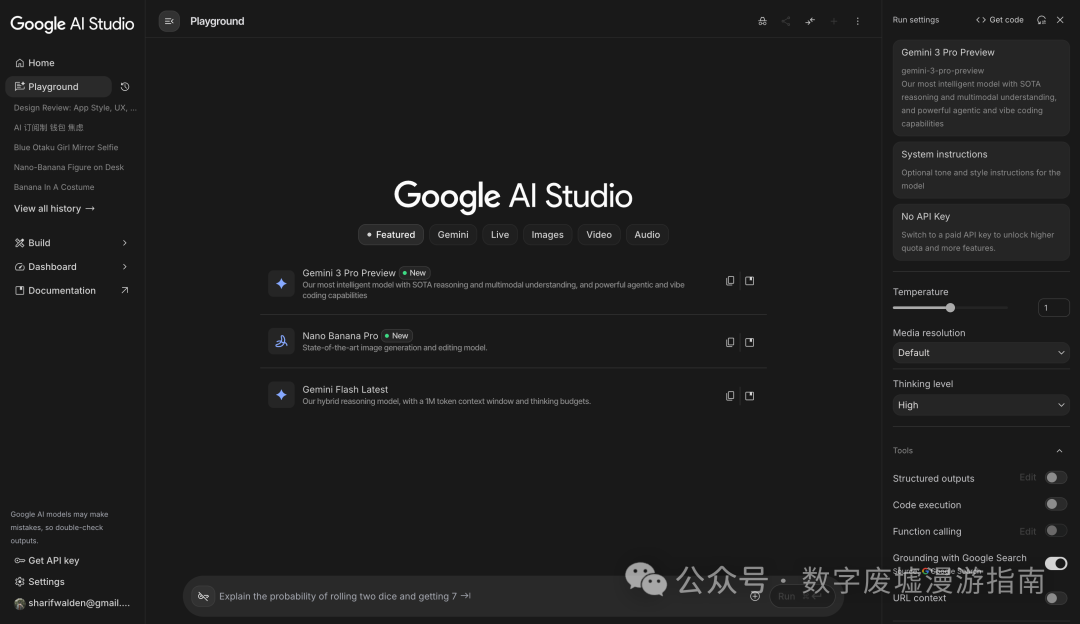
This can be said to be Google’s base camp, basically providing free access to Nano Banana Pro. However, it seems that there are some usage limits; everyone can try it out. You can also try Gemini’s homepage, but that abstract thing only needs to be tried two or three times before it charges, and of course, this requires scientific internet access.
ZenMux
https://zenmux.ai/
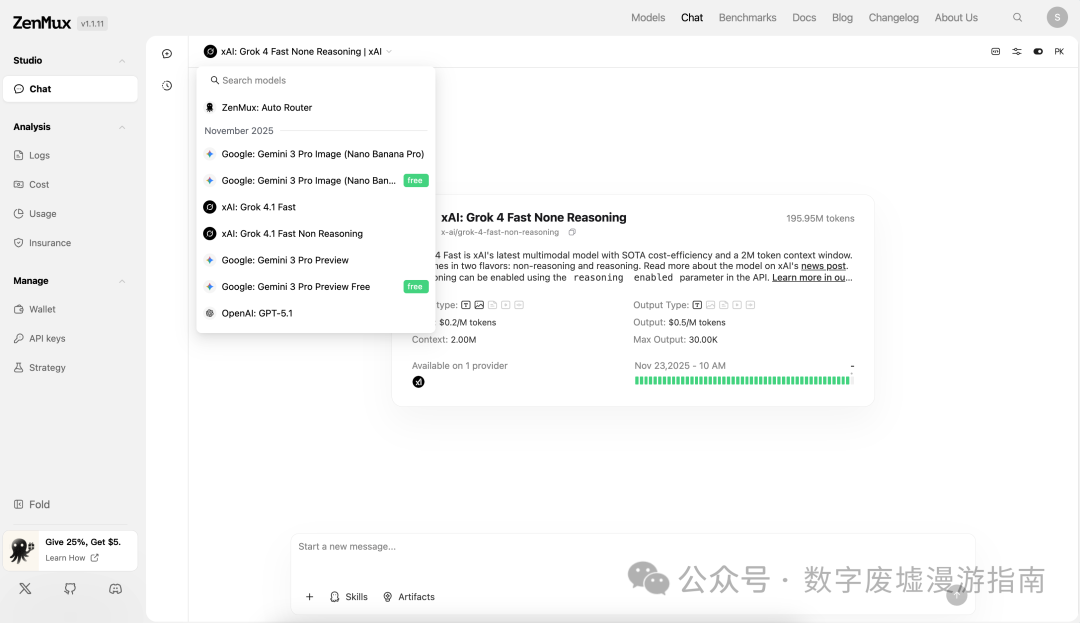
This is a shell website I saw when Nano Banana Pro first came out, claiming to be free to use, but I tried it, and basically after three uses, it requires payment. The advantage is that it does not require scientific internet access.
Lovart
https://www.lovart.ai/
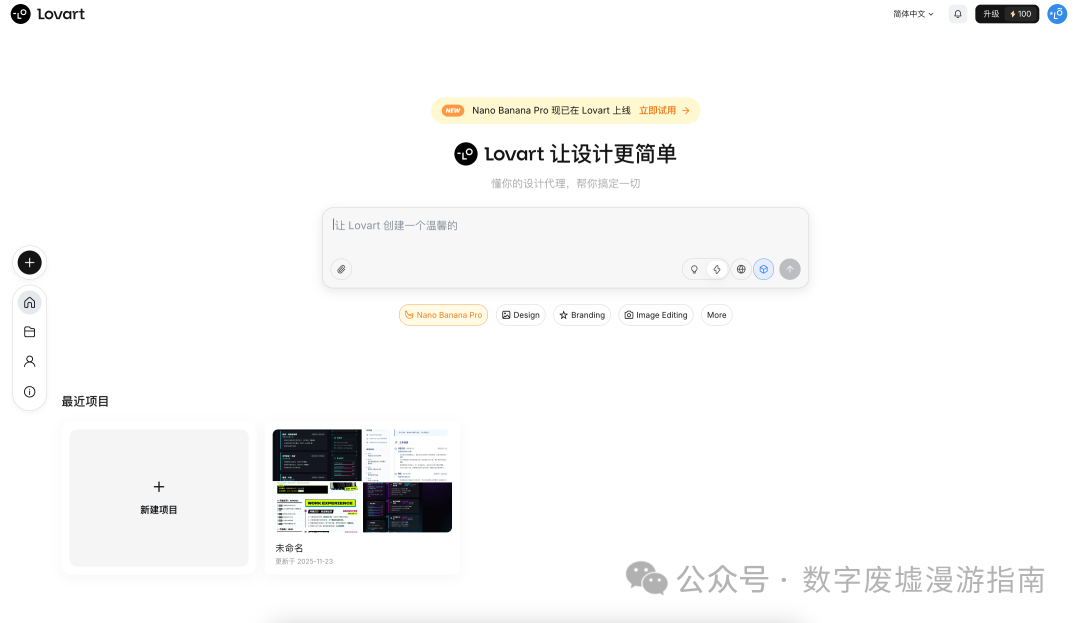
Lovart is a very useful comprehensive AI design website that provides many free access points for using Nano Banana Pro, and the effects are quite good. Currently, it offers over 1000 free points (that’s how it was when I tried it), and subsequent use requires a subscription.
(Lovart is said to be developed by the same team as Liblib, but I don’t know why, when I used Nano Banana on Liblib, the results were completely different from the original version. I even suspected it was connected to a fake API…)
Imagenate
https://www.imagenate.art/
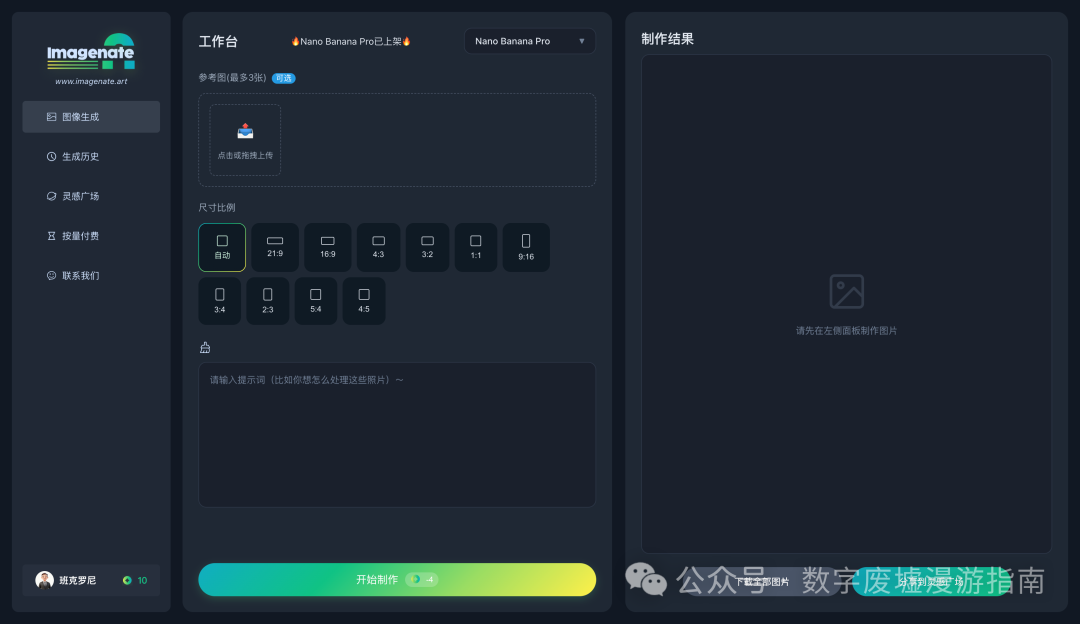
Imagenate is a pay-per-use AI image generation website that integrates APIs from Nano Banana Pro, Nano Banana, Seedream 4.0, Midjourney, and Flux, among others. Its biggest feature is pay-per-use. If your usage frequency is low, I recommend using this site. For example, if you occasionally need to generate images, you don’t need to subscribe to monthly or annual memberships.
Youmind
https://youmind.com/
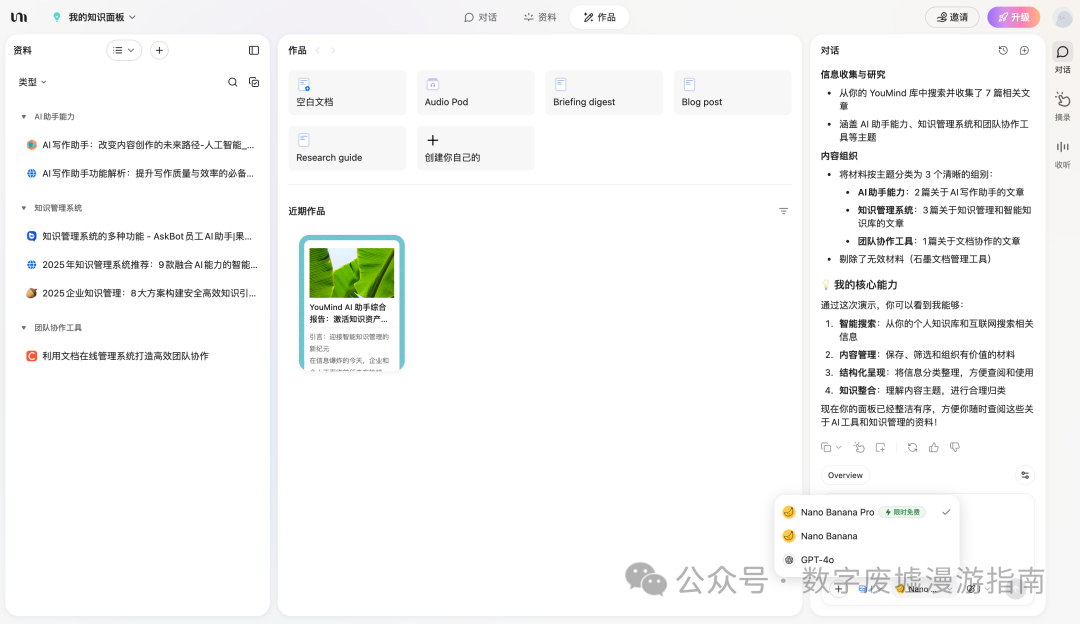
Youmind seems to be a content creation tool started by the founder of Yuque after leaving the company, and it currently offers free access to Nano Banana Pro.
The article ends here. Thank you all for reading this lengthy article. I hope it can provide you with useful help! (Actually, there are a few more cases about 3D scene images, but I really can’t keep going. Let’s leave it for later, that’s it!)