Debugging with Segger Ozone
What if our firmware gets stuck somewhere and printf debugging doesn’t work? What if even the startup code doesn’t work? We need a debugger. There are many options, but I recommend using Segger’s Ozone debugger. Why? Because it is standalone and does not rely on any IDE. We can provide the firmware.elf directly to Ozone, and it will automatically pick up the source files.
Ozone can be downloaded from the Segger website[1]. Before we use it to debug our Nucleo development board, we need to change the onboard ST-LINK firmware to J-Link firmware so that Ozone can recognize it. Follow the instructions on the Segger website[2] to complete the firmware modification.
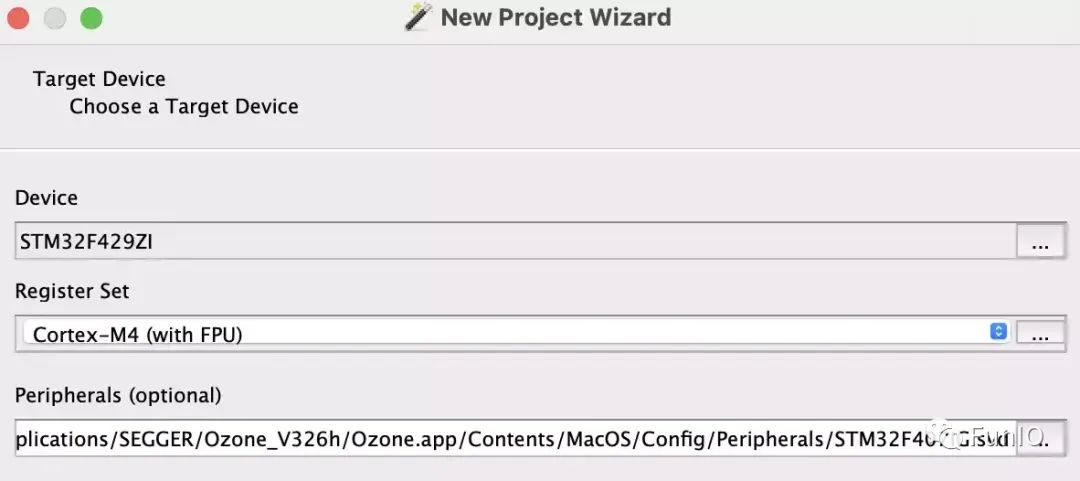
Now, run Ozone and select the device in the wizard:
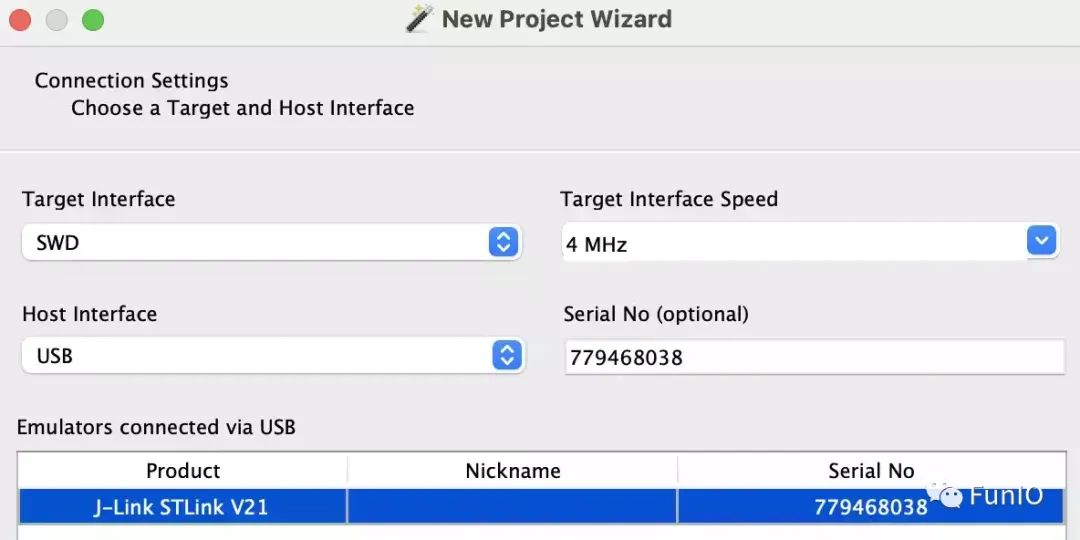
Select the hardware debugger we want to use:
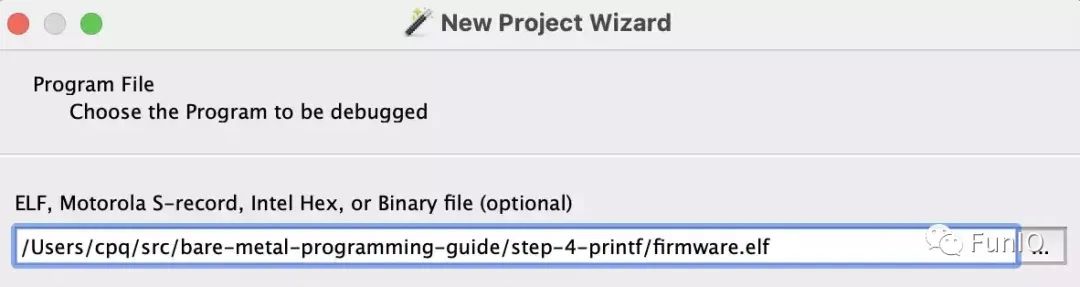
Then select the firmware.elf firmware file:
Keep the default settings for the next steps, click “Finish”, and the debugger is loaded (you can see that the mcu.h source code has been picked up):
Click the green button in the upper left corner to download and run the firmware, and it will stop here:
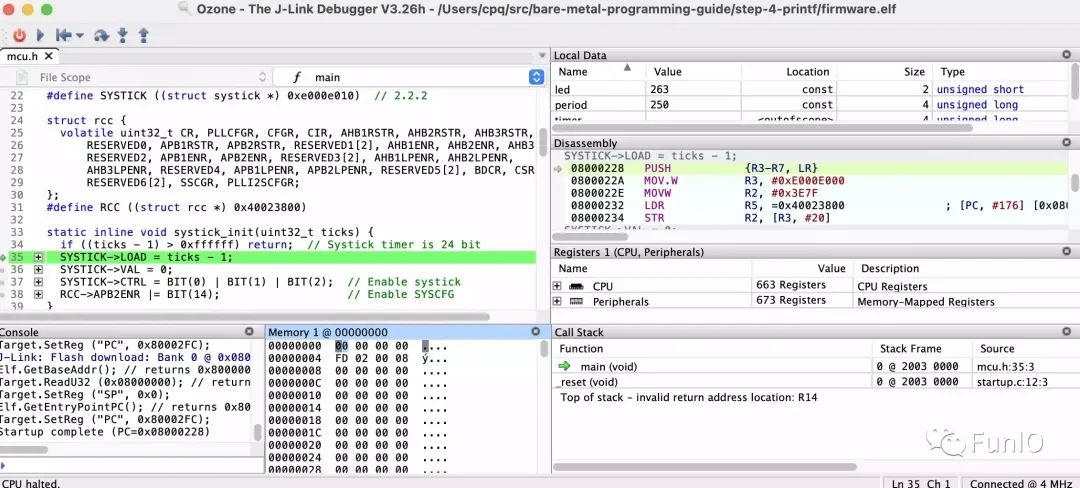
Now we can step through the code, set breakpoints, and do other debugging tasks. One thing to note is the convenient peripheral view in Ozone:
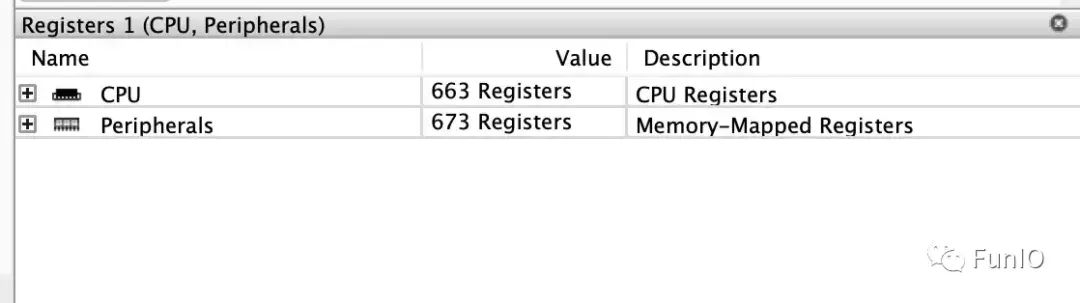
We can use it to directly check or set the state of peripherals, for example, to light up the green LED on the board (PB0):
-
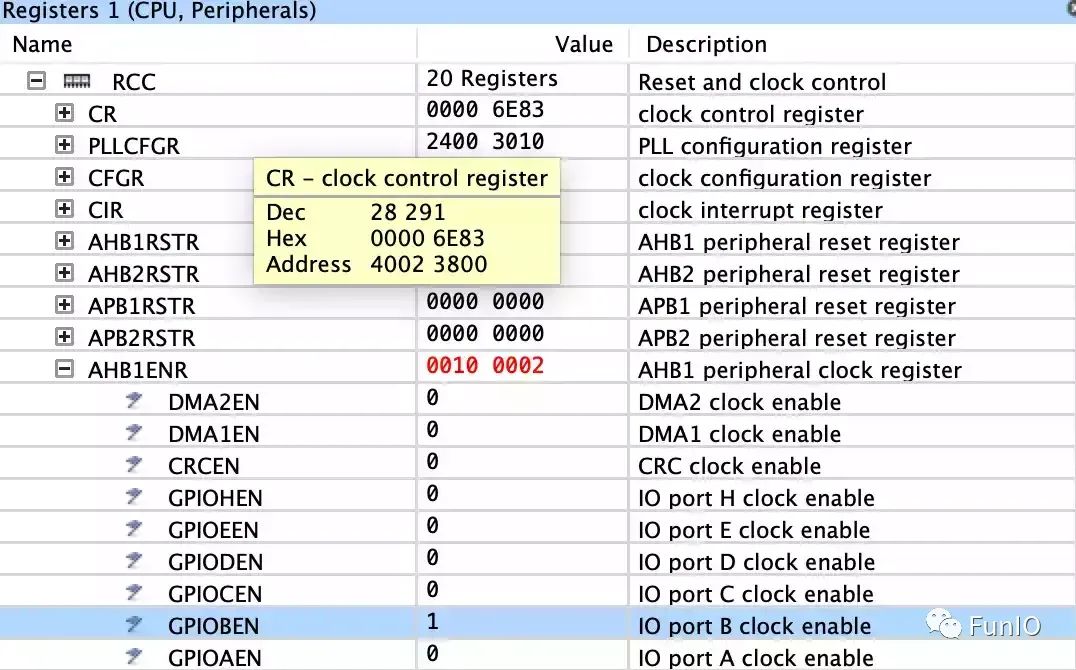
First enable the GPIOB clock, find Peripherals -> RCC -> AHB1ENR, and set the GPIOBEN bit to 1:
-
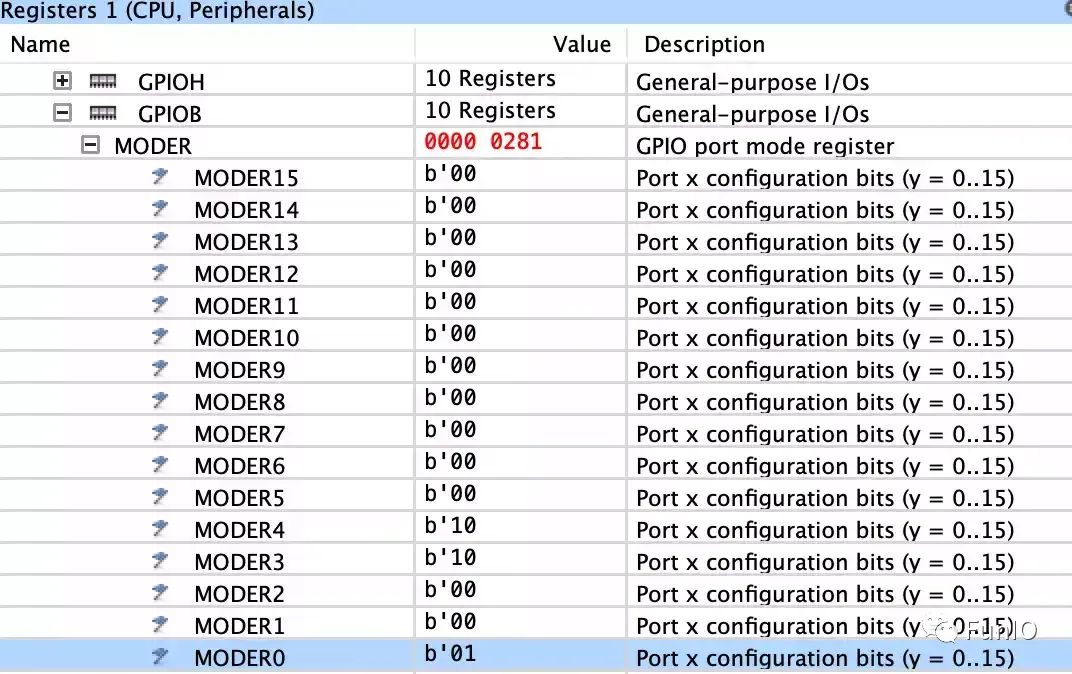
Find Peripherals -> GPIO -> GPIOB -> MODER, and set MODER0 to 1 (output):
-
Find Peripherals -> GPIO -> GPIOB -> ODR, and set ODR0 to 1 (high level):
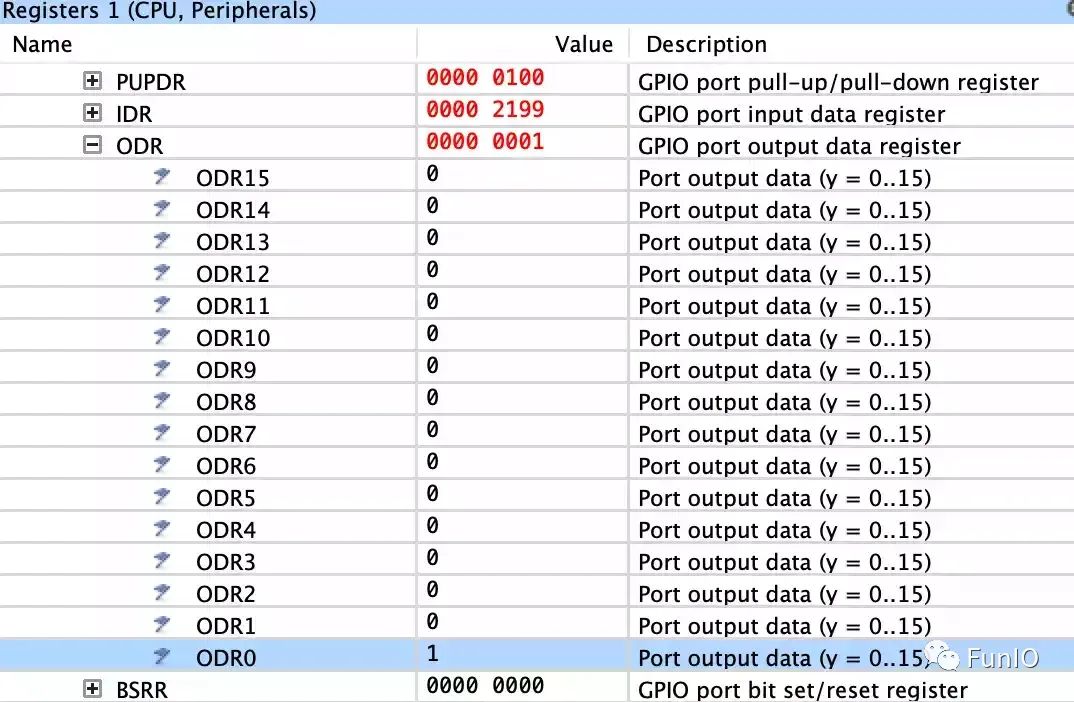
Now the green LED is lit up. Happy debugging!
Vendor CMSIS Header Files
In the previous sections, we developed the firmware program using only the data sheet, editor, and GCC compiler, creating peripheral structure definitions using the data sheet.
Now that we know how the MCU works, it’s time to introduce the CMSIS header files. What are they? They are header files created and provided by MCU manufacturers with all the definitions. They contain everything related to the MCU, so they are quite large.
CMSIS stands for Common Microcontroller Software Interface Standard, so it is the common foundation for the peripheral APIs specified by MCU manufacturers. Since CMSIS is an ARM standard and the CMSIS header files are provided by MCU manufacturers, they are an authoritative source. Therefore, using vendor header files is the preferred method instead of manually writing definitions.
In this section, we will replace the API functions in mcu.h with those from the vendor CMSIS header files while keeping the other parts of the firmware unchanged.
The CMSIS header files for the STM32 F4 series can be found in this repository[3], from which we will copy the following files to our firmware folder step-5-cmsis[4]:
- stm32f429xx.h[5]
- system_stm32f4xx.h[6]
The above two header files depend on the standard ARM CMSIS, so we need to download them simultaneously:
- core_cm4.h[7]
- cmsis_gcc.h[8]
- cmsis_version.h[9]
- cmsis_compiler.h[10]
- mpu_armv7.h[11]
Then remove all peripheral APIs and definitions from mcu.h, leaving only standard C includes, vendor CMSIS includes, pin definitions, etc.:
#pragma once

#include <inttypes.h>
#include <stdbool.h>
#include <stdlib.h>
#include <stdio.h>
#include <sys/stat.h>

#include "stm32f429xx.h"

#define FREQ 16000000  // CPU frequency, 16 Mhz
#define BIT(x) (1UL << (x))
#define PIN(bank, num) ((((bank) - 'A') << 8) | (num))
#define PINNO(pin) (pin & 255)
#define PINBANK(pin) (pin >> 8)

static inline void spin(volatile uint32_t count) {
  while (count--) asm("nop");
}

static inline bool timer_expired(uint32_t *t, uint32_t prd, uint32_t now) {
  ...
}
If we execute make clean build to recompile the firmware, GCC will report errors: missing systick_init(), GPIO_MODE_OUTPUT, uart_init(), and UART3. We will re-add them using the STM32 CMSIS files.
Starting with systick_init(), the core_cm4.h header file defines the SysTick_Type structure, which serves the same purpose as our struct systick and the macros related to the SysTick peripheral. Also, the stm32f429xx.h header file contains a RCC_TypeDef structure that is the same as our RCC macro definition, so our systick_init() function requires almost no modification, just replacing SysTick with SYSTICK:
static inline void systick_init(uint32_t ticks) {
  if ((ticks - 1) > 0xffffff) return;  // Systick timer is 24 bit
  SysTick->LOAD = ticks - 1;
  SysTick->VAL = 0;
  SysTick->CTRL = BIT(0) | BIT(1) | BIT(2);  // Enable systick
  RCC->APB2ENR |= BIT(14);                   // Enable SYSCFG
}
Next is the gpio_set_mode() function. The stm32f429xx.h header file contains a GPIO_TypeDef structure that is the same as our struct gpio, which we will use to rewrite:
#define GPIO(bank) ((GPIO_TypeDef *) (GPIOA_BASE + 0x400 * (bank)))
enum { GPIO_MODE_INPUT, GPIO_MODE_OUTPUT, GPIO_MODE_AF, GPIO_MODE_ANALOG };

static inline void gpio_set_mode(uint16_t pin, uint8_t mode) {
  GPIO_TypeDef *gpio = GPIO(PINBANK(pin));  // GPIO bank
  int n = PINNO(pin);                      // Pin number
  RCC->AHB1ENR |= BIT(PINBANK(pin));       // Enable GPIO clock
  gpio->MODER &= ~(3U << (n * 2));         // Clear existing setting
  gpio->MODER |= (mode & 3) << (n * 2);    // Set new mode
}
gpio_set_af() and gpio_write() are also simple replacements.
Then for the serial port, CMSIS has definitions for USART_TypeDef and USART1, USART2, USART3, which we will use:
#define UART1 USART1
#define UART2 USART2
#define UART3 USART3
In the uart_init() and other serial functions, replace struct uart with USART_TypeDef, leaving the rest unchanged.
After doing these, recompile and flash the firmware. The LED starts blinking again, and the serial output is working. Congratulations!
We have rewritten the firmware code using the vendor CMSIS header files, and now we will reorganize the code, placing all standard files into the include directory, and then update the Makefile to let the GCC compiler know:
...
  -g3 -Os -ffunction-sections -fdata-sections -I. -Iinclude \
Now we have a project template that can be reused in future projects.
The complete project source code can be found in the step-5-cmsis[12] folder.
References
[1]
Download Ozone: https://www.segger.com/products/development-tools/ozone-j-link-debugger/
[2]
Instructions: https://www.segger.com/products/debug-probes/j-link/models/other-j-links/st-link-on-board/
[3]
Repository: https://github.com/STMicroelectronics/cmsis_device_f4
[4]
step-5-cmsis: step-5-cmsis
[5]
stm32f429xx.h: https://raw.githubusercontent.com/STMicroelectronics/cmsis_device_f4/master/Include/stm32f429xx.h
[6]
system_stm32f4xx.h: https://raw.githubusercontent.com/STMicroelectronics/cmsis_device_f4/master/Include/system_stm32f4xx.h
[7]
core_cm4.h: https://raw.githubusercontent.com/STMicroelectronics/STM32CubeF4/master/Drivers/CMSIS/Core/Include/core_cm4.h
[8]
cmsis_gcc.h: https://raw.githubusercontent.com/STMicroelectronics/STM32CubeF4/master/Drivers/CMSIS/Core/Include/cmsis_gcc.h
[9]
cmsis_version.h: https://raw.githubusercontent.com/STMicroelectronics/STM32CubeF4/master/Drivers/CMSIS/Core/Include/cmsis_version.h
[10]
cmsis_compiler.h: https://raw.githubusercontent.com/STMicroelectronics/STM32CubeF4/master/Drivers/CMSIS/Core/Include/cmsis_compiler.h
[11]
mpu_armv7.h: https://raw.githubusercontent.com/STMicroelectronics/STM32CubeF4/master/Drivers/CMSIS/Core/Include/mpu_armv7.h
[12]
step-5-cmsis: https://github.com/cpq/bare-metal-programming-guide/tree/main/step-5-cmsis