In some cases, a Linux system may fail to operate normally due to the following reasons:
- Corrupted or misconfigured initramfs
- initramfs not generated correctly after a kernel upgrade
- The system cannot enter the normal boot process (e.g., stuck at the dracut command line, or displaying ‘Cannot find root device’, or stuck at ‘Loading initial ramdisk …’)
Here, I will take the RHEL series distributions as an example and demonstrate how to repair it using a bootable disk, which theoretically applies to all RHEL distributions.
1. Mount the bootable disk
Mount the bootable disk and set it as the first boot option, then power on the system.
2. Enter rescue mode
Select Troubleshooting → Rescue a XXX system from the disk, noting that the name XXX varies with different distributions.
3. Continue
Type 1 to continue, then press Enter to enter the shell.
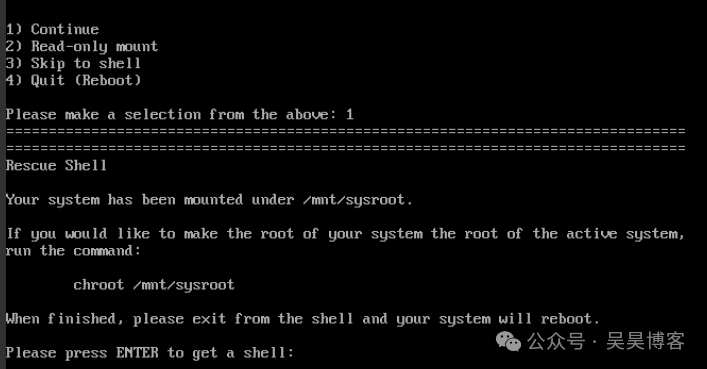
4. Mount the root partition
If you do not know the root partition device, you can check it using the fdisk command. In my case, the root partition is /dev/vda2.
mkdir /mnt/sysroot
mount /dev/vda2 /mnt/sysroot
5. Enter the chroot environment
Mount the virtual file system of the host system (Live CD/USB) to the corresponding directories of the target system (the system being repaired).
mount --bind /dev /mnt/sysroot/dev
mount --bind /proc /mnt/sysroot/proc
mount --bind /sys /mnt/sysroot/sys
chroot /mnt/sysroot /bin/bash
6. Check the kernel version
Ensure that the current kernel version matches the rebuilt initramfs.
|
7. Rebuild initramfs
dracut --force8. Update GRUB (optional)
If the system still cannot boot after rebuilding initramfs, you may need to update GRUB.
grub2-mkconfig -o /boot/grub2/grub.cfg9. Sync, exit, and reboot
|
For more details, please read the full article!
👇