The implementation effect is as follows: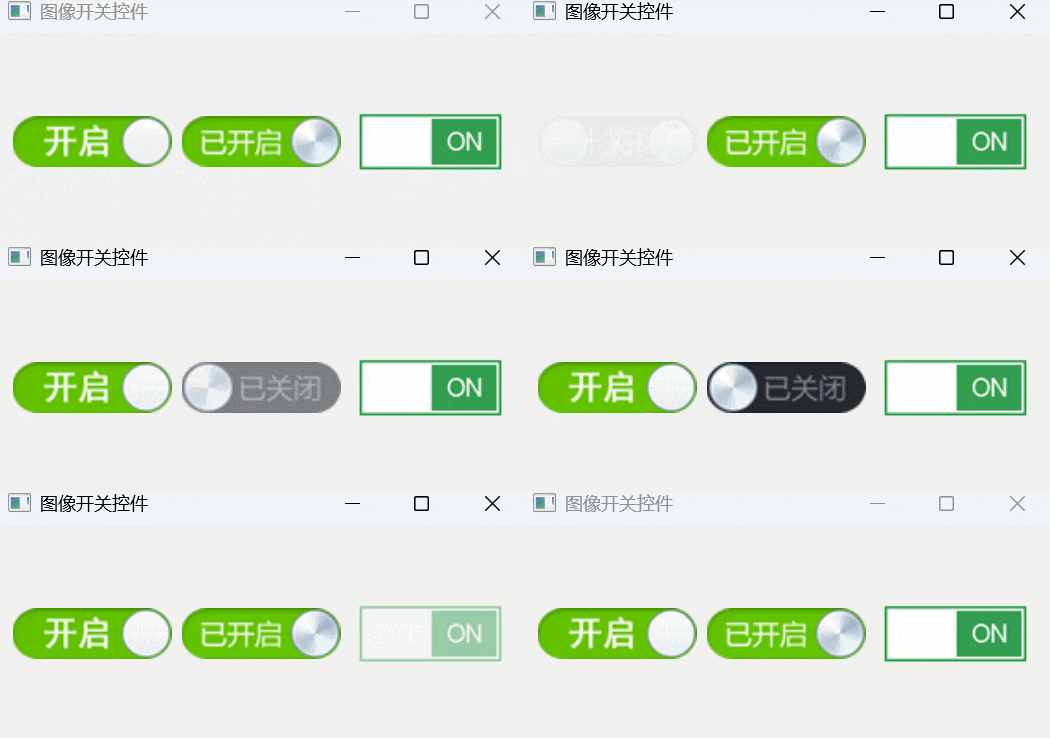
🧩 Function Overview
1. Switch State Control
-
Supports two states: On (checked) and Off (unchecked).
-
Can toggle state by clicking.
-
Supports immediate state setting without animation (
<span>setChecked</span>) and state switching with animation (<span>setCheckedWithAnimation</span>).
2. Multiple Built-in Styles
-
Provides three built-in styles (
<span>ButtonStyleOne</span>,<span>ButtonStyleTwo</span>,<span>ButtonStyleThree</span>), each style uses different switch images. -
Supports custom styles (
<span>ButtonStyleCustom</span>), allowing users to set their own switch images.
3. Smooth Animation Effects
-
Uses
<span>QPropertyAnimation</span>to implement fade-in and fade-out animations during state transitions. -
The animation progress is controlled by the
<span>animationProgress</span>property, ranging from<span>0.0</span>to<span>1.0</span>. -
Automatically updates the currently displayed image after the animation ends.
4. Image Path Management
-
Can set the image paths for off and on states using
<span>setOffImagePath</span>and<span>setOnImagePath</span>, respectively. -
Provides the
<span>setCustomImages</span>method to set custom image paths at once and automatically switch to custom style.
5. Adaptive Size
-
Overrides
<span>sizeHint</span>and<span>minimumSizeHint</span>to return appropriate default sizes based on the current style. -
Images are automatically centered and maintain aspect ratio during drawing.
The core code is as follows:
// imageswitch.h#ifndef IMAGESWITCH_H#define IMAGESWITCH_H
#include <QWidget>
#include <QPropertyAnimation>
class ImageSwitch : public QWidget{    Q_OBJECT    Q_ENUMS(ButtonStyle)
    Q_PROPERTY(bool bChecked READ getChecked WRITE setChecked)    Q_PROPERTY(ButtonStyle pButtonStyle READ getButtonStyle WRITE setButtonStyle)    Q_PROPERTY(QString offImagePath READ getOffImagePath WRITE setOffImagePath)    Q_PROPERTY(QString onImagePath READ getOnImagePath WRITE setOnImagePath)    Q_PROPERTY(double animationProgress READ getAnimationProgress WRITE setAnimationProgress)
public:    enum ButtonStyle {        ButtonStyleOne = 0,  // Switch Style 1        ButtonStyleTwo = 1,  // Switch Style 2        ButtonStyleThree = 2,   // Switch Style 3        ButtonStyleCustom = 3   // Custom Style    };
    explicit ImageSwitch(QWidget *parent = 0);
protected:    void mousePressEvent(QMouseEvent *);    void paintEvent(QPaintEvent *event);
private:    bool bChecked;             // Is checked    ButtonStyle pButtonStyle;    // Button style
    QString sImgOffFile;         // Off image    QString sImgOnFile;          // On image    QString sImgCurFile;            // Current image
    double animationProgress;    // Animation progress (0.0 - 1.0)    QPropertyAnimation *animation; // Animation object
    void updateAnimation();
public:    // Default size and minimum size    QSize sizeHint() const;    QSize minimumSizeHint() const;
    // Get and set checked state    bool getChecked() const;    void setChecked(bool isChecked);    void setCheckedWithAnimation(bool isChecked); // Set with animation
    // Get and set button style    ButtonStyle getButtonStyle() const;    void setButtonStyle(const ImageSwitch::ButtonStyle &buttonStyle);
    // Get and set custom image paths    QString getOffImagePath() const;    void setOffImagePath(const QString &path);    QString getOnImagePath() const;    void setOnImagePath(const QString &path);
    // Animation progress control    double getAnimationProgress() const;    void setAnimationProgress(double progress);
    // Set custom images    void setCustomImages(const QString &offImage, const QString &onImage);
Q_SIGNALS:    void checkedChanged(bool checked);};
#endif // IMAGESWITCH_H
// imageswitch.cpp#include "imageswitch.h"
#include <QPainter>
#include <QEasingCurve>
ImageSwitch::ImageSwitch(QWidget *parent) : QWidget(parent){    bChecked = false;    pButtonStyle = ButtonStyleTwo;    animationProgress = 0.0;
    sImgOffFile = ":/image/imageswitch/btncheckoff2.png";    sImgOnFile = ":/image/imageswitch/btncheckon2.png";    sImgCurFile = sImgOffFile;
    // Initialize animation    animation = new QPropertyAnimation(this, "animationProgress");    animation->setDuration(300); // 300 milliseconds animation duration    animation->setEasingCurve(QEasingCurve::InOutQuad);
    connect(animation, &QPropertyAnimation::finished, this, [this]() {        // Update current image file after animation ends        sImgCurFile = bChecked ? sImgOnFile : sImgOffFile;        update();    });}
void ImageSwitch::mousePressEvent(QMouseEvent *){    setCheckedWithAnimation(!bChecked);}
void ImageSwitch::paintEvent(QPaintEvent *){    QPainter painter(this);    painter.setRenderHints(QPainter::SmoothPixmapTransform | QPainter::Antialiasing);
    // If animating, draw transition effect    if (animation->state() == QAbstractAnimation::Running) {        QImage currentImage;
        if (bChecked) {            // Animation from off to on: show on image, adjust position or opacity based on progress            currentImage = QImage(sImgOnFile);        } else {            // Animation from on to off: show off image, adjust position or opacity based on progress            currentImage = QImage(sImgOffFile);        }
        currentImage = currentImage.scaled(this->size(), Qt::KeepAspectRatio, Qt::SmoothTransformation);
        // Center draw based on ratio        int pixX = rect().center().x() - currentImage.width() / 2;        int pixY = rect().center().y() - currentImage.height() / 2;        QPoint point(pixX, pixY);
        // Control opacity or position based on animation progress        if (bChecked) {            // From off to on: gradually show            painter.setOpacity(animationProgress);        } else {            // From on to off: gradually hide            painter.setOpacity(1.0 - animationProgress);        }
        painter.drawImage(point, currentImage);
    } else {        // Non-animation state, normal drawing        QImage img(sImgCurFile);        img = img.scaled(this->size(), Qt::KeepAspectRatio, Qt::SmoothTransformation);
        // Center draw based on ratio        int pixX = rect().center().x() - img.width() / 2;        int pixY = rect().center().y() - img.height() / 2;        QPoint point(pixX, pixY);        painter.drawImage(point, img);
    }}
QSize ImageSwitch::sizeHint() const{    switch (pButtonStyle) {    case ButtonStyleOne:    case ButtonStyleTwo:        return QSize(87, 28);    case ButtonStyleThree:        return QSize(96, 38);    case ButtonStyleCustom:        // For custom style, return a reasonable default size        return QSize(87, 28);    }    return QSize(87, 28);}
QSize ImageSwitch::minimumSizeHint() const{    return sizeHint();}
bool ImageSwitch::getChecked() const{    return bChecked;}
void ImageSwitch::setChecked(bool isChecked){    if (this->bChecked != isChecked) {        this->bChecked = isChecked;        sImgCurFile = bChecked ? sImgOnFile : sImgOffFile;        animationProgress = bChecked ? 1.0 : 0.0;        this->update();    }}
void ImageSwitch::setCheckedWithAnimation(bool isChecked){    if (this->bChecked != isChecked) {        //bool oldState = this->bChecked;        this->bChecked = isChecked;
        // Start animation        updateAnimation();        Q_EMIT checkedChanged(bChecked);    }}
ImageSwitch::ButtonStyle ImageSwitch::getButtonStyle() const{    return this->pButtonStyle;}
void ImageSwitch::setButtonStyle(const ImageSwitch::ButtonStyle &buttonStyle){    if (this->pButtonStyle != buttonStyle) {        this->pButtonStyle = buttonStyle;
        if (buttonStyle == ButtonStyleOne) {            sImgOffFile = ":/image/imageswitch/btncheckoff1.png";            sImgOnFile = ":/image/imageswitch/btncheckon1.png";        } else if (buttonStyle == ButtonStyleTwo) {            sImgOffFile = ":/image/imageswitch/btncheckoff2.png";            sImgOnFile = ":/image/imageswitch/btncheckon2.png";        } else if (buttonStyle == ButtonStyleThree) {            sImgOffFile = ":/image/imageswitch/btncheckoff3.png";            sImgOnFile = ":/image/imageswitch/btncheckon3.png";        }        // ButtonStyleCustom does not modify image paths, uses user-defined paths
        sImgCurFile = bChecked ? sImgOnFile : sImgOffFile;        this->update();        updateGeometry();    }}
QString ImageSwitch::getOffImagePath() const{    return sImgOffFile;}
void ImageSwitch::setOffImagePath(const QString &path){    if (sImgOffFile != path) {        sImgOffFile = path;        if (pButtonStyle == ButtonStyleCustom) {            sImgCurFile = bChecked ? sImgOnFile : sImgOffFile;            this->update();        }    }}
QString ImageSwitch::getOnImagePath() const{    return sImgOnFile;}
void ImageSwitch::setOnImagePath(const QString &path){    if (sImgOnFile != path) {        sImgOnFile = path;        if (pButtonStyle == ButtonStyleCustom) {            sImgCurFile = bChecked ? sImgOnFile : sImgOffFile;            this->update();        }    }}
void ImageSwitch::setCustomImages(const QString &offImage, const QString &onImage){    setOffImagePath(offImage);    setOnImagePath(onImage);    pButtonStyle = ButtonStyleCustom;    sImgCurFile = bChecked ? sImgOnFile : sImgOffFile;    this->update();}
double ImageSwitch::getAnimationProgress() const{    return animationProgress;}
void ImageSwitch::setAnimationProgress(double progress){    if (animationProgress != progress) {        animationProgress = progress;        this->update();    }}
void ImageSwitch::updateAnimation(){    if (animation->state() == QAbstractAnimation::Running) {        animation->stop();    }
    // Set animation direction    if (bChecked) {        // Animation from off to on: from 0 to 1        animation->setStartValue(0.0);        animation->setEndValue(1.0);    } else {        // Animation from on to off: from 1 to 0        animation->setStartValue(1.0);        animation->setEndValue(0.0);    }
    animation->start();}