Click the blue text to follow us


The NCCL (NVIDIA Collective Communication Library) is primarily used for GPU cluster communication. This article provides some basic C++ API library calls for learning reference. It mainly introduces how to establish multi-machine initialization connections using TCP/IP sockets..
The multi-machine example on the NCCL official website uses MPI to complete the task, and the nccl-tests also utilize MPI, which can lead to two issues:
Is MPI necessary for NCCL multi-machine communication, or are there other methods available?
Before establishing NCCL multi-machine communication, how do the machines exchange their connection information?
A brief exploration of the source code reveals the answer; it shows that the MPI plugin is not mandatory, as it is only used to transmit the unique ID. This article will explore how to establish NCCL multi-machine connections using sockets.
Assumed scenario: Machine 1: 4 cards, Machine 2: 4 cards, forming a communication group of 8 cards.
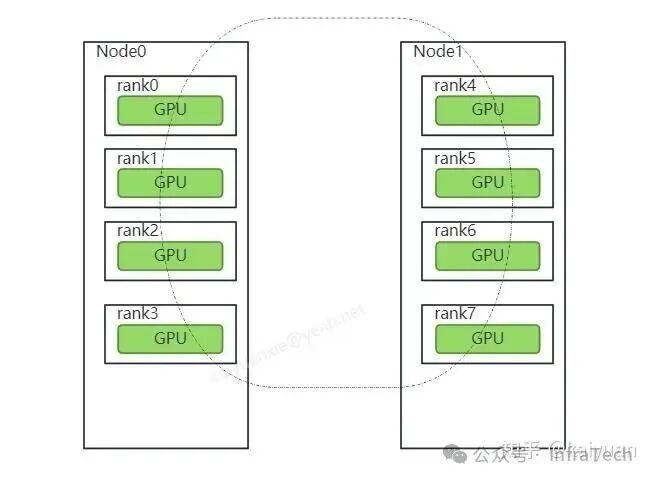
First, it is important to understand the role of ncclUniqueId, which serves as an identifier to distinguish different communication groups in NCCL. Communication groups need to establish initial communication connections through ncclUniqueId (as explained in Example 1).
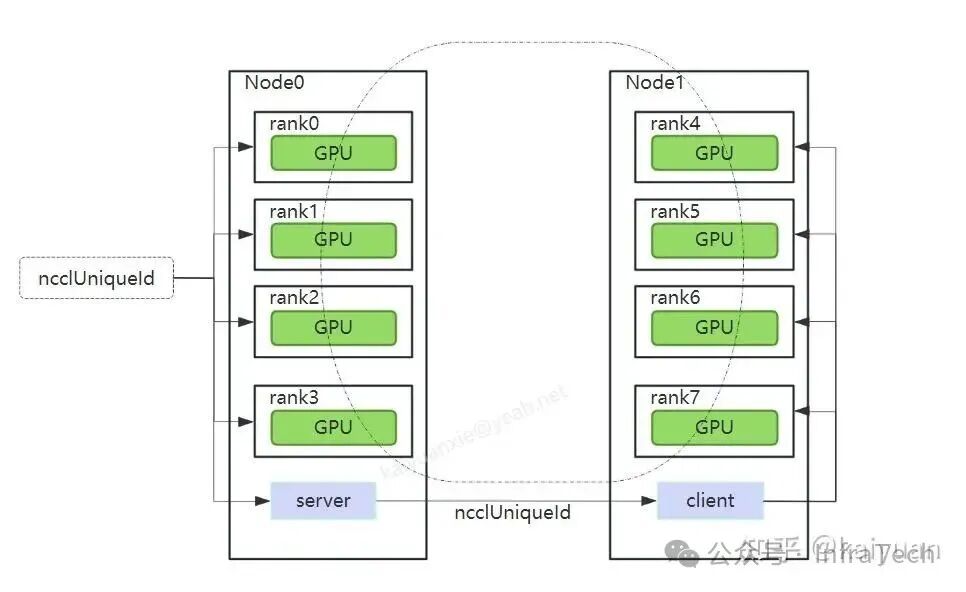
ncclUniqueId is created by a thread within a communication group. In this example, it is specified that the main thread of node0 creates it, and then ncclUniqueId needs to be passed to all communication ranks. All ranks within node0 can receive ncclUniqueId via thread parameter passing, while node1 must use other methods such as TCP/IP or the file system to obtain this ncclUniqueId.
Here, we illustrate the socket communication method as follows: let node0 establish a server, and node1 establish a client. Through socket communication, the server transmits the information to the client, and then node1 passes it to each rank within the machine using thread parameter passing.
Code:

-
Server implementation reference: https://github.com/CalvinXKY/BasicCUDA/blob/master/nccl/node_server.cu
-
Client implementation reference: https://github.com/CalvinXKY/BasicCUDA/blob/master/nccl/node_client.cu
Key code location 1: After establishing the connection on the server side, it sends id.internal, which has a length of 128:
NCCLCHECK(ncclGetUniqueId(&id)); if (send(client_socket, id.internal, 128, 0) < 0) { std::cerr << "Cannot send message to the client" << std::endl; }Key code location 2: After completing the cluster operation, it is necessary to first perform stream synchronization, and then exit the thread; otherwise, it may trigger a core dump error.
 NCCLCHECK(ncclAllReduce((const void *)sendbuff, (void *)recvbuff, size, ncclFloat, ncclSum, comm, s));    DEBUG_PRINT("============ncclAllReduce ===== end =====.
");    NCCLCHECK(ncclBroadcast((const void *)recvbuff, (void *)recvbuff, size, ncclFloat, 0, comm, s));    DEBUG_PRINT("============ncclBroadcast ===== end =====.
");    // completing NCCL operation by synchronizing on the CUDA stream    CUDACHECK(cudaStreamSynchronize(s));
Compilation:

It is recommended to compile on an image container (test image: http://nvcr.io/nvidia/pytorch:24.07-py3)
cd BasicCUDA/nccl/makeObtain the executable scripts node_server and node_client
Running Method:

Assuming the IP of node 1 is 10.10.1.1, it acts as the server
-
Node 1: ./node_server
-
Node 2: ./node_client –hostname 10.10.1.1
Of course, you can also add some other environment variables, such as specifying the port or modifying the number of threads per machine. The following shows nranks (which is actually the number of local ranks).
# server:NCCL_DEBUG=INFO NCCL_NET_PLUGIN=none NCCL_IB_DISABLE=1 ./node_server --port 8066 --nranks 8# client:NCCL_DEBUG=INFO NCCL_NET_PLUGIN=none NCCL_IB_DISABLE=1 ./node_client --hostname 10.10.1.1 --port 8066 --nranks 8This test was conducted using two V100 machines, and the output log (tail excerpt) is as follows:
71500:71541 [2] NCCL INFO Channel 00/0 : 2[2] -> 8[0] [send] via NET/Socket/071500:71541 [2] NCCL INFO Channel 01/0 : 2[2] -> 8[0] [send] via NET/Socket/071500:71535 [5] NCCL INFO Channel 00/0 : 5[5] -> 4[4] via P2P/direct pointer71500:71535 [5] NCCL INFO Channel 01/0 : 5[5] -> 4[4] via P2P/direct pointer71500:71537 [0] NCCL INFO Channel 00/0 : 10[2] -> 0[0] [receive] via NET/Socket/071500:71537 [0] NCCL INFO Channel 01/0 : 10[2] -> 0[0] [receive] via NET/Socket/071500:71542 [1] NCCL INFO Connected all rings71500:71539 [6] NCCL INFO Connected all rings71500:71541 [2] NCCL INFO Connected all rings71500:71536 [3] NCCL INFO Connected all rings71500:71538 [7] NCCL INFO Connected all rings71500:71540 [4] NCCL INFO Connected all rings71500:71535 [5] NCCL INFO Connected all rings71500:71537 [0] NCCL INFO Connected all ringsGPU:0 data: 56.000000.GPU:7 data: 56.000000.GPU:3 data: 56.000000.GPU:1 data: 56.000000.GPU:5 data: 56.000000.GPU:2 data: 56.000000.GPU:4 data: 56.000000.GPU:6 data: 56.000000.71500:71509 [0] NCCL INFO comm 0x7fe3ec84bbe0 rank 0 nranks 16 cudaDev 0 busId 2d000 - Destroy COMPLETE71500:71509 [7] NCCL INFO comm 0x7fe3dc7fbb70 rank 7 nranks 16 cudaDev 7 busId e9000 - Destroy COMPLETE71500:71509 [6] NCCL INFO comm 0x7fe3e0841640 rank 6 nranks 16 cudaDev 6 busId e1000 - Destroy COMPLETE71500:71509 [5] NCCL INFO comm 0x7fe3c07e8090 rank 5 nranks 16 cudaDev 5 busId be000 - Destroy COMPLETE71500:71509 [4] NCCL INFO comm 0x7fe3c87f3580 rank 4 nranks 16 cudaDev 4 busId b5000 - Destroy COMPLETE71500:71509 [3] NCCL INFO comm 0x7fe3d0854ad0 rank 3 nranks 16 cudaDev 3 busId 5f000 - Destroy COMPLETE71500:71509 [2] NCCL INFO comm 0x7fe3d883d460 rank 2 nranks 16 cudaDev 2 busId 5b000 - Destroy COMPLETE71500:71509 [1] NCCL INFO comm 0x7fe3c4896ab0 rank 1 nranks 16 cudaDev 1 busId 32000 - Destroy COMPLETEServer finished successfully.References:
Code for this article: https://github.com/CalvinXKY/BasicCUDA/tree/master/nccl
NCCL examples: https://docs.nvidia.com/deeplearning/nccl/user-guide/docs/examples.html
NCCL test: https://github.com/NVIDIA/nccl-tests
Scan the code to follow us and learn more about AI Infra fundamentals